USD
  • EUR
  • INR
  • USD
Cart
Cart 0
  • You have no items in your shopping cart.
    Cart
    Cart 0
    • You have no items in your shopping cart.
    Hire a Developer
    ×
    Contact Us!
    Send Again
    Close
    Please Login to Write Your Review

    CS-Cart Gestpay Payment Gateway

    CS-Cart GestPay Payment Gateway connects your store with GestPay to accept secure card payments through a hosted checkout page and track payment responses.


    • Accept secure card payments through the GestPay hosted checkout page.

    • Support Visa, Mastercard, American Express, JCB, and Diners cards.

    • Accept UnionPay card payments through the GestPay gateway.

    • Send customers to the secure GestPay payment page at checkout.

    • Save GestPay payment details and responses with store orders.

    • View payment details and payment records from the admin panel.

    • Use the GestPay test mode and live mode before taking payments.

    • Support GestPay fraud protection during online payments.

    • Let customers download payment receipts in PDF format.

    • Work with CS-Cart Multi-Vendor marketplace stores.

    Screenshots
    CS-Cart Gestpay Payment Gateway CS-Cart Gestpay Payment Gateway CS-Cart Gestpay Payment Gateway CS-Cart Gestpay Payment Gateway CS-Cart Gestpay Payment Gateway CS-Cart Gestpay Payment Gateway CS-Cart Gestpay Payment Gateway
    Show More Hide All
    $59.00

    * Required Fields

    Add To Cart
    $59.00
    Configure and Buy
    • Description
    • Reviews
    • FAQ
    • Customers ()
    • Specifications
    • Cloud Hosting
    • Changelog

    CS-Cart GestPay Payment Gateway helps stores accept card payments through the GestPay hosted checkout page. Customers can pay securely and return to the store after payment.

    The integration supports Visa, Mastercard, American Express, JCB, Diners, and UnionPay cards through a single payment gateway. Customers are sent to the secure GestPay payment page to enter card details. After payment, they are redirected back to the store.

    Store owners can save payment details and payment responses with orders. This makes it easier to review payment information when needed. Test mode and live mode help merchants check payment settings before accepting real customer payments on the website.

    Customers can download PDF receipts, while merchants can review transaction records and gateway responses from the admin panel.

    Additionally, If your marketplace handles multiple sellers and requires automated fund distribution between platform owners and vendors, then CS-Cart Mangopay Payment Gateway can help streamline the payment flow.
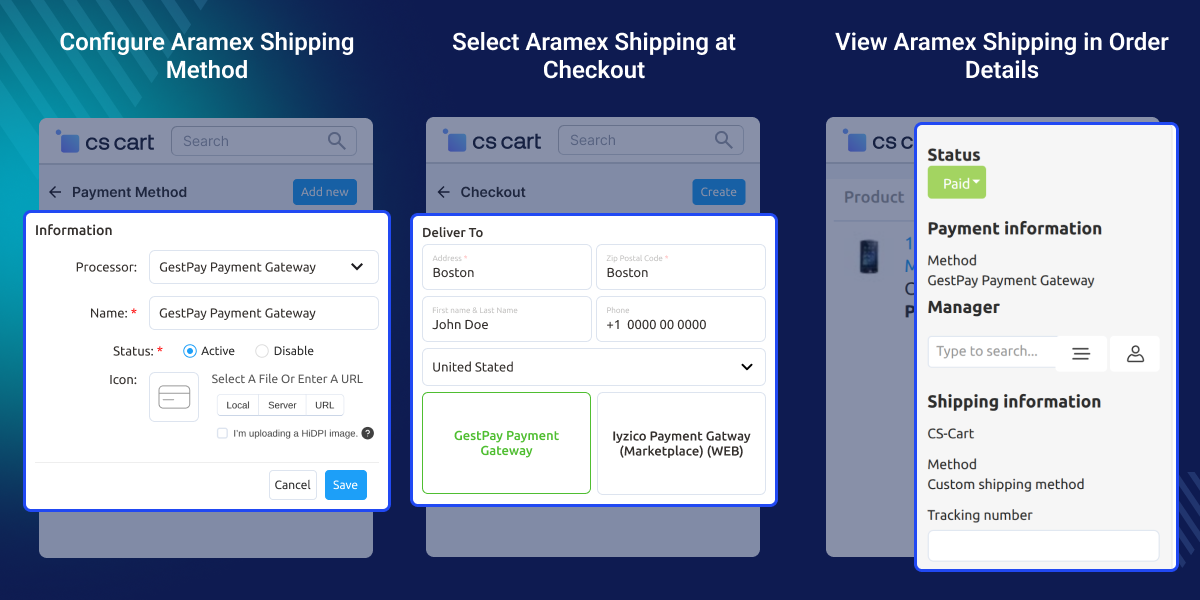
    CS-Cart Gestpay Payment Gateway

    Highlighted Features

     Secure Payment Gateway

    With Gestpay, your CS-Cart payments are simple and safe for you and your customers.

     Easy Checkout Process

    Customers can easily and securely make the payment by using the Gestpay payment gateway and completing the order.

     Support Multiple Cards

    Gestpay accepts payments from anywhere in the world, from any card such as Visa, Mastercard, American Express, JCB, Diners, and UnionPay.

     Redirected to outside Payment Page

    Provide an option to get redirected outside the payment page after payment submission; users will again be redirected to the order page.

    Why Do We Need CS-Cart GestPay Payment Gateway?

    CS-Cart GestPay Payment Gateway helps stores accept card payments through GestPay. It gives customers a secure way to pay during checkout. Many businesses want to accept card payments but do not have a direct connection with GestPay. This addon adds that connection to the store.

    Managing card payments should be simple for both merchants and customers. Buyers are sent to the GestPay checkout page and returned after payment. Stores that sell to customers in different regions often need support for many card types.

    GestPay supports Visa, Mastercard, American Express, JCB, Diners, and UnionPay. Store owners often need access to payment records when checking orders. Payment details are saved with orders and can be reviewed from the admin area.

    Test mode and live mode help merchants check settings before taking real payments. This helps reduce setup issues and supports a smoother checkout flow.

    Apart from this, Businesses that sell to customers in different countries often need support for multiple currencies and payment methods. For such payment requirements, CS-Cart PayTabs Payment Gateway can help provide secure online payments through a hosted checkout experience.

    Use Cases

    • Online Retail Stores

      Take card payments for products sold through online stores.

    • Multi-Vendor Marketplaces

      Let buyers pay for orders placed across many stores.

    • International Selling Businesses

      Receive card payments from buyers in many countries.

    • Fashion and Lifestyle Stores

      Give shoppers an easy way to pay during checkout.

    • Electronics and Gadget Stores

      Receive secure payments for costly product purchases.

    • Businesses Requiring Payment Tracking

      View payment records and order details from one place.

    Integrate CS-Cart Gestpay Axerve Payment in CS Cart

    After the installation, the admin needs to configure the Gestpay payment gateway by clicking on the add payment gateway options.
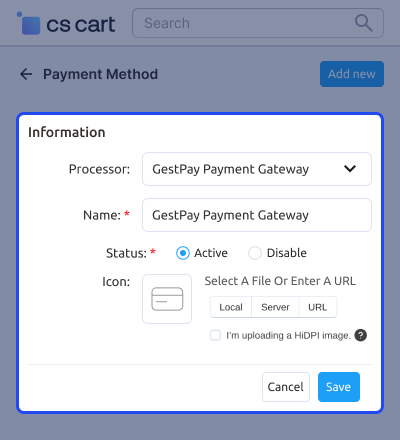
    • The admin can set the name of the payment method.
    • The admin can set the template for the payment processor.
    • The admin can set the redirection for the customer at the checkout page.
    • The admin can enable the payment gateway for all users, guests, registered users, and gold and silver status customers as well.
    CS-Cart Gestpay Payment Gateway

    CS-Cart Gestpay Payment Gateway - Checkout Page

    Once the payment method is configured, a new option for payment via Gestpay will be available for customers at the front end. The customer can select the CS-Cart payment method options as the Gestpay payment gateway.
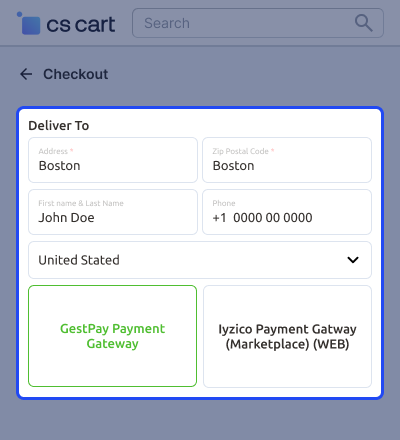
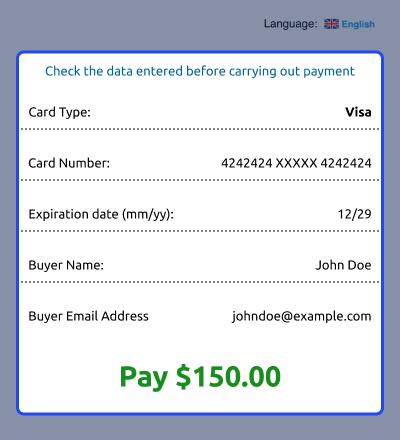
    • The customer will get redirected to the outside payment page of Gestpay where they need to enter the card details for the payment process.
    • The customer will get the option to download the receipt or return it to the store.
    • The customer can download the receipt in the pdf format.
    CS-Cart Gestpay Payment Gateway

    Gestpay Payment Response at the Backend

    The payment response will be saved at the backend on the order details page. This is a great way to check all the payment records with the payment transaction record.
    • The admin is able to check the bank transaction ID and authorization code.
    • The admin can also check the Gestpay transaction response.
    • Great way to provide your customers with an easy and secure payment process.
    Gestpay Payment Response at the Backend

     CS-Cart Gestpay Payment Gateway Support -

    For any query or issue please create a support ticket here http://webkul.uvdesk.com/

    You may also check our other top-quality CS-Cart Plugins.

    Specifications

    Product Version1.2
    Released8 years ago
    CategoryCS-CartPayment
    Last UpdatedJune 26, 2026 (9 days ago)
    Supported Versions4.14.x  4.15.x  4.16.x  4.17.x  CS-Cart  4.18.x  
    Write a review

    Frequently Asked Questions

     Q: Is the CS-Cart Gestpay module compatible with the CS-Cart marketplace?
    Ans: Yes, the extension is compatible with the CS-Cart marketplace.
     
     Q: Does the CS-Cart Gestpay Payment extension support PCI/DSS?
    Ans: Yes, Gestpay (Axerve Ecommerce Solution) is PCI-DSS 3.2 certified. This means that Axerve has implemented a comprehensive set of security controls to protect cardholder data.
     
     Q: Is Gestpay a secure payment method for my online store?
    Ans: GestPay Axerve is a secure payment gateway for your online store because it meets PCI DSS compliance, uses tokenization, offers fraud prevention, and is reliable and secure.
     
     Q: Can the admin set the redirection at the checkout page for customers?
    Ans: Yes, the admin can set the redirection so that the customer will get redirected to the outside payment page of Gestpay in order to move further with the payment process.
     
     Q: Can the admin track the transaction record at the backend?
    Ans: Yes, the admin can track the transactions from the backend along with the bank ID, and authorization code as well.
     
     Q: How does the Gestapay payment work with the CS-Cart marketplace extension?
    Ans: In the marketplace, Vendors can configure their individual Gestpay account details, allowing them to receive payments directly into their accounts when customers make purchases.

    Move to Cloud Today

    AWS Free tier hosting for one year by amazon web services, for more details please visit AWS Free Tier.

    GCP Free tier hosting for one year with 300 credit points by google cloud platform, for more details please visit GCP Free Tier.

    Azure free tier hosting for one year with 25+ always free services, for more details please visit Azure Free Tier.

    In our default configuration we will provide tremendous configuration for your eCommerce Website which is fast to load and response.

    Default Configuration Details of Server

    • 1 GB RAM
    • 1 Core Processor
    • 30 GB Hard Disk
    • DB with 1 GB RAM and 1 Core Processor

    * Server Configuration may vary as per application requirements.

    Want to know more how exactly we are going to power up your eCommerce Website with Cloud to fasten up your store. Please visit the Cloudkul Services.

    Get Started with Cloud
    • - Feature Add (+)
    • - Feature remove (-)
    • - Bug Fixed (!)
    • - Modification (*)
    Version 1.2
    • * Update the payment URL for the sandbox and live payment mode.
    • + Added API key field in the payment configuration page.
    Version 1.1
    • ! Fixed language-related issues.
    Version 1.0
    • + Admin can add Gestpay payment method.
    • + Customer can use the Gestpay payment method for the payment.


