USD
  • EUR
  • INR
  • USD
Cart
Cart 0
  • You have no items in your shopping cart.
    Cart
    Cart 0
    • You have no items in your shopping cart.
    Hire a Developer
    ×
    Contact Us!
    Send Again
    Close
    Please Login to Write Your Review

    CS-Cart Mobikwik Wallet

    CS-Cart Mobikwik Wallet adds Mobikwik wallet payments to your CS-Cart store for faster mobile checkout and secure digital payments in India.


    • Accept payments through Mobikwik wallet at checkout.

    • Add Mobikwik as a payment method in CS-Cart.

    • Configure merchant credentials from the backend.

    • Redirect customers to a secure payment gateway.

    • Assign payment access to specific customer groups.

    • Set order status after payment to paid, failed, cancelled, and more.

    • Add surcharge and tax settings per payment method.

    • Works with CS-Cart and CS-Cart Multivendor.

    Screenshots
    $49.00

    * Required Fields

    Add To Cart
    $49.00
    Configure and Buy
    • Description
    • Reviews
    • FAQ
    • Customers ()
    • Specifications
    • Cloud Hosting
    • Changelog

    CS-Cart Mobikwik Wallet integrates the Mobikwik digital wallet into your CS-Cart store. Customers can pay for orders using their e-wallet balance at checkout.

    Mobikwik is a widely used digital payment service in India. It lets users store money and make online payments through their e-wallet. Customers can select it at checkout alongside other payment methods and complete their purchase using their wallet balance.

    Payments go through a secure online payment gateway. Once the transaction is done, the order status updates automatically based on the configured settings.

    The payment method supports user group assignment, surcharge configuration, and custom order status mapping. All settings are managed from the CS-Cart backend.

    You can also explore CS-Cart Wallet System to add in-store wallet and store credit options for your customers.
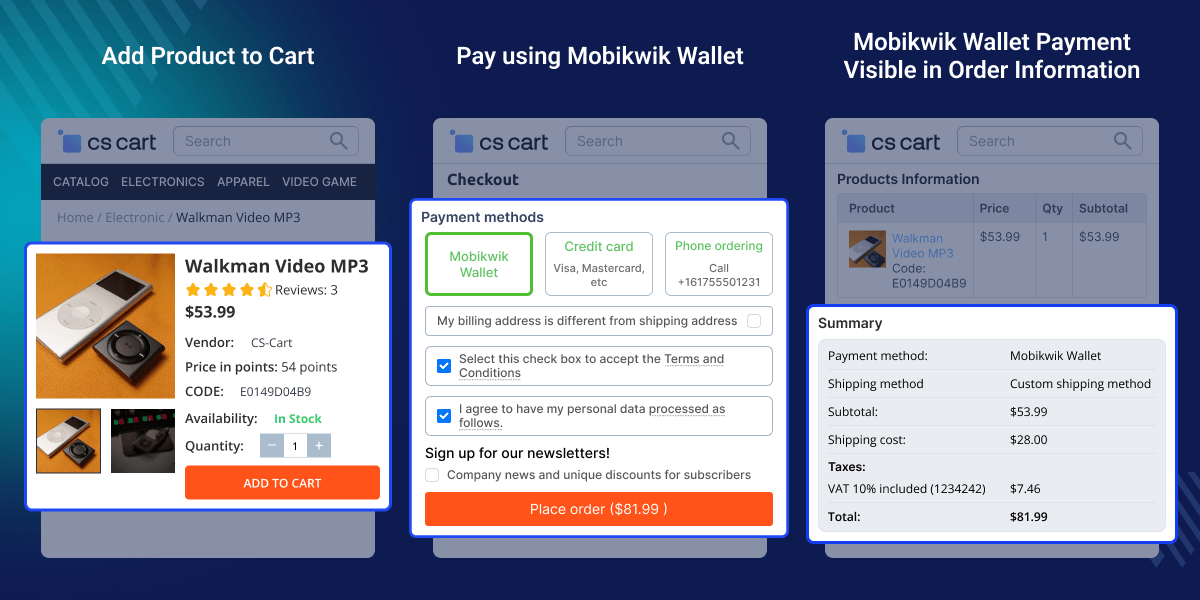
    CS-Cart Mobikwik Wallet

    Highlighted Features of CS-Cart Mobikwik Wallet

     Mobikwik Wallet at Checkout

    Allow customers to pay directly using their Mobikwik wallet during checkout.

     User Group Control

    Enable the payment method for all users, guests, or registered customers.

     Flexible Order Status Mapping

    Configure custom order statuses based on payment outcomes.

     Full Backend Order Visibility

    Track payment transactions and order details from the admin panel.

    Why Do We Need CS-Cart Mobikwik Wallet?

    CS-Cart Mobikwik Wallet solves a real gap for stores selling to customers in India. CS-Cart has no built in support for Indian digital wallets. Mobikwik is one of the most used e-wallet platforms in India.

    Many Indian shoppers use it daily for online purchases. Without it as a checkout option, stores miss a payment method that a large part of their audience already relies on. The default CS-Cart payment setup also lacks the control needed here.

    There is no native way to restrict payment methods by user group, set per-method order statuses, or configure surcharges without a payment addon. This module adds Mobikwik as a fully configurable payment method.

    User group control, order status, surcharge settings, and gateway credentials are all managed from one panel. For stores focused on the Indian market, offering a trusted local wallet option at checkout gives customers a familiar and fast way to pay.

    For controlling which payment methods appear based on products or categories, check out CS-Cart Payment Method Restriction module.

    Use Cases

    CS-Cart Mobikwik Wallet works for any CS-Cart store that wants to offer wallet based payments to Indian shoppers.

    Grocery and Daily Use Stores

    Enable repeat customers to make faster purchases using their Mobikwik wallet balance.

    Stores Targeting Indian Customers

    Add Mobikwik as a convenient payment option for shoppers across India.

    Mobikwik Wallet Integration

    CS-Cart Mobikwik Wallet can be configured directly from the payment method settings page. Store owners can set up the payment option and make it available during checkout.
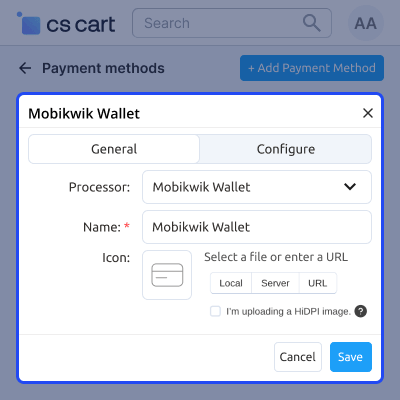
    • Select Mobikwik as the payment processor.
    • Configure the payment method name.
    • Upload a custom payment method icon.
    • Manage payment method settings from the backend.
    Mobikwik Wallet Integration

    Payment by Mobikwik Wallet

    Customers can pay more easily and conveniently with the CS-Cart Mobikwik Wallet module.
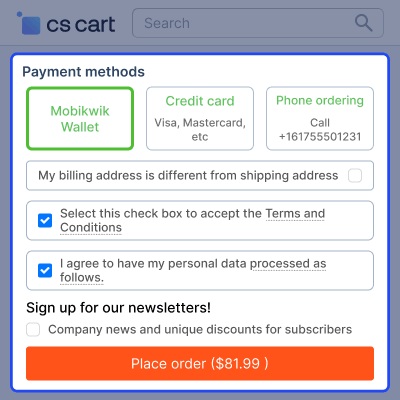
    • On the checkout page, the customer has the option of selecting the Mobikwik Wallet payment option.
    • Pay securely and quickly with the Mobikwik Wallet CS-Cart Payment Method.
    • After a successful payment, the amount is credited to the recipient's Mobikwik Wallet.
    Payment by Mobikwik Wallet

    Easy Order Management

    The admin can see and manage the details of orders placed with CS-Cart Mobikwik Wallet Payment. The admin can:
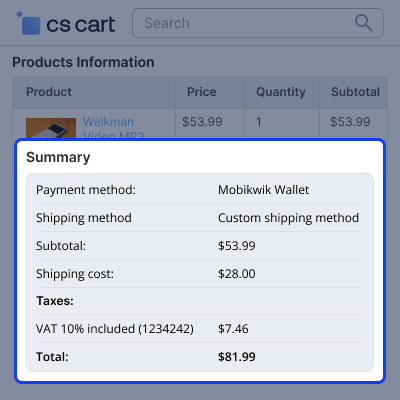
    • Manage the orders easily.
    • View a specific order's complete order details.
    • Check the transaction details for a specific order.
    Easy Order Management

    CS-Cart Mobikwik Wallet -

    For any query or issue please create a support ticket here http://support.webkul.com/en/customer/create-ticket

    You may also check our other top-quality CS-Cart Extensions.

    Specifications

    Product Version1.3
    Released10 years ago
    CategoryCS-CartPayment
    Last UpdatedJune 3, 2026 (8 days ago)
    Supported Versions4.15.x  CS-Cart  4.14.x  4.16.x  4.17.x  4.18.x  CS-Cart Multivendor  4.14.x  4.15.x  4.16.x  4.17.x  4.18.x  
    Write a review

    Frequently Asked Questions

     Does this module require a Mobikwik merchant account?
    Yes, an active Mobikwik merchant account is required along with the Merchant ID and Secret Key.
     
     Can the Mobikwik payment option be restricted to specific customer groups?
    Yes, the payment method can be assigned to all users, guests, or registered customers only.
     
     What order statuses can be set after a wallet payment?
    Supported statuses include paid, open, failed, declined, back-ordered, cancelled, and awaiting call.
     
     Does the module support adding extra charges on top of the Mobikwik payment?
    Yes, admins can configure transaction surcharges, titles, and applicable taxes.
     
     Where can the transaction details be reviewed?
    All payment and order information can be viewed from the CS-Cart backend order section.
     
     Does this module work with CS-Cart Multi-Vendor?
    Yes, the module supports both CS-Cart and CS-Cart Multi-Vendor editions.
     
     Is there an order value limit for using Mobikwik Wallet payments?
    No, the module does not impose any order value limit for Mobikwik wallet transactions.

    Move to Cloud Today

    AWS Free tier hosting for one year by amazon web services, for more details please visit AWS Free Tier.

    GCP Free tier hosting for one year with 300 credit points by google cloud platform, for more details please visit GCP Free Tier.

    Azure free tier hosting for one year with 25+ always free services, for more details please visit Azure Free Tier.

    In our default configuration we will provide tremendous configuration for your eCommerce Website which is fast to load and response.

    Default Configuration Details of Server

    • 1 GB RAM
    • 1 Core Processor
    • 30 GB Hard Disk
    • DB with 1 GB RAM and 1 Core Processor

    * Server Configuration may vary as per application requirements.

    Want to know more how exactly we are going to power up your eCommerce Website with Cloud to fasten up your store. Please visit the Cloudkul Services.

    Get Started with Cloud
    Not Available


