USD
  • EUR
  • INR
  • USD
Cart
Cart 0
  • You have no items in your shopping cart.
    Cart
    Cart 0
    • You have no items in your shopping cart.
    Hire a Developer
    ×
    Contact Us!
    Send Again
    Close
    Please Login to Write Your Review

    CS-Cart Product Video Gallery

    CS-Cart Product Video Gallery helps to showcase your product display through videos. Integrate YouTube & Vimeo videos easily into your store, offering customers a detailed view.


    • Fully compatible with CS-Cart Multi-Vendor.

    • Display product videos directly in the product gallery.

    • Adds a dedicated Product Video tab on the product details page.

    • Add product videos using YouTube or Vimeo by entering the video ID.

    • Display related videos using a YouTube Video List ID.

    • Display video thumbnails on the Grid and List views of the category page.

    • Allows vendors to add and manage product videos for their products.

    • Customize video playback settings from the admin panel.

    • Easy to configure and manage from the CS-Cart admin panel.


    Screenshots
    CS-Cart Product Video Gallery CS-Cart Product Video Gallery CS-Cart Product Video Gallery CS-Cart Product Video Gallery CS-Cart Product Video Gallery CS-Cart Product Video Gallery
    Show More Hide All
    $49.00

    * Required Fields

    Add To Cart
    $49.00
    Configure and Buy
    • Description
    • Reviews
    • FAQ
    • Customers ()
    • Specifications
    • Cloud Hosting
    • Changelog

    CS-Cart Product Video Gallery: This add-on lets the admin add videos related to the product on its product page. This module allows the admin to upload or embed videos from YouTube and Vimeo just by inserting the video URLs.

    Adding videos on the product page is beneficial in many aspects. It increases customer interest, enhances engagement, improves conversions rate, and boosts traffic.

    A customer always wants to completely understand the product before they make a purchase. Product videos help customers to easily understand how your products work. This saves customers time and allows them to make quick purchase decisions because watching a video takes little effort compared to reading a long description.

    Note-In order to use this add-on prepared video content products information and offers.
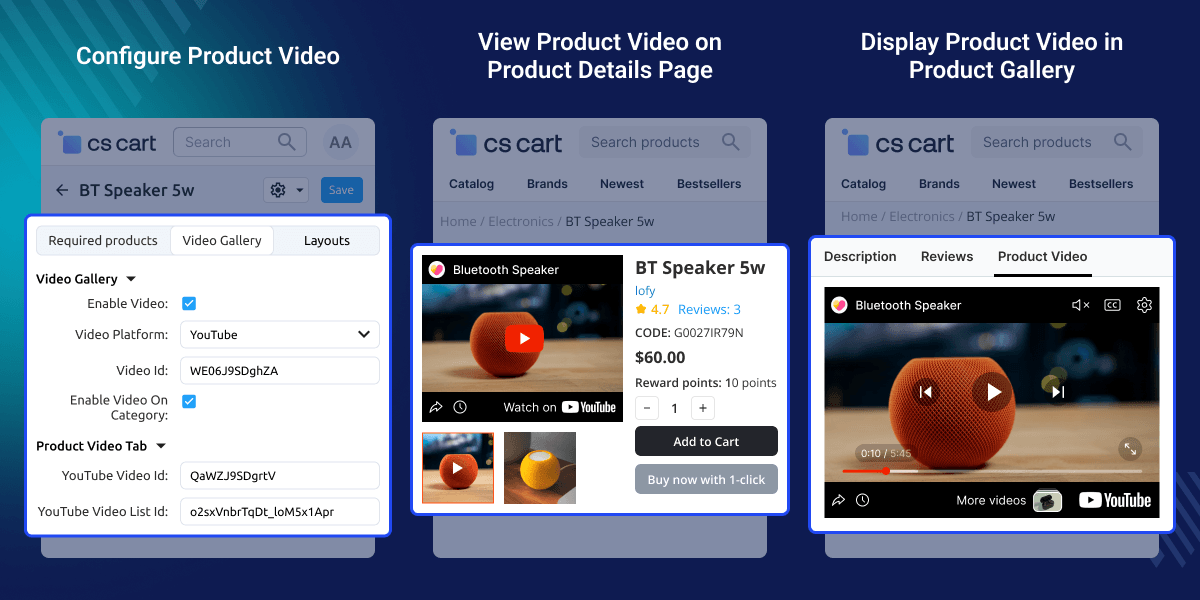
    CS-Cart Product Video Gallery

    Highlighted Features

     Well Integrated with CS-Cart Multi-Vendor

    This add-on is well integrated with CS-Cart Multi-vendor.

     Product Video has been provided

    A separate tab for product video is provided where customers can check products information.

     Add the YouTube video list

    Customers can view a YouTube video list of Products.

     Add a video by getting into the YouTube video id.

    The admin can add a products video by getting into the YouTube video id.

     Set the size of the video block at the admin end

    The admin can set the dimensions of the video block.

     The full-screen mode of the video

    The users can open the full-screen mode of the video.

    Why do we need a CS-Cart Products Video Gallery?

    As we know “What you see is sold”. This add-on helps in customer engagement and increases the sale and customer experience. It enhances customers' trust and customers can easily explore product information.

    A product video demonstrates the benefits of a product. Video can create a better lasting impact on the customer's thoughts, leaving the product features to be skilled in place of defined.

    Product Video Gallery Settings

    Admin can configure the Product Video Gallery settings to customize video playback on the storefront.
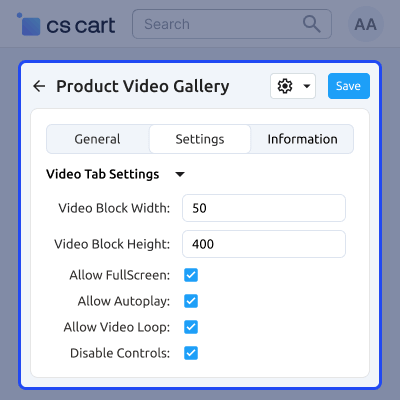
    • Set the video block width for the video player.
    • Set the video block height for the video player.
    • Enable fullscreen mode for better viewing.
    • Enable autoplay to play videos automatically.
    • Enable video loop to replay videos continuously.
    • Show or hide the video player controls.
    Product Video Gallery Settings

    Configure Product Video for CS-Cart Products

    Admin can configure product videos by selecting the video platform and entering the required video details.
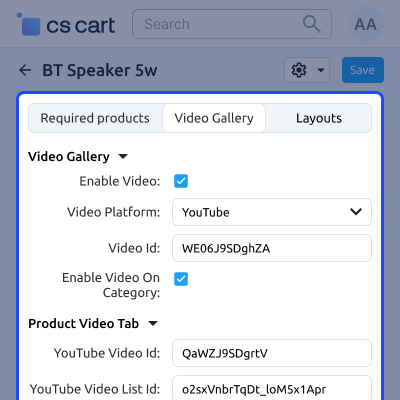
    • Enable or disable the product video.
    • Select the video platform (YouTube or Vimeo).
    • Enter the Video ID to display the product video.
    • Enable the video on the category page.
    • Add a YouTube Video ID for the Product Video tab.
    • Enter a YouTube Video List ID to display related videos.
    Configure Product Video for CS-Cart Products

    Display Product Video on the Product Details Page

    Customers can view the product video directly from the product gallery on the product details page.
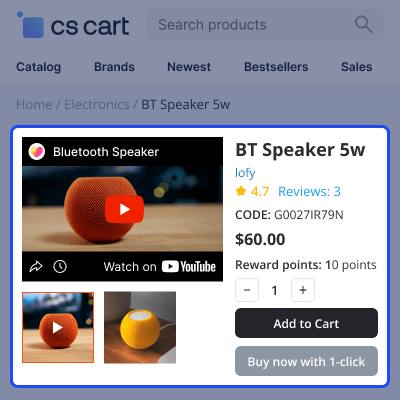
    • Play the product video from the product gallery.
    • Preview the product before purchasing.
    • Browse product images and videos together.
    • Access the video without leaving the product page.
    Display Product Video on the Product Details Page

    View Product Video in a Separate Tab

    Customers can watch the product video in a dedicated Product Video tab on the product details page.
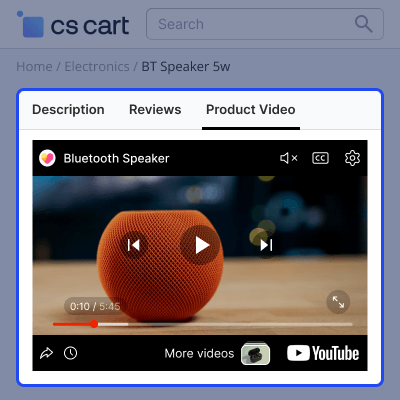
    • Watch the product video in a separate tab.
    • View the video without affecting product details.
    • Access related videos from the YouTube playlist.
    • Enjoy an improved product viewing experience.
    View Product Video in a Separate Tab

    CS-Cart Product Video Gallery Support -

    For any query or issue please create a support ticket here http://webkul.uvdesk.com

    You may also check our other top-quality CS-Cart Modules.

    Specifications

    Product Version2.4
    Released9 years ago
    Last UpdatedJuly 13, 2026 (3 days ago)
    Supported VersionsCS-Cart  CS-Cart Multivendor  4.18.x  4.19.x  4.20.x  
    Rating 5.0
    based on 2 reviews

    Recent Reviews

    Write a review

    CS-Cart Video Gallery

    Posted On - January 1, 2022

    Very good service, I am pleased to buy this addon.
    I will buy more products with webkul as they have many varieties of products.

    Hassle free

    Posted On - December 20, 2018

    Hassle free and very willing to keep me happy, great product not 1 if only. Will use more of their plugins or have them make it.

    Frequently Asked Questions

     Which platforms are supported by CS-Cart Product Video Gallery?

    CS-Cart Product Video Gallery supports both YouTube and Vimeo. Simply enter the Video ID to display product videos.

     
     Can the admin customize the video player settings?

    Yes. CS-Cart Product Video Gallery allows the admin to configure the video block size, autoplay, fullscreen mode, video loop, and player controls.

     
     Can product videos be displayed in the product gallery?

    Yes. CS-Cart Product Video Gallery displays product videos alongside product images, allowing customers to watch videos directly.

     
     Does CS-Cart Product Video Gallery provide a separate Product Video tab?

    Yes. CS-Cart Product Video Gallery automatically creates a dedicated Product Video tab on the product details page.

     
     Can the admin display multiple YouTube videos for a product?

    Yes. CS-Cart Product Video Gallery supports a YouTube Video List ID to display multiple related videos in the Product Video tab.

     
     Can product videos be displayed on the category page?

    Yes. CS-Cart Product Video Gallery displays video thumbnails in both Grid View and List View on the category page.

     
     Can vendors add product videos to their products?

    Yes. CS-Cart Product Video Gallery allows vendors to add and manage product videos directly from the vendor panel.

     
     Is CS-Cart Product Video Gallery easy to configure and manage?

    Yes. CS-Cart Product Video Gallery can be configured and managed directly from the CS-Cart admin panel without requiring coding knowledge.

    Move to Cloud Today

    AWS Free tier hosting for one year by amazon web services, for more details please visit AWS Free Tier.

    GCP Free tier hosting for one year with 300 credit points by google cloud platform, for more details please visit GCP Free Tier.

    Azure free tier hosting for one year with 25+ always free services, for more details please visit Azure Free Tier.

    In our default configuration we will provide tremendous configuration for your eCommerce Website which is fast to load and response.

    Default Configuration Details of Server

    • 1 GB RAM
    • 1 Core Processor
    • 30 GB Hard Disk
    • DB with 1 GB RAM and 1 Core Processor

    * Server Configuration may vary as per application requirements.

    Want to know more how exactly we are going to power up your eCommerce Website with Cloud to fasten up your store. Please visit the Cloudkul Services.

    Get Started with Cloud
    • - Feature Add (+)
    • - Feature remove (-)
    • - Bug Fixed (!)
    • - Modification (*)
    Version 2.4
    • ! Fixed the issue where width and height accepted negative values.
    • ! Fixed the issue where full-screen mode was accessible even when disabled in the module settings.
    • + Added license and encryption files for secure licensing.
    Version 2.3
    • ! Removed unusual text appearing above the product image.
    • ! Fixed the autoplay functionality.
    Version 2.2
    • ! Fixed the autoplay issue.
    • ! Fixed the video loop issue.
    • * Updated the UI.
    • * Updated the language.
    • + Added video thumbnails for Grid View, Table View, and List View on the category page.
    Version 2.1
    • ! Fixed the intermittent autoplay issue.
    • ! Fixed the issue where users were unable to switch between images and videos.
    Version 2.0
    • + Added product video display on the category page.
    • + Added support for full-screen video playback.
    Version 1.0
    • + Display product videos on the product page.
    • + Added support for both YouTube and Vimeo videos.
    • + Allow admins to add videos using YouTube or Vimeo video IDs.
    • + Display videos in place of the first product gallery image.
    • + Help improve conversions by reducing the bounce rate.


