USD
  • EUR
  • INR
  • USD
Cart
Cart 0
  • You have no items in your shopping cart.
    CS-Cart Extensions
    Cart
    Cart 0
    • You have no items in your shopping cart.
    Hire a Developer
    ×
    Contact Us!
    Send Again
    Close
    Please Login to Write Your Review
    CS-Cart Stripe Connect Standard Account

    CS-Cart Stripe Connect Standard Account

    x
    Free

    * Required Fields

    $59.00
    Add To Cart
    30 Days Money Back Guarantee*

    CS-Cart Stripe Connect Payment Gateway enables secure vendor payments and Stripe Connect features for multi-vendor marketplaces.


    • Admin can easily configure and manage Stripe Connect.

    • Admin can control Stripe Connect settings from the backend.

    • Admin can manage the complete payment system.

    • Customers can pay using Visa, Mastercard, American Express, and other supported cards.

    • Customers can pay using Apple Pay, Google Pay, Microsoft Pay, and other supported payment methods.

    • Customers can make payments in USD, EUR, GBP, INR, and other supported currencies.

    • Admin can choose Direct, Destination, or Separate Charge and Transfer.

    • Admin can use Stripe in Test and Production modes.

    • Vendors can connect their Stripe accounts with the admin's Stripe account.

    • This add-on supports recurring payments with the required Recurring Payment add-on.

    • This add-on supports Stripe Checkout for customer payments.

    CS-Cart Stripe Connect Standard Account
    CS-Cart Stripe Connect Standard Account
    $59.00
    Check How It Works
    $59.00
    Configure and Buy
    30 Days Money Back Guarantee*
    X
    • Description
    • Reviews
    • FAQ
    • Customers ()
    • Specifications
    • Cloud Hosting
    • Changelog

    CS-Cart Stripe Connect Standard Account enables secure and automated payments for multi-vendor marketplaces using Stripe. It makes the payment flow simple for customers, vendors, and store owners. Payments stay secure. No sensitive data is stored. This helps reduce risk.

    Payments are split automatically at checkout. Vendor earnings and admin commission are sent at the same time. This reduces manual work. Multi-currency support lets businesses accept payments from different countries. Customers can pay using major credit and debit cards.

    Real-time tracking shows payment and payout details. Admins and vendors can easily check their earnings. Secure APIs and fraud protection ensure smooth operations. This creates a safe payment system for marketplaces.

    Also, check out CS-Cart Stripe Connect Custom Account module for advanced payment control and vendor payout management.

    Note : As of May 2017, the name of "Standalone" accounts has been changed to "Standard" accounts. The functionality and usage remains the same.
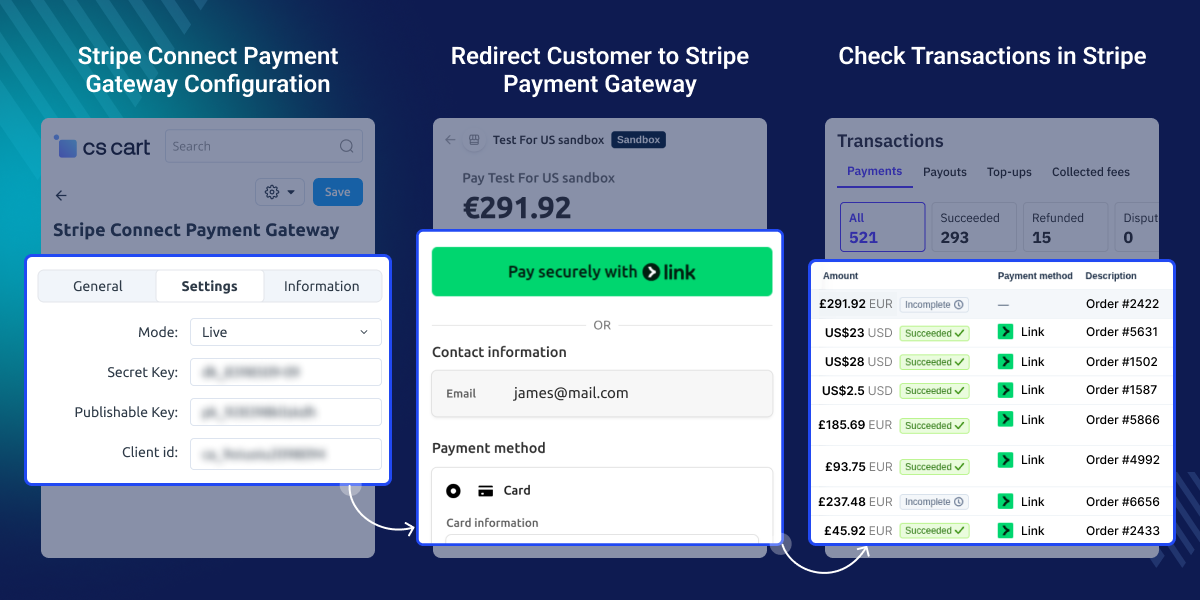
    CS-Cart Stripe Connect Standard Account

    Highlighted Features

     Automatic Commission Distribution

    Split payments at checkout. Vendor and admin get their share.

     Secure Payment Processing via Stripe

    Pay in a safe way. Fraud checks help keep payments secure.

     Multi-Currency Payment Support

    Pay from any country and use your local currency easily.

     Real-Time Transaction Tracking

    See all payments live and track payouts from the admin panel.

     Direct Charge

    Admin can charge the customer directly through the vendor's connected Stripe account.

     Destination Charge

    Admin can collect the payment and transfer the vendor's amount to their connected Stripe account.

     Separate Charge and Transfer

    Admin can charge the customer separately and transfer the vendor's payment amount to their connected Stripe account.

     3D Secure

    Customers can complete additional authentication for supported card payments.

    Why do we need CS-Cart Stripe Connect Standard Account

    CS-Cart Stripe Connect Standard Account helps manage payments in a multi-vendor marketplace. Default systems often lack automatic commission distribution and need manual work.

    Manual processes can cause errors and delay payouts. They also reduce trust between vendors and platform owners. It automates the payment flow. It ensures accurate and secure fund distribution. Built for real marketplace needs, it offers a reliable solution.

    Apart from online payments, you can check out the CS-Cart Stripe POS Terminal Connector to accept in-store payments using Stripe POS devices.

    Use Cases

    • Marketplace Payments

      Split payments at checkout. Vendors and admins get paid on time.

    • International Transactions

      Accept payments from other countries. Use many currencies with ease.

    • High Order Volume

      Handle many orders with ease. Payments run smoothly.

    • Commission Management

      Set commission for each order. It runs automatically.

    • Vendor Payout Flow

      Send payments to vendors. Money goes to their accounts.

    • Business Scalability

      Grow your business with ease. No need to change payment setup.

    Configure Stripe Payment Settings

    CS-Cart Stripe Connect Standard Account allows admin to set up Stripe from the payment settings panel. Admin can choose test or live mode and add API keys.

    It helps connect the store with Stripe for secure payment handling. This ensures smooth and safe transactions.
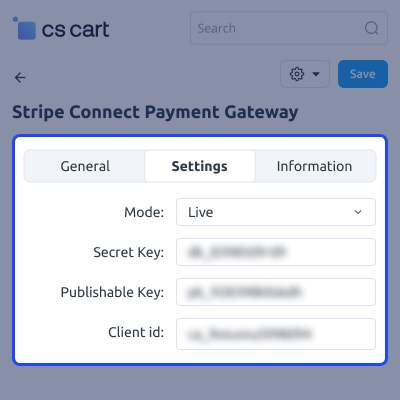
    • Set Stripe test mode and live mode easily
    • Add Stripe API keys from admin panel
    • Enable secure payment setup for store
    • Connect your store with Stripe gateway
    Configure Stripe Payment Settings

    Add Payment Method

    Admin can add and configure the Stripe payment method from the CS-Cart backend.
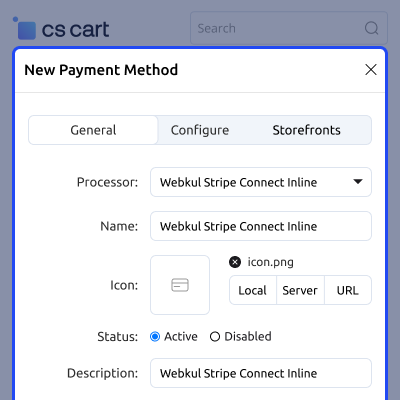
    • Admin can add the Stripe Connect payment method.
    • Admin can configure the Stripe payment settings.
    • Admin can select Direct, Destination, or Separate Charge and Transfer.
    • Admin can configure successful, pending, and failed payment statuses.
    Add Payment Method

    Customer Selects the Stripe Payment Method

    Customer can select the Stripe payment method during checkout to proceed with the payment.
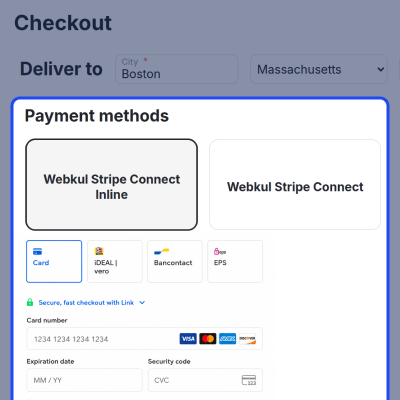
    • Customer can select the Stripe payment method.
    • Customer can enter the required payment details.
    • Customer can complete the required payment verification.
    • Customer can place the order after successful payment.
    Customer Selects the Stripe Payment Method

    Stripe Transactions

    Admin can view the payment transactions generated through the Stripe payment gateway on the Stripe dashboard.
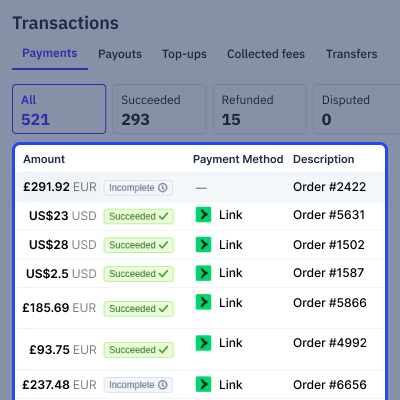
    • Admin can view successful payment transactions.
    • Admin can view payment and transfer details.
    • Admin can view refund transactions.
    • Admin can track Stripe transactions from the Stripe dashboard.
    Stripe Transactions

    CS-Cart Stripe Connect Standard Account-

    For any query or issue please create a support ticket here http://webkul.com/ticket

    You may also check our other top-quality CS-Cart Add-ons.

    Specifications

    Product Version2.3
    Released10 years ago
    CategoryCS-CartPaymentMarketplace
    Last UpdatedAugust 21, 2026 (11 days ago)
    Supported VersionsCS-Cart Multivendor  4.18.x  4.19.x  4.20.x  

    Ratings

    We'd love to hear your thoughts! Share your feedback and help us craft an even better experience tailored just for you.

    Write a review

    Frequently Asked Questions

     Do vendors need to create their own Stripe accounts?
    Each vendor must connect an individual Stripe account to receive payments directly.
     
     What happens if a vendor has not connected their Stripe account?
    In such cases, payments for that vendor cannot be completed until the account setup is finished.
     
     Can the admin control or hold vendor payouts?
    Payouts are handled automatically by Stripe, so manual control or holding funds is not supported.
     
     Is it possible to refund an order after payment is split?
    Refunds can still be initiated, and the system adjusts amounts based on the original split.
     
     Are there any transaction fees involved?
    Stripe applies standard processing fees, which may vary depending on region and payment method.
     
     Can it handle orders with multiple vendors in one checkout?
    The system supports multi-vendor orders and splits the payment accordingly during checkout.
     
     What happens if a transaction fails?
    No funds are transferred, and the order remains unpaid until a successful transaction occurs.
     
     Is sensitive payment data stored on the server?
    All sensitive information is securely managed by Stripe, ensuring data protection.

    Specification

    Detailed technical features and requirements to help you understand the module’s capabilities and ensure smooth integration with your system.

    Cloud Hosting

    Detailed technical features and requirements to help you understand the module’s capabilities and ensure smooth integration with your system.

    Default Configuration Details of Server

    1 GB
    RAM
    1 Core
    Processor
    30 GB
    Hard Disk
    1 GB RAM & 1 Core Processor
    Database

    Want to know more how exactly we are going to power up your eCommerce Website with Cloud to fasten up your store

    * Server Configuration may vary as per application requirements.

    Change Logs

    • - Feature Add (+)
    • - Feature remove (-)
    • - Bug Fixed (!)
    • - Modification (*)
    Version 2.3
    • + Added different types of charge (direct, destination, and separate) for Stripe Connect.
    • + Added Stripe hosted payment page for Stripe inline payment method.
    Version 2.2
    • + Implemented license validator.
    • + Encrypted code of the necessary files.
    • + Added different types of charge (direct, destination, and separate) for Stripe Connect.
    Version 2.1
    • + Added Recurring Payment Support.
    • + Integrated the Stripe Checkout.
    • + Optimized the add-on structure, improving maintainability, scalability, and efficiency.
    Version 1.3
    • ! Fixed the payment issue in the Stripe Checkout.
    • * Updated the version in the add-on's XML.
    • + Made compatible with CS-Cart version 4.16.x.
    Version 1.0
    • Initial Launch


