USD
  • EUR
  • INR
  • USD
Cart
Cart 0
  • You have no items in your shopping cart.
    Cart
    Cart 0
    • You have no items in your shopping cart.
    Hire a Developer
    ×
    Contact Us!
    Send Again
    Close
    Please Login to Write Your Review

    CS-Cart Stripe Connect Standard Account

    CS-Cart Stripe Connect Standard Account helps accept secure payments and send money to vendors and admin in a multi-vendor store.


    • Accept payments using Stripe gateway in CS-Cart store easily.

    • Split payments between vendor and admin at checkout automatically.

    • Support credit and debit card payments for global customers.

    • Track payments and payouts with real-time updates in admin panel.

    • Secure payments using Stripe with built-in fraud protection system.

    • Use Stripe in both test mode and live mode for transactions.

    • Support multiple currencies for global marketplace payments.

    • Works smoothly with CS-Cart Multi-Vendor marketplace system.

    Screenshots
    CS-Cart Stripe Connect Standard Account CS-Cart Stripe Connect Standard Account CS-Cart Stripe Connect Standard Account CS-Cart Stripe Connect Standard Account CS-Cart Stripe Connect Standard Account CS-Cart Stripe Connect Standard Account CS-Cart Stripe Connect Standard Account
    Show More Hide All
    $59.00

    * Required Fields

    Add To Cart
    $59.00
    Configure and Buy
    • Description
    • Reviews
    • FAQ
    • Customers ()
    • Specifications
    • Cloud Hosting
    • Changelog

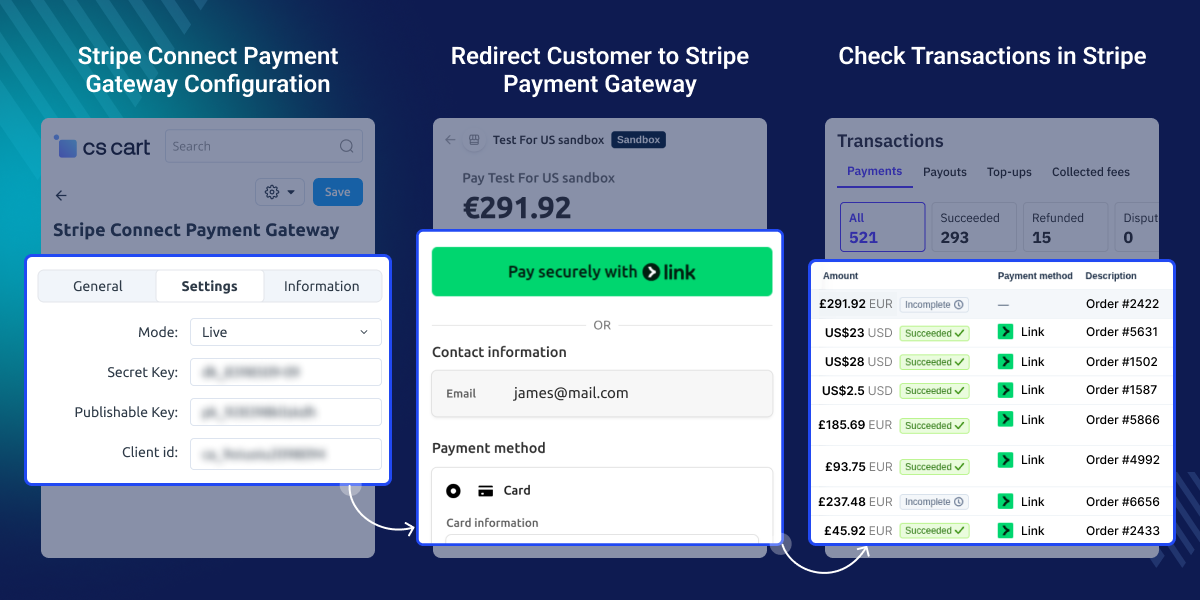
    CS-Cart Stripe Connect Standard Account enables secure and automated payments for multi-vendor marketplaces using Stripe. It makes the payment flow simple for customers, vendors, and store owners. Payments stay secure. No sensitive data is stored. This helps reduce risk.

    Payments are split automatically at checkout. Vendor earnings and admin commission are sent at the same time. This reduces manual work. Multi-currency support lets businesses accept payments from different countries. Customers can pay using major credit and debit cards.

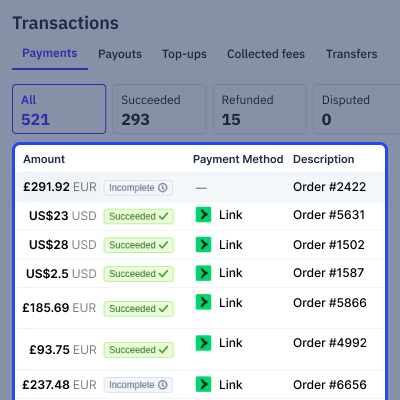
    Real-time tracking shows payment and payout details. Admins and vendors can easily check their earnings. Secure APIs and fraud protection ensure smooth operations. This creates a safe payment system for marketplaces.

    Also, check out CS-Cart Stripe Connect Custom Account module for advanced payment control and vendor payout management.

    Note : As of May 2017, the name of "Standalone" accounts has been changed to "Standard" accounts. The functionality and usage remains the same.
    CS-Cart Stripe Connect Standard Account

    Highlighted Features

     Automatic Commission Distribution

    Split payments at checkout. Vendor and admin get their share.

     Secure Payment Processing via Stripe

    Pay in a safe way. Fraud checks help keep payments secure.

     Multi-Currency Payment Support

    Pay from any country and use your local currency easily.

     Real-Time Transaction Tracking

    See all payments live and track payouts from the admin panel.

    Why do we need CS-Cart Stripe Connect Standard Account

    CS-Cart Stripe Connect Standard Account helps manage payments in a multi-vendor marketplace. Default systems often lack automatic commission distribution and need manual work.

    Manual processes can cause errors and delay payouts. They also reduce trust between vendors and platform owners. It automates the payment flow. It ensures accurate and secure fund distribution. Built for real marketplace needs, it offers a reliable solution.

    Apart from online payments, you can check out the CS-Cart Stripe POS Terminal Connector to accept in-store payments using Stripe POS devices.

    Use Cases

    • Marketplace Payments

      Split payments at checkout. Vendors and admins get paid on time.

    • International Transactions

      Accept payments from other countries. Use many currencies with ease.

    • High Order Volume

      Handle many orders with ease. Payments run smoothly.

    • Commission Management

      Set commission for each order. It runs automatically.

    • Vendor Payout Flow

      Send payments to vendors. Money goes to their accounts.

    • Business Scalability

      Grow your business with ease. No need to change payment setup.

    Configure Stripe Payment Settings

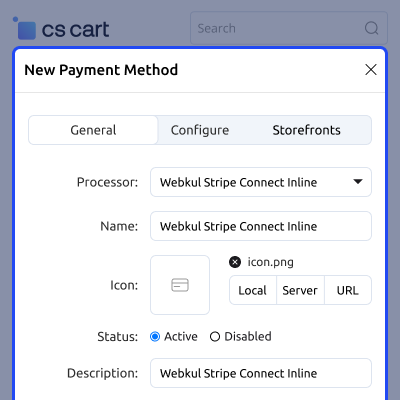
    CS-Cart Stripe Connect Standard Account allows admin to set up Stripe from the payment settings panel. Admin can choose test or live mode and add API keys.

    It helps connect the store with Stripe for secure payment handling. This ensures smooth and safe transactions.
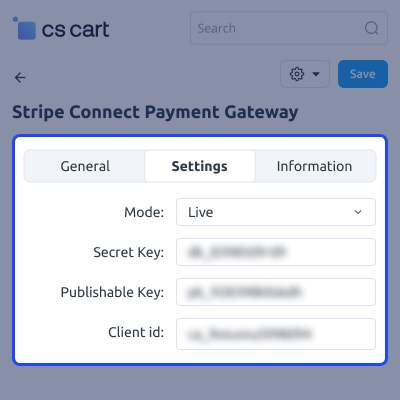
    • Set Stripe test mode and live mode easily
    • Add Stripe API keys from admin panel
    • Enable secure payment setup for store
    • Connect your store with Stripe gateway
    Configure Stripe Payment Settings

    Manage Payment Configuration

    CS-Cart Stripe Connect Standard Account provides options to manage payment behavior. Admin can set currency, capture settings, and response status.

    It helps control how payments work in the store. This improves payment handling and order flow.

    • Set default currency for store payments
    • Manage payment status from admin panel
    • Configure capture settings for payments
    • Control payment response and status
    Manage Payment Configuration

    Select Stripe Payment Method at Checkout

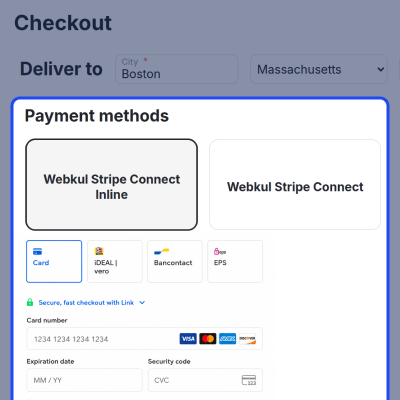
    CS-Cart Stripe Connect Standard Account shows Stripe as a payment option on the checkout page. Customers can select it to complete payments.

    It provides a simple and secure checkout experience. This helps improve payment success rate.

    • Display Stripe payment option at checkout
    • Allow customers to select Stripe easily
    • Provide smooth checkout experience
    • Support secure online payments
    Stripe Payment Method at Checkout

    CS-Cart Stripe Connect Standard Account-

    For any query or issue please create a support ticket here http://webkul.com/ticket

    You may also check our other top-quality CS-Cart Add-ons.

    Specifications

    Product Version2.1
    Released10 years ago
    CategoryCS-CartPaymentMarketplace
    Last UpdatedApril 9, 2026 (4 days ago)
    Supported VersionsCS-Cart Multivendor  4.16.x  4.17.x  4.18.x  
    Write a review

    Frequently Asked Questions

     Do vendors need to create their own Stripe accounts?
    Each vendor must connect an individual Stripe account to receive payments directly.
     
     What happens if a vendor has not connected their Stripe account?
    In such cases, payments for that vendor cannot be completed until the account setup is finished.
     
     Can the admin control or hold vendor payouts?
    Payouts are handled automatically by Stripe, so manual control or holding funds is not supported.
     
     Is it possible to refund an order after payment is split?
    Refunds can still be initiated, and the system adjusts amounts based on the original split.
     
     Are there any transaction fees involved?
    Stripe applies standard processing fees, which may vary depending on region and payment method.
     
     Can it handle orders with multiple vendors in one checkout?
    The system supports multi-vendor orders and splits the payment accordingly during checkout.
     
     What happens if a transaction fails?
    No funds are transferred, and the order remains unpaid until a successful transaction occurs.
     
     Is sensitive payment data stored on the server?
    All sensitive information is securely managed by Stripe, ensuring data protection.

    Move to Cloud Today

    AWS Free tier hosting for one year by amazon web services, for more details please visit AWS Free Tier.

    GCP Free tier hosting for one year with 300 credit points by google cloud platform, for more details please visit GCP Free Tier.

    Azure free tier hosting for one year with 25+ always free services, for more details please visit Azure Free Tier.

    In our default configuration we will provide tremendous configuration for your eCommerce Website which is fast to load and response.

    Default Configuration Details of Server

    • 1 GB RAM
    • 1 Core Processor
    • 30 GB Hard Disk
    • DB with 1 GB RAM and 1 Core Processor

    * Server Configuration may vary as per application requirements.

    Want to know more how exactly we are going to power up your eCommerce Website with Cloud to fasten up your store. Please visit the Cloudkul Services.

    Get Started with Cloud
    • - Feature Add (+)
    • - Feature remove (-)
    • - Bug Fixed (!)
    • - Modification (*)
    Version 2.1
    • + Added Recurring Payment Support.
    • + Integrated the Stripe Checkout.
    • + Optimized the add-on structure, improving maintainability, scalability, and efficiency.
    Version 1.3
    • ! Fixed the payment issue in the Stripe Checkout.
    • * Updated the version in the add-on's XML.
    • + Made compatible with CS-Cart version 4.16.x.
    Version 1.0
    • Initial Launch