USD
  • EUR
  • INR
  • USD
Cart
Cart 0
  • You have no items in your shopping cart.
    Cart
    Cart 0
    • You have no items in your shopping cart.
    Hire a Developer
    ×
    Contact Us!
    Send Again
    Close
    Please Login to Write Your Review

    CS-Cart Wallet System

    CS-Cart Wallet System Add-on lets customers add funds, use their balance at checkout, transfer money, and manage all their transactions in one place.


    • Built-in digital wallet to store and manage user balance.

    • Add balance using online and offline payment methods.

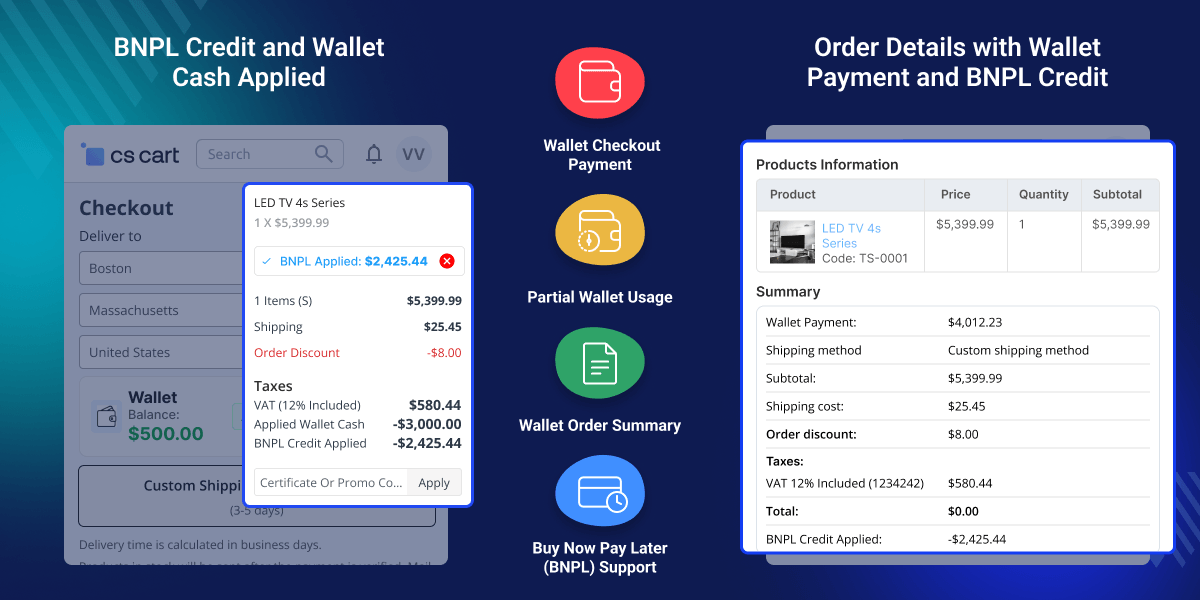
    • Use wallet balance as a payment option at checkout.

    • Support split payments with multiple payment methods.

    • Process instant refunds directly to the user's wallet.

    • Transfer money securely between registered users.

    • Send wallet balance to linked bank accounts easily.

    • Manage multiple bank accounts from the dashboard.

    • Set limits for recharge, transfer, and withdrawals.

    • Offer cashback and reward options for users.

    • Track all wallet activity with clear records.

    • Send alerts for all wallet account activities.

    Screenshots
    CS-Cart Wallet System CS-Cart Wallet System CS-Cart Wallet System CS-Cart Wallet System CS-Cart Wallet System CS-Cart Wallet System CS-Cart Wallet System CS-Cart Wallet System CS-Cart Wallet System CS-Cart Wallet System
    Show More Hide All
    $89.00

    * Required Fields

    Add To Cart
    $89.00
    Configure and Buy
    • Description
    • Reviews
    • FAQ
    • Customers ()
    • Specifications
    • Cloud Hosting
    • Changelog

    CS-Cart Wallet System Add-on helps store owners offer an internal balance system for faster and easier payments. Customers can add money, check their balance, and view details from their account dashboard.

    Users can recharge using different payment methods. Once funds are added, they can be used at checkout. Details are in the Wallet Payment at Checkout section. It supports flexible payments.

    Users can combine stored funds with other methods when needed. Options are covered in the Partial Payment with Wallet section. Users can send money to other customers or move funds to their bank accounts.

    Details are in the Wallet-to-Wallet Money Transfer and Wallet to Bank Transfer sections. All transactions are recorded clearly. This includes credits, debits, and refunds. Tracking is simple in the Wallet Transaction History section.

    This reduces checkout time. It improves payment flow and increases repeat purchases. Also, check out our CS-Cart Iyzico Multi-Vendor Payment Gateway Add-on for secure multi-vendor payments using Iyzico.
    CS-Cart Wallet System

    Highlighted Features of CS-Cart Wallet System

     Real-Time Balance Management

    Users can check their wallet balance anytime. It keeps them updated.

     Flexible Recharge Options

    Customers can add money easily. Online and manual methods are supported.

     Checkout Payment Support

    Customers can pay using their wallet balance. Checkout becomes faster.

     Split Payment Functionality

    Users can use the wallet with other methods. Split payments are supported.

     Admin Control Panel

    Admin can manage credits and debits. Control remains simple.

     Instant Refund Handling

    Refunds go to wallet accounts. Funds can be reused quickly.

     Secure User Transfers

    Users can send money with OTP. Transfers stay secure.

     Bank Withdrawal Support

    Users can move the balance to the bank. Funds can be used easily.

    Why Do We Need CS-Cart Wallet System Add-on?

    CS-Cart does not provide a built-in way to manage user funds. So, store owners lack flexibility in handling payments. Customers rely on external payment methods for every purchase.

    This slows down checkout and reduces convenience. Refunds go through payment gateways, so funds cannot be reused quickly. This affects repeat purchases. This add-on provides a central balance system.

    Users can store funds, make quick payments, and reuse refunds easily. For actions like checkout, transfers, and withdrawals, dedicated sections explain each process clearly. It improves payment flow and reduces friction.

    It also supports prepaid and reward-based use cases. Built for real store needs, it makes payment handling simple and reliable. Also, check out our CS-Cart Stripe Payment Gateway Add-on for secure online payments and a smooth checkout experience.

    Use Cases

    CS-Cart Wallet System Add-on helps improve payment flexibility and user experience across different scenarios.

    • Faster Checkout Experience

      Complete purchases quickly using your wallet balance. So, checkout becomes faster.

    • Peer-to-Peer Transfers

      Send money to other registered users quickly and easily. So, transfers become simple.

    • Secure Fund Tracking

      Track all wallet activity with clear and simple records. This helps maintain control.

    • Prepaid Balance System

      Add funds in advance and use them later. This helps plan purchases easily.

    • Flexible Payment Handling

      Use wallet balance with other payment methods when needed. For example, split payments easily.

    • Cashback Utilization

      Use rewards for future purchases. As a result, total spending is reduced.

    Integrate Wallet System to CS-Cart

    The admin can make the general settings, wallet refund configurations, wallet recharge configurations, wallet transfer configurations in the module. The settings can be configured as follows:

    • Can allow cashback in the wallet for new user registration.
    • The admin can set a cashback amount for the wallet when a new user gets registered.
    • The store owner can configure the maximum and minimum amount for the wallet refund.
    • Can set the minimum and maximum amount for wallet recharge.
    • Can restrict the maximum and minimum value for the wallet transfer.
     Integrate Wallet System to CS-Cart

    Credit/Debit Using Wallet

    The store owner and the user both can credit and debit the money to the wallet. The store owner can credit or debit the amount by entering the following details:

    • Enter the amount which he wants to credit or debit.
    • Enter the reason for credit or debit in the wallet.
    • The admin has to select the user from Choose User option.
    • Now choose the option credit or debit and click on the button.
    • The customer can also add the wallet amount easily by clicking on Add Money option in his profile.
    • During checkout, the customer has to enter his details and simply proceed to checkout, and the order is placed for the same.
    • The money gets added to the customer’s wallet.
    Credit/Debit Using Wallet

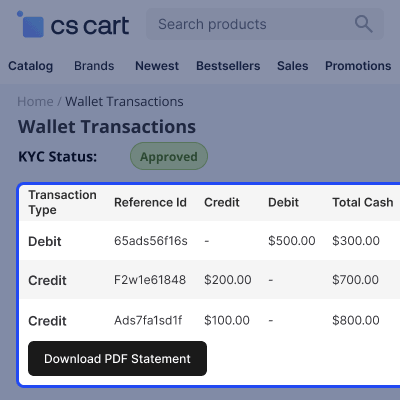
    Wallet Transactions View

    The wallet transactions will display to the customers in the wallet transaction section in their profile. Similarly, the admin can also view the wallet transaction from his dashboard in the wallet transaction option. The admin and the wallet user can view the following details:

    • The credit or debit id will be visible in the transactions.
    • The user and admin both can view the transaction type.
    • Reference id will display in the transaction history from which the money gets debited or credited.
    • Debit or credit amount will also be visible to the customer and admin both.
    • Total cash, gross wallet cash, and the date of wallet transaction will also display in the wallet transaction.
    Wallet Transactions View

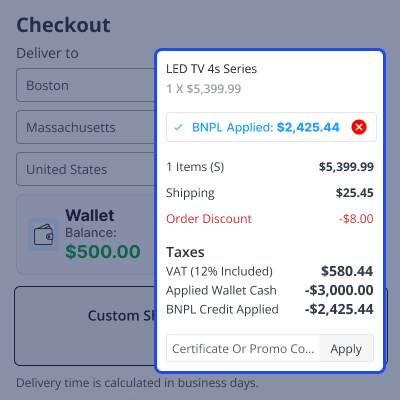
    Payment During Checkout

    During the checkout process, the wallet user can use the wallet money during the purchase. Whenever a customer adds any product and proceeds to checkout to purchase the product then he has to enter the below details:

    • The delivery address where the product will deliver.
    • Wallet available cash and the option to use the wallet cash.
    • Customer details like; address, email id, contact details.
    • Payment method details will be disabled when the wallet cash is used by the user.
    • The wallet user has to accept the terms and conditions.
    • Click on the Place Order button to purchase the product.
    Payment During Checkout

    Earned Reward Points -

    During the checkout process, the wallet user can use the earn rewards points and transfer them to the wallet account.

    • Admin can set the minimum and maximum points of reward to the customer and set the commission value.
    • Admin can enable payment by reward point and then admin set earned reward points per product or category for the customer.
    • Customers can transfer reward points in their wallet account.
    • The reward point amount will be added to the wallet cash.
    Earned Reward Points

    Kablewala – How Banglamark Group Embarked its E-commerce Journey

    Kablewala by Banglamark Group conglomerate is a popular online marketplace in Bangladesh. It has over 2 million registered users and over 100,000 orders placed every month. Kablewala is also one of the most trusted online marketplaces in Bangladesh.

    But in order to expand further, they adopted the mobile commerce strategy and developed mobile apps for their business. Moreover, Webkul assisted the client to add more custom features to their marketplace website.

    • Fully native Android and iOS mobile app development.
    • Dedicated mobile applications for shoppers, vendors, and delivery staff.
    • Web and mobile wallet system integration for faster checkout payments.
    • Deployed multiple CS-Cart add-ons and customizations for both web and mobile platforms.
    • Read the Kablewala case study to learn more about the client.
    Kablewala

     Support

    For any query or issue please create a support ticket here http://webkul.uvdesk.com

    You may also check our other top-quality CS-Cart Add-ons.

    Specifications

    Product Version5.2
    Released10 years ago
    CategoryCS-CartPayment
    Last UpdatedMarch 30, 2026 (9 days ago)
    Supported VersionsCS-Cart  CS-Cart Multivendor  4.16.x  4.17.x  4.18.x  4.19.x  
    Rating 5.0
    based on 11 reviews

    Recent Reviews

    Write a review

    Good addons and Perfect Service

    Posted On - October 31, 2023

    good and payable addons
    services also AA+++ happy to work with them more
    both already many addons and al working great

    Great addon

    Posted On - November 21, 2022

    quick and fast to install and a good service like all the products I have already AAA+++

    Excellent!

    Posted On - September 13, 2021

    Serious business. They make good modules. I go through them for the development and design of my modules. The after-sales service is reactive.

    Wonderful addon

    Posted On - March 8, 2019

    wonderfull a add-on, thank you very much for fastly support especially Shailesh Kumar , I advise this add-on and company.

    Great Addon

    Posted On - March 8, 2019

    great add-on and it's "must have" for every growing eCommerce
    as Thomas H said below the support was the best part of the deal
    fast , professional reply, that what you get every time you had any query

    Load more reviews

    Frequently Asked Questions

     How can customers add money to their wallet?
    Customers can recharge their wallet using online or offline payment methods by entering the desired amount and completing the payment.
     
     Can wallet balance be used for partial payments?
    Yes, customers can first apply the wallet balance to the order, and then select another payment method to pay the remaining amount.
     
     How are refunds handled in the wallet system?
    Admin can refund order amounts directly to the customer’s wallet, and the refunded amount is instantly credited to the wallet balance.
     
     Is wallet-to-bank transfer supported?
    Yes, admin can enable wallet-to-bank transfers, set minimum and maximum limits, and control which customer types can use this feature.
     
     Can admins view wallet transaction history?
    Yes, the admin can view complete transaction details, including credit, debit, and transfer records.

    Move to Cloud Today

    AWS Free tier hosting for one year by amazon web services, for more details please visit AWS Free Tier.

    GCP Free tier hosting for one year with 300 credit points by google cloud platform, for more details please visit GCP Free Tier.

    Azure free tier hosting for one year with 25+ always free services, for more details please visit Azure Free Tier.

    In our default configuration we will provide tremendous configuration for your eCommerce Website which is fast to load and response.

    Default Configuration Details of Server

    • 1 GB RAM
    • 1 Core Processor
    • 30 GB Hard Disk
    • DB with 1 GB RAM and 1 Core Processor

    * Server Configuration may vary as per application requirements.

    Want to know more how exactly we are going to power up your eCommerce Website with Cloud to fasten up your store. Please visit the Cloudkul Services.

    Get Started with Cloud
    • - Feature Add (+)
    • - Feature remove (-)
    • - Bug Fixed (!)
    • - Modification (*)
    Version 5.2
    • + Added the email templates to the configurations
    • * Update the UI.
    Version 5.1
    • ! The wallet transaction were not getting filtered on switching the company id
    • ! The shipping methods were hiding on applying the wallet system amount
    • ! Updated the version in addon.xml
    Version 5.0
    • + Now Customer can transfer wallet cash to bank account.
    • + Now Admin can add cashback rules.
    • + Automatic amount refund to wallet when order status is changed to decline.
    • ! Fixed tags not working properly with validation.
    • ! Removed transaction id filter.
    Version 4.10
    • - Now Customers can change points into wallets with some commission (+).
    • - Fixed refund issue(!).
    • - Fixed Language issue(!).
    Version 4.9
    • - Admin can send monthly reports to Each customer (+).
    • - Admin can set which payment method wallet Rechange did (+).
    • - Admin can set which UserGroup wallet can be used (+).
    • - Now Admin and Customer Both can view separate transactions (+).
    • - A separate tab has been provided to Admin to track the details of credit, debit, and the current amount of wallet of the individual users (+).
    • - Supports wallet partial refund where admin has the option of partial refund via wallet depending on the necessity(+).
    • - Supports partial payment option at checkout which allows the buyer to pay a certain order amount via wallet and the rest by other payment gateways(+).
    • - Now Transfer Wallet Money From one account to another is more secure using the OTP feature(+).
    • - compatible with CS-cart multistore(+).
    Version 4.8
    • - Fixed Git Issue(!).
    • - Compatible with CS-Cart RMA product refund(*).
    • - Compatibile with version 4.14.X(!).
    Version 4.7
    • - Fixed Git Issue(!).
    • - Recharge the wallet by using the PayPal payment method need to override the paypal.php script by wallet paypal.php(*).
    • - Compatibile with version 4.13.X(!).
    Version 4.6
    • - Fixed Git Issue(!).
    • - Convert to Opp's structure and optimize the code(*).
    Version 4.5
    • - Fixed Git Issue(!):
    • - Compatible with version 4.12.X.(*)
    Version 4.4
    • - Fixed Git Issues(!).
    • - Added 4.11.x Compatibility(*)
    Version 4.3
    • - Fixed Git Issues(!).
    • - Added 4.10.x Compatibility(*).
    Version 4.2
    • - Fixed Git Issues(!).
    Version 4.1
    • - Fixed Git Issues(!).
    Version 4.0
    • - fixed inaccurate sales issue(!).
    • - currency restriction removed(-).
    Version 3.0
    • - new email templating feature added(+).
    Version 2.1
    • - Fixed Git Issues(!).
    • - Added 4.8.x Compatibility(*).
    Version 2.2
    • - fixed database table-related issue(!).
    • - debit reason at front-end issue fixed here(+)
    • - debit/credit for vendor issue fixed here(+)
    • - pay pal related issue fixed here(+)
    Version 1.5
    • - transfer confirmation button added(+)
    • - wallet credit & debit history search by date added(+)
    Version 1.4
    • - wallet money transfer functionality added(+)
    • - update wallet refund button(*)
    Version 1.3
    • - now it accepts partial payment of orders through wallet(+).
    Version 1.2
    • - Added order id and refund in admin credit view page(+).
    • - Added Wallet Recharge Feature and changed the menu of Wallet in frontend(+).
    Version 1.1
    • - compatible with cscart 4.3.1 & 4.2.x(!).
    Version 1.0
    • - mail issue solved(!).
    • - total fix(!).
    • - calculation of wallet fix(!).