USD
  • EUR
  • INR
  • USD
Cart
Cart 0
  • You have no items in your shopping cart.
    Cart
    Cart 0
    • You have no items in your shopping cart.
    Hire a Developer
    ×
    Contact Us!
    Send Again
    Close
    Please Login to Write Your Review
    Product Image
    Technology Partner Awards.
    Top Selling Extension Winner
    2 times in a row

    Magento 2 Pre Order

    Magento 2 Pre Order extension lets store owners sell upcoming or out-of-stock items. Set full or partial payments to capture demand and manage cash flow.


    • Simple, virtual, group, bundle, downloadable, and configurable products supported.

    • Full, partial, or pay on release options available for pre-order products.

    • Set a custom percentage for the partial payment when pre-ordering items.

    • Automatic pre-order notifications sent via email to keep customers informed.

    • Customers can see pre-order listing from separate section.

    • Badges and Visual merchandising feature for admin and customers.

    • Show a live pre-order availability countdown on the product page.

    • Admin can enable or disable auto-enable pre-order when product goes out of stock.

    • Admin can auto-disable pre-order when product comes back in stock.

    • Admins can allow or prevent customers from canceling pre-orders.

    • Pre-order analytics and reports for admins to track sales globally.

    • Magento 2 BackOrder Extension is compatible with the Hyva Theme.

    Technology Partner Awards.
    Top Selling Extension Winner
    2 times in a row
    Screenshots
    Magento 2 Pre Order Magento 2 Pre Order Magento 2 Pre Order Magento 2 Pre Order Magento 2 Pre Order Magento 2 Pre Order Magento 2 Pre Order Magento 2 Pre Order Magento 2 Pre Order Magento 2 Pre Order
    Show More Hide All
    $179.00

    * Required Fields

    Add To Cart
    $179.00
    Configure and Buy
    • Description
    • Reviews
    • FAQ
    • Customers ()
    • Specifications
    • Cloud Hosting
    • Changelog

    Magento 2 Pre Order Extension allows merchants to sell products before they are available. Customers can place orders for upcoming, pre-launch, or out-of-stock items without waiting for inventory to arrive.

    The extension supports registered customers and guest users. It works with simple, configurable, grouped, bundle, virtual, and downloadable products. Admins can choose from full payment, partial payment, or pay-on-release options. This gives shoppers more flexibility while helping merchants secure sales early.

    Magento 2 Inventory Reservation Extension enables customers to reserve products by paying a full or partial amount in advance, allowing merchants to secure sales and fulfill orders as soon as the products are back in stock or become available.

    Adobe Commerce Back Order Extension enables backorders when all available pre-order quantities have been sold out, allowing store owners to continue accepting additional customer orders beyond the pre-order limit.

    Additionally, the module includes a notification feature that sends an automated email directly to the customer's inbox. Customers receive updates for pre-order confirmations, availability date changes, product releases, payment reminders, back-in-stock alerts, restock notifications, and order cancellations.

    Apart from that, if you want customers to receive an email notification when an out-of-stock product becomes in stock, then you can check Magento 2 Out of Stock Notification.

    Important Note -
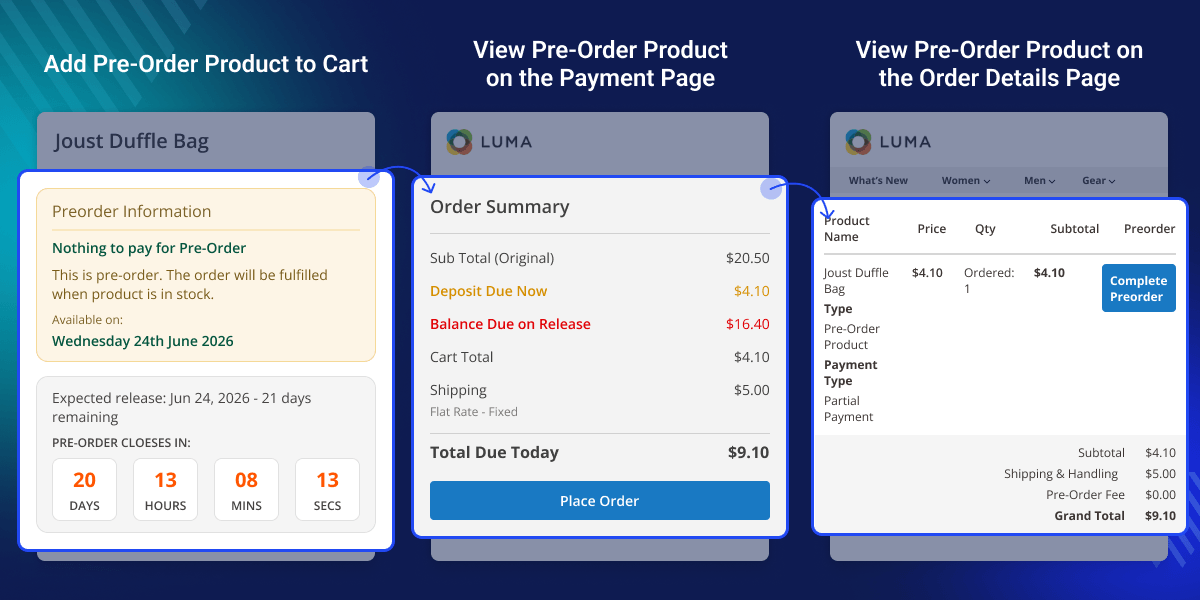
    • Partial payment info is visible on the product page and the cart page only when the admin enables partial payments from the configurations.
    • For the configurable, bundle, and grouped products admin needs to add its associate product in the preorder state.
    • All product types and MSI-compatible modules 3.0.0 will not show old preorder version data. If you purchase any previous version, it will not be compatible with all types of products and MSI.
    Magento 2 Pre Order

     Highlighted features of Magento 2 Pre Order Module

     Sell Upcoming Products

    Sell and accept orders for upcoming products.

     Analyze New Product Demand

    Analyze customer demand and initial sales of the products.

     Advance Booking

    Pay in advance and book items to guarantee assured delivery.

     Receive Advance Payment

    Accept partial or full payment for pre-order products.

     Show Arrival Date

    Specify the product availability date.

     Email Notification

    Notify customers when a pre-ordered product is available.

     Custom Message on Pre Order Page

    The admin can set a custom message as required on the Pre Order Product page.

     Compatible With Hyva Theme

    Magento 2 Pre Order Extension is fully compatible with the Hyva Theme.

    Why Do We Need Magento 2 Pre Order?

    Launching a new product can be risky because it’s hard to know how much customers will want it. Default systems in Magento 2 do not let stores track demand before a product is available. This makes it hard to plan inventory and can lead to overstock or stockouts.

    Magento 2 Pre Order Extension solves this problem. It lets customers reserve products before launch, giving merchants real data on demand. This helps stores plan stock better and reduce risks.

    Customers benefit too. They can secure popular items early and get updates while waiting for release. Trusted by leading online stores, pre-order tools help businesses plan smarter and sell more efficiently.

    If you would also like to have a tip system functionality on the store which can be used by customers to tip the delivery person, then you can check the Magento 2 Order Tip extension.

    Use Cases

    Product Pre-Launch Sales

    Accept orders for upcoming products before they are officially available.

    Demand Validation

    Measure customer interest before investing in inventory or production.

    Pre-Launch Campaigns

    Generate excitement and early sales before a product release.

    Inventory Planning

    Use pre-order data to forecast demand and optimize stock levels.

    Customer Notifications

    Keep customers updated with automated pre-order email alerts.

    Seasonal Products

    Capture orders early for seasonal or limited-time items.

     Pre-Order Payment - Full or Partial

    The Magento 2 Pre Order module is useful for the products that are about to be launched or not available in the store. So, the customers can pay in advance and book their items to guarantee assured delivery. The admin can configure the module for the proper workflow like -
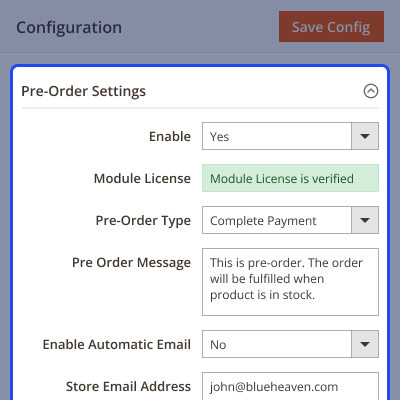
    • Enable the pre order products feature for the products.
    • Define payment for pre-orders for the customers – Full Payment or Partial Payment.
    • Set the percentage amount of the product’s price to be paid by the customers if payment for pre-orders is a partial payment type.
    • Configure a custom message displayed on the pre-order product page.
    • Can even charge the pre-order additional fee by defining the additional fee calculation type as fixed or percentage.
    • Define the maximum allowed quantity for the customers to purchase the pre-order (Backorder) products.
    Pre-Order Payment - Full or Partial

     Show Custom Note & Product Availability Date

    The module works with simple, virtual, and configurable products. On the product page, the customer will see various information about pre-ordering the product, such as:

    • Partial Payment Info - The partial amount of the product’s price needs to be paid by the customer.
    • Pre-order Custom Message - Custom message for displaying additional information for the customer.
    • Product Availability Date - Date of pre-order product availability.
    • Pre Order Button - Button to place an order for the pre-order product.

    Note - The pre-order product should have the pre-order option set to 'Yes'.
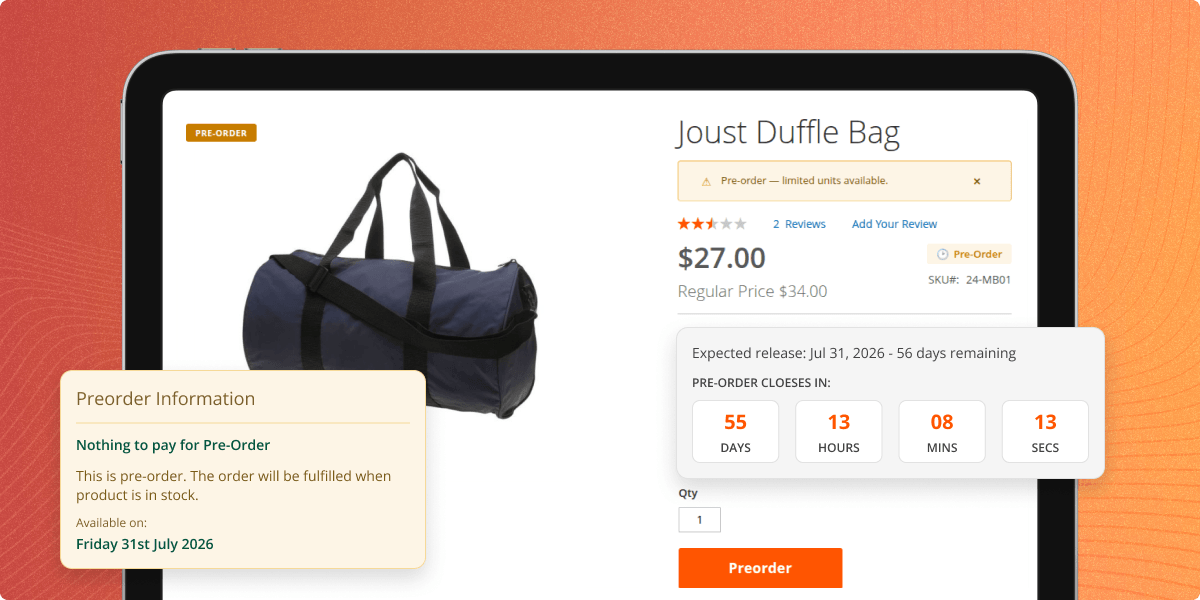
    Show Custom Note & Product Availability Date

     Completing Partial Payment PreOrder (Backorder) 

    • Registered and guest users both can place pre-orders successfully.
    • The customer can place the pre-order either by making the full payment or partial payment as per the configuration.
    • On the product page, the customers can view the pre-order payment information.
    • For the full payment, the customer will make the full payment including the shipping cost, and place the order.
    • And, when the product is available, the customer receives an email notification.
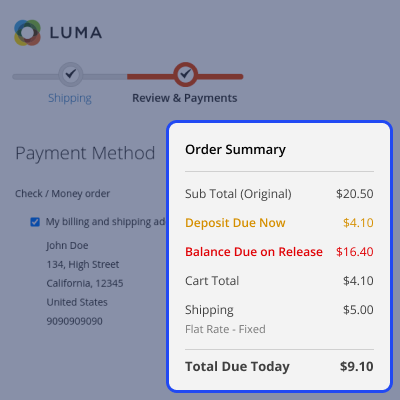
    • But in partial payment, the customer first pays some percentage of the product’s price plus the shipping cost.
    • And, when the product is available, the customer receives an email notification for making the remaining payment using the second-order ID.
     Completing Partial Payment PreOrder

     Add Pre-Order Items & Products in Shopping Cart

    The customers can add pre-order products and non-pre-order products to the single cart successfully. After adding the product to the shopping cart, the customer can see the following details about the pre-order:

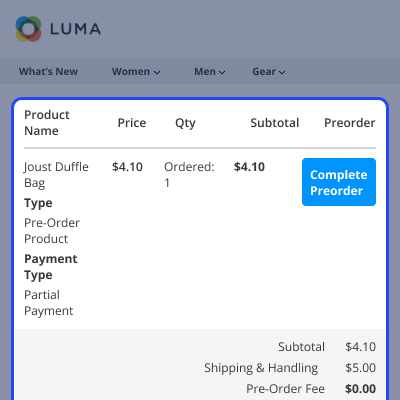
    • Type - The type can be preordered as the product.
    • Payment Type - The preorder type can be partial or full payment for preordering the product.
    • Pre-order Percent - Partial amount percentage of the product’s price configured by the admin.

    Note: The customer can place the same order multiple times for a particular pre-order product.
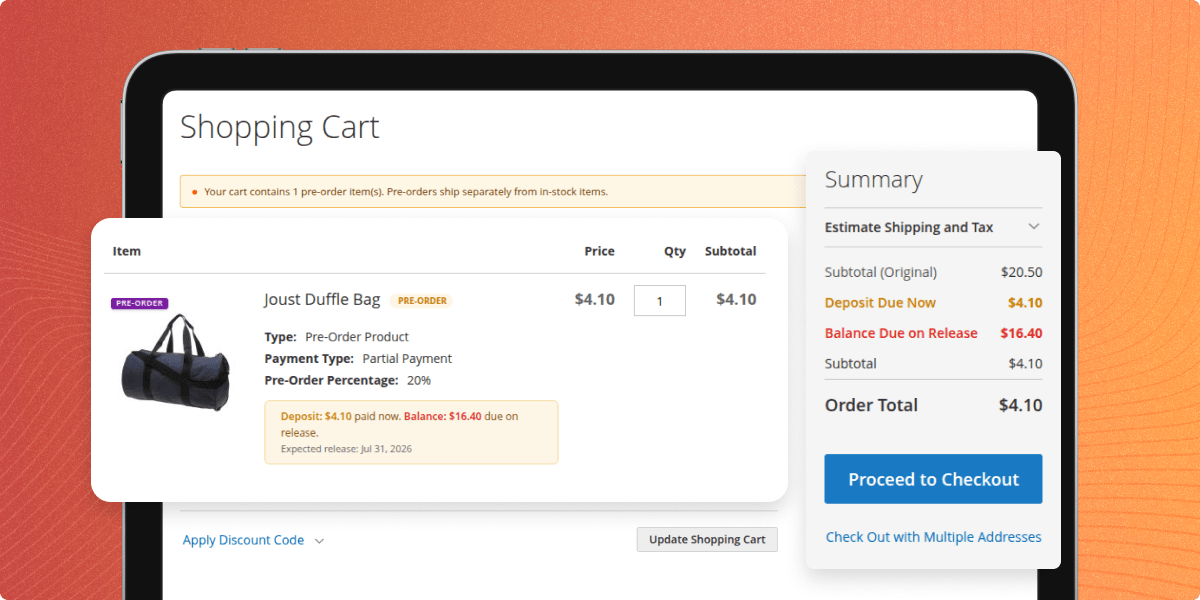
    Add Pre-Order Items & Products in Shopping Cart

     Completing Pre Order

    • Placing the order by the customer will not reduce the inventory.
    • The product inventory will decrease only when the admin completes the pre-order.
    • When the product will be available, the customer will get an email notification for completing the order and paying the remaining amount.
    • The customer will not pay the shipping charge at the time of pre-order (backorder) completion.
    • The customer cannot update the quantity of the pre-ordered products on the shopping cart page.
    • Once the order is placed, the customer can view the pre-order information “My Orders” section.
    Completing Pre Order

     View Pre Orders List

    The admin can view all pre-orders placed by customers along with complete order details. The module also allows the admin to select multiple orders and send email notifications in bulk.

    • The admin can easily identify pre-orders and regular orders using the Order Type column.
    • The global order list includes an Order Type filter to display only pre-order orders.
    • A dedicated section is available to view all customer pre-orders.
    • The admin can view details such as Order ID, Purchase Date, Product Name, Customer Name, Customer Email, Paid Amount, Remaining Amount, Pre-order Type, and Pre-order Status.
    • The admin can manually notify customers when the product becomes available.
    • Bulk email notifications can be sent to selected pre-orders.

    Note - If an invoice is not generated for a pre-order, the customer will not receive the Product Availability notification. Therefore, the admin must create the invoice after receiving the pre-order payment.

    Note - This Pre Order Magento 2 module does not apply to version 3.0.0. Magento 2 BackOrder supports simple, configurable, grouped, bundle, virtual, and downloadable products.
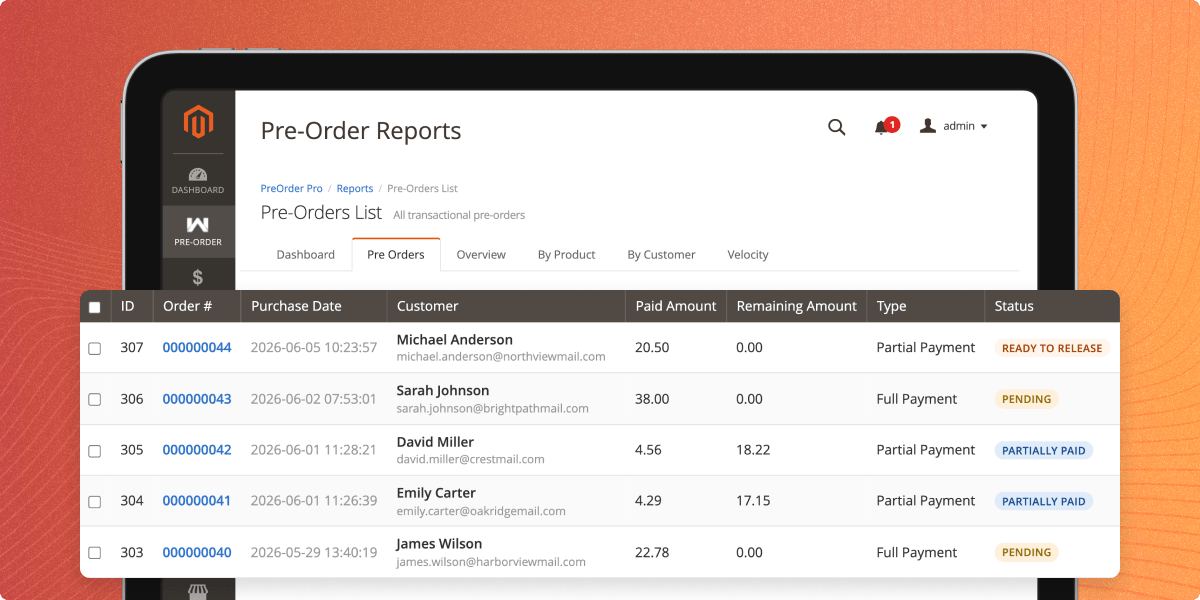
    View Pre Orders List

     Pre-Order Analytics and Reports

    The Pre-Order Reports & Analytics Dashboard shows all your pre-order data in one place. It gives you a clear view of sales, revenue, customers, and product performance.

    Use the dashboard to track pre-order activity, find popular products, understand customer trends, and make better business decisions with real-time data.
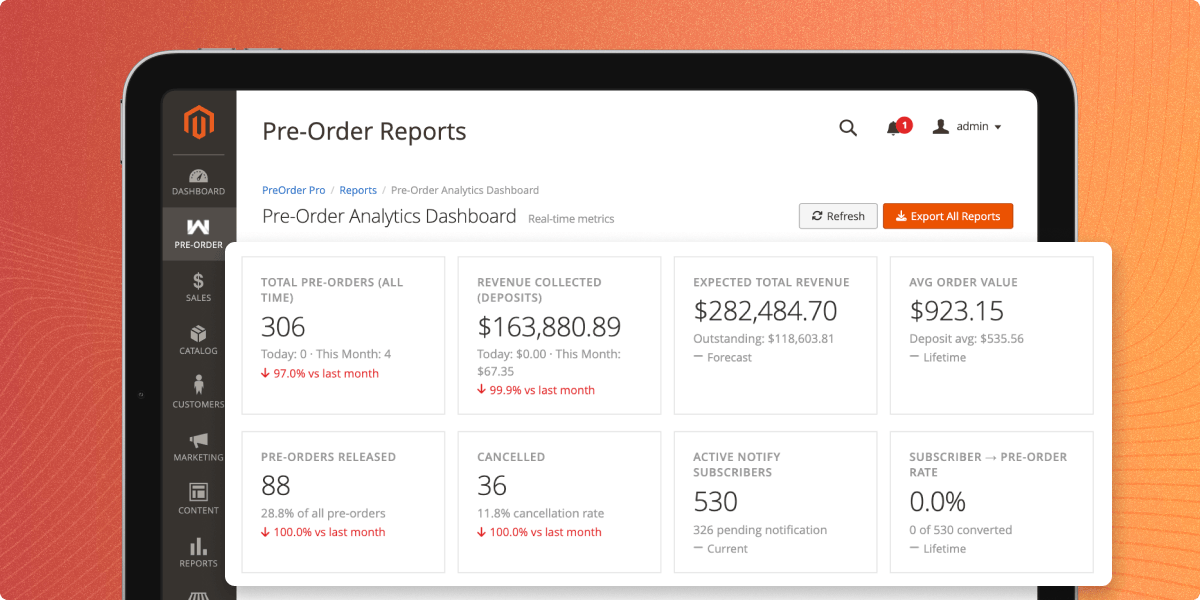
    • View all pre-order data from a single dashboard.
    • Track pre-order sales, revenue, and customer activity.
    • Monitor the performance of individual products.
    • Switch between summary and detailed reports using tabs.
    • Filter report data to find specific information quickly.
    • Export reports for analysis and record keeping.
    Pre-Order Analytics and Reports

     Pre-Order Campaign Management

    Pre-Order Campaign Management feature allows admins to create and manage time-limited pre-order campaigns. Multiple products can be grouped under a single campaign to run promotions more effectively.

    Use campaigns to organize pre-order promotions, track their performance, and manage multiple products from one place.
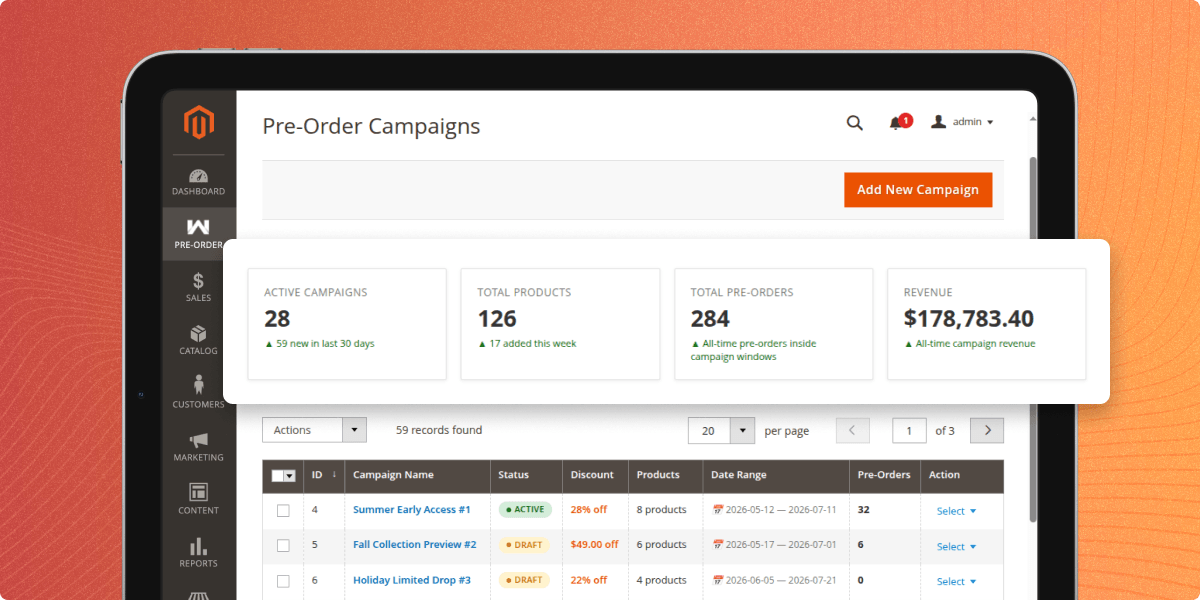
    • Add, edit, or delete campaigns.
    • Group multiple products under a single campaign.
    • View key metrics such as active campaigns, total products, total pre-orders, and revenue.
    • Compare campaign performance with the time.
    • Save campaigns as Active or Draft.
    Pre-Order Campaign Management

     Pre-Order Badges & Visual Merchandising

    Pre-Order Badges & Visual Merchandising lets you add eye-catching badges to your storefront. These badges help shoppers quickly identify pre-order, backorder, and limited-availability products.

    Use visual badges to highlight product availability, improve product visibility, and help customers make faster purchasing decisions.
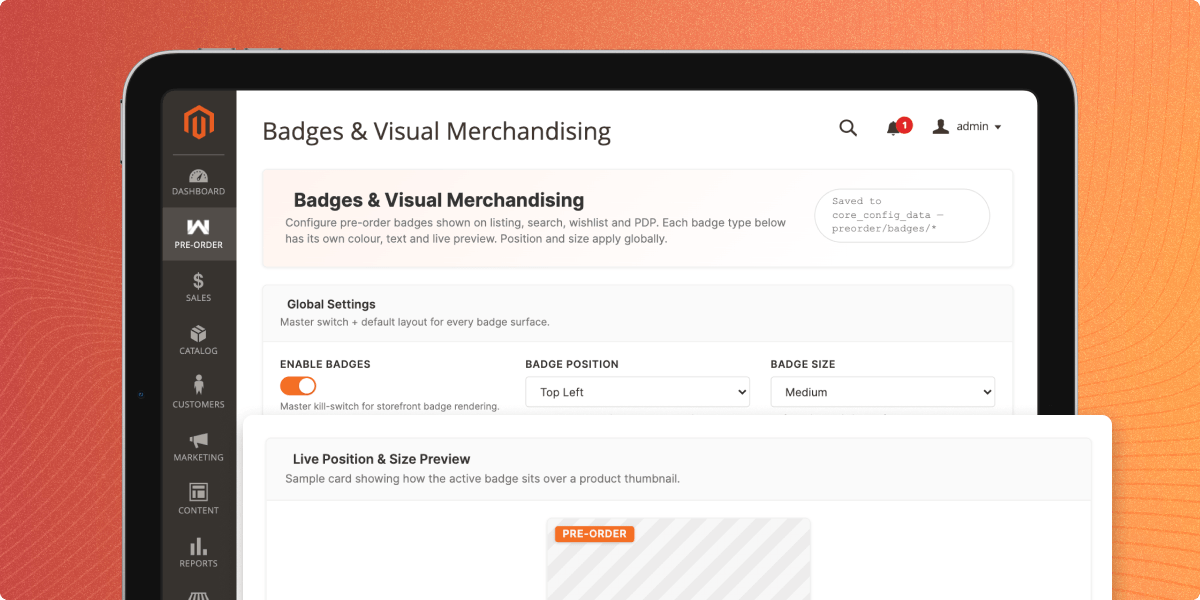
    • Display badges for pre-order, backorder, and limited-availability products.
    • Customize badge colors using the built-in color picker.
    • Choose where badges appear on product images.
    • Adjust badge size to match your storefront design.
    • Enable or disable individual badge types as needed.
    • Improve product visibility with clear visual indicators.
    Pre-Order Badges and Visual Merchandising

     Pre-Order Email Configuration

    Pre-Order Email Configuration feature lets you manage all pre-order email templates from a single admin page. You can customize, preview, and test emails before sending them to customers.

    Use this feature to maintain consistent branding, customize email content for different pre-order events, and ensure emails display correctly before they are sent.
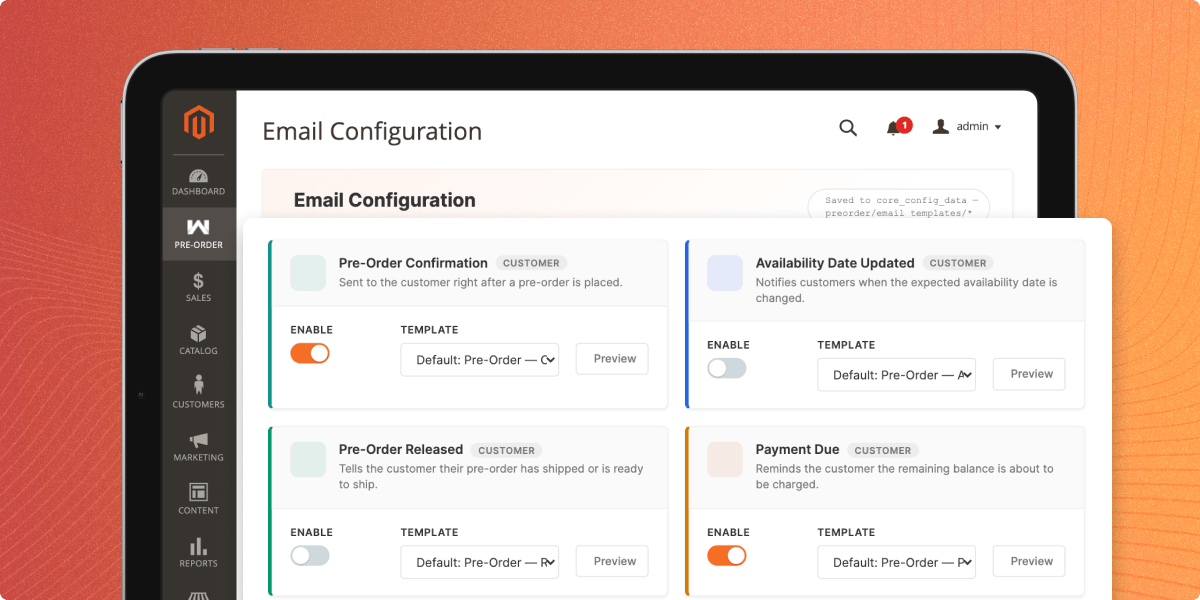
    • View all pre-order email scenarios in one place.
    • Check whether each email uses a default or custom template.
    • Assign custom templates to individual email scenarios.
    • Customize email content and branding for different notifications.
    • Preview emails with sample data before publishing.
    • Send test emails to verify the appearance and content in a real inbox.
    Pre-Order Email Configuration

    Compatible With MSI Feature

    Make the pre-order process for the customers faster and more efficient, and save their time by speeding up the delivery process.

    • This can be done by getting the products from the nearest source or inventory.
    • Magento 2 MSI allows showing the stock availability to the customers according to the nearest sources.
    • The admin can create multiple sources and add stock availability according to the sources.
    • Further customers can pre-order the products on the front end and that will get delivered to them from the nearest source.
    Compatible With MSI Feature

     Complete Features List for Magento 2 BackOrder

    • Buyers can pre-order products.
    • Magento 2 backorder module also supports the product with custom options.
    • Admin can set a custom message to display on the preorder product page.
    • Admin can set preorder status and availability dates.
    • Using Magento 2 Pre Order modules customers can pay the full or partial payment.
    • Set the custom percentage or, fixed partial amount to pay for pre-ordering.
    • Customers can receive an automatic email notification when a product is made available in the store and removed from the PreOrder state.
    • Customer can also order preorder product with normal product.
    • Customer can also order two preorder product at once.
    • Customers can see pre-order listing from separate section.
    • Admin can display Free Preorder notes to customers.
    • Admin can enable or disable auto-enable pre-order when product goes out of stock.
    • Admin can auto-disable pre-order when product comes back in stock.
    • Admin can globally set stock threshold for pre-order.
    • Admin can set full-payment pre-order label from both global and product-level settings.
    • Admin can set partial-payment and pay-on-release pre-order labels from both global and product-level settings.
    • Admin can enable/disable show countdown timer on pdp.
    • Admin can set countdown label.
    • Admins can allow or prevent customers from canceling pre-orders.
    • Admins can allow or prevent customers to edit shipping address before release.
    • Admin can set cutoff days for pre-order cancel and shipping address edit.
    • Admin can enable/disable backorder mode for pre-order.
    • Admins can set the backorder label globally or at the product level.
    • Admin can enable or disable preorder banner visibility on cart page.
    • Admins can allow or restrict customer groups from placing pre-orders.
    • Admins can allow or prevent guest users from placing pre-orders.
    • Admins can set a default maximum pre-order quantity per product.
    • Admins can set a default maximum pre-order quantity per customer.
    • Admins can set a low pre-order slot warning threshold.
    • Admin can see pre-order reports.
    • Admin can see pre-order notification reports.
    • Admin can create discounts & promotions campaigns for their stores.
    • Badges and Visual merchandising feature for admin and customers.
    • Separate email configuration section for admins.
    • Multi-Lingual support / All language working including RTL.
    • The code is fully open & you can customize it according to your need.

    Huawei Case Study - Online Inventory Management

    Dealing with product unavailability is a challenge faced by every other retailer and online seller.

    No matter, how reliable is the flow of goods and materials, your supply chain management can get affected due to many controllable or uncontrollable reasons.

    Read Huawei Kuwait Case Study to know, this leading smartphone manufacturer handles pre-sale orders and online inventory to serve its Middle-East consumers.

    Huawei Case Study - Online Inventory Management

    TrainWorld- Advanced Inventory Management for the Ultimate Model Train Store's Pre-Orders

    Trainworld company stands tall as a prominent multi-channel retail and direct marketing enterprise. With half a century of experience in the training industry, it has emerged as the unrivaled champion of online model train stores.

    Trainworld sought customization from Webkul for pre-order functionality in their Adobe Commerce-based platform. They aim to offer customers the ability to purchase unreleased model trains, pay upfront, and have orders shipped upon availability. Pre-order tabs will facilitate this process.

    • TrainWorld managing their eCommerce store on Adobe Commerce.
    • Webkul's customization allowed TrainWorld to implement a seamless pre-order process.
    • With the custom development, TrainWorld's customers can now pay in advance for pre-order products.
    • By offering a dedicated Pre-Order tab and different categories for pre-order products.
    • TrainWorld can provide a user-friendly experience for customers to find and purchase pre-order items easily.
    • Webkul's customization included a feature to complete pre-orders in bulk, enabling TrainWorld's team to efficiently manage and process a large number of pre-orders.
    • Read the complete TrainWorld case study to know more.
    TrainWorld

    Support

    For any query or issue please create a support ticket here http://webkul.uvdesk.com/.

    You may also check our quality Magento 2 Extensions.

    Specifications

    Product Version5.0.5
    Released10 years ago
    Last UpdatedJune 11, 2026 (8 days ago)
    Supported VersionsMagento  2.0.x  2.1.x  2.2.x  2.3.x  2.4.x  
    Rating 5.0
    based on 14 reviews

    Recent Reviews

    Write a review

    Excellent Support and Service

    Posted On - December 12, 2023

    I want to express my sincere appreciation for the outstanding work done by the team at Webkul. We collaborated on the development of our website, and the results were nothing short of exceptional.

    Webkul's team displayed a remarkable level of professionalism and expertise throughout the entire process. They were not only responsive to our needs but also provided creative solutions that significantly enhanced our website's functionality and user experience.

    From the initial consultation to the final delivery, the communication was seamless, and the project was completed on time. The attention to detail and commitment to quality were evident in every aspect of their work.

    I highly recommend Webkul for anyone in search of a reliable and skilled development partner. They surpassed our expectations, and we are grateful for their dedication to turning our vision into reality.

    Thank you, Webkul, for your outstanding service! Looking forward to future collaborations.

    Excellent Support Services

    Posted On - December 29, 2022

    Outstanding after-sales services, just awesome.

    Great module, perfect support

    Posted On - July 18, 2021

    Great and simple module! Can just recommend it! After installation, it didn't work (my own fault :-)), so I posted in the support ticket and the problem was solved within 4 hours!

    MAGENTO 2 PRE-ORDER

    Posted On - February 10, 2021

    Fault free aftercare, 12 stars out of 10. A few issues with it working out the box but this was related to our site and the amount of customisation probably, the guys kept plugin away to resolve where others would give up, cannot fault them

    Brilliant aftercare

    Posted On - February 10, 2021

    Fault free aftercare, 12 stars out of 10. A few issues with it working out the box but this was related to our site and the amount of customisation probably, the guys kept the plugin away to resolve where others would give up, cannot fault them.

    Load more reviews

    Frequently Asked Questions

     In which cases is the Pre-Order feature useful?
    The Pre-Order feature is ideal for launching new products, accepting orders for out-of-stock items with high demand, and selling quantities beyond currently available inventory.
     
     Does the customer need to make full payment for a pre-order?
    No, customers can place pre-orders using partial or payment on release, depending on the store configuration.
     
     How is inventory managed for pre-orders?
    Inventory is updated only after the pre-order is completed, helping merchants manage stock accurately.
     
     How are customers notified when a product is back in stock?
    Customers receive an automated email notification as soon as the product becomes available again.
     
     How do customers know a product is available for pre-order?
    A custom pre-order message is displayed on the product page, clearly indicating that the item can be pre-ordered.
     
     Can customers cancel their pre-orders?
    Yes, customers can cancel eligible pre-orders directly from their account, subject to the store's cancellation policy.
     
     Can different pre-order labels be used for different products?
    Yes, custom pre-order labels can be configured based on product requirements and pre-order settings.
     
     Can different badges be used for different pre-order statuses?
    Yes, separate badges can be configured for statuses such as Pre-Order, Coming Soon, Backorder, and Out of Stock.

    Move to Cloud Today

    AWS Free tier hosting for one year by amazon web services, for more details please visit AWS Free Tier.

    GCP Free tier hosting for one year with 300 credit points by google cloud platform, for more details please visit GCP Free Tier.

    Azure free tier hosting for one year with 25+ always free services, for more details please visit Azure Free Tier.

    In our default configuration we will provide tremendous configuration for your eCommerce Website which is fast to load and response.

    Default Configuration Details of Server

    • 1 GB RAM
    • 1 Core Processor
    • 30 GB Hard Disk
    • DB with 1 GB RAM and 1 Core Processor

    * Server Configuration may vary as per application requirements.

    Want to know more how exactly we are going to power up your eCommerce Website with Cloud to fasten up your store. Please visit the Cloudkul Services.

    Get Started with Cloud
    • + Features
    • - Bugs
    Version 5.0.5
    • + Compatible with Magento ^2.4.8 and php 8.4
    Version 5.0.4
    • + Compatible with PayPal Payment method
    Version 5.0.3
    • + Compatible with Magento 2.4.7
    • + Buyer can order preorder products with normal products.
    • + Buyer can order two preorder products at once.
    • - Bug fixed
    Version 5.0.2
    • - Bug fixed
    Version 5.0.1
    • + Add an option to filter by “Pre-Order Product” in the my orders' section in the customer end.
    • + Add useful details on the above pre-order product listing On the Pre-Order List Admin page
    • + Add “Apply Pre-Order” and “Disable Pre-Order” options in the mass action options on the product page
    • + Add Pre-order Condition for Catalog Price Rule & cart Price Rule
    • - Bug fixed
    Version 5.0.0
    • + Compatible with Magento 2.4.x and php 8.1.
    • + Version upgrade.
    • - Bug fixed
    Version 4.0.7
    • + Compatible with Magento 2.4.8 and PHP 8.4.
    Version 4.0.6
    • + Compatible with Magento 2.4.7.
    • + Buyer can order preorder products with normal products.
    • + Buyer can order two preorder products at once.
    Version 4.0.5
    • + Compatible with Magento 2.4.6.
    Version 4.0.4
    • + Add an option to filter by “Pre-Order Product” in the my orders' section in the customer end.
    • + Add useful details on above pre-order product listing On the Pre-Order List Admin page
    • + Add “Apply Pre-Order” and “Disable Pre-Order” options in the mass action options on the product page
    • + Add Pre-order Condition for Catalog Price Rule & cart Price Rule
    • - Bug fixed
    Version 4.0.3 E.E.
    • + Compatible with MagentoEE 2.4.x php 8.1.
    • + Preorder note added on category page.
    • + Preorder note added on search page.
    • + Preorder note added on wishlist page.
    • + Preorder note added on compare page.
    • + Buyer can preorder out of stock products.
    • + Works with products like Simple, Downloadable, Virtual & Configurable.
    • + Using this module customer can pay full or partial payment.
    • + Admin can set custom percentage of the amount to be paid for preordered product.
    • + Admin can set a custom message to display on the preorder product.
    Version 4.0.2
    • + Compatible with Magento 2.4.x ce and ee.
    • - Bug fixed
    Version 4.0.1
    • + Version upgrade.
    Version 4.0.0
    • + Compatible with Magento 2.4.x.
    Version 3.0.0
    • + Compatible with MSI feature.
    • + Add supportability with Grouped Product, Bundle Product, Virtual Product, Downloadable Product.
    • + Worked with In Stock products.
    • + Remaining preorder quantity will show in the admin panel.
    Version 2.1.0
    • + Compatible with Magento 2.3.*.
    Version 2.0.6
    • + Preorder Qty feature added.
    • + Added Global and customer wise Preorder Fee feature added.
    • + Preorder Order Status added.
    • - Issue related with 0 quantity fixed.
    Version 2.0.5
    • + Compatible with Magento 2.2.x.
    Version 2.0.4
    • + Email template functionality added for notification email.
    • - Tax management issue fixed.
    • - Currency management issue fixed.
    • - Some XSS issues were fixed.
    • - Partial preorder shipment issue fixed.
    • - Filter issues fixed in the preorder grid.
    • - Multiple items for Preorder Complete issue fixed.
    Version 2.0.3
    • + Preorder note added on the category page.
    • + Preorder note added on the search page.
    • + Preorder note added on the wishlist page.
    • + Preorder note added on compare page.
    • - Fixed issue of quantity decrease after complete preorder.
    • - Fixed the issue of complete preorders for guests.
    • - Fixed issue of email for complete payment preorder.
    • - Fixed issue of multiple quantity complete preorder.
    • - Fixed issue of preorder button on wishlist page.
    • - Fixed issue of preorder button on compare page.
    • - Fixed issue of preorder button on advanced result page.
    • - Fixed issue of wrong preorder info in minicart.
    • - Fixed issue of edit preorder complete product in cart.
    Version 2.0.2
    • + Ui grid added in admin.
    • + Order note functionality added for preorder product.
    • - Validation added in system configuration
    • - 0 percent preorder issue fixed.
    • - Grid issue fixed.
    • - Swatch issue fixed.
    • - All products add to cart button issue fixed.
    Version 2.0.1
    • + Updated composer.json as per magento 2.1.x version.
    • - Date issue fixed
    • - Quantity issue fixed
    Version 2.0.0
    • + Buyer can preorder out-of-stock products.
    • + Works with products like Simple, Downloadable, Virtual & Configurable.
    • + Using this module customer can pay full or partial payment.
    • + Admin can set custom percentage of the amount to be paid for preordered product.
    • + Admin can set a custom message to display on the preorder product.
    Version 1.0.1
    • + Compatible with Magento 2.4.7
    • - Bug fixed
    Version 1.0.0
    • + Compatible with Magento 2.4.x and php 8.2
    • + Compatible with Hyva Theme