USD
  • EUR
  • INR
  • USD
Cart
Cart 0
  • You have no items in your shopping cart.
    Odoo Apps Extensions
    Cart
    Cart 0
    • You have no items in your shopping cart.
    Hire a Developer
    ×
    Contact Us!
    Send Again
    Close
    Please Login to Write Your Review
    Odoo Meta Pixel Integration

    Odoo Meta Pixel Integration

    x
    Free

    * Required Fields

    $35.00
    Add To Cart

    Odoo Meta Pixel Integration helps businesses capture key store actions in Meta Events Manager, so they can test event flow and review customer activity.


    • Odoo Meta Pixel Integration links Odoo with Meta Pixel.

    • Add the required Dataset ID in Odoo Website settings.

    • Track views, cart actions, checkout, and purchase events.

    • Send key store actions to Meta Events Manager.

    • Test website activity from the Meta Test Events page.

    • Enter Odoo website URL to check received events.

    • Review active events from the dataset Overview.

    • Check event status and total event counts in Meta.

    Odoo Meta Pixel Integration
    Odoo Meta Pixel Integration
    $35.00
    Check How It Works

    Need Help Deciding?

    Support answers within one business day.

    Open a ticket
    $35.00
    Configure and Buy
    X
    • Description
    • Reviews
    • FAQ
    • Customers ()
    • Specifications
    • Cloud Hosting
    • Changelog

    Odoo Meta Pixel Integration helps businesses track store activity through Meta Pixel. It sends key website events from Odoo to Meta Events Manager. Admins can set up the connection from Odoo Website settings; the required Dataset ID from Meta is entered in the available Pixel ID field.

    Once the setup is saved, this module sends key store events to Meta. These include PageView, View Content, Add to Cart, Initiate Checkout, Add Payment Info, and Purchase. Admins can also test the connected website from Meta Events Manager. They enter Odoo website URL, perform store actions, and check the events received by Meta.

    The dataset Overview shows active events, their status, and total counts. This gives teams a clear view of the activity sent from Odoo store. For Facebook catalog management, this module can work with Odoo Marketplace Facebook Catalog Integration.
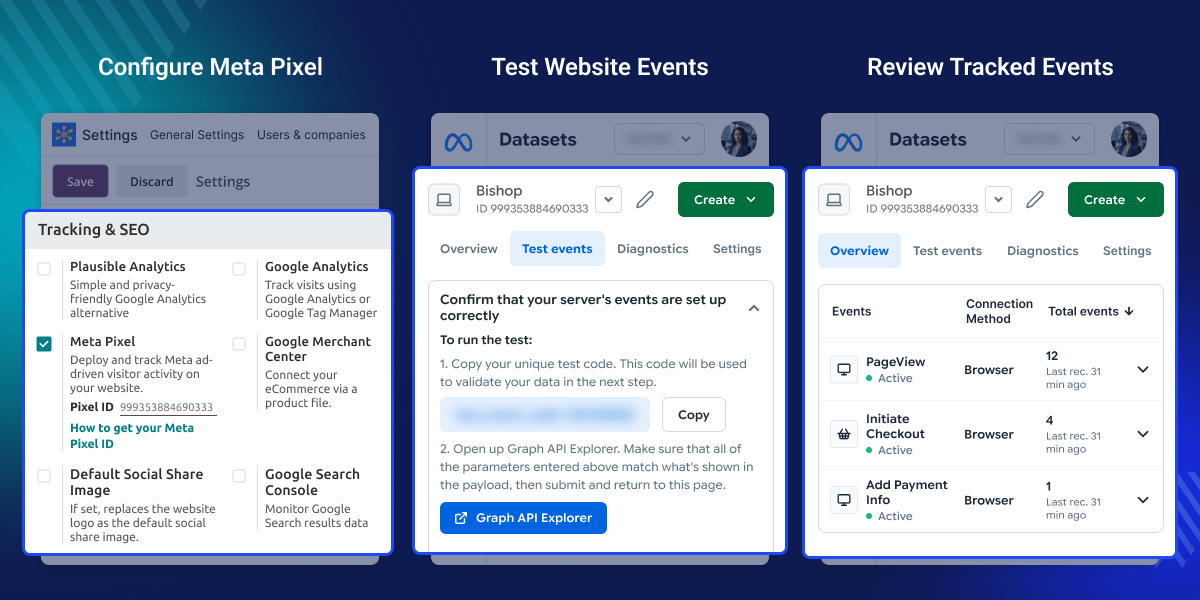
    Odoo Meta Pixel Integration

    Highlighted Features

    Simple Meta Pixel Setup

    Use the Dataset ID to connect Odoo website with the required Meta data source.

    Ecommerce Event Tracking

    Track product views, cart actions, checkout steps, payment activity, and purchases.

    Website Event Testing

    Test store actions from the Test Events page available in Meta Events Manager.

    Meta Event Monitoring

    Review active events, current status, and total counts from the dataset Overview.

    Why Do We Need Odoo Meta Pixel Integration?

    Odoo Meta Pixel Integration gives businesses a simple way to send key store actions from Odoo to Meta Pixel.

    This module connects the website with the selected Meta data source through its Dataset ID. The setup is managed from Odoo Website settings.

    After setup, key e-commerce actions are sent to Meta Events Manager. Admins can test the website and confirm that Meta receives the expected events.

    The dataset Overview also shows event status and total counts. This helps teams review store activity without checking each action separately. For businesses that use Facebook Live, this module can work with Odoo Website Facebook Live Stream.

    Use Cases

    Track Store Activity

    Odoo Meta Pixel Integration helps teams track product views, cart actions, checkout steps, payment activity, and completed purchases.

    Test Website Events

    Admins can enter Odoo website URL, run a test, and confirm whether Meta receives the expected store actions.

    Review Event Data

    Teams can review active events, their current status, and total counts from the connected Meta dataset Overview.

    Check Purchase Activity

    Businesses can review cart, checkout, payment, and purchase events sent from Odoo website to Meta Events Manager.

    Configure Meta Pixel

    Odoo Meta Pixel Integration lets admins configure the Meta connection from Odoo Website settings. Admins enter the required Dataset ID in the Pixel ID field, enable Meta Pixel for the selected website, and save the setup.
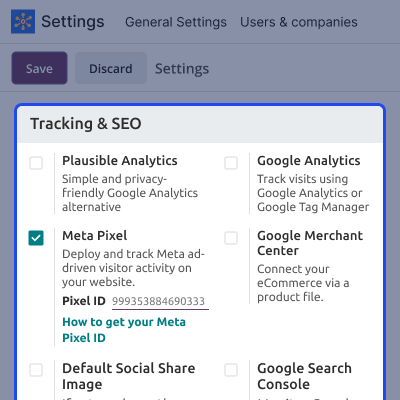
    • Open the Meta Pixel section in Odoo Website settings.
    • Enter the required Dataset ID in the Pixel ID field.
    • Enable Meta Pixel for the selected Odoo website.
    • Save the settings to complete the Meta connection.
    Configure Meta Pixel

    Test Website Events

    Odoo Meta Pixel Integration lets admins test website activity from the Test Events page in Meta Events Manager. Admins enter the connected website URL, perform store actions, and check which events are received by Meta during the test.
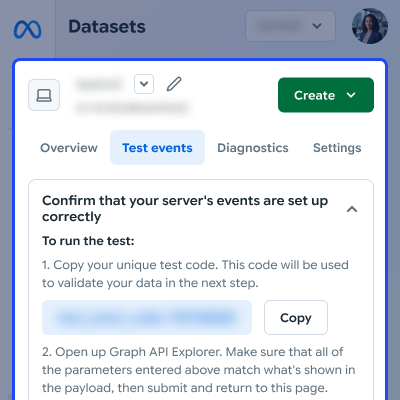
    • Open the connected dataset in Meta Events Manager.
    • Go to Test Events for the selected Meta dataset.
    • Enter the URL of the connected Odoo website.
    • Perform store actions and check the received events.
    Test Website Events

    Review Meta Events

    Odoo Meta Pixel Integration sends supported website events to Meta Events Manager for review. The dataset Overview shows the events received from Odoo. Admins can check each event's status and see its total count.
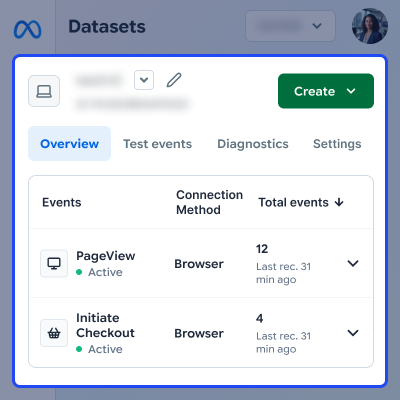
    • Open the dataset Overview in Meta Events Manager.
    • Review events received from Odoo website.
    • Check view, cart, checkout, and purchase events.
    • Review each event status and its total count.
    Review Meta Events

    Support

    For any query or issue, please create a support ticket here CREATE A TICKET HERE

    You may also check our other top-quality Odoo Modules.

    Specifications

    Product Version1.2.0
    Released7 years ago
    Last UpdatedSeptember 8, 2026 (13 days ago)
    Supported Versions12.x  13.x  14.x  15.x  16.x  17.x  18.x  19.x  

    Ratings

    We'd love to hear your thoughts! Share your feedback and help us craft an even better experience tailored just for you.

    5.0
    1 Reviews
    based on verified customer feedback
    Write a review
    Xavier Micharet

    Good product

    Posted On - July 3, 2023

    (Translated by Google) An excellent service. They have helped us configure the module we purchased and have made sure that everything worked correctly by making all the necessary revisions.

    (Original)
    Un servicio de excelente. Nos han ayudado a configurar el módulo que adquirimos y se han asegurado que todo funcionara correctamente haciendo todas las revisiones necesarias.

    FAQs

     What does Odoo Meta Pixel Integration do?
    Odoo Meta Pixel Integration sends key store events to Meta Pixel, where admins can test and review website activity clearly in Meta Events Manager.
     Which ID is required for Meta Pixel setup?
    Admins need the Dataset ID from Meta. This module uses this value in the Pixel ID field available in Odoo Website settings for correct setup.
     Which Odoo events can this module track?
    This module tracks PageView, View Content, Add to Cart, Initiate Checkout, Add Payment Info, and Purchase events from the connected Odoo website.
     How can admins test website events?
    Admins can open Test Events, enter Odoo website URL, perform store actions, and check the events that Meta receives during the testing process.
     Where can tracked events be reviewed?
    Tracked events appear in the dataset Overview, where admins can review active events, their current status, and the total count for each event.
     How does Odoo Meta Pixel Integration help with tracking?
    Odoo Meta Pixel Integration sends key store actions to Meta Events Manager, helping teams review e-commerce and conversion activity from Odoo.

    Specification

    Detailed technical features and requirements to help you understand the module’s capabilities and ensure smooth integration with your system.

    Cloud Hosting

    Detailed technical features and requirements to help you understand the module’s capabilities and ensure smooth integration with your system.

    Default Configuration Details of Server

    1 GB
    RAM
    1 Core
    Processor
    30 GB
    Hard Disk
    1 GB RAM & 1 Core Processor
    Database

    Want to know more how exactly we are going to power up your eCommerce Website with Cloud to fasten up your store

    * Server Configuration may vary as per application requirements.

    Change Logs

    Not Available


