USD
  • EUR
  • INR
  • USD
Cart
Cart 0
  • You have no items in your shopping cart.
    Odoo Apps Extensions
    Cart
    Cart 0
    • You have no items in your shopping cart.
    Hire a Developer
    ×
    Contact Us!
    Send Again
    Close
    Please Login to Write Your Review
    Odoo Marketplace Vouchers

    Odoo Marketplace Vouchers

    x
    Free

    * Required Fields

    $35.00
    Add To Cart

    Odoo Marketplace Vouchers lets marketplace admins and sellers create, manage, and offer vouchers with usage, validity, and product-based controls.


    • Create vouchers from Odoo Marketplace vouchers with ease and control.

    • Set fixed voucher values and control the total voucher usage limit.

    • Define voucher validity with specific start and expiry dates.

    • Apply vouchers to selected marketplace products and promotional offers.

    • Allow vouchers for all eligible products across the marketplace.

    • Set customer eligibility rules for controlled voucher usage and access.

    • Show available vouchers to customers directly during checkout.

    • Let customers apply available vouchers directly from the checkout.

    • Review voucher activity through the available voucher usage history.


    Odoo Marketplace Vouchers
    Odoo Marketplace Vouchers
    $35.00
    X
    • Description
    • Reviews
    • FAQ
    • Customers ()
    • Specifications
    • Cloud Hosting
    • Changelog

    Odoo Marketplace Vouchers helps admins and sellers create and manage discount vouchers. It gives them more control over voucher values, usage, products, customers, and validity.

    Admins and sellers can set a fixed value, a usage limit, a validity period, and customer rules for each voucher. This makes it easier to plan offers for different sales needs.

    Vouchers can apply to chosen products, or to all eligible products. This lets sellers run focused promotions without applying every offer across their whole range.

    Sellers can also cap how many times a voucher can be used. This limits repeat redemptions and keeps limited-run campaigns on track.

    Customers see available vouchers at checkout. They can copy a code or apply an offer right there while completing their purchase.

    Sellers can set start and expiry dates for each voucher. This means offers run on schedule, with no need to check manually whether one is still active.

    Voucher settings also cover customer eligibility and cart amount checks. These help sellers match offers to the right customers and order conditions.

    You can enhance your Odoo marketplace with Odoo Marketplace Rental Sale and allow sellers to create and publish rental products with flexible rental terms and pricing options.
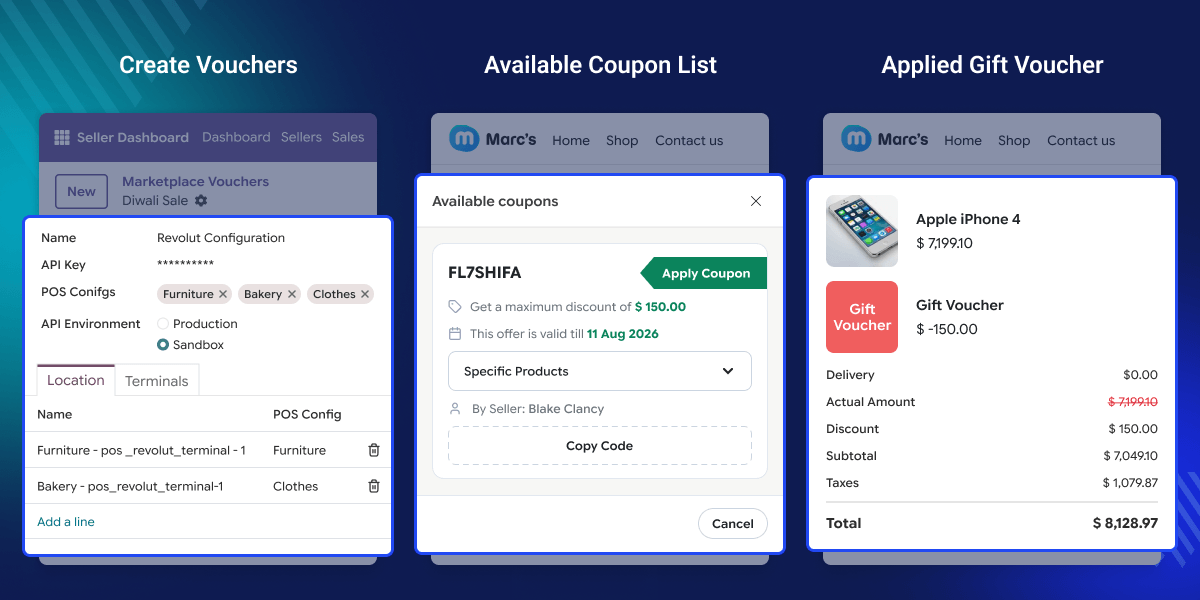
    Odoo Marketplace Vouchers

     Prerequisites For Odoo Marketplace Vouchers Module

    Odoo Marketplace Vouchers works in conjunction with the following modules:

    You would need to install these modules for Odoo Marketplace Vouchers to work properly.

    Highlighted Features of Odoo Marketplace Vouchers

    Flexible Voucher Creation

    Odoo Marketplace Vouchers lets admins and sellers create vouchers with set values, dates, customer rules, and other offer settings.

    Set Number of Usage

    Cap the total number of times a voucher can be used to control repeat redemptions.

    Defined Voucher Validity

    Set start and expiry dates so vouchers stay active only for the planned period.

    Product-Specific Vouchers

    Apply vouchers to chosen products when an offer should cover only certain items.

    Set Voucher Eligibility For Customers

    Choose which customers can use a voucher based on your own conditions.

    Easy Voucher Redeem

    Customers can view available vouchers, copy codes, and apply them at checkout.

    Why Do We Need Odoo Marketplace Vouchers?

    Customers always look for good deals that help them save money on purchases. Odoo Marketplace Vouchers helps sellers create and manage vouchers, allowing customers to get discounts on their purchases.

    This module lets admins and sellers set voucher value, dates, use caps, and which items count. It keeps voucher campaigns simple and quick to run.

    Shoppers can see and use vouchers right at checkout. This makes a good deal quick to grab and cuts down on slow, hand-typed codes.

    You can also manage marketplace returns and exchanges with Odoo Marketplace RMA, helping admins and sellers handle customer return and exchange requests more efficiently.

    Use Cases

    Seasonal Sales

    With Odoo Marketplace Vouchers, sellers can create vouchers for a limited period and use them for festive or seasonal campaigns.

    Product Promotions

    A seller can apply a voucher only to selected products when promoting specific items.

    Customer Offers

    Marketplace businesses can use Odoo Marketplace Vouchers to create gift vouchers for eligible customers and control how those offers are used.

    Limited Use

    Sellers can set a usage limit when they want an offer to be available only for a fixed number of redemptions.

    Flexible Voucher Creation

    Admins and sellers can create vouchers with a set value, usage limit, customer eligibility, and validity period. These settings help control when and how each voucher can be used.
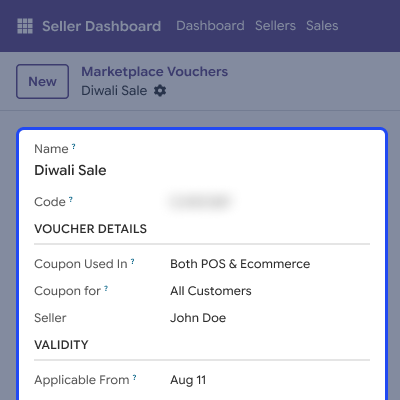
    • Create vouchers with custom names, codes, and fixed values.
    • Set voucher quantity, start date, and expiry date.
    • Select eligible customers for voucher usage.
    • Enable cart amount validation when required.
    Flexible Voucher Creation

    Flexible Product Selection for Vouchers

    Admins and sellers can apply vouchers to selected products or all eligible products from the Products tab. This makes it easy to create offers for specific items or the entire store.
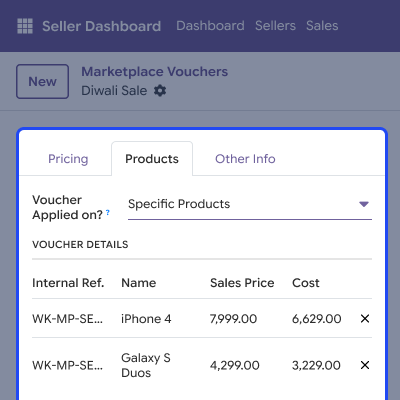
    • Apply vouchers to selected marketplace products.
    • Apply vouchers to all eligible products.
    • Add multiple products to one voucher.
    • View or remove selected products easily.
    Flexible Product Selection for Vouchers

    Apply Available Vouchers at Checkout

    Customers can view available vouchers at checkout with details like the code, discount value, validity, products, and seller. They can apply a voucher directly or copy its code and enter it manually.
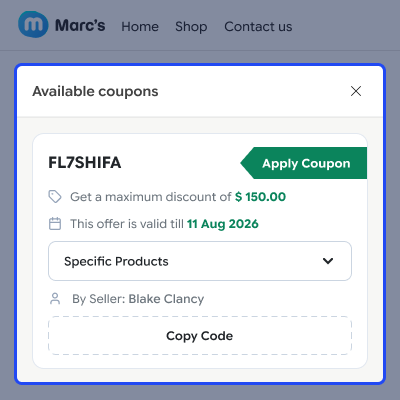
    • View available vouchers directly at checkout.
    • See voucher codes, discount values, and expiry dates.
    • Check applicable products and seller details.
    • Apply vouchers directly or copy their codes.
    Apply Available Vouchers at Checkout

    Support

    For any query or issue, please create a support ticket here CREATE A TICKET HERE

    You may also check our other top-quality Odoo Modules

    Specifications

    Product Version1.0.0
    Released8 years ago
    CategoryOdoo AppsMarketplace
    Last UpdatedSeptember 7, 2026 (3 days ago)
    Supported VersionsOdoo  10.x  11.x  12.x  13.x  14.x  15.x  16.x  17.x  18.x  19.x  

    Ratings

    We'd love to hear your thoughts! Share your feedback and help us craft an even better experience tailored just for you.

    5.0
    1 Reviews
    based on verified customer feedback
    Write a review
    Paulius Kr

    Products Are Outstanding!

    Posted On - December 21, 2020

    Very satisfied with the Odoo apps, service Top notch!!!

    FAQs

     How can marketplace admins and sellers create vouchers?
    Odoo Marketplace Vouchers lets admins and sellers create vouchers with a fixed value, usage limit, customer eligibility, and validity period.
     Can vouchers be applied to specific products or all products?
    Yes, admins and sellers can choose whether a voucher applies only to selected products or to every eligible product across the whole marketplace store.
     Can I set a fixed voucher value and usage limit?
    Yes, you can set a fixed voucher value and also define the total number of times that voucher may be used during a single promotional campaign.
     Can I set an applicable date and expiry date for vouchers?
    Yes, you can define a start date and an expiry date so customers can only use the voucher during its own configured validity period and window.
     Can I select multiple products for a specific voucher?
    Yes, sellers and admins can select multiple products for one voucher, and remove individual products later when they need to update that offer.
     Can customers view available vouchers during checkout?
    Yes, customers can view all available vouchers, along with the discount value, expiry date, seller name, and applicable product details, before applying them.
     Can customers apply vouchers directly from the checkout page?
    Yes, customers can apply an available voucher directly at checkout, or copy its code and enter it by hand into the coupon field on that same page.
     Can I control which customers can use a voucher?
    Yes, voucher settings let admins and sellers define clear customer eligibility rules and control exactly who can use a particular voucher offer.
     Does the module support cart amount validation for vouchers?
    Yes, admins and sellers can enable cart amount validation to apply voucher conditions based on the customer's total order amount at checkout.
     Can admins and sellers manage vouchers after creating them?
    Yes, admins and sellers can manage voucher records after creation, and review their configured details and available promotional offers anytime.

    Specification

    Detailed technical features and requirements to help you understand the module’s capabilities and ensure smooth integration with your system.

    Cloud Hosting

    Detailed technical features and requirements to help you understand the module’s capabilities and ensure smooth integration with your system.

    Default Configuration Details of Server

    1 GB
    RAM
    1 Core
    Processor
    30 GB
    Hard Disk
    1 GB RAM & 1 Core Processor
    Database

    Want to know more how exactly we are going to power up your eCommerce Website with Cloud to fasten up your store

    * Server Configuration may vary as per application requirements.

    Change Logs

    Not Available


