USD
  • EUR
  • INR
  • USD
Cart
Cart 0
  • You have no items in your shopping cart.
    Odoo Apps Extensions
    Cart
    Cart 0
    • You have no items in your shopping cart.
    Hire a Developer
    ×
    Contact Us!
    Send Again
    Close
    Please Login to Write Your Review
    Odoo Multi Vendor Marketplace

    Odoo Multi Vendor Marketplace

    x
    Free

    * Required Fields

    $299.00
    Add To Cart

    Odoo Multi Vendor Marketplace helps businesses build a powerful online marketplace. Sellers can register, manage products, and start selling from one platform.


    • Take full control of vendor joining requests from one place.

    • Set and manage vendor commissions your way from the backend.

    • Every vendor gets their own shop and profile page to shine.

    • Customers can post reviews for seller products and recommend their favorites.

    • Sellers join as portal or internal users. Admins decide who gets in.

    • Get instant alerts for vendor registration and product approvals.

    • Track sales and performance through a smart analytics dashboard.

    • Build custom reports using multiple filters in just a few clicks.

    • Portal sellers manage product variants straight from their dashboard.

    • Portal sellers edit existing products straight from their dashboard.

    • Upload bulk products and inventory via CSV files in no time.

    • Reach customers worldwide with built-in multi-language support.

    Odoo Multi Vendor Marketplace
    Odoo Multi Vendor Marketplace
    $299.00
    Odoo Silver Partner
    Odoo Functional Certified Experts
    Check How It Works
    $299.00
    Configure and Buy
    X
    • Description
    • Reviews
    • FAQ
    • Customers ()
    • Specifications
    • Cloud Hosting
    • Changelog

    Odoo Multi Vendor Marketplace helps businesses build a seller marketplace. Sellers can join, add products, and start selling from one place. It works for both portal sellers and internal sellers. Sellers manage products, inventory, orders, and payments from one simple dashboard.

    Portal sellers can manage product variants and edit existing products with ease. Admins handle approvals, commissions, analytics, and marketplace rules. Only approved sellers and products go live on the marketplace. Admins can add terms and conditions to seller registration forms.

    The analytics dashboard shows a clear view of sales, revenue, and product performance. Custom reports can be filtered by date, product category, and revenue trends. Email alerts keep admins and sellers informed about registrations, approvals, and new orders. This Multivendor marketplace in Odoo helps businesses grow while staying in full control.

    Additionally, to manage vendor memberships and subscription plans, you can explore Odoo Marketplace Membership module.
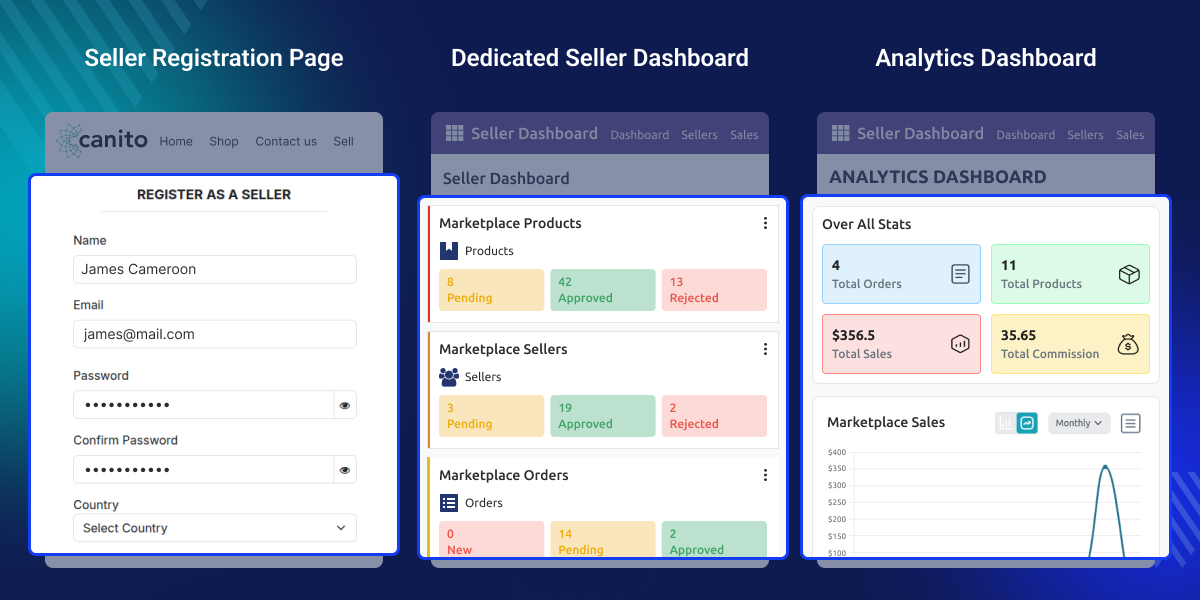
    Odoo Multi Vendor Marketplace

    Highlighted Features

    Manage Multiple Vendors

    Admin has full control over multiple sellers and their products on the Odoo website with ease.

    Manage Approvals

    Set manual or automatic approval for seller products and product quantities with ease.

    Selected Vendor

    Allow only approved sellers and products to go live on the marketplace.

    Manage Commissions Easily

    Set different commission rates for each seller directly from the backend your way.

    Manage Terms and Conditions

    Add your own terms and conditions to seller registration forms for better control.

    Analytics Dashboard

    Track sales, monitor performance, and analyze trends from one smart dashboard.

    Internal Categories

    Create custom categories for all marketplace products straight from the backend.

    E-Mail Alerts

    Get instant email notifications for new orders, approvals, and key marketplace activities.

    Contact with Seller

    Let customers reach out to sellers directly through the Email to Seller button.

    Unique Seller Profile

    Give every seller a unique profile page with their shop name, description, and tagline.

    Manage Visibility of Information

    Control what seller information appears on the website. Sellers choose what policies to show.

    Desired Payment Method

    Let sellers choose their preferred payment method for fast and hassle-free transfers.

    Seller Dashboard

    Get a complete view of shop details, product approval requests, and seller payments in one place.

    Seller Benefits

    Sellers can add products, set prices, assign categories, and publish or unpublish any product freely.

    Seller Payment Requests

    Both portal and internal sellers can create and submit payment requests directly from their respective dashboards with ease.

    Increase Seller Shop Reach

    Create a unique shop URL so customers can find any store quickly via the search bar.

    View the Sales Report

    View total sales and manage all orders through clear and detailed sales reports.

    Multi-Language Support

    Odoo Multi Vendor Marketplace supports multiple languages. Change the marketplace language anytime.

    Portal Seller Dashboard

    Manage products, orders, inventory, and payments from a simple website dashboard. No backend access needed.

    Product Variant Management

    Manage product variants directly from the portal dashboard. No backend access is needed.

    Bulk Product Upload

    Upload many products at once using a ZIP file straight from the portal dashboard.

    Edit Existing Products

    Portal sellers can update existing products and re-upload the ZIP file directly from the portal dashboard.

    Why do we need Odoo Multi Vendor Marketplace?

    Imagine a business owner who wants to build an online marketplace where many sellers can sell products from multiple vendors on one website.

    Each seller needs their own space to manage products and track orders easily. At the same time, admins must control approvals, commissions, and seller activities without spending too much time on manual tasks.

    By default, Odoo does not support multiple sellers on one platform. Businesses that want to run an online marketplace have no built-in way to manage vendors, their products, and commissions together.

    Odoo Multi Vendor Marketplace solves this by automating seller and admin workflows. It keeps the marketplace organized, scalable, and easy to manage from one platform.

    To offer customers a more localized shopping experience, consider adding Odoo Marketplace Hyperlocal System module.

    Use Cases

    Online Retail Marketplace

    Let multiple sellers list and sell products on one website. It works just like a mini eCommerce marketplace.

    Wholesale and B2B Marketplace

    Wholesale businesses can bring in multiple vendors. They can manage bulk product listings and inventory from one place.

    Niche Product Marketplace

    Build a focused marketplace for a specific niche. Verified sellers can offer products to a targeted group of buyers.

    Service-Based Marketplace

    Service providers can join as sellers and list their offerings. They can manage orders and payments from the portal dashboard.

    Easy Seller Registration

    Odoo Multi Vendor Marketplace makes it easy for vendors to register and manage their stores as internal or portal users based on admin configuration.
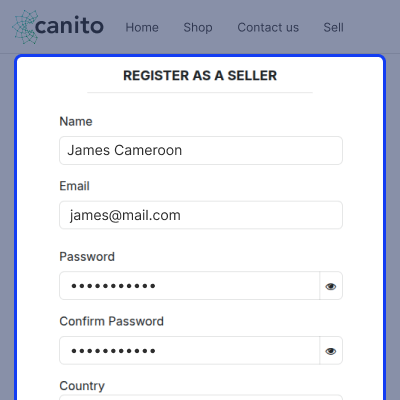
    • Quick and easy vendor registration and login from the website.
    • Vendors can set up their own stores to sell products online.
    • Admin approval is needed before a seller goes live.
    • Sellers can create and process payments for their orders.
    • Only admin-verified products are allowed for trading online.
    Easy Seller Registration

    Portal Seller Dashboard

    Portal sellers run their entire business from a simple website dashboard without needing any backend access.
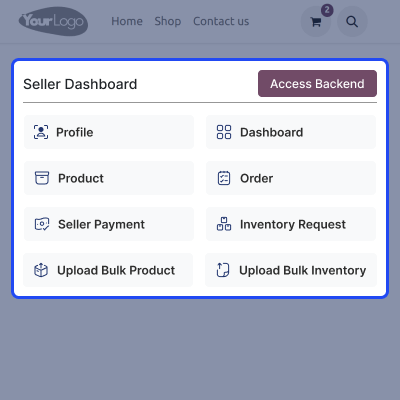
    • Access the dashboard directly from the website portal.
    • Manage products, orders, and inventory from one place.
    • Portal sellers manage product variants using the Variant Expression Builder.
    • Portal sellers edit existing products by updating and re-uploading the existing ZIP file.
    • Create inventory and payment requests easily from the dashboard.
    Portal Seller Dashboard

    Product Variant Management

    Portal sellers can create and manage product variants right from the portal dashboard using the Variant Expression Builder without any backend access.
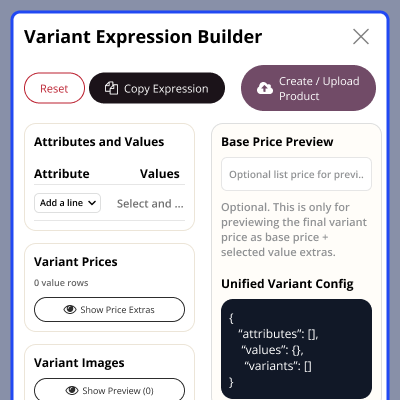
    • Open the Variant Expression Builder from the products section.
    • Pick attributes and values to generate all variant combinations.
    • Set price extras and images for specific variant combinations.
    • Copy the variant expression and paste it into the product CSV.
    • Create and upload products directly using the upload button.
    Product Variant Management

    Update Existing Products

    Portal sellers can update and modify existing products directly from the portal dashboard by re-uploading the updated ZIP file.
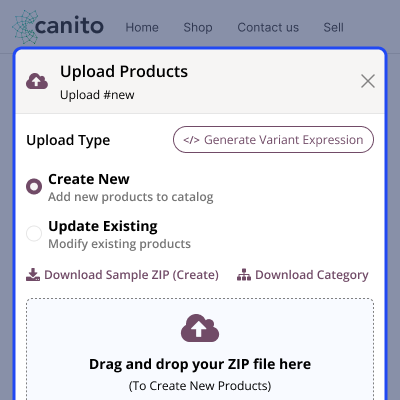
    • Edit product name, description, price, and images from portal.
    • Update existing products without backend access.
    • Upload updated product CSV using the Update Existing option.
    • Admin reviews and approves all product changes.
    • Product details stay accurate and up to date at all times.
    Update Existing Products

    Seller Profile Section

    Sellers can view and manage their complete profile information from their dashboard at any time to keep their details accurate and up to date.
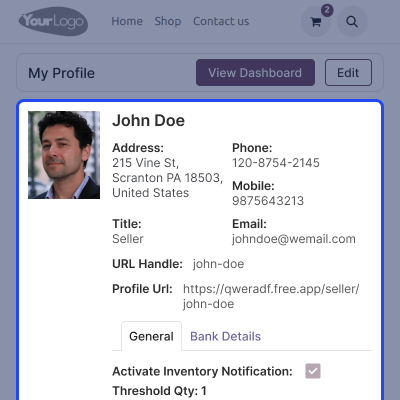
    • All seller profile details are visible from their respective dashboards.
    • Contact information and address details are displayed clearly.
    • Bank details are stored and managed securely under the profile section.
    • Marketplace commission details are shown for full transparency.
    • Seller status, ratings, and sales summary all in one view.
    Seller Profile Section

    Analytics Dashboard

    Admins and sellers get real-time insights to track sales, monitor performance, and make better business decisions from one dashboard.
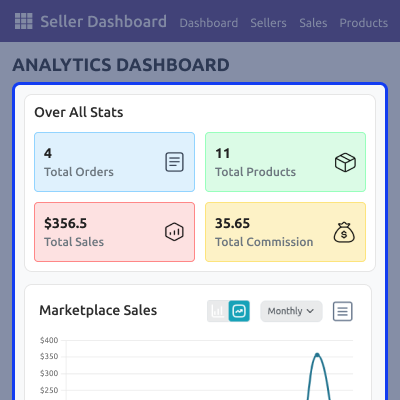
    • View total sales, revenue, and top-performing sellers.
    • Sellers can track their own sales trends anytime.
    • Identify top-selling products easily from the dashboard.
    • Filter analytics data by date and time period quickly.
    • Track commissions and seller performance from one dashboard.
    Analytics Dashboard

    The E-Mail Alerts

    Admins and sellers receive automatic email alerts for all key marketplace activities and seller updates to stay informed at all times.
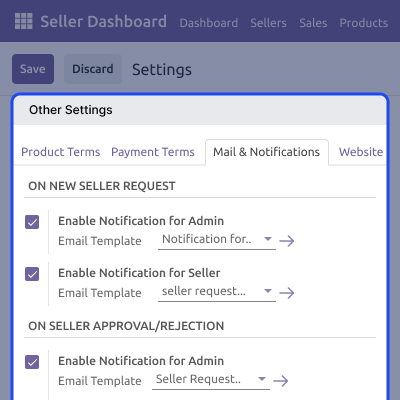
    • Both admins and sellers get emails for marketplace activity.
    • Admins receive emails for vendor registration approvals.
    • Vendors get product approval and rejection alerts.
    • Sellers get notified for product request approvals or rejections.
    • Both admins and sellers get notified for new orders.
    The E-Mail Alerts

    Reviews and Feedbacks

    Vendors can track and manage product feedback and reviews from their store to improve seller reputation and build customer trust.
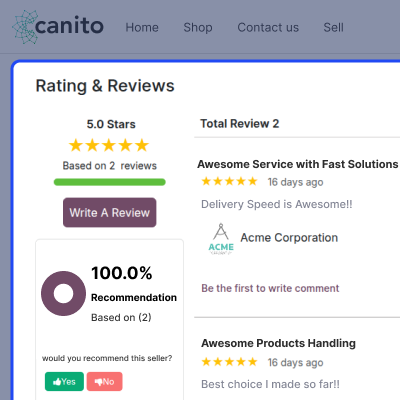
    • Customers can post reviews on products easily.
    • Reviews sorted by Most Recent and Most Helpful.
    • Admins can control review visibility on the page.
    • Average ratings and recommendations visible to customers.
    • Vendors can monitor all product feedback from dashboard.
    Reviews and Feedbacks

    Commission Management

    Admins can set, manage, and track vendor commission on sales directly from the backend settings for accurate revenue distribution.
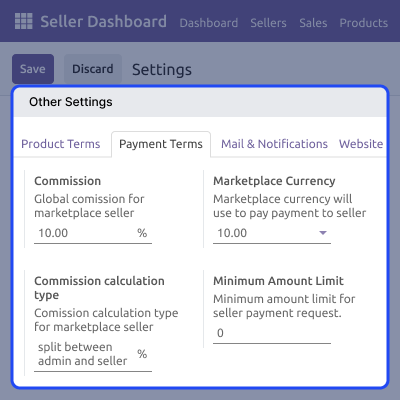
    • Set commission rules for individual or all sellers.
    • Collect commission as a percentage on vendor sales.
    • Rules and prices set from settings collectively.
    • Apply separate rules and policies to individual vendors.
    • Commission generated is visible on the seller profile.
    Commission Management

    Support

    For any query or issue, please create a support ticket here CREATE A TICKET HERE

    You may also check our other top-quality Odoo Modules.

    Specifications

    Product Version1.4.6
    Released9 years ago
    CategoryOdoo AppsMarketplace
    Last UpdatedAugust 11, 2026 (3 days ago)
    Supported VersionsOdoo  8.x  9.x  10.x  11.x  12.x  13.x  14.x  15.x  16.x  17.x  18.x  19.x  

    Ratings

    We'd love to hear your thoughts! Share your feedback and help us craft an even better experience tailored just for you.

    4.9
    19 Reviews
    based on verified customer feedback
    Write a review
    Arsene Guekoue
    Arsene Guekoue
    🇨🇲 Cameroon

    Amazing Product Quality

    Posted On - August 9, 2024

    Their product quality is consistently outstanding, exceeding my expectations every time.. Wroking with Webkul ensures a long-living and efficient collaboration.

    David Claffy

    Good Support and Service

    Posted On - December 22, 2023

    We recently upgraded from Odoo 12 to Odoo 15 as well as upgraded our Magento storefront. Webkul is integral in our daily function to transfer data from Magento to Odoo as well as several key customizations they have made for us in Odoo. Their team is always quick to reply and the work done is excellent. Any additional work I request is completed quickly, sometimes by the time I get in the office the next morning. Terrific team and great value.

    Cristhian

    Excelente Producto y Servicio

    Posted On - October 22, 2023

    Excelente producto, potencia las funcionalidades de Odoo, y lo convierte en un Multivendor con muchas opciones extras.

    Brinda a cada vendedor su propio apartado y muchas extensiones que facilitan la gestión.

    Adcional, el servicio y soporte es excelente, las novedads que se presentaron fueron solucionadas de inmediato.

    Recomiendo 100% el producto.

    Transalation from Google.


    Excellent product, it enhances the functionalities of Odoo, and turns it into a Multivendor with many extra options.

    It provides each seller with their own section and many extensions that facilitate management.

    Additionally, the service and support is excellent, the issues that was presented was resolved immediately.

    I recommend the product 100%.

    Aung Kyaw Oo
    🇸🇬 Singapore

    Sincere Expression of My Satisfaction to Webkul Service

    Posted On - November 19, 2021

    I have working with Webkul for my customers' app linking to Odoo web applications. I sincerely expressed my satisfaction for their supports and quick turn around. Webkul service is excellent, professional and timely.
    I am content and I will continue working with them for other project developments.

    Kristin Sellers
    Kristin Sellers

    This module, let me tell you, is amazing!

    Posted On - August 20, 2021

    This module, let me tell you, is amazing! To me it was overwhelming in the beginning. But with their customer support responding to every inquiry I had. I learned quickly haha! They helped so much! I actually tried other marketplaces and they were incomparable in the options provided to control just about everything I need to to run a proper marketplace. I'm grateful this company exists.

    Load More Reviews

    FAQs

     Which type of user is a seller - internal or portal user?
    Sellers can be internal or portal users based on admin configuration. Portal users use the frontend dashboard. Internal users access the backend.
     Do sellers have their own dashboards for vendor product management?
    Yes, sellers get dedicated dashboards to manage products, orders, inventory, and payments from one place easily.
     Can I track marketplace sales and seller performance?
    Yes, the analytics dashboard shows sales data, revenue trends, commissions, and seller performance clearly and accurately.
     Will I receive notifications for seller and order activities?
    Yes, email notifications are sent for seller requests, approvals, products, and orders automatically based on settings.
     Can portal sellers manage product variants from their dashboard?
    Yes, portal sellers use the Variant Expression Builder to create and manage product variants without any backend access.
     Can portal sellers edit existing products from the portal dashboard?
    Yes, portal sellers can update product name, description, price, and images directly from the portal dashboard anytime.
     How does seller approval work in the marketplace?
    Admins can enable manual approval to review each seller request or turn on automatic approval to save time.
     Can sellers upload products in bulk from the portal?
    Yes, portal sellers can upload bulk products using a ZIP file from the dashboard. Admin reviews and approves all uploads.
     Can buyers rate and review sellers on the marketplace?
    Yes, buyers can rate sellers and write reviews directly on the seller profile page on the marketplace easily.
     How are seller commissions managed in the marketplace?
    Admins set commission rules for individual or all sellers. Commission is calculated as a percentage on each vendor sale.
     Can admins control which sellers and products appear on the website?
    Yes, admins can approve sellers and products manually or automatically before they go live on the marketplace.
     Does Odoo Multi Vendor Marketplace module support multiple languages?
    Yes, this module supports multiple languages so admins can change the marketplace language easily based on preference.

    Specification

    Detailed technical features and requirements to help you understand the module’s capabilities and ensure smooth integration with your system.

    Cloud Hosting

    Detailed technical features and requirements to help you understand the module’s capabilities and ensure smooth integration with your system.

    Default Configuration Details of Server

    1 GB
    RAM
    1 Core
    Processor
    30 GB
    Hard Disk
    1 GB RAM & 1 Core Processor
    Database

    Want to know more how exactly we are going to power up your eCommerce Website with Cloud to fasten up your store

    * Server Configuration may vary as per application requirements.

    Change Logs

    • Legend
    Version 1.0.1 to 2.0.0
    • Modify marketplace dashboard kanban view (Seller, Product, Order, Stock, Seller Payment)
    • Update seller dashboard kanban view.
    • Update product dashboard kanban view.
    • Update Seller payment kanban view.
    • Update UI in seller profile form view.
    • Update UI in seller list page.
    • Update seller profile page.
    • Update seller reviews and recommendation section.
    • Stop clickable of customer name and other user name in chatter from seller's end.
    • Hide icons from seller's end.
    Version 1.0.0 to 1.0.1
    • Make all footers compatible with marketplace menus
    • Restrict recommmend a seller when user have not purchased product from seller.
    • Update UI in seller profile form view
    • Marketplace commission will not be visible for Seller Payment when Admin pay to seller.
    • Seller name will be Render in mail body ON New ORDER mail notification
    • Global configuration for those fields which have implied groups are now updating correctly for new seller signup.
    Version 1.0.1 to 1.0.2
    • Seller payment issue incase of automatic invoice
    Version 1.0.2 to 1.0.3
    • Sale Order and Quotation not visible to seller on my account page
    Version 1.0.3 to 1.0.4
    • Order line kanban view improvement.
    • Seller profile kanban view update.
    • Add note section in order line to provide information about invoice and service type product.
    • Pricing should open a wizard where the seller/admin can decide a fixed discount or percentage discount on the product.
    • Fixed bulk approval and bulk rejection product action.
    • Add "Done" state in the sale order line.
    • Add Done button on Dashboard.
    • Deactivate feature for seller.
    • For service-type products there is no ship now button.
    • Stop clickable of customer name and other user name in chatter from seller's end.
    • Hide icons from the seller's end.
    Version 1.0.5 to 1.0.6
    • Updated the changelog and minor fixes for the odoo apps store


