Send Again
Close
Odoo Marketplace WhatsApp Live Chat module changes how customers and sellers talk through instant WhatsApp chats. It gives real-time messaging between buyers and sellers for all product questions.
This module adds a WhatsApp chat widget that shows available sellers with their own chat windows. Key features include showing the right seller on product pages and letting sellers manage their own settings.
Real-time communication is key for online stores, and this module delivers just that. It cuts response times and boosts sales a lot.

Traditional support methods like email or phone create long waits that frustrate customers. This module lets customers reach sellers right away through WhatsApp every day.
This module gives your store a strong edge through direct seller-customer talks. Sellers handle chats in one app, which cuts the work for your support team.
Odoo Marketplace WhatsApp Live Chat Module works in conjunction with the following modules:
You need to install the modules mentioned above to use Odoo Marketplace WhatsApp Live Chat.
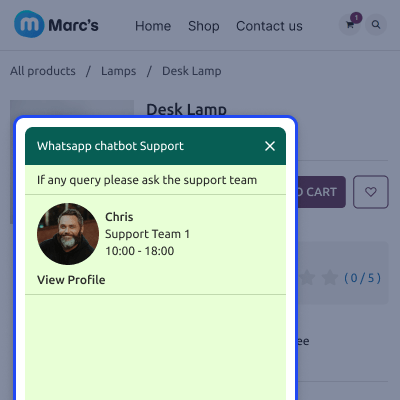
When customers view a product page, the WhatsApp widget shows only the seller who owns that product.
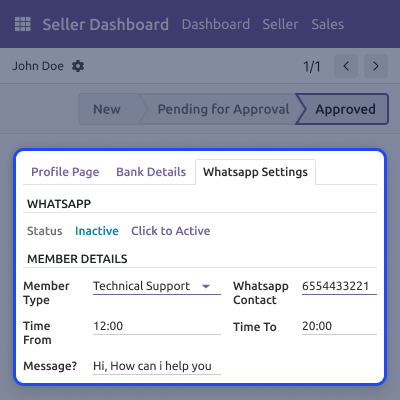
During marketplace sign up, sellers can create and set up their WhatsApp accounts for buyer chats, making onboarding easy.
Sellers can set up and update their WhatsApp account settings from their own dashboard without needing any admin help.
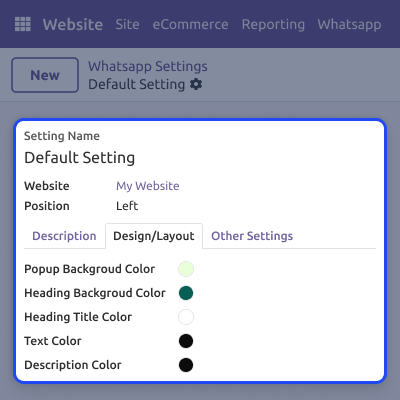
Admins can change the WhatsApp chat widget's look by adjusting background colors, welcome messages, and titles from the backend.
The chat widget shows each seller's availability times, helping customers know when they can get quick responses from sellers.
Customers connect directly with sellers through one click, opening WhatsApp web or app for immediate conversation without delays.
The module easily adds a WhatsApp chat widget to your marketplace website. This widget shows all sellers who are available for live chat support through WhatsApp.
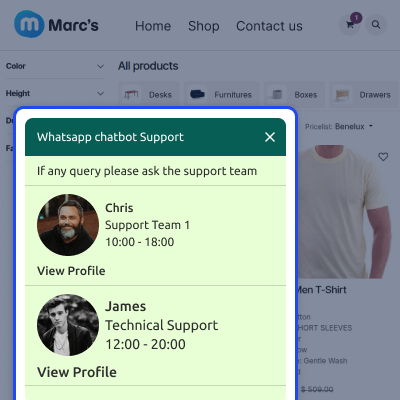
When customers browse specific product pages, the widget shows only the linked seller. This targeted way stops confusion and makes sure customers connect with the right person.
Sellers gain full control over their WhatsApp chat settings through their dashboard. They can add their number, update profile info, and manage settings on their own.
Admins keep complete oversight of the WhatsApp chat system from the backend. They can enable seller support, customize widget design, and monitor active sellers.
For any query or issue, please create a support ticket here CREATE A TICKET HERE
You may also check our other top-quality Odoo Modules.
Detailed technical features and requirements to help you understand the module’s capabilities and ensure smooth integration with your system.
Detailed technical features and requirements to help you understand the module’s capabilities and ensure smooth integration with your system.
We’re partnered with top-tier, trusted providers!
Want to know more how exactly we are going to power up your eCommerce Website with Cloud to fasten up your store
* Server Configuration may vary as per application requirements.



