Send Again
Close
Odoo Multi Website is an Odoo module that runs several eCommerce storefronts from one Odoo database. Admins handle every site, product, and order from a single backend.
Each website carries its own name, domain, and homepage. Admins set these under Website > Configuration > Settings, then pick a theme for that site alone.
Products reach the right storefront through Odoo product categories. A florist site and an electronics site share one database while showing different catalogs.
Pricelists, delivery carriers, and payment methods are chosen per site. Shoppers on each domain see only the options an admin mapped to that storefront.
Orders, invoices, pickings, and customers all record the website they came from. Sales reports and the dashboard change as soon as another site is selected.
Additionally, if you want to publish separate blog content for each storefront, then check Odoo Multi Website Blog Extension.
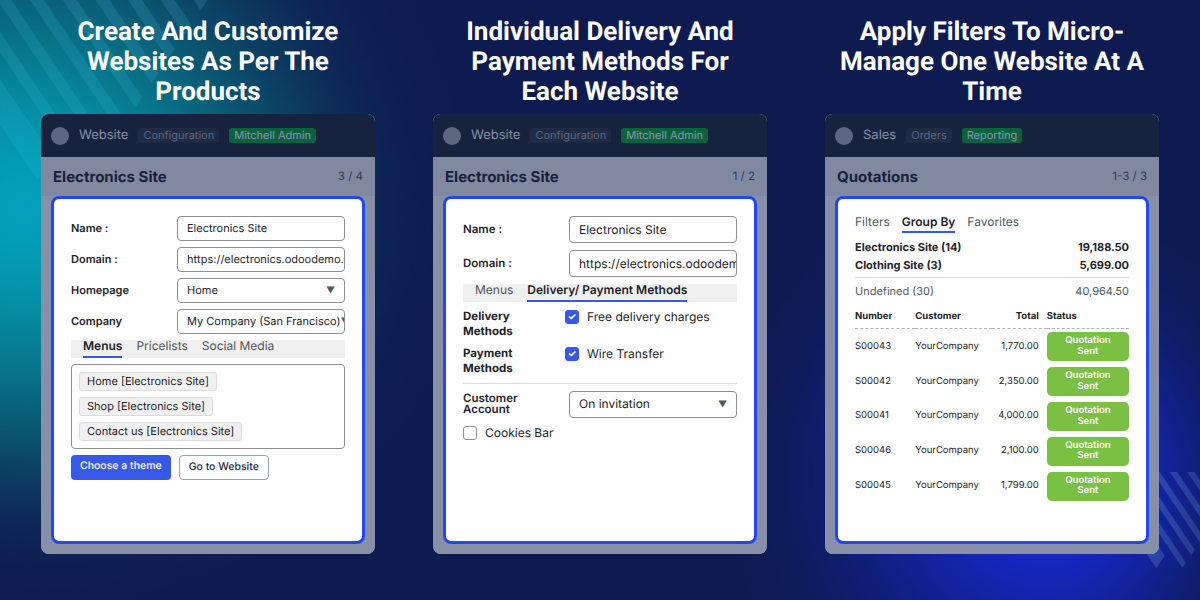
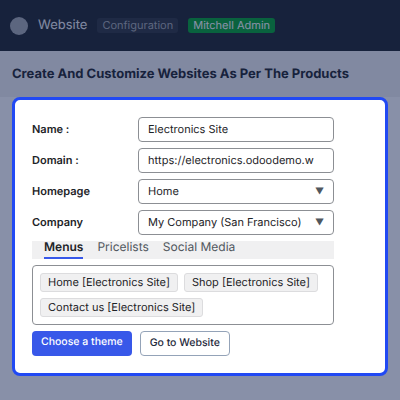
Build several websites on one Odoo database and open each one from the Website menu in the backend.
Give every website its own domain name so each storefront answers on its own web address.
Apply a separate theme, logo, and favicon so each storefront keeps a look of its own.
Use Odoo product categories to decide which products appear on which website.
Attach a different pricelist to each site so prices follow the storefront a buyer lands on.
Filter and group orders, invoices, pickings, and customers by the website that created them.
Odoo ships with one website record set up out of the box. A second storefront usually means a second database, a second install, and two backends to keep in sync.
That split costs a team real time. Product data, orders, and stock get maintained twice, and one consolidated sales report turns into a manual export job.
Odoo Multi Website supports Odoo 20 and lets you manage multiple storefronts from a single database. Admins can switch between websites from the Website menu without leaving the backend.
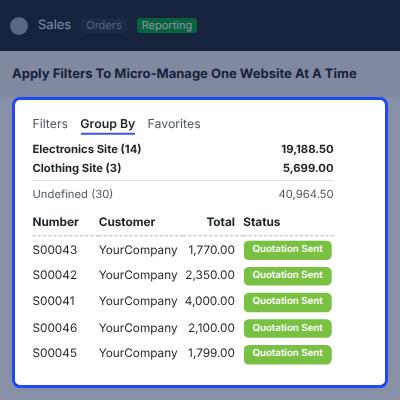
Every order, customer invoice, and stock transfer stores the website it belongs to, so Group By > Website under Sales > Quotations or Inventory > Operations > Transfers splits the data with no custom filter.
Also, if you want to control which products stay visible in search and listing pages, you can check our module Odoo Website Product Visibility.
Run an electronics shop and a florist shop as two websites with separate catalogs on one database.
Serve each country from its own domain, with local pricelists, carriers, and payment providers.
Give every brand its own theme, logo, favicon, and social links while sharing one inventory.
Keep wholesale and retail on separate domains, each with its own pricelist and payment methods.
Set up storefronts for different companies in the same database and report on each one on its own.
Launch a campaign site on its own domain, then retire it without touching the main storefront.
Each website is built around its own product range, such as an electronics shop and a florist e-shop. Website > Configuration > Settings holds the name, domain, favicon, and languages for the selected site.
Odoo Multi Website marks the source website on orders, invoices, and stock operations. Admins filter or group those records to work on one storefront at a time.
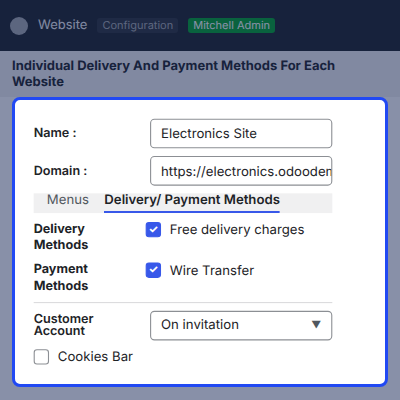
Delivery methods and payment methods are selected per website. Each storefront offers only the carriers and payment providers an admin mapped to it.
Webkul's dedicated support provides you with the customizations and troubleshooting solutions for your Odoo Multi-Website Module.
For any query or issue please CREATE A TICKET HERE
You may also check our other top-quality Odoo Plugins.
Very good modules for Odoo. We have version 11 enterprise and the multi-website module works correctly. The company has good technical support and they have countless useful modules for odoo. Highly recommended!
Very good modules for Odoo. We have version 11 enterprise and the multi-website module works correctly. The company has good technical support and they have countless useful modules for odoo. Highly recommended!

Módulo básico y muy funcional para desarrollar diferentes website.
En nuestro caso lo hemos mejorado con el gran soporte que ofrece WEBKUL creando así un completo módulo multiwebsite para todas las funcionalidades de ODOO.
Funciona para varios website, trabajando en instancias con multiempresa, y varias bases de datos.
Un módulo y un equipo desarrollador muy recomendables. Resolutivos y de muy rápida respuesta.
we use the extension to offer single websites with different contents for different country sections of an association.
The support is very good and striving. It was also very uncomplicated to order special changes.
Detailed technical features and requirements to help you understand the module’s capabilities and ensure smooth integration with your system.
Detailed technical features and requirements to help you understand the module’s capabilities and ensure smooth integration with your system.
We’re partnered with top-tier, trusted providers!
Want to know more how exactly we are going to power up your eCommerce Website with Cloud to fasten up your store
* Server Configuration may vary as per application requirements.



