Send Again
Close
Odoo Shopware Connector is an Odoo app that connects Shopware stores with Odoo. It imports orders, products, categories, customers, and delivery methods into one Odoo database.
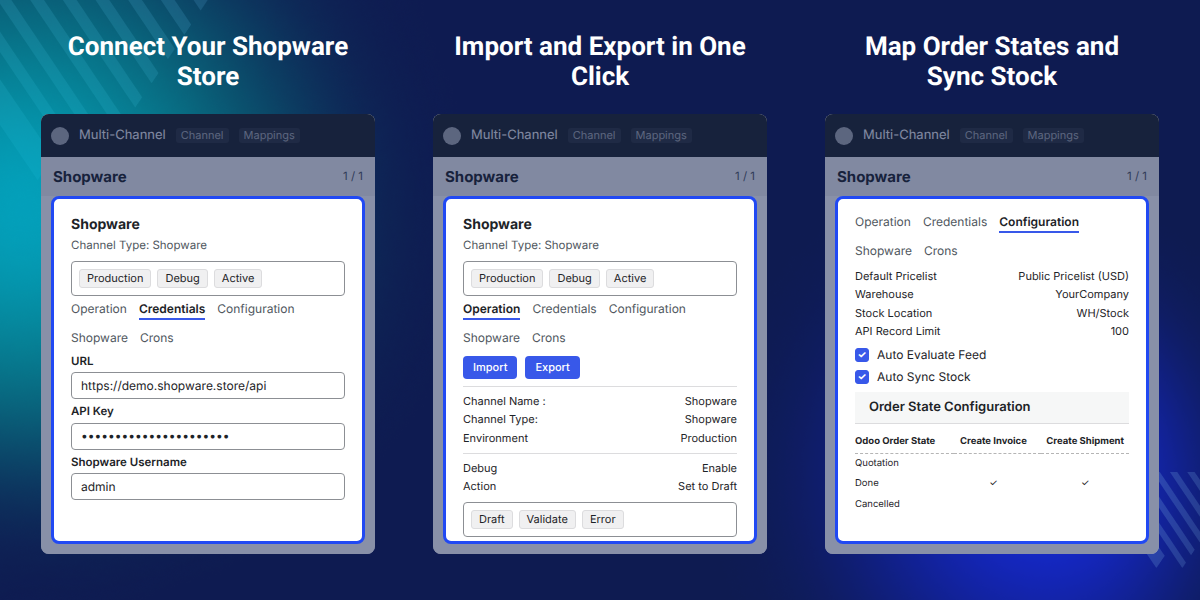
Admins add the Shopware URL and login details in a channel, run Test Connection, and start an import. Imported records arrive as feeds, and Odoo builds the sale orders, products, and partners from them.
Each imported record gets a mapping entry, so this app never creates the same Shopware product or order twice. Sync history keeps a log of what each run did.
Channel settings hold the default tax, currency, pricelist, sales team, warehouse, and product category. Auto Evaluate Feed and Auto Sync Stock decide how much of the flow runs without a click.
This app runs on Odoo 13.0 through 19.0 and works with Shopware 5 and Shopware 6. It needs the Odoo Multi-Channel Sale framework module installed first.
Additionally, if you also sell through a Shopify store and want the same order and stock flow there, then check Odoo Shopify Connector.
Below is the list of things you would need before installing Odoo Shopware Connector:
Note: You can connect up to 3 Shopware stores with a single Odoo Instance For Free. If you want to connect more than three Shopware stores with your Odoo instance then you reach us at [email protected].
Connect up to three Shopware stores with one Odoo instance, and read the orders and catalogs of all of them in one place.
New Shopware orders reach Odoo in real time through webhooks, so the sales team does not wait for the next import run.
Products arrive in Odoo with their categories, attributes, and attribute values attached, so nothing needs retyping.
Send products and categories from Odoo to Shopware in bulk, or export a single record straight from its product form.
Pair each Shopware order state with an Odoo state in the Order Status table, and mark one Odoo state as the default.
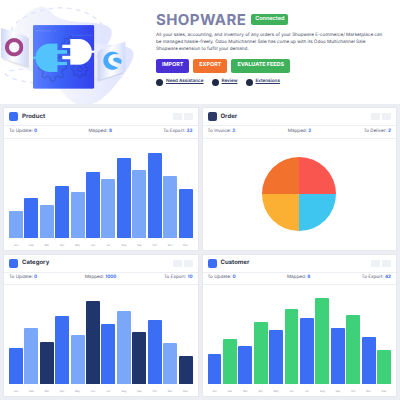
Donut charts, line graphs, and clickable data cards report what has moved between Shopware and Odoo since the last run.
Shopware runs the storefront, and Odoo runs stock, invoicing, and accounting. Out of the box the two systems do not talk, so every order has to be retyped in Odoo.
That copying costs hours a week and gets worse with each extra store. Stock counts drift apart, invoices are raised late, and a customer address typed twice is an address typed wrong once.
Odoo Shopware Connector moves the records instead. Orders, products, categories, customers, and delivery methods land in Odoo, and stock and order status travel back to Shopware.
Setup is exact rather than open-ended. The Shopware API user needs Create rights on Catalogues and Media, Edit on Orders and order_transaction, and Create on webhook and webhook_event_log, and only one Odoo order state can be marked default at a time.
Also, if you want the framework that this app is built on, you can check our module Odoo Multi Channel Sale.
Brands that run multiple Shopware stores, one per country or one per brand, read every order in a single Odoo database.
Finance teams raise invoices in Odoo, because each order arrives with its taxes, currency, and payment method attached.
Warehouse teams count stock in Odoo, and Auto Sync Stock passes the new figure to Shopware without a second entry.
Teams that write product data in Odoo export products from Odoo to Shopware in bulk, and keep the storefront current.
Import catalog data from Shopware to Odoo and manage products, categories, attributes, and attribute values through a simplified import process.

Export catalog data from Odoo to Shopware and transfer products along with their assigned categories through a simple export process.

Import orders from Shopware to Odoo along with the customer, address, tax, shipping, payment, currency, and order status information associated with them.

Monitor and analyze Shopware data from a single dashboard with visual graphs, data cards, clickable tabs, and direct import and export options.
Webkul's dedicated support provides you with the customizations and troubleshooting solutions for your Odoo Shopware Connector and its extensions.
For any query or issue please CREATE A TICKET HERE
You may also check our other top-quality Odoo Extensions.
thank you for your continuously great support and responsiveness. working with Webkul on several customizations during the last 6 months. we always figured out proper solutions. we are working on sophisticated Shopware 6 to Odoo connectors. Thanks to the team!
Detailed technical features and requirements to help you understand the module’s capabilities and ensure smooth integration with your system.
Detailed technical features and requirements to help you understand the module’s capabilities and ensure smooth integration with your system.
We’re partnered with top-tier, trusted providers!
Want to know more how exactly we are going to power up your eCommerce Website with Cloud to fasten up your store
* Server Configuration may vary as per application requirements.



