USD
  • EUR
  • INR
  • USD
Cart
Cart 0
  • You have no items in your shopping cart.
    Cart
    Cart 0
    • You have no items in your shopping cart.
    Hire a Developer
    ×
    Contact Us!
    Send Again
    Close
    Please Login to Write Your Review

    Odoo Twilio SMS Gateway

    Odoo Twilio SMS Gateway enables bulk and automated SMS to multiple recipients using predefined templates, with delivery tracking and secure Twilio integration.


    • Quick and secure Twilio SMS setup inside Odoo.

    • Send bulk SMS to multiple contacts in one click.

    • Pre-built and custom SMS templates for faster messaging.

    • Automated SMS alerts triggered by order, invoice, or shipment events.

    • Real-time SMS delivery tracking and status updates.

    • User-level permissions to control who can send SMS.

    • Schedule SMS messages to send at a specific time.

    • Auto-delete option to manage your SMS message history.

    Screenshots
    $50.00

    * Required Fields

    Add To Cart
    $50.00
    Configure and Buy
    • Description
    • Reviews
    • FAQ
    • Customers ()
    • Specifications
    • Cloud Hosting
    • Changelog

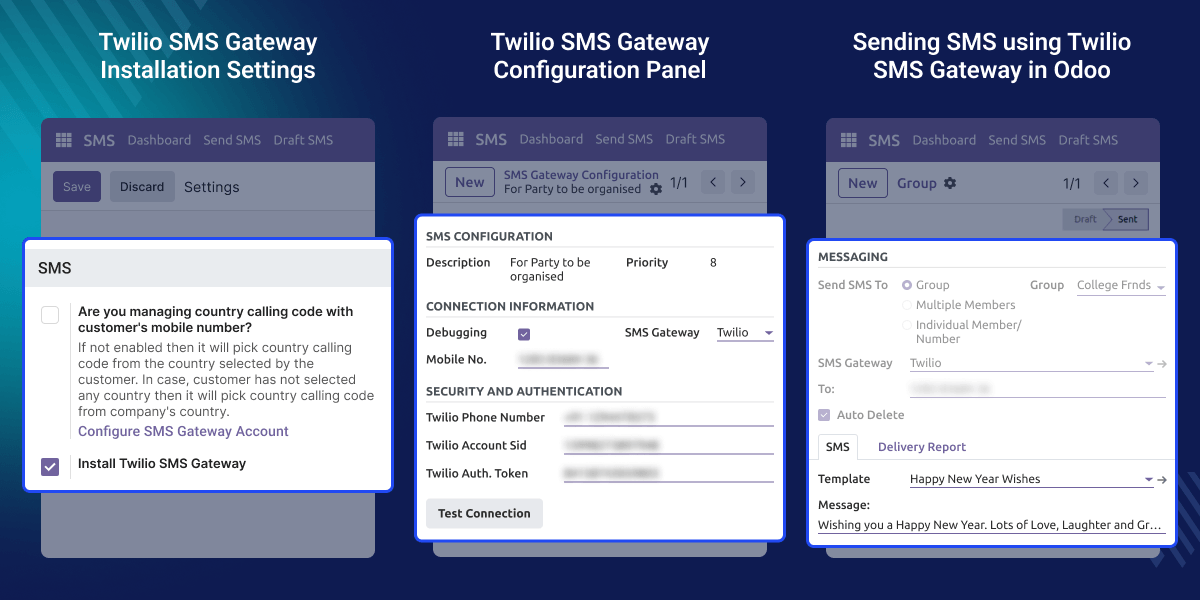
    Odoo Twilio SMS Gateway lets you send SMS messages directly from Odoo using your Twilio account. You can connect Twilio in a few steps and start sending messages right away.

    Once set up, the module handles both manual and automated messaging. You can notify a single customer or send a message to hundreds of contacts, all from one screen inside Odoo.

    Creating SMS templates saves time and keeps your messages consistent. You write the message once, save it as a template, and reuse it whenever needed across different workflows.

    Automated alerts remove the need for manual follow-ups. When an order is confirmed, an invoice is raised, or a shipment is updated, the system sends the SMS on its own without any extra steps.

    Delivery tracking gives you a clear picture of every message sent. You can see which messages were delivered, which failed, and fix any issues directly from the same screen.

    User access control lets admins decide who can send SMS inside the system. This keeps communication organized and makes sure only the right people are sending messages.
    Odoo Twilio SMS Gateway

    Why do we need Odoo Twilio SMS Gateway?

    Businesses rely on SMS to keep customers informed. But sending messages manually for every order, invoice, or shipment update takes time and leads to delays. There is no built-in way to automate this in Odoo by default.

    Odoo does not include direct Twilio integration out of the box. It also lacks bulk messaging tools, reusable SMS templates, and event-based automation for customer notifications.

    Odoo Twilio SMS Gateway solves that. It automates SMS delivery, reduces manual effort, and keeps your customers updated in real time, all from within your existing Odoo system.

    Prerequisites for using Odoo Twilio SMS Gateway

    Odoo Twilio SMS Gateway works in conjunction with the following module:

    Odoo SMS Notification

    You need to install the module mentioned above to use Odoo Twilio SMS Gateway.

    Highlighted Features of Odoo Twilio SMS Gateway

    Twilio SMS Integration

    Connect Twilio to Odoo using SID, Token, and Phone Number in minutes.

    Bulk SMS Sending

    Select multiple recipients and send SMS to all of them at once from one screen.

    SMS Templates

    Create reusable message templates to save time and keep communication consistent.

    Automated SMS Alerts

    Trigger SMS automatically when orders, invoices, or shipments are updated in Odoo.

    Delivery Tracking

    Track every SMS status in real time, delivered, pending, or failed, with fix options.

    User Permission Control

    Assign SMS sending rights per user or role to keep messaging secure and organized.

    Use Cases

    This module helps businesses handle SMS communication in different scenarios.

    Invoice and Payment Alerts

    Notify customers instantly when an invoice is generated or a payment is received.

    Shipment Updates

    Keep customers informed when their order is dispatched or out for delivery.

    Bulk Promotions

    Send one message to a large group of contacts at once without any manual effort.

    Sale Order Confirmation

    Send an automatic SMS to customers as soon as an order is placed in Odoo.

    Twilio SMS Integration

    With Odoo Twilio SMS Gateway, you can connect Twilio easily using your SID, Token, and Phone Number.
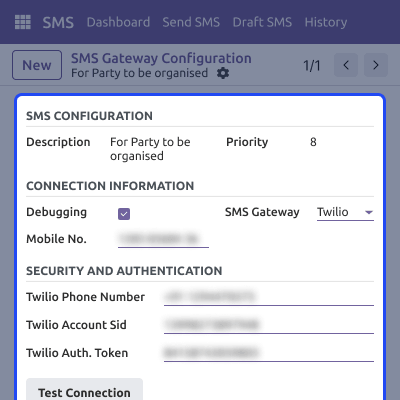
    • Connect Twilio securely inside Odoo.
    • Validate configuration using Test Connection.
    • Access all settings from one panel.
    • Start SMS communication immediately after verification.
     Twilio SMS Integration

    Bulk Messaging Tools

    Send SMS to multiple contacts at once using SMS groups or mass recipient selection to save time and increase communication speed.
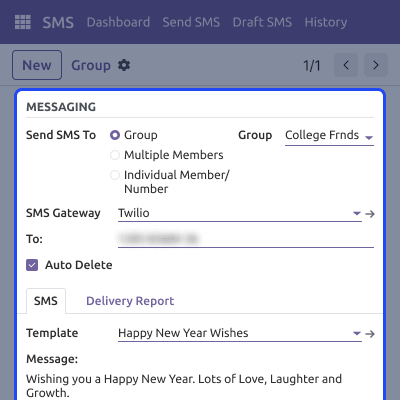
    • Select multiple recipients in a single click.
    • Send mass SMS instantly from one screen.
    • Improve outreach without manual effort.
    • Ideal for promotions, alerts, or reminders.
    Bulk Messaging Tools

    Smart SMS Templates

    Use and create SMS templates to maintain communication consistency and reduce repetitive typing for commonly used messages.
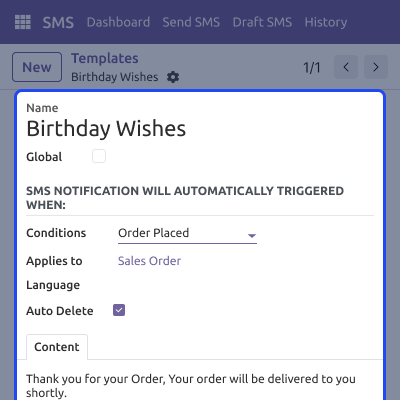
    • Create workflow-based templates.
    • Maintain branding and messaging clarity.
    • Reuse templates for faster communication.
    • Reduce manual errors and inconsistencies.
     Smart SMS Templates

    Advanced SMS Permissions

    Control who can send SMS inside your Odoo system by assigning SMS rights to specific users or roles.
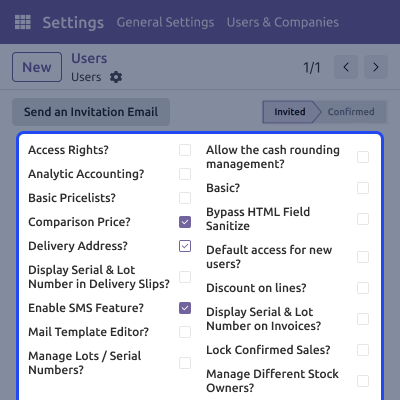
    • Manage SMS privileges per user.
    • Prevent unauthorized SMS sending.
    • Improve security of communication.
    • Keep messaging flow organized.
    Advanced SMS Permissions

    Dedicated Support For Odoo Twilio SMS Gateway

    Webkul's dedicated support provides you with the customizations and troubleshooting solutions for your Odoo Twilio SMS Gateway Module.

    For any query or issue please CREATE A TICKET HERE

    You may also check our other top-quality Odoo Modules.

    Specifications

    Product Version1.2.2
    Released10 years ago
    Last UpdatedMay 14, 2026 (2 days ago)
    Supported VersionsOdoo  8.x  9.x  10.x  11.x  12.x  13.x  14.x  15.x  16.x  17.x  18.x  19.x  
    Write a review

    FAQs

     How do I verify my Twilio connection inside Odoo?
    Go to the settings panel and click Test Connection. If it shows a success message, your Twilio account is linked and ready to send SMS.
     Can I schedule an SMS to send at a later time?
    Yes, You can set a specific time and the system will send the message automatically at that time without any manual action needed.
     Are all sent messages stored in the system?
    Yes, messages are saved by default. You can enable the auto-delete option if you want the system to clear old messages automatically.
     Can I restrict which users are allowed to send SMS?
    Yes, Admins can assign SMS permissions to specific users or roles. Only those with the correct access will be able to send messages.
     Can I send SMS to employees and vendors as well?
    Yes, You can send messages to anyone in your Odoo contacts, customers, vendors, partners, and employees all from one place.
     What happens if an SMS is sent to a wrong number?
    The message shows a Failed status. You can correct the phone number in Odoo and try sending the message again from the same screen.
     Does it follow SMS rules for different countries?
    Yes, Twilio follows all country-specific SMS rules, so Odoo Twilio SMS Gateway sends messages safely to contacts anywhere.
     Is there a sending limit for bulk SMS?
    The module itself does not set a limit. Sending limits depend on your Twilio account plan and its usage policy.

    Move to Cloud Today

    AWS Free tier hosting for one year by amazon web services, for more details please visit AWS Free Tier.

    GCP Free tier hosting for one year with 300 credit points by google cloud platform, for more details please visit GCP Free Tier.

    Azure free tier hosting for one year with 25+ always free services, for more details please visit Azure Free Tier.

    In our default configuration we will provide tremendous configuration for your eCommerce Website which is fast to load and response.

    Default Configuration Details of Server

    • 1 GB RAM
    • 1 Core Processor
    • 30 GB Hard Disk
    • DB with 1 GB RAM and 1 Core Processor

    * Server Configuration may vary as per application requirements.

    Want to know more how exactly we are going to power up your eCommerce Website with Cloud to fasten up your store. Please visit the Cloudkul Services.

    Get Started with Cloud
    Not Available


