USD
  • EUR
  • INR
  • USD
Cart
Cart 0
  • You have no items in your shopping cart.
    Odoo Apps Extensions
    Cart
    Cart 0
    • You have no items in your shopping cart.
    Hire a Developer
    ×
    Contact Us!
    Send Again
    Close
    Please Login to Write Your Review
    Odoo Task Notification Reminder

    Odoo Task Notification Reminder

    x
    Free

    * Required Fields

    $45.00
    Add To Cart

    Odoo Task Notification Reminder sends daily reminders before a task deadline, inside the Odoo backend and by email, so teams act on time.


    • Set daily reminders for task deadlines in the Odoo backend.

    • Choose how many days ahead of the due date the reminders start.

    • Receive the same task deadline reminder by email as well.

    • Set reminders for a whole project or for selected tasks only.

    • Filter reminders by your role: Project Manager, follower, or team member.

    • Get reminders for tasks assigned to you with the Assigned To option.

    • Read each reminder in the task chatter, posted by OdooBot.

    • Turn a reminder setting on or off with the Active checkbox.

    • View all reminder settings in one list under Notification Setting.


    Odoo Task Notification Reminder
    Odoo Task Notification Reminder
    $45.00
    Check How It Works

    Need Help Deciding?

    Support answers within one business day.

    Open a ticket
    $45.00
    Configure and Buy
    X
    • Description
    • Reviews
    • FAQ
    • Customers ()
    • Specifications
    • Cloud Hosting
    • Changelog

    Odoo Task Notification Reminder is an Odoo module that sends daily task deadline reminders to project users. It helps teams prioritize work and stay informed about the tasks in hand.

    Users create a reminder from Project > Notification Setting > Notifications. They add a name, set the days before the deadline, and pick the projects and tasks to watch.

    From the chosen day, OdooBot posts a reminder on the task each day until the deadline. The message names the task, its stage, the assigned user, and the due date.

    Reminders appear in the Odoo backend by default. Tick Enable Mail Notification on a setting, and Odoo also sends the same reminder as an email.

    A reminder can cover a whole project or only specific tasks in a project. Project Managers can also filter reminders by the role they hold on each task.

    This module depends on Odoo Project Advance Team Management, so you need to buy and install that module as well.
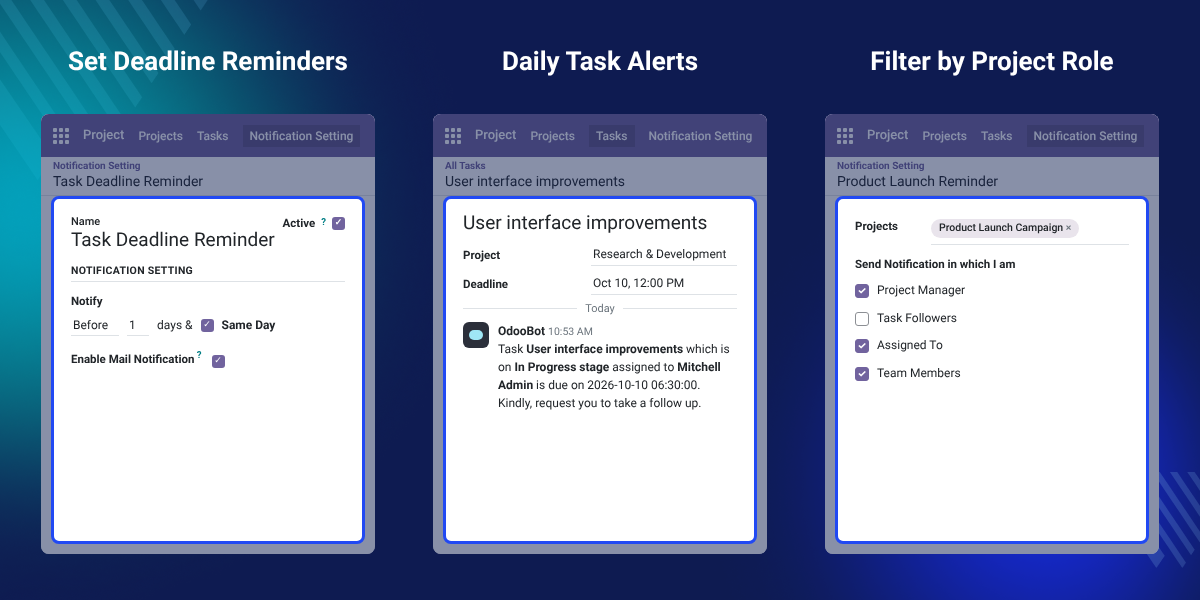
    Odoo Task Notification Reminder

    Highlighted Features of Odoo Task Notification Reminder

     Daily Deadline Reminders

    Get a reminder every day, starting the number of days you set ahead of the task due date.

     Email Notifications

    Enable Mail Notification to receive each task reminder in your mailbox as well.

     Project or Task Scope

    Point a reminder at whole projects, at selected tasks, or at both in one setting.

     Role-Based Filters

    Receive reminders only for tasks where you are Project Manager, follower, assignee, or team member.

    Why Do We Need Odoo Task Notification Reminder?

    Odoo Project stores a deadline on each task, but it does not remind anyone as that date gets close. Users have to open their task lists and check the dates themselves.

    When people handle many tasks at once, a deadline is easy to forget. Missed dates delay projects and hurt the work schedule of the whole team.

    This module sends a daily reminder before each deadline, in Odoo and by email. Users can then plan the day around the tasks that are due first.

    Each reminder reads like this: Task User interface improvements, on In Progress stage, assigned to Mitchell Admin, is due on the given date. Kindly, request you to take a follow up.

    Also, if you want to send email reminders for other records in Odoo, you can check our extension Odoo Reminder Mail.

    Task Reminder Use Cases for Odoo Project Teams

    • Busy Team Members

      Staff working on many tasks at once get a daily nudge for the ones due soon.

    • Project Managers Tracking Delivery

      Managers follow deadlines across their projects without opening every task.

    • Key Client Tasks

      Pick only the critical tasks of a project so the reminders stay focused.

    • Users Away from Odoo

      Email reminders reach users who do not keep the Odoo backend open all day.

    Task Deadline Reminder Settings

    Task Deadline Reminder Settings decide when a reminder starts and where it goes. Each setting has its own name, and users can switch it off at any time.
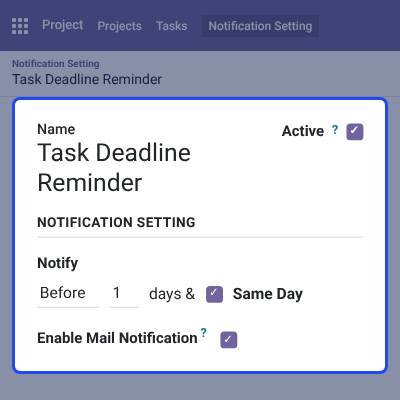
    • Open Project > Notification Setting > Notifications and click New.
    • Add a Name for the reminder, such as Task Deadline Reminder.
    • Keep the Active checkbox ticked to run the reminder.
    • Under Notify, keep Before and enter the number of days to start reminders early.
    • Tick Enable Mail Notification to also get each reminder by email.
    Task Deadline Reminder Settings

    Set Reminders for Projects and Tasks

    A reminder setting can watch entire projects or only chosen tasks. Users can add several projects and tasks to one setting.

    To start and stop work on those tasks from Odoo, you can also check Odoo Project Task Start Stop.
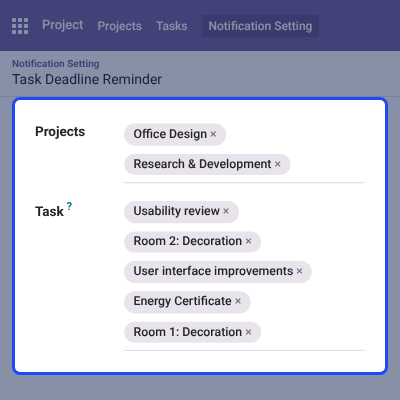
    • Add one or more projects in the Projects field.
    • Add specific tasks in the Task field, from any of those projects.
    • Use a project-level reminder to cover every task in a project.
    • Use a task-level reminder to focus on critical work only.
    Set Reminders for Projects and Tasks

    Filter Task Notifications by Project Role

    Users designated as Project Managers can filter the reminders of a setting by their role on each task. The form calls this option Send Notification in which I am.
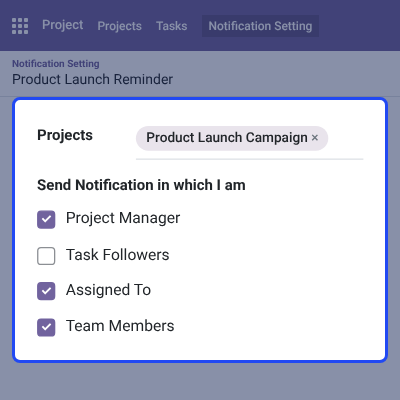
    • Tick Project Manager for tasks in projects you manage.
    • Tick Task Followers for tasks you follow.
    • Tick Assigned To for tasks assigned to you.
    • Tick Team Members for tasks where you are part of the team.
    Filter Task Notifications by Project Role

    Deadline Reminders in the Task Chatter

    OdooBot posts each daily reminder in the chatter of the task. Users see it right where they work on the task.
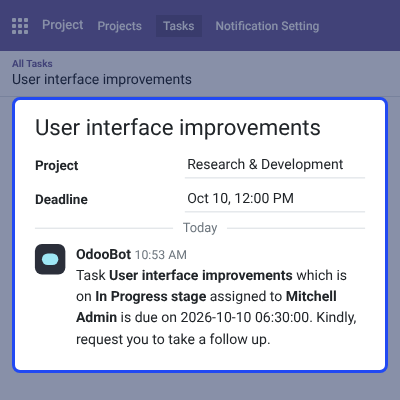
    • Reminders start on the day set in the reminder setting.
    • The message shows the task name and its current stage.
    • It names the user who holds the task.
    • It shows the task due date and asks for a follow up.
    Deadline Reminders in the Task Chatter

    Email Reminders for Task Deadlines

    With Enable Mail Notification ticked, Odoo also sends the task deadline reminder as an email. The task chatter logs the sent email too.
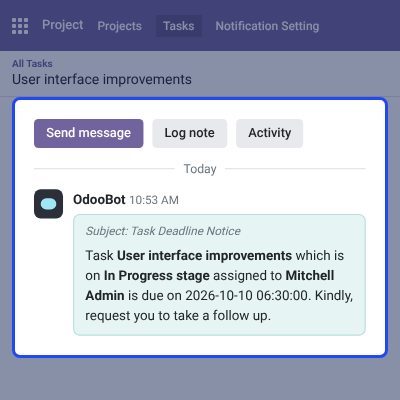
    • The email subject reads Task Deadline Notice.
    • The body carries the task name, stage, assignee, and due date.
    • Email reminders go out daily, like the Odoo reminders.
    • Untick the option to keep reminders inside Odoo only.
    Email Reminders for Task Deadlines

    Manage All Notification Reminders

    The Notification Setting list shows every task notification reminder in one place. Users can open any row to review or change the setting.

    Teams that also log daily work against tasks can pair this list with Odoo Employee Daily Work Report.
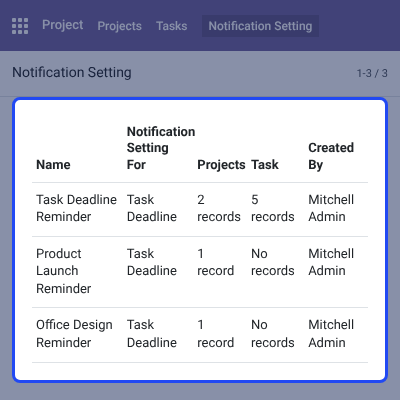
    • See the Name of each reminder setting.
    • Check the Notification Setting For column, set to Task Deadline.
    • Count the Projects and Task records each setting covers.
    • See who created the reminder in the Created By column.
    Manage All Notification Reminders

    Complete Odoo Task Notification Reminder Feature List

    Deadline Reminders

    • Send daily task deadline reminders in the Odoo backend
    • Set how many days ahead of the due date the reminders begin
    • Post each reminder in the task chatter through OdooBot
    • Show the task name, stage, assignee, and due date in every reminder

    Email Notifications

    • Send the same reminder by email with Enable Mail Notification
    • Use the Task Deadline Notice subject for reminder emails
    • Log each sent reminder email on the task chatter

    Reminder Scope & Role Filters

    • Set reminders for whole projects, selected tasks, or both
    • Filter reminders by Project Manager, Task Followers, Assigned To, and Team Members
    • Let users designated as Project Managers apply the role filters

    Reminder Management

    • Create reminder settings from Project > Notification Setting > Notifications
    • Name each setting and turn it on or off with the Active checkbox
    • List all settings with Name, Notification Setting For, Projects, Task, and Created By
    • Requires Odoo Project Advance Team Management to work

    Odoo Task Notifications Reminder Support -

    For any query or issue please create a support ticket here http://webkul.uvdesk.com

    You may also check our other top-quality Odoo Extensions.

    Specifications

    Product Version1.0.0
    Released8 years ago
    CategoryOdoo Apps, Tool, 
    Last UpdatedOctober 9, 2026 (26 days ago)
    Supported Versions8.x  9.x  10.x  11.x  12.x  13.x  14.x  15.x  16.x  17.x  18.x  19.x  20.x  

    Ratings

    We'd love to hear your thoughts! Share your feedback and help us craft an even better experience tailored just for you.

    Write a review

    Specification

    Detailed technical features and requirements to help you understand the module’s capabilities and ensure smooth integration with your system.

    Cloud Hosting

    Detailed technical features and requirements to help you understand the module’s capabilities and ensure smooth integration with your system.

    Default Configuration Details of Server

    1 GB
    RAM
    1 Core
    Processor
    30 GB
    Hard Disk
    1 GB RAM & 1 Core Processor
    Database

    Want to know more how exactly we are going to power up your eCommerce Website with Cloud to fasten up your store

    * Server Configuration may vary as per application requirements.

    Change Logs

    Not Available