USD
  • EUR
  • INR
  • USD
Cart
Cart 0
  • You have no items in your shopping cart.
    Cart
    Cart 0
    • You have no items in your shopping cart.
    Hire a Developer
    ×
    Contact Us!
    Send Again
    Close
    Please Login to Write Your Review

    POB Extension Discount On Products

    POB Extension Discount On Products lets you send special discounts from Prestashop to Odoo, so managing discounts is simple on both platforms.


    • Quickly export special discounts to Odoo.

    • Easily handle discounts on both platforms.

    • These special discounts can also be used in Point of Sale.

    • Syncs currency from Prestashop to Odoo as a pricelist.

    • Any changes to discounts in Odoo can be seamlessly synced to Prestashop.


    Screenshots
    POB Extension Discount On Products POB Extension Discount On Products POB Extension Discount On Products POB Extension Discount On Products POB Extension Discount On Products POB Extension Discount On Products POB Extension Discount On Products
    Show More Hide All
    $99.00

    * Required Fields

    Add To Cart
    $99.00
    Configure and Buy
    • Description
    • Reviews
    • FAQ
    • Customers ()
    • Specifications
    • Cloud Hosting
    • Changelog

    POB Extension Discount On Products lets businesses easily share special discounts from Prestashop to Odoo, making it easy to manage discounts.

    Prestashop Odoo Bridge only syncs regular discounts like sales price or cost price, whereas this extension supports special discounts, like percentage discounts, buy-one-get-one deals, and bundled offers on a particular product.

    If the user has special discounts on your Prestashop store and wants to share them with Odoo ERP for use in Point-of-Sale systems, then this module is perfect.
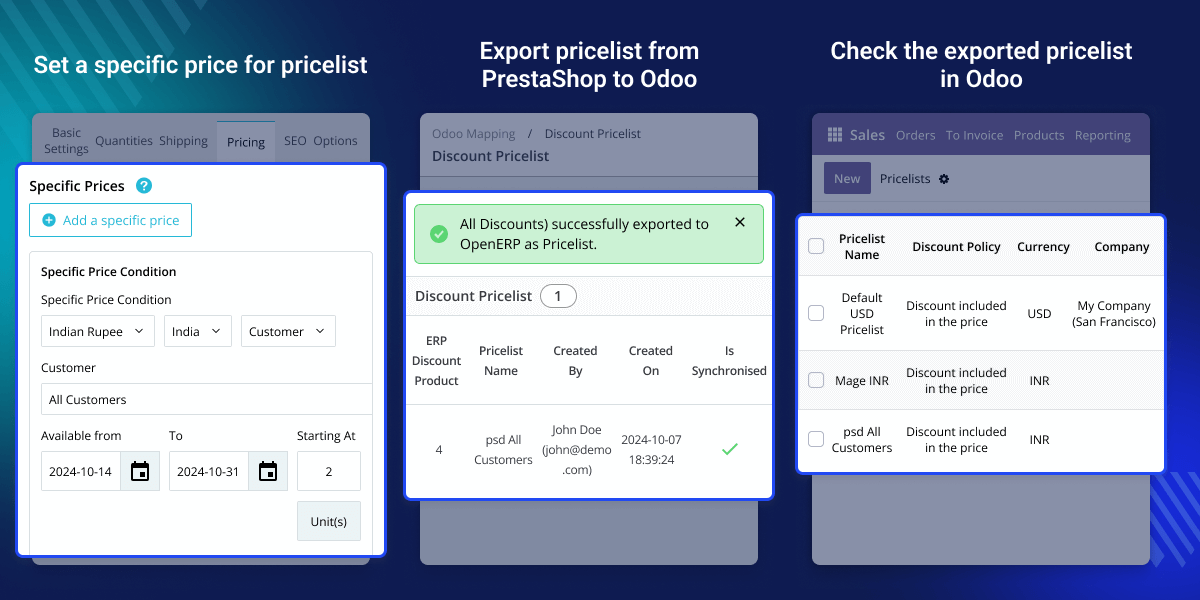
    POB Extension Discount On Products

    Why do we need POB Extension Discount On Products?

    This module makes it easy to manage special discounts between Prestashop and Odoo. Without this module, businesses would have to update discounts manually on both platforms, which can lead to mistakes and extra work.

    For example, a store having a big million days sale with a special 20% discount and free delivery on certain products, these deals wouldn’t update in Odoo. It means Point of Sale (POS) system wouldn’t show the same discounts, confusing customers and staff.

    All special discounts are transferred from Prestashop to Odoo using this extension. This way, online shoppers and in-store customers get great offers, making their shopping experience smooth and professional.

     Prerequisites For Using POB Extension Discount On Products

    POB Extension Discount On Products works in conjunction with the following module:

    Highlighted Features of POB Extension Discount On Products

     Sync Special Discounts

    Export special discounts from Prestashop to Odoo to keep special prices updated on both platforms.

     Use Discounts in Point Of Sales (POS)

    Apply exported discounts from Prestashop to Point of Sales of Odoo.

     Modify and Sync Discounts

    Edit discounts in Odoo and sync them back to Prestashop, keeping both platforms updated.

     Multiple Ways To View Exported Pricelist

    Check exported pricelists in Odoo via Extra Prices section under product details or by navigating to the Pricelists section in Sales.

    Special Discount Export

    POB Extension Discount On Products helps businesses manage and share special discounts from Prestashop to Odoo ERP to attract more customers.
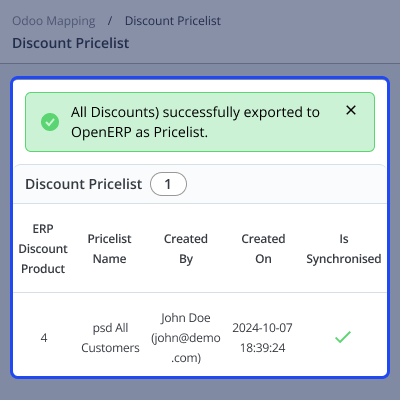
    • Quickly move special discounts from Prestashop to Odoo, saving time and work.
    • Any changes made in Prestashop can be synced manually to Odoo, making it easy to keep both platforms updated.
    • Special discounts are easy for customers to see, helping boost sales.
    • Navigate through odoo mapping >> discount pricelist >> synchronise
    Special Discount Export

    Viewing Exported Pricelists in Odoo

    After exporting pricelists from Prestashop to Odoo, you can view the discounts in two simple ways:
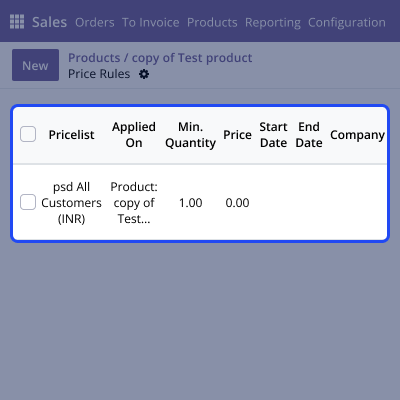
    • Go to the product details page in Odoo and look in the Extra Prices section. Here, you’ll see the discounts applied to the product from the exported pricelist.
    • You can also go to the Sales section in Odoo, select Products, and click on Pricelists to see all the available pricelists, including those from Prestashop.
    • They can also view the seller's ratings given by other customers.
    • These discounts are visible under each product’s pricing, where you can check the special offers for each item.
    • Navigate through products>> any product with discounts>> extra prices.
    Viewing Exported Pricelists in Odoo

    Modify and Export Discounts from Odoo to Prestashop

    The module makes it simple to update special discounts also in Odoo and send them back to Prestashop.

    • Easily change and export special discounts from Odoo to Prestashop, keeping prices synced across both platforms.
    • Any changes the user makes to discounts in Odoo can be synced easily to Prestashop, ensuring consistent prices.
    • Make changes to special discounts in Odoo and then manually update in Prestashop.
    Modify and Export Discounts from Odoo to Prestashop

    Specifications

    Product Version3.5
    Released11 years ago
    Last UpdatedJanuary 7, 2026 (1 month ago)
    Supported VersionsPrestaShop  1.5.x.x​  1.6.x.x​  1.7.x.x​  8.x.x  Odoo  7.x  8.x  9.x  10.x  11.x  12.x  13.x  14.x  15.x  16.x  17.x  18.x  
    Write a review

    Frequently Asked Questions

     How is this module different from the standard Prestashop Odoo Bridge?
    Prestashop Odoo Bridge only syncs regular discounts like sales price or cost price. This module lets you export special discounts like percentage discounts, sale discounts, and more.
     
     What happens if I modify a discount in Odoo after syncing it from Prestashop?
    If you modify a discount in Odoo, the extension allows you to export those changes back to Prestashop, ensuring both platforms are always up to date with the latest offers.
     
     Can I apply the exported special discounts in Point of Sale (POS)?
    Yes, any special discounts synced from Prestashop are applied in Odoo’s Point of Sale systems with POB Extension Discount On Products.
     
     Can I sync pricelists from Odoo to Prestashop and vice versa?
    Yes, you can easily sync prices between Odoo and Prestashop, allowing you to update discounts and prices on either platform.
     
     How do I export the Discount Pricelist from Prestashop to Odoo?
    After installation, navigate to ‘Odoo Mapping’ and select ‘Discount Pricelist’. From there, use the ‘Synchronize’ button to export the pricelist to Odoo.

    Move to Cloud Today

    AWS Free tier hosting for one year by amazon web services, for more details please visit AWS Free Tier.

    GCP Free tier hosting for one year with 300 credit points by google cloud platform, for more details please visit GCP Free Tier.

    Azure free tier hosting for one year with 25+ always free services, for more details please visit Azure Free Tier.

    In our default configuration we will provide tremendous configuration for your eCommerce Website which is fast to load and response.

    Default Configuration Details of Server

    • 1 GB RAM
    • 1 Core Processor
    • 30 GB Hard Disk
    • DB with 1 GB RAM and 1 Core Processor

    * Server Configuration may vary as per application requirements.

    Want to know more how exactly we are going to power up your eCommerce Website with Cloud to fasten up your store. Please visit the Cloudkul Services.

    Get Started with Cloud
    Not Available


