USD
  • EUR
  • INR
  • USD
Cart
Cart 0
  • You have no items in your shopping cart.
    Cart
    Cart 0
    • You have no items in your shopping cart.
    Hire a Developer
    ×
    Contact Us!
    Send Again
    Close
    Please Login to Write Your Review

    AureusERP WooCommerce Connector

    AureusERP WooCommerce Connector syncs products, orders, customers, and inventory between AureusERP and WooCommerce for faster store management.


    • Sync simple and variable products across both systems.

    • Import WooCommerce orders into AureusERP instantly.

    • Synchronize customer records between ERP and store.

    • Push inventory updates from AureusERP to WooCommerce.

    • Generate invoices for paid online orders automatically.

    • Process refunds with credit note creation support.

    • Sync product categories and attribute information.

    • Support webhooks for near real time data updates.

    • Run scheduled sync jobs for automatic data transfer.

    • Detect and manage conflicting record updates safely.

    • Track synchronization activity through detailed logs.

    • Force re-sync records using the mapping management tool.

    Screenshots
    AureusERP WooCommerce Connector AureusERP WooCommerce Connector AureusERP WooCommerce Connector AureusERP WooCommerce Connector AureusERP WooCommerce Connector AureusERP WooCommerce Connector
    Show More Hide All
    $199.00
    Add To Cart
    $199.00
    Configure and Buy
    • Description
    • Reviews
    • FAQ
    • Customers ()
    • Specifications
    • Cloud Hosting
    • Changelog

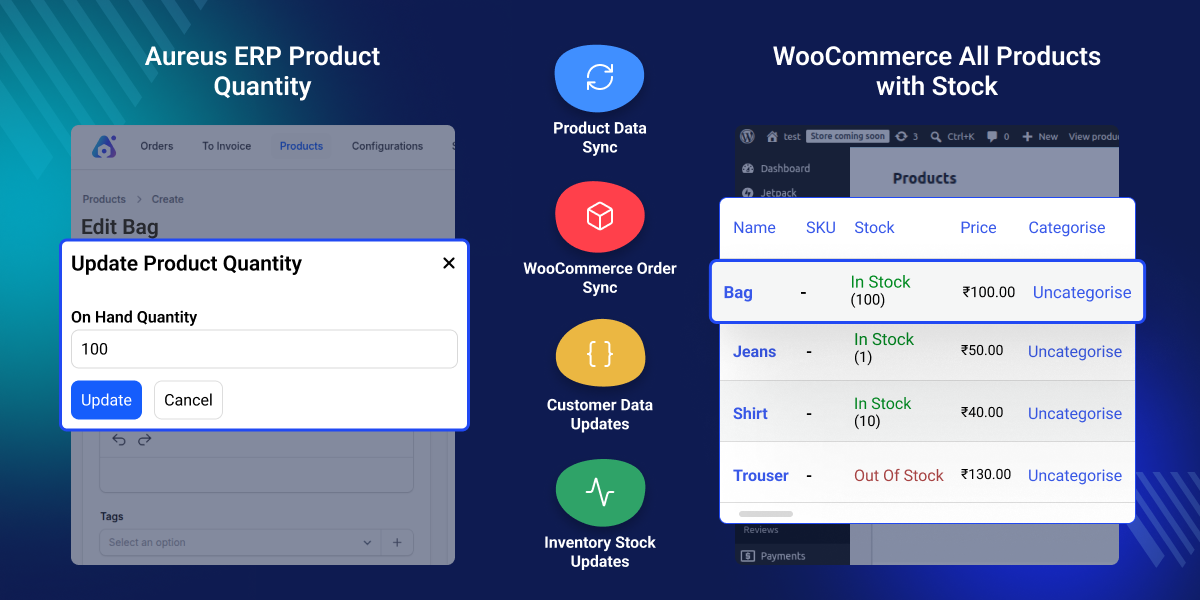
    AureusERP WooCommerce Connector connects WooCommerce with AureusERP. It keeps product, customer, order, and stock data up to date in both systems. You can manage product data in AureusERP and send it to WooCommerce. This means you do not need to enter the same data again.

    Customer details and order data can move between both systems. This helps teams use the latest business data every day. Stock changes made in AureusERP can be sent to WooCommerce. This helps show the right stock amount in your store and helps reduce stock issues.

    When an order is paid, the connector can create an invoice and save the payment record. If an order is refunded, it can create a credit note and update stock data. This connector supports webhooks and scheduled sync jobs. This helps keep data updated when changes are made in either system.

    Logs, mapping tools, and conflict checks help administrators view data updates, check changes, and fix issues when needed. This connector is a good choice for retailers, wholesalers, and online stores that want to keep WooCommerce and AureusERP data in sync.

    You can also check our AureusERP QuickBooks Online Connector, which links AureusERP with QuickBooks and syncs invoices, customers, vendors, and payment data automatically.
    AureusERP WooCommerce Connector

    Highlighted Features of AureusERP WooCommerce Connector

     Product Data Sync

    Sync simple products, variable products, categories, attributes, and product details between AureusERP and WooCommerce.

     WooCommerce Order Sync

    Import WooCommerce orders into AureusERP. Create sales orders and manage them from one system.

     Customer Data Updates

    Keep customer accounts and contact details updated in both WooCommerce and AureusERP.

     Inventory Stock Updates

    Send stock updates from AureusERP to WooCommerce. Show the correct stock quantity in your online store.

     Invoice and Payment Sync

    Create invoices when orders are paid. Record payment details in AureusERP automatically.

     Refund and Credit Management

    Handle refunds from WooCommerce. Create credit notes and update stock after product returns.

     Data Conflict Resolution

    Find data changes made in both systems. Choose which data should stay when records do not match.

     Sync Logs and Reports

    View sync logs, mappings, and status reports. Check data updates between WooCommerce and AureusERP.

    Why Do We Need AureusERP WooCommerce Integration?

    Managing products, customers, stock, and orders in WooCommerce and AureusERP can take time. Teams may need to enter the same data in both systems.

    When the two systems are not connected, stock changes, customer details, and order data must often be updated by hand. This can lead to mistakes and data that does not match.

    As a business gets more orders, manual work takes more time. It can also cause stock problems, slow order processing, and old data in the system.

    AureusERP WooCommerce Integration links WooCommerce and AureusERP. It helps keep product data, customer details, orders, and stock information up to date in both systems.

    This connector includes automatic updates, tools to handle data differences, and logs to track data changes. These tools help keep business data correct and easy to manage.

    Many businesses use WooCommerce and ERP integration to save time, reduce manual work, and keep store data up to date.

    Use Cases

    Online Retail Businesses

    Keep WooCommerce and AureusERP connected. Product, customer, order, and stock data stay updated in both systems. This helps reduce manual work and errors.

    Wholesale and Distribution Companies

    Share product, customer, and sales data between WooCommerce and ERP. This keeps records the same in both systems and avoids data mismatch.

    Growing eCommerce Brands

    Move data between WooCommerce and AureusERP automatically. This helps handle more orders and customers with less manual work.

    Businesses with Large Product Catalogs

    Manage all product details in one place. The same product data is used in both WooCommerce and AureusERP.

     Product and Catalog Synchronization

    Keep product data up to date in AureusERP and WooCommerce. Product details stay the same in both places, which helps save time and reduces extra work.
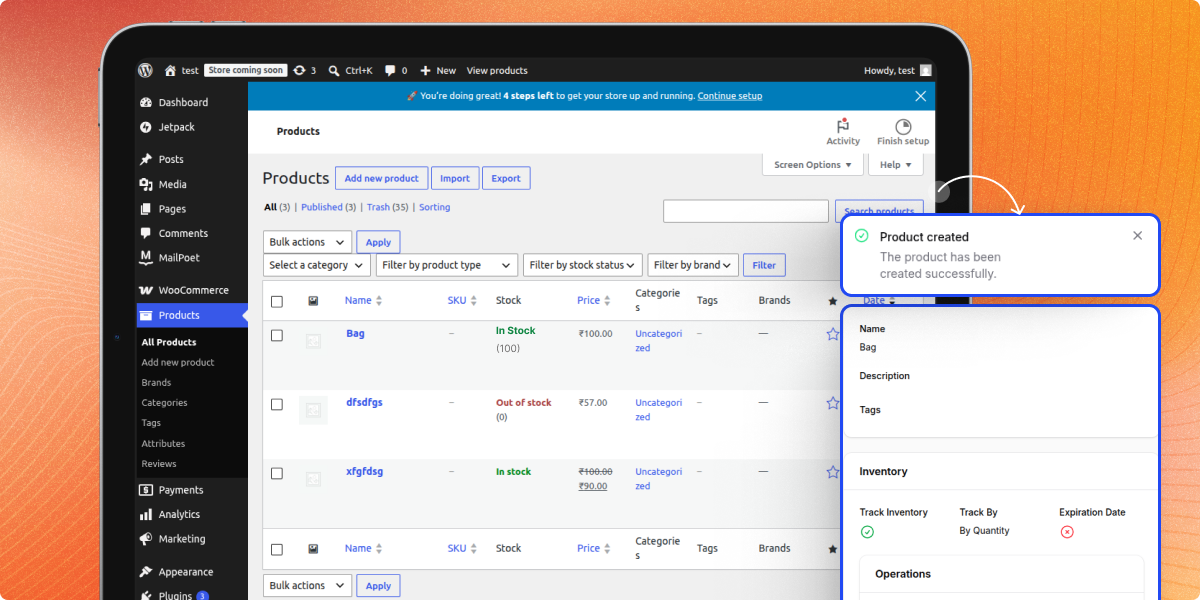
    • Sync simple products between both systems.
    • Sync variable products with all options.
    • Update product names, SKUs, and details.
    • Keep categories the same in both systems.
    • Sync attributes and their values.
    • Update product status automatically.
    • Keep product data up to date.
    Product and Catalog Synchronization

     WooCommerce Inventory Sync

    WooCommerce Inventory Sync helps manage stock in AureusERP and send stock updates to WooCommerce. This helps show the right stock amount and keeps stock data up to date.
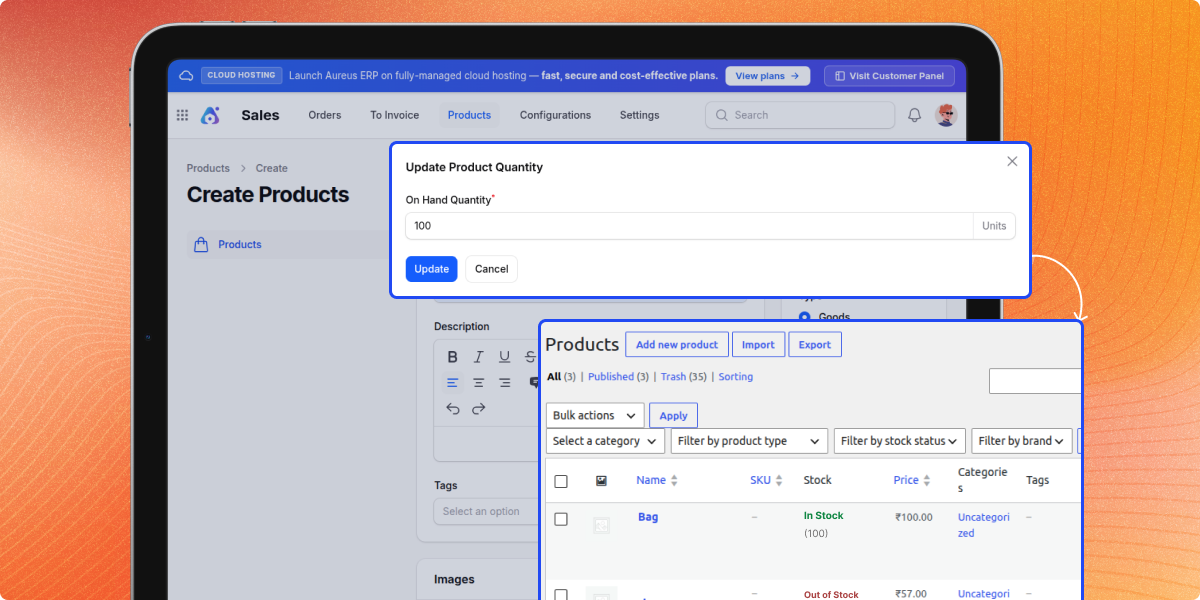
    • Send stock updates to WooCommerce.
    • Keep stock levels up to date.
    • Use AureusERP as the main stock source.
    • Help reduce overselling issues.
    • Update product availability automatically.
    • Make stock tracking easier.
    • Manage stock from one place.
    WooCommerce Inventory Sync

    Sync Logs, Mappings, and Conflict Management

    Check sync activity, view record links, and fix data issues. These tools help keep data correct and easy to manage.
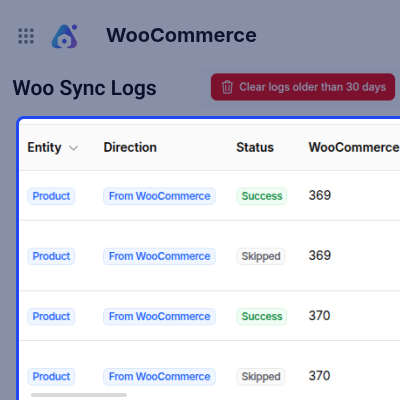
    • View sync history records.
    • Check successful and failed syncs.
    • Filter logs by type and status.
    • View links between records.
    • Re-sync records when needed.
    • Find data differences.
    • Choose which data to keep.
    Sync Logs, Mappings, and Conflict Management

    Support

    For any query or issue, please create a support ticket here http://webkul.uvdesk.com/.

    Specifications

    Product Version1.0.0
    Released4 days ago
    CategoryBagisto Laravel
    Last UpdatedJuly 2, 2026 (1 day ago)
    Supported Versions1.4.0  
    Write a review

    Frequently Asked Questions

     What does the AureusERP WooCommerce Connector do?
    It connects WooCommerce and AureusERP. It keeps products, customers, orders, and stock data updated in both systems so records stay the same and work is reduced.
     
     Can simple and variable products be synchronized?
    Yes, simple and variable products are synced. It also syncs categories, attributes, options, prices, SKUs, and product details between both systems.
     
     How are WooCommerce orders handled in AureusERP?
    WooCommerce orders are sent to AureusERP and changed into sales orders. This helps teams handle order work, shipping, and tracking in one system.
     
     Does the connector synchronize customer information?
    Yes, customer accounts and contact details are synced in both systems. This keeps customer data correct and up to date everywhere.
     
     How does inventory synchronization work?
    Stock updates go from AureusERP to WooCommerce. This shows correct stock in the store and helps avoid selling out of stock items.
     
     Can the connector create invoices automatically?
    Yes, invoices are made in AureusERP when WooCommerce orders are paid. Payment details are also saved for records.
     
     What happens when a customer refund is processed?
    Refunds create a credit note, update payment records, and return items to stock. This keeps stock and accounts correct.
     
     How are synchronization conflicts managed?
    If both systems change the same data, the connector shows the difference. Admins can choose the correct data to keep.
     
     Are synchronization logs available for monitoring?
    Yes, logs show all sync activity like success, failure, and skipped records. This helps admins check and fix problems.
     
     Can administrators manually re-sync records?
    Yes, admins can re-sync records anytime using the re-sync option when data needs to be fixed or updated.
     
     Does the connector support automated synchronization?
    Yes, it supports webhooks, scheduled sync jobs, and auto updates. This keeps both systems updated with less manual work.

    Move to Cloud Today

    AWS Free tier hosting for one year by amazon web services, for more details please visit AWS Free Tier.

    GCP Free tier hosting for one year with 300 credit points by google cloud platform, for more details please visit GCP Free Tier.

    Azure free tier hosting for one year with 25+ always free services, for more details please visit Azure Free Tier.

    In our default configuration we will provide tremendous configuration for your eCommerce Website which is fast to load and response.

    Default Configuration Details of Server

    • 1 GB RAM
    • 1 Core Processor
    • 30 GB Hard Disk
    • DB with 1 GB RAM and 1 Core Processor

    * Server Configuration may vary as per application requirements.

    Want to know more how exactly we are going to power up your eCommerce Website with Cloud to fasten up your store. Please visit the Cloudkul Services.

    Get Started with Cloud
    • - Feature Add (+)
    • - Feature remove (-)
    • - Bug Fixed (!)
    • - Modification (*)
    Version 1.0.0
    • Initial Release


