USD
  • EUR
  • INR
  • USD
Cart
Cart 0
  • You have no items in your shopping cart.
    Cart
    Cart 0
    • You have no items in your shopping cart.
    Hire a Developer
    ×
    Contact Us!
    Send Again
    Close
    Please Login to Write Your Review

    Bagisto Marketplace FedEx Shipping

    Bagisto Marketplace FedEx Shipping adds the FedEx shipping method to your store, lets you calculate shipping rates, create shipments, and track orders from the Bagisto admin panel.


    • Enable or disable the FedEx shipping method easily.

    • Show a custom FedEx shipping title at checkout.

    • Select allowed FedEx shipping service options.

    • Choose weight units for shipping calculations.

    • Configure package type for every shipment.

    • Set the preferred FedEx drop off method.

    • Create FedEx shipments from the admin panel.

    • Track FedEx shipments from the admin dashboard.

    Screenshots
    Bagisto Marketplace FedEx Shipping Bagisto Marketplace FedEx Shipping Bagisto Marketplace FedEx Shipping Bagisto Marketplace FedEx Shipping Bagisto Marketplace FedEx Shipping Bagisto Marketplace FedEx Shipping
    Show More Hide All
    $199.00
    Add To Cart
    $199.00
    Configure and Buy
    • Description
    • Reviews
    • FAQ
    • Customers ()
    • Specifications
    • Cloud Hosting
    • Changelog

    Marketplace FedEx Shipping for Bagisto helps you add FedEx as a shipping option in your store. This Bagisto FedEx Integration lets your store communicate with FedEx services for shipping, shipment creation, and tracking.

    Store owners can offer trusted FedEx delivery services during checkout. Customers can choose from the available shipping methods based on their order and location.

    This module lets you manage shipment creation directly from the admin panel. This saves time and reduces the need to switch between different systems.

    Admins can also track shipments without leaving the store dashboard. Order updates stay organized, making it easier to answer customer shipping questions.

    You can configure shipping methods, package types, weight units, and drop off options. These settings help match your shipping process with your business needs.

    This module works well for businesses that ship products across cities or countries. It supports smooth order fulfillment while giving customers reliable delivery choices.

    From small online stores to growing businesses, this FedEx Shipping Extension for Bagisto helps simplify daily shipping tasks and order fulfillment. This allows your team to manage more orders with less manual work.

    You may also be interested in our Laravel Aramex Shipping plugin Laravel Aramex Shipping, which integrates Aramex with your store to calculate shipping costs automatically during checkout.
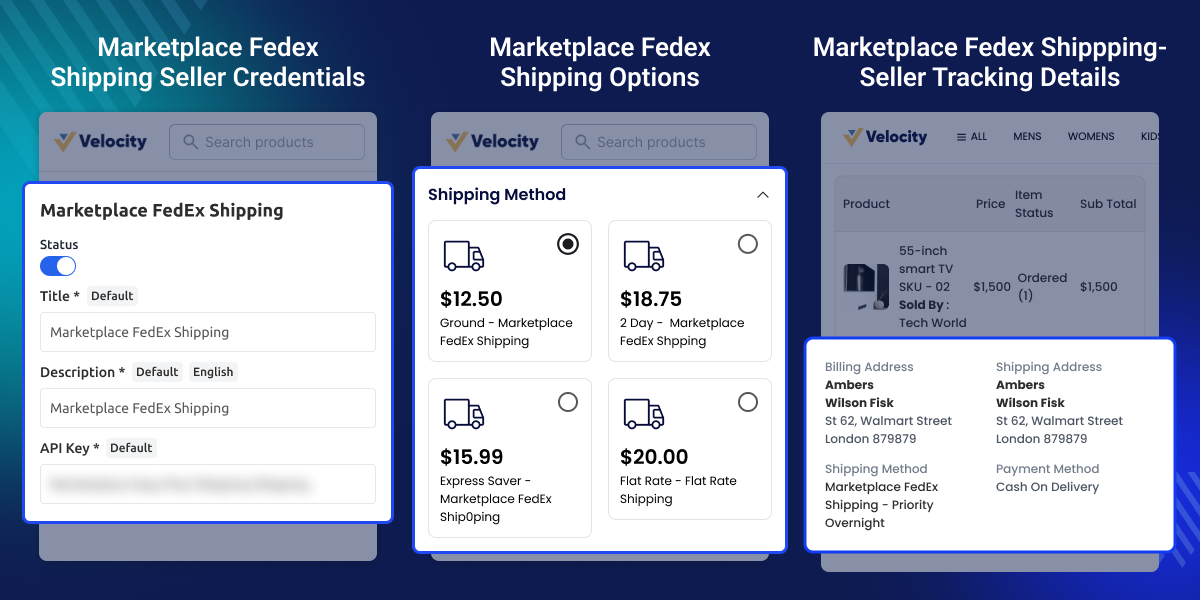
    FedEx Shipping for Bagisto

    Highlighted Features of Bagisto Marketplace FedEx Shipping

     Real-Time FedEx Shipping Methods

    Offer Bagisto Real Time Shipping Rates through FedEx services at checkout. Customers can choose the available delivery option.

     Custom Shipping Method Title

    Set a custom title for the FedEx shipping method. Display a name that matches your store's shipping preferences.

     Flexible Shipping Configuration

    Choose supported shipping services, package types, weight units, and drop off options from the admin settings.

     Create Shipments from Admin

    Generate FedEx shipments directly from the Bagisto admin panel. Manage shipping without using external tools.

     Track Shipments Easily

    View Bagisto Shipment Tracking details from the admin dashboard. Follow delivery progress and answer customer questions quickly.

     Simple Admin Management

    Enable or disable the shipping method at any time. Update shipping settings as your business requirements change.

    Why Choose Bagisto Marketplace FedEx Shipping for Your Store?

    Many online stores need a trusted shipping carrier to deliver orders on time. Without direct FedEx support, shipping tasks often take more time. The default shipping setup may not provide FedEx services, shipment creation, or tracking from the admin panel. This can increase manual work.

    Managing shipping from different systems can slow daily operations. It also makes it harder to keep order and shipment details together. This module adds FedEx shipping directly to your Bagisto store. You can configure shipping options, create shipments, and track deliveries from one place.

    Flexible settings let you choose shipping methods, package types, weight units, and drop off options based on your business needs. In practical store operations, managing shipments from a single dashboard helps reduce manual work and improves order handling.

    Use Cases

    Ship Orders Across the United States

    Stores selling across the U.S. can offer FedEx shipping at checkout. Customers choose the delivery service that fits their budget and timeline.

    Manage Daily Store Shipments

    Businesses with regular orders can create FedEx shipments from the admin panel. This reduces manual work and speeds up order processing.

    Sell High Value Products

    Jewelry, electronics, and premium goods need reliable shipping. FedEx services help stores deliver valuable products with shipment tracking.

    Handle Business to Business Orders

    Wholesalers can use FedEx to ship bulk orders to distributors and retail partners. Shipment tracking helps monitor deliveries until they arrive.

    Support International Shipping

    Businesses selling to customers in other countries can provide FedEx international shipping services for eligible destinations.

    Improve Customer Order Tracking

    Customer support teams can check shipment status from the admin panel. This helps answer delivery questions without logging into another system.

    Marketplace FedEx Shipping Configuration

    Set up FedEx shipping from the admin panel. Manage shipping settings, services, and package options for every marketplace seller.
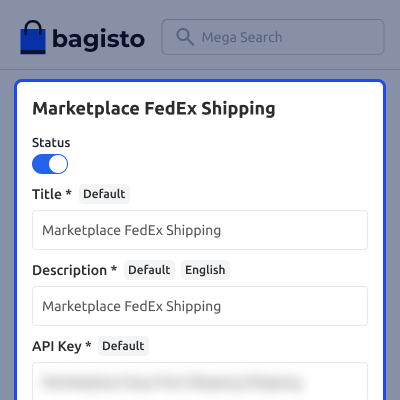
    • Turn FedEx shipping on or off for all marketplace sellers.
    • Add a custom title for the FedEx shipping method.
    • Choose FedEx shipping services for marketplace orders.
    • Select the package type used for every shipment.
    • Set the preferred FedEx drop off type for shipments.
    • Choose the weight unit used to calculate shipping rates.
    Marketplace FedEx Shipping Configuration

    Seller FedEx Account

    Sellers can add their own FedEx account details from the seller panel. This lets them create shipments with their own account.
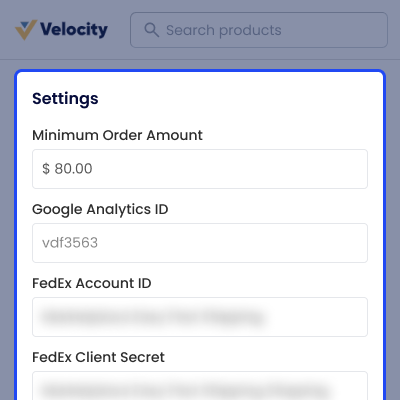
    • Add FedEx account details from the seller dashboard.
    • Update FedEx account information whenever needed.
    • Use a personal FedEx account for shipping orders.
    • Create shipments without asking the admin for help.
    • Keep each seller account and settings separate.
    • Connect the account before creating shipments.
    Seller FedEx Account

    Marketplace FedEx Shipping Options

    Sellers can choose the FedEx shipping services they want to offer. They can update shipping settings whenever required.
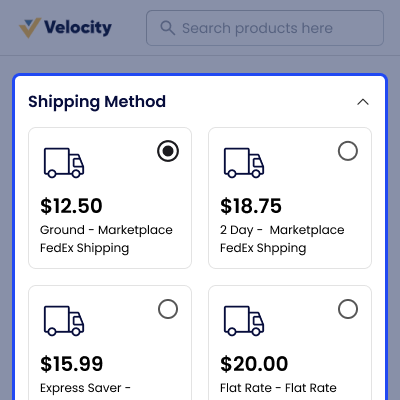
    • Choose available FedEx shipping services for products.
    • Set shipping methods based on seller preferences.
    • Manage shipping settings from the seller dashboard.
    • Apply saved shipping settings to new orders easily.
    • Support different shipping needs for each seller.
    • Update shipping options whenever business needs change.
    Marketplace FedEx Shipping Options

    Seller Order Details

    Sellers can create FedEx shipments from the order page. Shipment details and tracking stay available in one place.
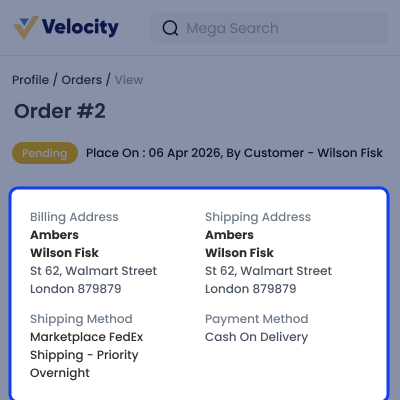
    • Create FedEx shipments directly from seller orders.
    • View shipment details from the seller order page.
    • Create shipments after the order gets approved.
    • Check tracking details for every shipped order.
    • Manage all shipping tasks from one dashboard.
    • Reduce manual work during shipment processing.
    Seller Order Details

    Customer Shipping Details

    Customers can see the FedEx shipping method during checkout. They can also track their shipment after the order is shipped.
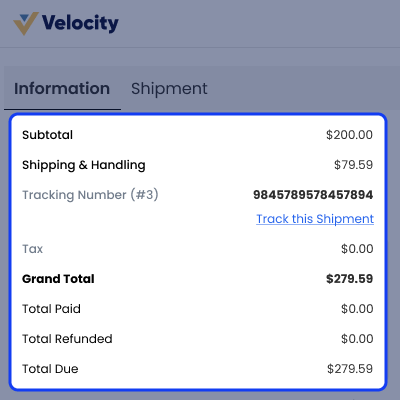
    • View the FedEx shipping method during checkout.
    • See shipping details on the customer order page.
    • Track shipments with the available tracking number.
    • Check shipment status after the order is shipped.
    • View delivery updates from the customer account.
    • Follow order progress until the package arrives.
    Customer Shipping Details

    Support

    For any query or issue, please create a support ticket here http://webkul.uvdesk.com/. You may also check our all Bagisto Extensions.

    Specifications

    Product Version2.4.4
    Released3 days ago
    Last UpdatedJune 29, 2026 (1 day ago)
    Supported VersionsBagisto  2.4.4  
    Write a review

    Frequently Asked Questions

     What does the Bagisto Marketplace FedEx Shipping module do?
    This module adds FedEx shipping to your Bagisto store. Customers can choose FedEx at checkout, and admins can create shipments and track orders.
     
     Can the admin enable or disable the FedEx shipping method?
    Yes, the admin can turn the FedEx shipping method on or off from the settings panel at any time without changing any store files or code.
     
     Can I change the shipping method title shown to customers?
    You can set a custom title for the FedEx shipping method from the admin panel so customers see the name you want during checkout.
     
     Does this module support different FedEx shipping services?
    Yes, you can choose the FedEx shipping services you want to offer. Customers will see the selected shipping options during checkout.
     
     Can I create FedEx shipments from the admin panel?
    Admins can create FedEx shipments from the Bagisto order page. This saves time and keeps shipping work inside the store dashboard.
     
     Can I track FedEx shipments from the store backend?
    Admins can view shipment tracking details from the order page. This helps store staff check delivery progress and answer customer questions.
     
     Is this module suitable for stores with international shipping?
    Yes, if your FedEx account supports international shipping, you can offer eligible services and manage those shipments from the admin panel.
     
     Can I configure package type and weight units?
    You can choose the package type, weight unit, and drop off option from the settings to match your shipping process and FedEx account.
     
     Does this module help reduce manual shipping work?
    Yes. It keeps shipping settings, shipment creation, and tracking in one place, helping store teams complete daily shipping tasks with less effort.
     
     Is this module compatible with the latest Bagisto version?
    This module supports Bagisto v2.4.4. If you use another version, check the compatibility details before installing the module.

    Move to Cloud Today

    AWS Free tier hosting for one year by amazon web services, for more details please visit AWS Free Tier.

    GCP Free tier hosting for one year with 300 credit points by google cloud platform, for more details please visit GCP Free Tier.

    Azure free tier hosting for one year with 25+ always free services, for more details please visit Azure Free Tier.

    In our default configuration we will provide tremendous configuration for your eCommerce Website which is fast to load and response.

    Default Configuration Details of Server

    • 1 GB RAM
    • 1 Core Processor
    • 30 GB Hard Disk
    • DB with 1 GB RAM and 1 Core Processor

    * Server Configuration may vary as per application requirements.

    Want to know more how exactly we are going to power up your eCommerce Website with Cloud to fasten up your store. Please visit the Cloudkul Services.

    Get Started with Cloud
    • - Feature Add (+)
    • - Feature remove (-)
    • - Bug Fixed (!)
    • - Modification (*)
    Version 2.4.4
    • + Compatible with Bagisto v2.4.4.
    • + Admin can track shipment.
    • -Remove unwanted methods, create new methods, modified methods, refactoring code and clean up also.
    Version 2.1.2
    • + Admin can create complete or partial order quantity shipment.
    Version 1.4.5
    • + The admin can enable or disable the FedEx Shipping method.
    • + The admin can set the FedEx shipping method name that will be shown from the front side.
    • + The admin can define the allowed methods and weight units.
    • + The admin can set packaging type and drop off type.
    • + compatible with Bagisto v2.1.2


