Laravel e-Commerce Multi Company SaaS Module turns one Bagisto install into a hosted platform where merchants sign up, get their own store, and pay by plan.
- Run many merchant stores from a single Bagisto installation.
- Let merchants sign up and get a storefront and admin panel.
- Create subscription plans with monthly and yearly pricing.
- Set plan limits on products, categories, attributes, channels, and orders.
- Collect payments through Stripe, PayPal, or a manual gateway.
- Track gross volume, orders, active tenants, and signups across all stores.
- Map a merchant's own domain to their store with a CNAME record.
- Open premium storefront themes to merchants on higher plans.
- Send signed webhook events to your billing and support systems.
- Log in as any tenant to see exactly what that merchant sees.
- Description
- Reviews
- FAQ
- Customers ()
- Specifications
- Cloud Hosting
- Changelog
Laravel e-Commerce Multi Company SaaS Module is a Bagisto extension that turns one installation into a hosted platform. Merchants register, get their own store, and pay for it by plan.
A merchant signs up through a three-step form with a live subdomain preview. Provisioning then creates the storefront, the admin panel, and the store records without any manual work.
Each tenant gets the full Bagisto backend. Catalog, sales, customers, marketing, CMS, and reporting all behave as usual, but remain scoped to that one store.
Super admins decide what a plan allows. Product counts, category counts, attribute families, channels, order volume, and premium theme access are all set on the plan.
Billing runs on Stripe, PayPal, or a manual gateway. Trial plans, plan offers, and direct plan assignment cover migrations, pilots, and negotiated deals.
Additionally, if you want sellers to list inside one shared storefront instead of separate stores, then check Laravel Multi Vendor Marketplace.
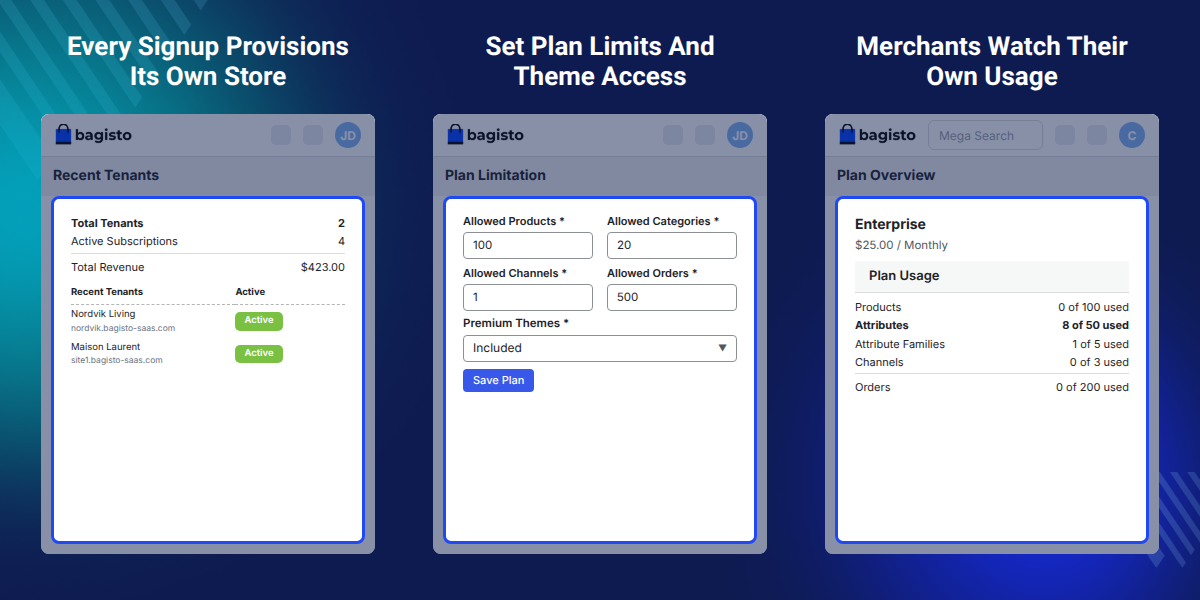
Highlighted Features
Automatic Store Provisioning
A new signup receives a storefront, an admin panel, and a subdomain with no setup work from your team.
Plan Limits and Usage Bars
Merchants watch how much of their product, category, and order allowance a plan still leaves them.
Cross-Tenant Insights
Gross volume, orders, active tenants, and new signups roll up over 7, 30, and 90 day windows.
Login As Tenant
Open a merchant admin panel and reproduce a reported issue without ever asking for a password.
Signed Webhook Events
Tenant, subscription, and billing events post as signed JSON to any system you already run.
Premium Theme Gating
Breeze, Fashion, Commercia, and Adornments reach only those stores on a plan that permits them.
Why Do We Need a Multi Company SaaS Module for Bagisto?
Laravel e-Commerce Multi Company SaaS Module lets multiple merchants run separate stores from one Bagisto installation, with their own catalogs, admin panels, and customer data.
Managing multiple merchants separately quickly becomes complex, with individual deployments, credentials, and invoices to maintain for each store.
Multi Company SaaS Module uses a multi-tenant setup to serve multiple stores from one codebase while keeping each merchant's catalog, orders, and customers separate.
Provisioning happens at signup, so a merchant reaches Store Setup while the registration form is still fresh. Their plan usage bars read from the same limits you set on the plan, which keeps a support reply and the merchant screen in agreement.
Also, if you want suppliers to run branded microsites for wholesale buyers, you can check our module Laravel eCommerce SaaS B2B Marketplace.
Use Cases
-
Launch a Hosted Store Builder
Offer store subscriptions where merchants select a plan, pay, and start selling products from their own store.
-
Run a Franchise Network
Give each branch its own storefront and order queue while head office monitors all branches from one dashboard.
-
Serve Agency Clients
Host multiple client stores on one platform, with each client getting a separate admin panel and custom domain.
-
Build a Regional Mall
Let local shops join one platform while keeping their own branding, storefront, name, and theme.
-
Offer Free Trial Stores
Enable trial plans with a set duration so prospects can test a complete store before subscribing.
-
Split Brands Under One Company
Let large retailers manage separate brand stores while maintaining individual catalogs, channels, and currency settings.
Super Admin Dashboard and Cross-Tenant Insights
Super admins sign in at /super/login and land on the platform dashboard. Totals for tenants, active subscriptions, and revenue sit beside recent tenants and recent invoices.
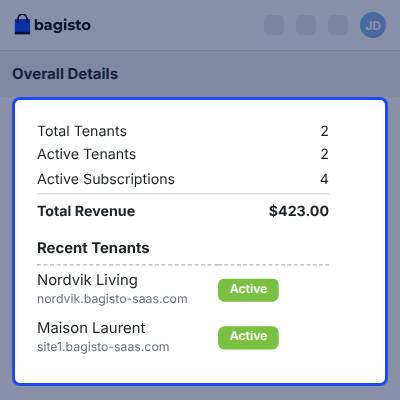
- Read total tenants, active tenants, active subscriptions, and total revenue at a glance.
- Compare 7 day, 30 day, and 90 day windows on the insights trend chart.
- Open the Needs Attention panel for tenants with expiring plans or failed payments.
- Sort the tenant leaderboard by volume and export the result.
- Review subscription stats and plan distribution across the whole platform.
- Reset a lost super admin password from the forgot-password screen.

Tenant Management and Store Provisioning
Tenant grid lists every merchant on the platform with search, filters, and pagination. Registering a tenant here provisions the storefront and the admin panel in the same step.
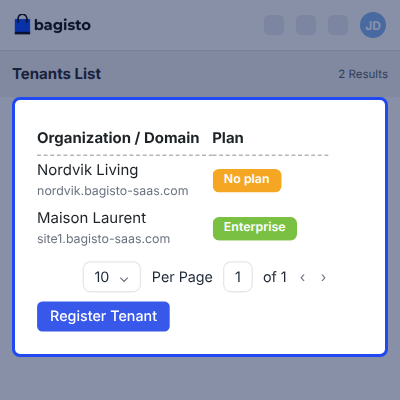
- Register a tenant and let provisioning create the store automatically.
- Edit tenant details, status, profile image, and CNAME value.
- Assign a plan to a tenant, or cancel the plan they hold.
- Use Login As Tenant to enter a merchant admin panel directly.
- Browse cross-tenant read-only lists of all customers, products, and orders.
- Delete a tenant when the account is closed.

Subscription Plans and Plan Limits
Plans carry a code, a name, a description, and pricing. Monthly and yearly pricing sit on the same plan, and yearly is entered month by month.
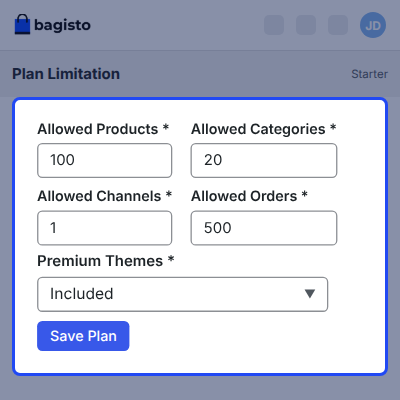
- Cap products, categories, attributes, attribute families, channels, and orders per plan.
- Toggle premium themes on a plan to gate storefront theme access.
- Add a plan offer as a fixed amount or a percentage discount.
- Switch trial plans on and set how many days a trial runs.
- Check the purchased plans list to see which merchant sits on which plan.

Tenant Billing and Self-Service Checkout
Merchants handle their own billing inside the store admin. Plan overview shows the current plan, its price, the next billing date, and the payment method on file.
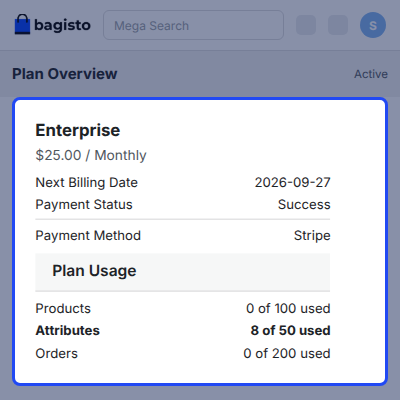
- Compare plans with a monthly and yearly toggle before choosing one.
- Pay through Stripe, PayPal, or the manual gateway at checkout.
- Download subscription invoices from the tenant panel.
- Look back over purchased plan history for past renewals.
- Keep company profile and billing address details up to date.

Storefront Themes for Every Tenant Store
Every store starts on the Default theme. Breeze, Fashion, Commercia, and Adornments are premium themes, and a store only sees them when its plan permits premium themes.
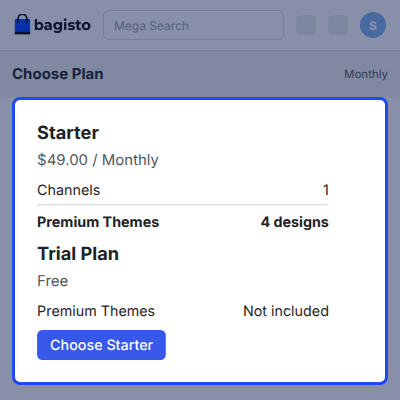
- Pick a theme per channel from the list the plan allows.
- Edit theme content blocks such as sliders, collections, columns, and footer.
- Give merchants on higher plans a visible reason to upgrade.
- Keep theme customizations stored through an automatic downgrade.

Custom Domain and CNAME Mapping
Each store gets a username.rootdomain.com subdomain at registration. Merchants who own a domain point it at that subdomain with a CNAME record, and no extra plugin is needed.
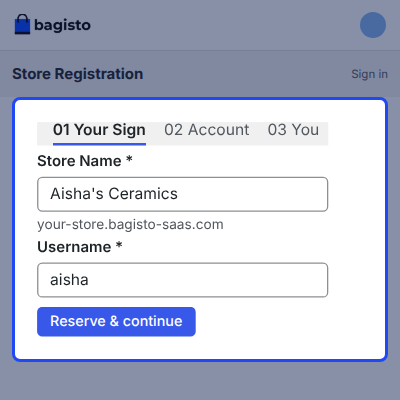
- Set the CNAME value for a tenant from the tenant edit screen.
- Show a live subdomain preview during the three-step registration form.
- Keep the default subdomain working alongside the mapped custom domain.
- Let a merchant trade under their own brand address from day one.

Webhooks, Agents, and Platform Settings
Settings hold the pieces that keep a platform running. Agents, roles, currencies, exchange rates, and webhooks all live here.
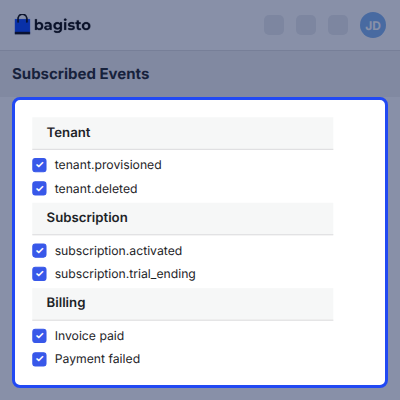
- Fire tenant events on created, provisioned, updated, and deleted.
- Fire subscription events on activated, changed, cancelled, trial ending, and expired.
- Fire billing events on invoice paid and payment failed.
- Inspect and retry any call from the webhook delivery log.
- Create agents and give them All access or a custom role.
- Add currencies and set exchange rates against the base currency.

Support
For any issue related to this module, please create a support ticket here at - https://webkul.uvdesk.com/en/customer/create-ticket/ or send an email to [email protected]
You may also check our quality Bagisto Extensions.
Specifications
Great Support Experience
Talking to Bagisto's support is always a great experience.
They're experts and know what they have to do very well.
Special thanks to Simant who is always up-to-date with every request!
Software Cpanel has Just great Experience with Bagisto software
Software Cpanel has Just great Experience with Bagisto software as open-source eCommerce system and they have Very Good Support Team, and we will always look forward to improving the bagisto system again and again.
Thanks for the great module
Thanks for the great module. We received Best Services from Webkul Team.
I am very impressed with their accurate & fast response. Many thanks from all of our Team.
Frequently Asked Questions
Specification
Detailed technical features and requirements to help you understand the module’s capabilities and ensure smooth integration with your system.
Cloud Hosting
Detailed technical features and requirements to help you understand the module’s capabilities and ensure smooth integration with your system.
Move to Cloud Today
We’re partnered with top-tier, trusted providers!
Default Configuration Details of Server
RAM 1 Core
Processor 30 GB
Hard Disk
Database
Want to know more how exactly we are going to power up your eCommerce Website with Cloud to fasten up your store
* Server Configuration may vary as per application requirements.
Change Logs
- + Features
- - Bugs
- - Feature Add (+)
- - Feature remove (-)
- - Bug Fixed (!)
- - Modification (*)
- Compatible with Bagisto version v2.4.9.
- Added a new Tenant Insights dashboard with active tenants, gross volume, orders, average order value, new signups, customers, trend chart, tenant health panel, and revenue leaderboard.
- Added automatic dashboard data refresh without requiring a page reload.
- Added a tenant health panel with Security, Errors, Dormant, and Stalled flags to identify tenants needing attention.
- Added a What do these flags mean? explanation with plain language descriptions and the exact limits used for each health flag.
- Added a tenant revenue leaderboard with search, sorting, filtering, and pagination.
- Added currency specific dashboard amounts without combining values across different currencies.
- Added an Insights setting to configure the dashboard cache lifetime.
- Added Insights permissions to the Super Admin roles screen.
- Fixed unauthorized access to Insights dashboard data by applying permission checks to every dashboard component.
- Fixed missing permission checks for the Update Rates action on exchange rates.
- Fixed an issue where an unexpected Super Admin agent account state could cause the panel to hang and run out of memory.
- Fixed tenant creation form validation so errors are displayed on the relevant fields.
- Fixed permission and server error messages that referenced missing text.
- Added missing dashboard and error messages in all 22 languages.
- Fixed tenant tagging for records created outside a tenant session, including scheduled and command line tasks.
- Unified tenant creation from the signup wizard and Super Admin panel through a shared process with consistent results and events.
- Improved failed tenant setup handling so incomplete setups no longer leave tenants partially created.
- Added a compiled stylesheet for Super Admin pages to remove dependency on externally built styles.
- Added automated code level and browser tests for the Insights dashboard.
- Updated module documentation with corrected installation steps and an expanded developer guide.
- + Compatible with bagisto version v2.4.8
- + Compatible with bagisto version v2.4.1
- + Compatible with bagisto version v2.3.9
- - Fixed company theme images visibility in Super Admin / Admin Shop Theme.
- - Fixed checkout flow after clicking Add to Cart.
- - Fixed CMS page editing functionality in the Super Admin panel.
- - Fixed product search functionality on the tenant end.
- - Fixed update process for Super Agent email and Social Connect settings.
- - Fixed CNAME URL handling on the tenant shop front.
- - Fixed footer text update functionality.
- - Fixed tenant shop front theme image display.
- + Compatible with Bagisto version v2.3.6
- + Compatible with Bagisto version v2.3.0
- + Handled exception when super admin saves the slider carousel without adding any data.
- + Enabled tenants to successfully create configurable products
- - Fixed GDPR request page not working at the customer end.
- - Fixed GDPR request page not working at the tenant end.
- - Fixed the booking page not working in list view.
- + Compatible with Bagisto version v2.2.3.
- + Add the "Save Filter" option on description mention pages at super tenant end.
- + Super Admin should be able to add the account image.
- + Tenant should receive email when super admin create new tenant.
- + Compatible with Bagisto version v2.2.2.
- - Fixed issue where the attribute family was missing from the data grid on the product list page (customer end).
- + Made the "Connect with us" section dynamic.
- - Removed the "phone" text on the tenant view page.
- - Fixed issue #351: Filter page not working on all super tenant pages.
- + Improved the status text on the order list page.
- - Fixed issue where products were not loading on the catalog and homepage.
- + Updated the status dropdown options from "True/False" to "Active/Disable" on the product list filter page.
- + Added state, postcode, and phone columns on the company address list page (Admin).
- + Display full country names in the country column on the company address list page.
- + Added respective currencies and locales when a new tenant is created by the super admin.
- + Made the "Connect with us" section dynamic.
- + Displayed the tenant company address list on the super admin view tenant page.
- + Enabled super admin to upload profile images on the edit agent page.
- + Enabled super admin to update the status of registered tenants from the tenants list page.
- - Fixed UI issues.
- - Fixed mobile responsiveness issues.
- - Resolved RTL view issues and improved display.
- + Compatible with Bagisto version v2.0.0. Implemented Full Page Cache support for improved performance.
- + Added Laravel Octane support for enhanced application speed and efficiency.
- + Added Dark Theme support, giving users the option to switch to a darker color scheme.
- - Fixed translation issues.
- - Fixed UI issues.
- - Resolved several functionality issues.
- - Fixed issues related to Dark Mode.
- + Compatible with Bagisto version v1.5.1.
- + Updated SaaS version in the super admin profile box.
- - Fixed issue where super admin tenants' product list was not appearing.
- - Fixed issue where no products appeared in tenant storefronts.
- - Resolved issue where configure sub-tabs were not opening in the super admin mobile view.
- + Compatible with Bagisto version v1.4.5.
- + Validated that the phone number field is numeric on the merchant registration page.
- + Compatible with Bagisto version v1.4.4.
- + Enabled the sitemap feature.
- + Updated all super admin grid pages.
- - Fixed an exception error when super admin attempted to delete tenants using the mass delete filter.
- + Displayed tenant, super agent, and page datagrids on the super admin end.
- + Added a delete notification flash message for tenants and CMS pages.
- - Fixed an exception error when super admin tried to reset a password.
- + Compatible with Bagisto version v1.4.3.
- + Implemented responsive design for the super admin section.
- + Added eye-visible password icon on the super admin login page.
- - Fixed exception when selecting tenant products and orders on the super admin end.
- - Fixed exception when adding new CMS pages on the super admin end.
- - Fixed configuration functionality on the super admin end.
- + Compatible with Bagisto version v1.3.3.
- + Added a feature for super admin to enable or disable any module.
- + Implemented ACL system for super admin users.
- + Configured SMTP email settings for each tenant.
- + Added domain registration and CNAME mapping options similar to Shopify.
- + Enabled multi-theme support for super admin.
- + Added CMS pages support for super admin.
- + Added an option to register a tenant account from the super admin end.
- - Fixed exception when creating a tenant with Seed-Data error.
- - Fixed velocity issues after creating a tenant.
- - Resolved ACL issue where super users couldn't log back in after deactivating all agents.
- - Fixed exception in the super admin panel.
- + Compatible with Bagisto version v1.3.2.
- - Fixed issue where header content count could not be updated from the Admin Velocity Menu.
- - Resolved issue where admin user couldn't be created with the same email used by a different tenant.
- - Fixed exception when creating a new tenant with a username already registered for a second channel.
- + Compatible with Bagisto version v1.3.1.
- - Resolved issue where deactivated tenants displayed a 404 error instead of an exception page.
- - Fixed issue where text on the image button was under inverted commas when editing the super channel.
- - Fixed issue where locale direction changed automatically when editing super admin locale.
- + Standardized warning color across all views (yellow for currency, red for locale).
- + Compatible with Bagisto version v1.2.x.
- - Fixed pre-filled SEO data issue on the home page as in Bagisto.
- - Fixed non-working layered navigation filters.
- - Resolved issue where changes in Velocity footer middle content did not reflect on the frontend for the last created company.
- - Fixed error during SaaS installation with Composer 2.0.
- - Resolved issue with saving the channel when the username was alphanumeric during company creation.
- + Added CNAME feature for tenants to map their sub-domain to a specific domain.
- + Added Arabic language translation.
- + Compatible with Bagisto version v1.1.0.
- + Added email configuration for tenants to receive email notifications.
- + Added support for the Booking Product type for tenants.
- + Compatible with Bagisto Velocity theme.
- + Compatible with Bagisto version v1.0.0.
- + Super Admin will receive an order email when a customer places an order.
- + Added a super agent email feature in the SaaS configure section.
- + Added Tenant's Customers DataGrid in the Super Admin panel.
- + Added Tenant's Products DataGrid in the Super Admin panel.
- + Added Tenant's Orders DataGrid in the Super Admin panel.
- + Compatible with Bagisto version v0.2.0.
- + Added company front link in the Super Admin header links.
- - Corrected spelling and message for deleting company addresses.
- - Resolved issue where the "company updated successfully" message was not displayed when updating the company profile.
- - Fixed issue where locale could not be deleted from the admin end.
- + Enabled admin to add new channels in SaaS.


