USD
  • EUR
  • INR
  • USD
Cart
Cart 0
  • You have no items in your shopping cart.
    Bagisto Laravel Extensions
    Cart
    Cart 0
    • You have no items in your shopping cart.
    Hire a Developer
    ×
    Contact Us!
    Send Again
    Close
    Please Login to Write Your Review
    Bagisto Marketplace Delivery Time Slot SaaS

    Bagisto Marketplace Delivery Time Slot SaaS

    x
    Free
    $99.00
    Add To Cart

    Bagisto Marketplace Delivery Time Slot lets sellers and the tenant publish delivery windows that customers book at checkout.


    • Create default delivery windows for any calendar date.

    • Set a start time, an end time, and a booking quota per window.

    • Set the minimum days required in order processing before delivery.

    • Let sellers publish delivery windows for their own products.

    • Fall back to the tenant defaults when a seller publishes none.

    • Search and filter every active window in one delivery slot list.

    • Show the available delivery windows on the product page.

    • Group the checkout calendar per seller in the customer cart.

    • Hide a delivery window once its booking quota is full.

    • Track booked deliveries in a dedicated Delivery Orders list.

    • Give sellers their own Delivery Order History with export.

    • Keep windows, bookings, and settings separate for every tenant.

    Bagisto Marketplace Delivery Time Slot SaaS
    Bagisto Marketplace Delivery Time Slot SaaS
    $99.00
    Check How It Works

    Need Help Deciding?

    Support answers within one business day.

    Open a ticket
    $99.00
    Configure and Buy
    X
    • Description
    • Reviews
    • FAQ
    • Customers ()
    • Specifications
    • Cloud Hosting
    • Changelog

    Bagisto Marketplace Delivery Time Slot is a Bagisto SaaS extension that adds seller-level scheduling to a multi-seller marketplace.

    Tenants build default windows for each date. Every delivery time window carries a start time, an end time, and a booking quota.

    Sellers publish windows against the products they own. Whoever publishes nothing inherits the tenant defaults instead.

    Customers meet one calendar per seller at checkout. Windows that reach their quota drop out of the list.

    Bookings follow the order into the order view, the invoice, customer order history, and the order placed mail.

    Additionally, if you want the multi-tenant platform this module plugs into, then check Laravel e-Commerce Multi Company SaaS Module.
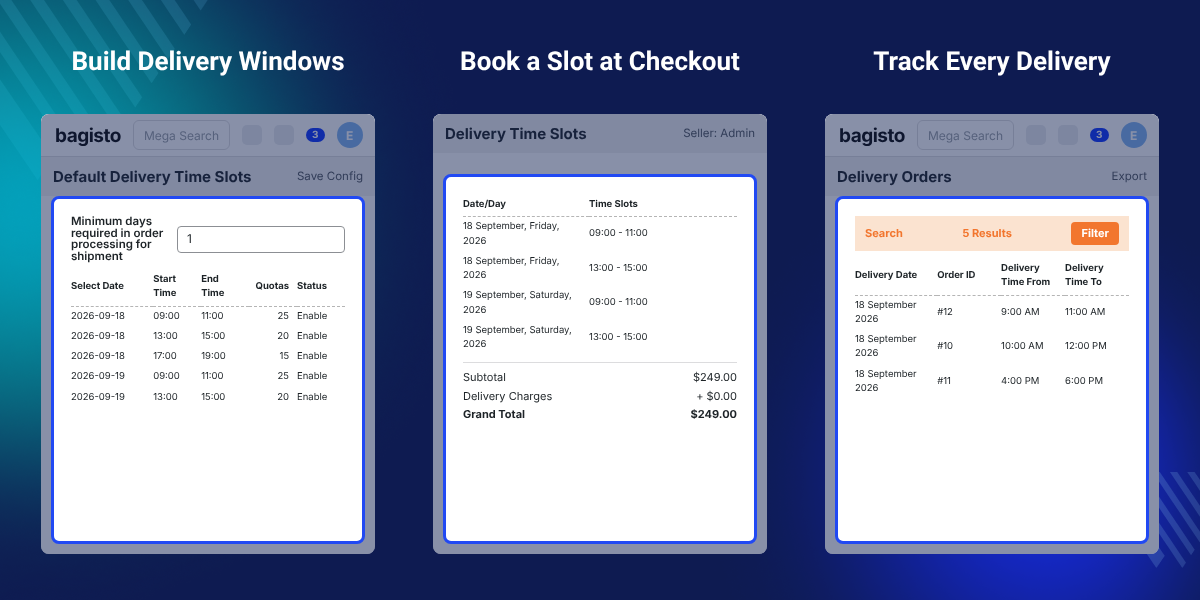
    Bagisto Marketplace Delivery Time Slot

    Highlighted Features of Bagisto Marketplace Delivery Time Slot

     Default Delivery Windows

    Tenants build windows for any date, with a start time, an end time, a quota, and a processing period.

     Seller Published Slots

    Sellers publish windows against the products they own, and inherit the tenant defaults until they do.

     Slot List Filters

    One list holds every active window, searchable by seller name or delivery day and sortable by column.

     Per-Seller Checkout

    Three sellers in one cart produce three calendars, each carrying that seller's published windows.

     Quota Enforcement

    Windows disappear from checkout once bookings reach the quota the seller set on them.

     Delivery Order Export

    Tenants filter booked deliveries by date, order, or seller name, then export the result.

     Seller Order History

    Sellers read the bookings taken against orders of their own, with a purchase date on every row.

     Tenant-Level Isolation

    Every window and booking carries the company that created it, including the ones a seller creates.

    Why Do We Need Bagisto Marketplace Delivery Time Slot?

    Bagisto Marketplace Delivery Time Slot exists because a marketplace cart rarely holds one seller's goods.

    Two sellers ship from two places on two rotas. One delivery date across the whole order suits neither of them.

    Without a schedule, sellers agree times over e-mail once the order lands, and the marketplace owner never sees the promise.

    Bagisto Marketplace Delivery Management hands each seller its own calendar.

    Sellers set their windows, quotas, and processing days, inside the weekdays the tenant allows.

    Beneath that sits a tenant floor, so any seller publishing nothing falls back to the defaults.

    Quota matters more than it looks. Windows vanish at the quota rather than greying out, so nobody books a van that left this morning.

    Also, check Laravel eCommerce Multi Tenant Marketplace Table Rate Shipping for rates by zip code range and weight.

    Bagisto Marketplace Delivery Time Slot Use Cases

    • Grocery and Food Marketplaces

      Grocers publish morning and evening windows with a quota that matches their kitchen capacity.

    • Multi-Seller Delivery Carts

      Baskets spanning several sellers resolve into one calendar each, without a single shared date.

    • Local Seller Networks

      Sellers delivering inside one town publish windows their own round can reach that day.

    • Made to Order Sellers

      Processing periods hold the first offered date behind the build time each seller needs.

    • Capacity Bound Sellers

      Quotas per window stop a seller taking more drops than its round can serve that day.

    • Multi-Channel Marketplaces

      Settings and the no-slot message differ per channel, and per language within each channel.

    Bagisto Delivery Time Slot Setup

    Tenants build the default windows every seller falls back to. Each window holds a date, a time range, a booking quota, and a processing period.

    Several windows go onto one date from the same screen. The module refuses a second window at the same date and start time.
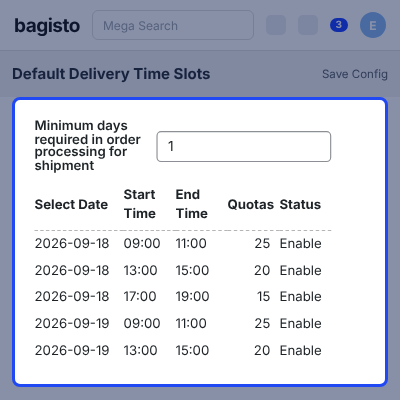
    • Create default windows for any date, several at a time.
    • Set a time range, a quota, and the minimum processing days.
    • Edit the date, time range, or quota of a saved window.
    • Activate or deactivate a window to control what checkout offers.
    • Delete one window, or select several and delete them together.
    • Quotas outside the range of 1 to 99999 are refused on save.
    Bagisto Delivery Time Slot Setup

    Bagisto Delivery Slot Management

    One Delivery Time Slots list carries every active window in the store. Each row says whether a window belongs to a seller or to the tenant.

    Tenants search by seller name or delivery day, narrow the rest by column, then open a seller profile from the row.
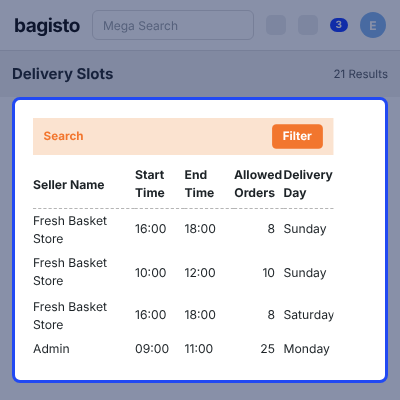
    • See every active window in one list, marked seller or tenant, with the seller profile a click away.
    • Search by seller name or delivery day, and sort by any column.
    • Filter by allowed orders, delivery day, start time, and end time.
    • Change how many windows appear on each page.
    Bagisto Delivery Slot Management

    Bagisto Seller Delivery Slots

    Sellers publish delivery windows from the seller panel, against the products they own. Individual sellers set their times and quotas.

    No seller reads or edits another seller's windows. Publishing nothing stays valid, because the tenant defaults cover that seller instead.
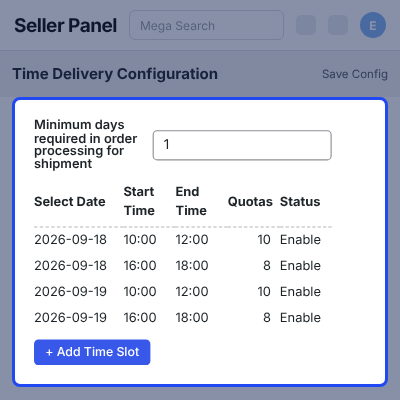
    • Publish delivery windows against the products they own.
    • Set a time range, a quota, and their own processing days.
    • Activate or deactivate those windows, and add more to a date.
    • A seller never sees or edits another seller's windows.
    • Tenant defaults apply to any seller that publishes none.
    Bagisto Seller Delivery Slots

    Delivery Time Slot Configuration

    Configuration holds the rules the seller screens and the checkout both obey.

    Tenants switch the module on, pick the delivery weekdays, and set how many dates checkout displays.

    Every setting takes a value per channel, and the no-slot message takes one per channel and per language.
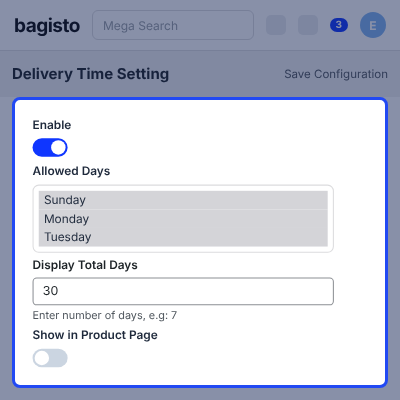
    • Enable or disable the module for one store.
    • Select the weekdays that qualify, and the dates checkout displays.
    • Write the message shown when no window is available.
    • Show the windows on the product page, and choose whether past ones stay visible.
    • Disabling the module blocks its admin and seller screens.
    Delivery Time Slot Configuration

    Product Page Delivery Windows

    Customers read the delivery windows open to a product before it enters the cart.

    Windows arrive grouped by day and date, the same way checkout presents them, while the tenant keeps that setting switched on.
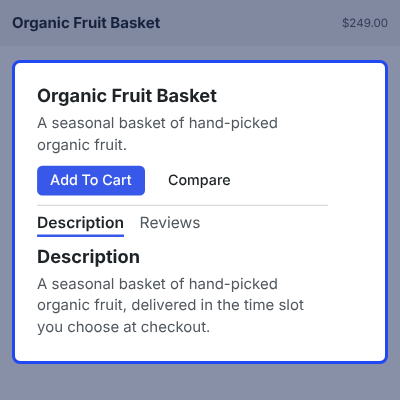
    • See the windows available for a product, grouped by day and date, before the cart.
    • The block follows the tenant configuration setting.
    • Windows come from the seller that owns the product, or the tenant defaults.
    Product Page Delivery Windows

    Bagisto Marketplace Delivery Slot at Checkout

    Checkout groups the windows per seller. Three sellers in one cart produce three calendars, and products the tenant sells sit under Admin.

    Customers pick a checkout delivery slot while placing the order. Full windows disappear rather than grey out, and a shipping method is still required.
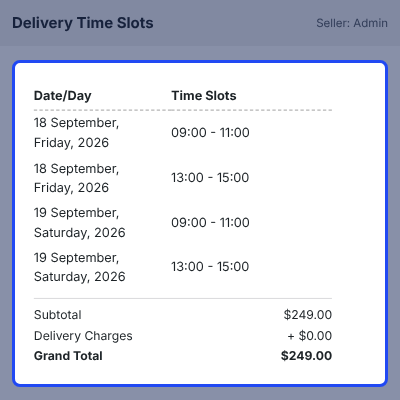
    • Choose a delivery date and a time window per seller.
    • Read one calendar per seller, with tenant products under Admin.
    • See only the configured weekdays and number of dates.
    • Read a clear message for a seller with no window available.
    • Windows at their quota, and dates inside the processing time, stay hidden.
    • The chosen windows stay on the cart and reach the order.
    Bagisto Marketplace Delivery Slot at Checkout

    Delivery Orders and Notifications

    Every booking lands in a dedicated Delivery Orders list. Each row carries the seller, the delivery date, the order, and the time window.

    Tenants search the list, open an order from it, and export the result. Booked slots also reach the order view and the invoice.
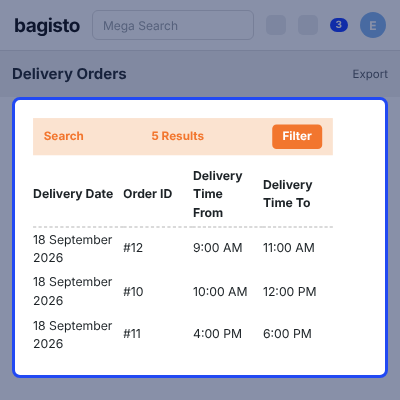
    • Search the list, open an order from it, filter by date, order, or seller, then export.
    • Delete one booking, or select several and delete them together.
    • Read the booked slot on the order, the invoice, and order history.
    • Order placed mail reaches the customer, the seller, and the tenant.
    Delivery Orders and Notifications

    Seller Delivery Order History

    Sellers read the bookings taken against orders of their own, in a Delivery Order History list.

    Each row carries the delivery date, the order, the chosen window, and the purchase date. Filtering, export, and clearing stay inside that seller.
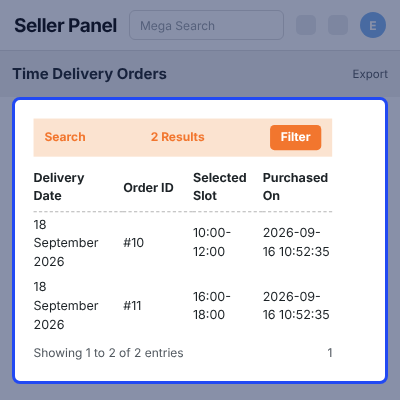
    • See the delivery date, order, chosen window, and purchase date.
    • Filter by delivery and purchase date, then export the list.
    • Delete one booking, or select several and delete them together.
    • Read the booked date and window on their own order view.
    Seller Delivery Order History

    Complete Bagisto Marketplace Delivery Time Slot Feature List

    Tenant Default Delivery Windows

    • Create default windows for any calendar date, several going onto one date from the same screen
    • Set a time range, a booking quota, and the minimum processing days on every window
    • Edit a saved window, activate or deactivate it, and delete one or several together
    • A second window at the same date and start time is refused, as is a quota outside 1-99999
    • Tenant defaults apply to any seller who has published no windows of its own

    Slot List and Filters

    • See every active window in one Delivery Time Slots list, marked seller or tenant, with the seller profile a click away
    • Search by seller name or delivery day, and filter by allowed orders, delivery day, start time, and end time
    • Sort by any of those columns, and change how many windows appear per page

    Seller Delivery Slots

    • Sellers publish windows against the products they own, with their times, quotas, and processing days
    • Sellers activate or deactivate those windows, and add further ones to a date they cover
    • Sellers only ever see and edit windows of their own, never another seller's

    Storefront and Checkout

    • Show the delivery windows on the product page, grouped by day and date
    • Group the checkout calendar per seller, with the tenant's own products listed under Admin
    • Offer only the allowed weekdays and only as many dates as the configuration displays
    • Hide a window at its booking quota, and hide dates inside the minimum processing time
    • Show a clear message for a seller with no window, ask for a shipping method, and carry the choice into the order

    Delivery Orders, History and Mail

    • Track every booking with the seller, delivery date, order, and time window on one row
    • Search, filter by date, order, or seller name, open an order, and export
    • Delete one booking or several together, from the tenant list and the seller list alike
    • Give sellers a Delivery Order History with its own filters and export
    • Read the booked slot on the order view, the invoice, and customer order history
    • Order placed mail reaches the customer, the seller, and the tenant

    Configuration and Channels

    • Enable or disable the module per store, which blocks its admin and seller screens
    • Select the delivery weekdays, the dates checkout displays, and whether past windows stay visible
    • Configure every setting per channel, and the no-slot message per channel and per language

    SaaS, Tenancy and Setup

    • Every tenant keeps its own windows, bookings, and settings, configured independently
    • Every window and booking is stamped with the company that created it, seller windows included
    • Admin lists, seller lists, and checkout all stay inside the current tenant
    • The super admin assigns the extension to a subscription plan, and a plan without it switches off
    • Install with one artisan command that migrates the base and SaaS tables and publishes assets
    • Re-run it safely, or skip migrations when only assets need republishing, in 22 languages

    Support

    For any query or issue, please create a support ticket here http://webkul.uvdesk.com/. You may also check our all Bagisto Extensions.

    Specifications

    Product Version2.4.9
    Released4 days ago
    Last UpdatedSeptember 23, 2026 (4 days ago)
    Supported VersionsBagisto  2.4.x  

    Ratings

    We'd love to hear your thoughts! Share your feedback and help us craft an even better experience tailored just for you.

    Write a review

    Frequently Asked Questions

     How does Bagisto Marketplace Delivery Time Slot work?
    Bagisto Marketplace Delivery Time Slot lets the tenant build default delivery windows and each seller publish its own. Customers pick a date and a window per seller at checkout.
     
     What happens when a seller publishes no delivery windows?
    That seller falls back to the tenant default windows, so checkout still shows a calendar and no customer is left without a delivery option.
     
     How does checkout handle a cart with several sellers?
    Checkout shows one calendar per seller in the cart. Products the tenant sells appear under Admin, and the customer books each calendar separately.
     
     Can a booking limit be set on a delivery window?
    Yes. Every window carries a quota between 1 and 99999. Once the bookings reach it, the window is hidden at checkout rather than shown as unavailable.
     
     Can sellers see each other's delivery slots?
    No. A seller only ever reads and edits its own windows and its own bookings. The tenant is the only party that sees every window in one list.
     
     Can the delivery orders list be exported?
    Yes. The tenant exports the Delivery Orders list, and each seller exports its own Delivery Order History. Both carry their own search and filters.
     
     Does each tenant keep separate delivery data?
    Yes. Every window and booking is stamped with the company that created it, seller windows included. Admin lists, seller lists, and checkout stay in-tenant.
     
     How is the module installed?
    One artisan command installs it. The command migrates the base and SaaS tables, publishes the assets, and clears the caches, and it can be re-run safely.

    Specification

    Detailed technical features and requirements to help you understand the module’s capabilities and ensure smooth integration with your system.

    Cloud Hosting

    Detailed technical features and requirements to help you understand the module’s capabilities and ensure smooth integration with your system.

    Default Configuration Details of Server

    1 GB
    RAM
    1 Core
    Processor
    30 GB
    Hard Disk
    1 GB RAM & 1 Core Processor
    Database

    Want to know more how exactly we are going to power up your eCommerce Website with Cloud to fasten up your store

    * Server Configuration may vary as per application requirements.

    Change Logs

    • - Feature Add (+)
    • - Feature remove (-)
    • - Bug Fixed (!)
    • - Modification (*)
    Version 2.4.9
    • + Now compatible with new release Bagisto v2.4.9, SAAS Customizer v2.4.9.1, Bagisto Marketplace v2.4.9.3, Marketplace SaaS v2.4.9.0 and Marketplace Delivery Time Slot v2.4.9.0.
    • + The delivery time slot extension can now be granted per subscription plan. A super admin can include or exclude it while creating a plan, and a company whose plan does not include it has the extension switched off.
    • + Delivery slots and slot bookings are registered as company-aware overrides once the application has finished booting, so the tenant-aware models are used no matter which order the delivery time slot packages are listed in.
    • + The install command locates the base and SaaS migration directories from the packages themselves instead of assuming a fixed folder under the project root, so installing from a different location no longer skips the migrations.
    • - A super admin working inside a tenant was shown every company's delivery slots and delivery orders, and any slot saved in that state was stored without a company. Both now follow the same tenant rules as the rest of SAAS Customizer v2.4.9.1.
    • - The default delivery time slots, delivery orders and seller delivery history grids failed to load on an installation that uses a database table prefix.
    • - Adding the company column to the delivery time slot tables failed on a store that already had slots saved, and the migration could not be run a second time. It is now safe to re-run and no longer requires the tables to be empty.


