Bagisto Marketplace FedEx Shipping adds the FedEx shipping method to your store, lets you calculate shipping rates, create shipments, and track orders from the Bagisto admin panel.
- Enable or disable the FedEx shipping method easily.
- Show a custom FedEx shipping title at checkout.
- Select allowed FedEx shipping service options.
- Choose weight units for shipping calculations.
- Configure package type for every shipment.
- Set the preferred FedEx drop off method.
- Create FedEx shipments from the admin panel.
- Track FedEx shipments from the admin dashboard.
- Description
- Reviews
- FAQ
- Specifications
- Cloud Hosting
- Changelog
Marketplace FedEx Shipping for Bagisto helps you add FedEx as a shipping option in your store. This Bagisto FedEx Integration lets your store communicate with FedEx services for shipping, shipment creation, and tracking.
Store owners can offer trusted FedEx delivery services during checkout. Customers can choose from the available shipping methods based on their order and location.
This module lets you manage shipment creation directly from the admin panel. This saves time and reduces the need to switch between different systems.
Admins can also track shipments without leaving the store dashboard. Order updates stay organized, making it easier to answer customer shipping questions.
You can configure shipping methods, package types, weight units, and drop off options. These settings help match your shipping process with your business needs.
This module works well for businesses that ship products across cities or countries. It supports smooth order fulfillment while giving customers reliable delivery choices.
From small online stores to growing businesses, this FedEx Shipping Extension for Bagisto helps simplify daily shipping tasks and order fulfillment. This allows your team to manage more orders with less manual work.
You may also be interested in our Laravel Aramex Shipping plugin Laravel Aramex Shipping, which integrates Aramex with your store to calculate shipping costs automatically during checkout.
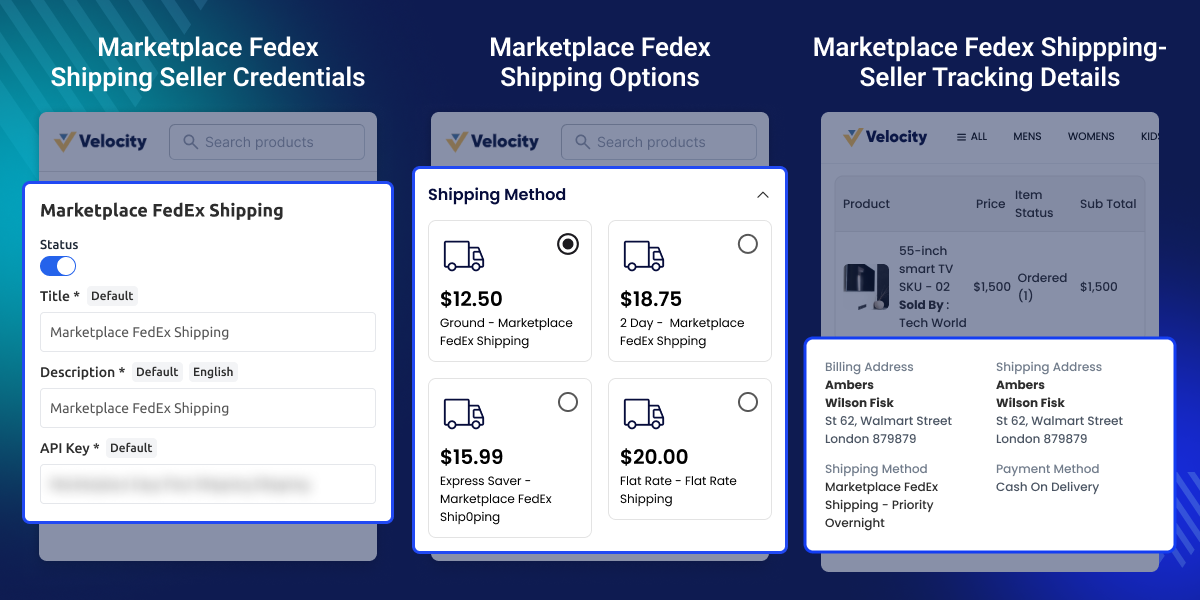
Highlighted Features of Bagisto Marketplace FedEx Shipping
Real-Time FedEx Shipping Methods
Offer Bagisto Real Time Shipping Rates through FedEx services at checkout. Customers can choose the available delivery option.
Custom Shipping Method Title
Set a custom title for the FedEx shipping method. Display a name that matches your store's shipping preferences.
Flexible Shipping Configuration
Choose supported shipping services, package types, weight units, and drop off options from the admin settings.
Create Shipments from Admin
Generate FedEx shipments directly from the Bagisto admin panel. Manage shipping without using external tools.
Track Shipments Easily
View Bagisto Shipment Tracking details from the admin dashboard. Follow delivery progress and answer customer questions quickly.
Simple Admin Management
Enable or disable the shipping method at any time. Update shipping settings as your business requirements change.
Why Choose Bagisto Marketplace FedEx Shipping for Your Store?
Many online stores need a trusted shipping carrier to deliver orders on time. Without direct FedEx support, shipping tasks often take more time. The default shipping setup may not provide FedEx services, shipment creation, or tracking from the admin panel. This can increase manual work.
Managing shipping from different systems can slow daily operations. It also makes it harder to keep order and shipment details together. This module adds FedEx shipping directly to your Bagisto store. You can configure shipping options, create shipments, and track deliveries from one place.
Flexible settings let you choose shipping methods, package types, weight units, and drop off options based on your business needs. In practical store operations, managing shipments from a single dashboard helps reduce manual work and improves order handling.
Use Cases
Ship Orders Across the United States
Stores selling across the U.S. can offer FedEx shipping at checkout. Customers choose the delivery service that fits their budget and timeline.
Manage Daily Store Shipments
Businesses with regular orders can create FedEx shipments from the admin panel. This reduces manual work and speeds up order processing.
Sell High Value Products
Jewelry, electronics, and premium goods need reliable shipping. FedEx services help stores deliver valuable products with shipment tracking.
Handle Business to Business Orders
Wholesalers can use FedEx to ship bulk orders to distributors and retail partners. Shipment tracking helps monitor deliveries until they arrive.
Support International Shipping
Businesses selling to customers in other countries can provide FedEx international shipping services for eligible destinations.
Improve Customer Order Tracking
Customer support teams can check shipment status from the admin panel. This helps answer delivery questions without logging into another system.
Marketplace FedEx Shipping Configuration
Set up FedEx shipping from the admin panel. Manage shipping settings, services, and package options for every marketplace seller.
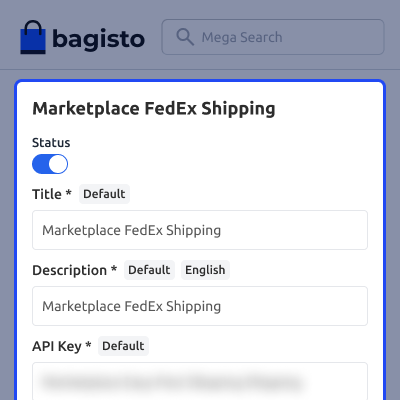
- Turn FedEx shipping on or off for all marketplace sellers.
- Add a custom title for the FedEx shipping method.
- Choose FedEx shipping services for marketplace orders.
- Select the package type used for every shipment.
- Set the preferred FedEx drop off type for shipments.
- Choose the weight unit used to calculate shipping rates.

Seller FedEx Account
Sellers can add their own FedEx account details from the seller panel. This lets them create shipments with their own account.
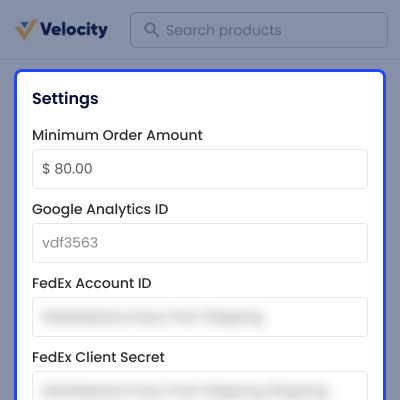
- Add FedEx account details from the seller dashboard.
- Update FedEx account information whenever needed.
- Use a personal FedEx account for shipping orders.
- Create shipments without asking the admin for help.
- Keep each seller account and settings separate.
- Connect the account before creating shipments.

Marketplace FedEx Shipping Options
Sellers can choose the FedEx shipping services they want to offer. They can update shipping settings whenever required.
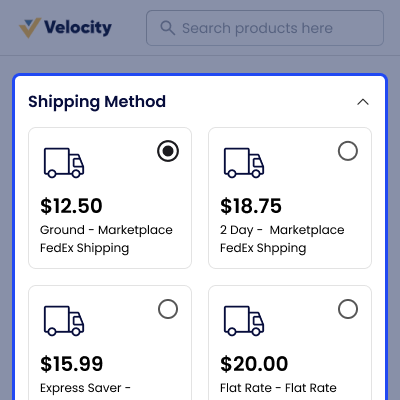
- Choose available FedEx shipping services for products.
- Set shipping methods based on seller preferences.
- Manage shipping settings from the seller dashboard.
- Apply saved shipping settings to new orders easily.
- Support different shipping needs for each seller.
- Update shipping options whenever business needs change.

Seller Order Details
Sellers can create FedEx shipments from the order page. Shipment details and tracking stay available in one place.
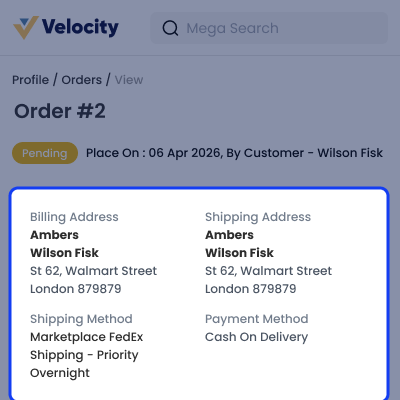
- Create FedEx shipments directly from seller orders.
- View shipment details from the seller order page.
- Create shipments after the order gets approved.
- Check tracking details for every shipped order.
- Manage all shipping tasks from one dashboard.
- Reduce manual work during shipment processing.

Customer Shipping Details
Customers can see the FedEx shipping method during checkout. They can also track their shipment after the order is shipped.
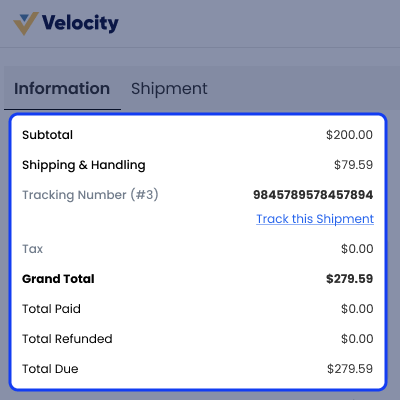
- View the FedEx shipping method during checkout.
- See shipping details on the customer order page.
- Track shipments with the available tracking number.
- Check shipment status after the order is shipped.
- View delivery updates from the customer account.
- Follow order progress until the package arrives.

Support
For any query or issue, please create a support ticket here http://webkul.uvdesk.com/. You may also check our all Bagisto Extensions.
Specifications
Frequently Asked Questions
Specification
Detailed technical features and requirements to help you understand the module’s capabilities and ensure smooth integration with your system.
Cloud Hosting for Websites & Applications
Power your website or application with flexible, scalable cloud infrastructure designed for performance and growth.
Move Your Website or Application to the Cloud
Get started with Cloudkul hosting tailored to your needs.
Configure Your Cloud Server
Choose server resources based on your workload, expected traffic, and performance requirements.
Start with the cloud resources your project needs today and adjust your server configuration as your business grows.
Explore flexible cloud hosting plans and choose your ideal configuration.
* Starting price is indicative. Final pricing and available server resources depend on the selected hosting configuration and requirements.
Change Logs
- - Feature Add (+)
- - Feature remove (-)
- - Bug Fixed (!)
- - Modification (*)
- * Compatible with Bagisto v2.5.0 and Marketplace v2.5.0.x. Updated the module version to v2.5.0.0.
- ! Fixed the customer order page crashing because the old print-invoice route name was no longer available. Rebased the page on the Bagisto v2.5 version, retaining only the FedEx tracking link and adopting core's Tailwind CSS 4 classes and renamed icons.
- ! Rebased the admin shipment page on its Bagisto v2.5 version, restoring core's Tailwind CSS 4 classes around the FedEx Shipping card.
- ! Fixed FedEx panel, checkout warning and tracking-page styles that Tailwind CSS 4 no longer compiles. Updated important modifiers, opacity colours, rounded sizes and seller tracking card shadow classes. The tracking pages' empty state now uses the icon-orders icon.
- * Renamed the module's route names to snake_case to match Bagisto v2.5. For example, admin.fedexshiping.print-shipping-label is now admin.fedexshiping.print_shipping_label. URLs remain unchanged.
- + Added PostgreSQL support by seeding seller credential attributes as actual booleans and comparing inventory-source status with true.
- ! Fixed the FedEx authentication error and admin "shipment not found" tracking message displaying only in English. Both now use module translations.
- ! Fixed saving seller FedEx credentials clearing other seller profile data, including logos, banners, restricted categories and channels. Only FedEx seller attributes are now saved.
- ! Fixed FedEx shipments not being booked when different sellers' parts of an order shipped separately. The order listener now creates a FedEx shipment for each seller whose items use FedEx, using the account that quoted that seller's rate.
- ! Fixed FedEx labels, pickups and fulfilment bookings using an incorrect FedEx service. The service is now resolved through resolveShipmentServiceType(), including the method selected for the shipment's seller. The customer order page also displays FedEx tracking links for these shipments.
- ! Fixed FedEx rate requests obtaining a new OAuth token for every inventory source and pre-flight check. Tokens are now reused per account until they expire.
- * Added FedExShippingHelper::getRatesPerSeller() to rate each seller's items separately and identify rates quoted using the seller's own FedEx account for modules that offer carriers per seller.
- * Removed overrides of core customer order and admin shipment pages, and Marketplace seller order shipments, to prevent outdated copies from hiding upstream changes. FedEx tracking links and admin and seller shipment panels are now added through render-event partials, with data supplied by view composers.
- ! Fixed seller and admin label and pickup routes, and the seller credentials route, returning server errors for non-numeric IDs on PostgreSQL. These routes now return 404 for invalid IDs on every database.
- ! Fixed the fallback pickup origin using whichever active inventory source the database returned first. It now selects the active source with the highest priority, followed by the lowest ID, across all databases.
- ! Fixed FedEx lookups by cart, order, pickup and tracking number, and pickup searches by source, date, carrier and status, scanning tables on PostgreSQL. Added indexes with short, prefixed names through the create migrations.
- ! Fixed FedEx shipment booking failures after order placement being returned to checkout, potentially causing checkout failures or repeated orders. Such failures are now logged while the order remains placed.
- ! Fixed admin and seller FedEx tracking tables losing cell padding and header styling because their Tailwind classes were unavailable in the respective stylesheets. Also updated the checkout warning's bullet-list class to one supported by the storefront stylesheet.
- * Updated the checkout "FedEx cannot ship" warning to receive its items through Http\ViewComposers\UnshippableWarningComposer instead of looking up the cart in the template.
- ! Fixed sellers accessing FedEx labels, pickups and tracking for shipments containing the admin's or another seller's items. Seller routes now work only when every shipment item belongs to that seller's Marketplace shipment and return 404 for other or mixed shipments. The seller FedEx panel is displayed only for eligible shipments.
- ! Fixed FedEx labels being purchased through GET requests when an unbooked shipment's print link was opened. Labels are now purchased only through POST using the Buy FedEx Label button on the admin shipment page or seller shipment card. Purchases are limited to one per shipment using a shared lock with Marketplace's FedExFulfilment::createLabel(), and labels are stored with the shipment. Print links only download stored labels.
- ! Fixed custom admin roles receiving 401 errors on FedEx shipment actions. Added dedicated Sales → Shipments permissions for Print FedEx Label, Track FedEx Shipment and Schedule FedEx Pickup. The admin FedEx panel now displays only actions allowed by the role.
- ! Fixed cancelling a FedEx pickup from the FedEx panel leaving the corresponding Marketplace pickup scheduled on the seller's shipment card.
- + Added seller payout support for FedEx shipping quoted through the seller's own FedEx account. Listeners\SellerShipping adds eligible shipping charges to seller_total and seller_total_invoiced after order placement, seller invoices and refunds. Shipping quoted on the admin's account remains store shipping, and orders using another method include only item totals.
- ! Fixed seller sub-users seeing empty FedEx credential fields and being redirected to seller login when saving. Sub-users now view and save the FedEx credentials of their associated seller account.
- ! Fixed seller panel FedEx routes being accessible to all seller sub-users regardless of role. Added required permissions for Settings → FedEx Shipping and Sales → Orders actions for Print FedEx Label, Track FedEx Shipment and Schedule FedEx Pickup.
- ! Fixed the seller FedEx credentials page being missing from the seller menu. It now appears under Settings → FedEx Shipping when the carrier is active and sellers are allowed to use their own FedEx account.
- * Updated the carrier to read seller-specific shipping methods through FedExShippingHelper::getSellerShippingMethod(). It returns no method unless a module supporting split-order shipping overrides it, removing the dependency on another module's data.
- + Compatible with Bagisto v2.4.10 and Bagisto Marketplace v2.4.10.0; bumped the module version to v2.4.10.0.
- Audited the module against the marketplace v2.4.10.0 breaking changes, including the removed
ThemeCustomizationRepository, the 20 argument productImporter, the renamedmarketplace.sales.seller.transaction.save.afterandquery_builder.prepare.afterdatagrid events, and the relocatedmarketplace.general.*config codes. None are used here, so no code changes were required. The FedEx and fulfilment carriers already match the unchangedWebkul\Marketplace\Carrierscontracts. - Aligned
composer.jsonwith the core marketplace package conventions by dropping the brokenextra.laravelauto discovery block, as the provider is registered manually per the README, and adding a package description and keywords. - - Removed the dead
webpack.mix.js,package.json, andpackage-lock.jsonbuild tooling. The module ships no compiled front end assets, and the old Laravel Mix config pointed to amarketplace-fedex.scsssource that does not exist, so no build step is needed. - Hardened the
marketplacefedex:installcommand by resolving the migration path throughrealpath()with--realpathso it runs from any working directory, publishing provider assets with--force, and printing an ASCII onboarding banner on completion.
- + Compatible with Bagisto v2.4.9 and Bagisto Marketplace v2.4.9.0.
- + Compatible with Bagisto v2.4.4.
- + Admin can track shipment.
- -Remove unwanted methods, create new methods, modified methods, refactoring code and clean up also.
- + Admin can create complete or partial order quantity shipment.
- + The admin can enable or disable the FedEx Shipping method.
- + The admin can set the FedEx shipping method name that will be shown from the front side.
- + The admin can define the allowed methods and weight units.
- + The admin can set packaging type and drop off type.
- + compatible with Bagisto v2.1.2