Send Again
Close
Bagisto Multi Tenant SaaS GST Module helps every tenant manage tax settings from their own admin panel without affecting other stores. Each tenant can set GSTIN, GST rates, HSN codes, and pricing preferences based on their business needs. This makes tax management simple and organized for every seller.
This module automates tax calculation during checkout. It applies IGST, CGST, or SGST based on the customer's billing state and supports Goods and Services Tax only for orders with Indian billing addresses. It also lets tenants assign tax rates and HSN codes to products and update details in bulk using CSV import.
It also simplifies daily tax management with a dedicated section to search, filter, sort, export, and manage GST-enabled products. Details such as GSTIN, HSN codes, and tax breakdowns are automatically added to orders, invoices, refunds, PDFs, and emails for better compliance and record-keeping.
Built for Bagisto Multi Tenant SaaS platform, this module keeps tax records separate for every tenant and removes them automatically when a tenant is deleted. It also supports role-based permissions for viewing, importing, and deleting GST records, helping businesses manage tax data securely as they grow.
Additionally, if you need GST management for a single Bagisto store, you can also explore Laravel eCommerce GST Extension. It lets you configure tax settings, assign HSN codes, and calculate IGST, CGST, and SGST automatically.
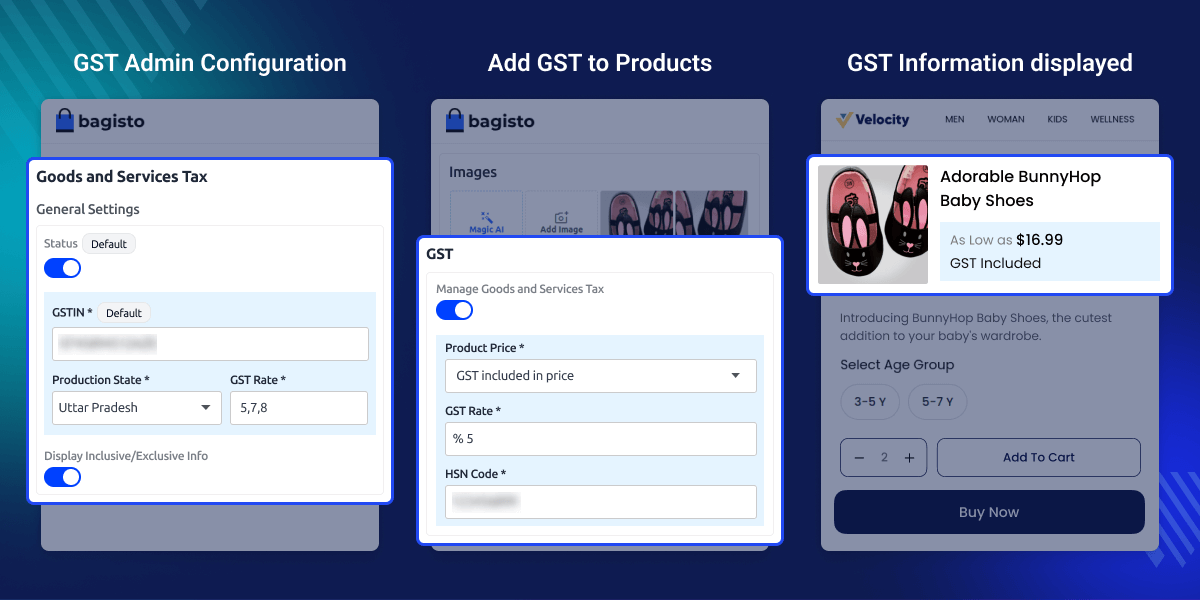
Each tenant can manage Goods and Services Tax Identification Number, state, GST rates, and tax settings from their own admin panel.
Assign GST rates, HSN codes, GST types, and inclusive or exclusive pricing for every product.
Calculate IGST, CGST, and SGST automatically based on the customer's billing state.
Display tax information on invoices, PDFs, order details, and customer emails automatically.
Managing taxes for many tenants is not easy. The default Bagisto SaaS system does not give each tenant separate GST settings. Store owners must manage tax data by hand. This takes more time and can lead to tax calculation errors.
Bagisto Multi Tenant SaaS GST Module gives each tenant full control of tax settings. It lets tenants manage rates, HSN codes, and GSTIN from a single place. It also calculates IGST, CGST, and SGST automatically and supports CSV import for faster updates.
This Multi Tenant SaaS GST Module for Bagisto saves time and reduces manual work. It helps tenants create GST-compliant orders with accurate tax details. Many SaaS marketplaces use this approach to keep tax records clear, simple, and easy to manage as their business grows.
Apart from this, if you want to integrate Stripe into your SaaS store, you can explore Laravel eCommerce Multi-Company SaaS Stripe Payment Gateway. It enables secure payments and automatic revenue sharing between tenants and the super admin.
Many sellers can manage GST separately on one SaaS marketplace.
Businesses that sell products across India can apply the correct GST to every order based on the customer's billing state.
Businesses with large product catalogs can update GST rates and HSN codes in bulk to save time and reduce manual work.
Growing SaaS marketplaces can give every new seller a separate GST setup from the first day.
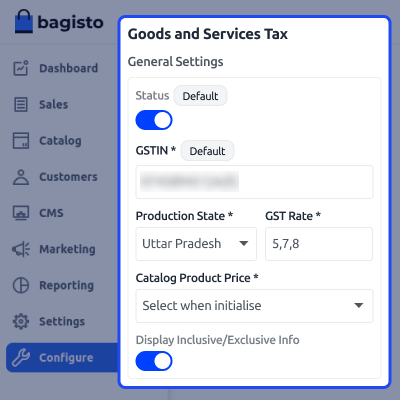
Set up all GST details from a single admin page. Add your GSTIN, select the production state, enter tax rates, and choose whether product prices are GST-inclusive or exclusive. This setup saves time and helps apply consistent tax rules across your store from the start.
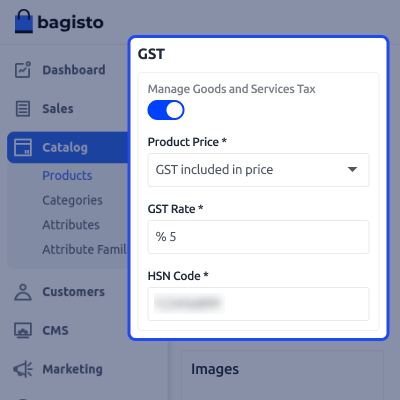
Add tax details to each product from the product edit page. Enable GST, choose how prices are shown, select the applicable rate, and enter the HSN code. This helps apply the correct tax to every product and keeps your product catalog GST-compliant.
For any query or issue, please create a support ticket here http://webkul.uvdesk.com/. You may also check our all Bagisto Extensions.
Each tenant has a separate admin panel to configure Goods and Services Tax (GST) settings, including GSTIN, state, and GST rates.
Yes, you can enable or disable GST, assign the appropriate rate and type, and add an HSN code for each product.
Yes, you can enable or disable GST for each product without affecting the configuration of other products.
You can choose to display product prices either with GST included or excluded, based on your pricing preference.
Yes. You can update the GSTIN, production state, GST rates, and other tax details whenever your business requirements change.
Detailed technical features and requirements to help you understand the module’s capabilities and ensure smooth integration with your system.
Detailed technical features and requirements to help you understand the module’s capabilities and ensure smooth integration with your system.
We’re partnered with top-tier, trusted providers!
Want to know more how exactly we are going to power up your eCommerce Website with Cloud to fasten up your store
* Server Configuration may vary as per application requirements.



