USD
  • EUR
  • INR
  • USD
Cart
Cart 0
  • You have no items in your shopping cart.
    Cart
    Cart 0
    • You have no items in your shopping cart.
    Hire a Developer
    ×
    Contact Us!
    Send Again
    Close
    Please Login to Write Your Review

    Laravel eCommerce GST Extension

    Laravel eCommerce GST Extension integrates the Indian Goods and Service Tax structure to the Bagsito store.


    • Admin can enter the GSTIN Number of their choice.

    • Option to select the State for taxation purposes.

    • Inbuilt feature in the extension to differentiate between IGST, CGST, and SGST based on home and away state.

    • Admin sets GST rate from the backend and can input multiple GST rates at a single time.

    • Function for admin to set the product price based on including/excluding GST or selecting it while editing or adding a product.

    • A button is provided to either display or hide the GST inclusion information on the storefront.

    • Store admin can enable or disable including GST per product.

    • Field is provided to enter the HSN code in product edit settings.

    • Specific GST rates can be set or changed by admin while adding or editing products.

    Screenshots
    Laravel eCommerce GST Extension Laravel eCommerce GST Extension Laravel eCommerce GST Extension Laravel eCommerce GST Extension Laravel eCommerce GST Extension
    Show More Hide All
    $99.00

    * Required Fields

    Add To Cart
    $99.00
    Configure and Buy
    • Description
    • Reviews
    • FAQ
    • Customers ()
    • Specifications
    • Cloud Hosting
    • Changelog

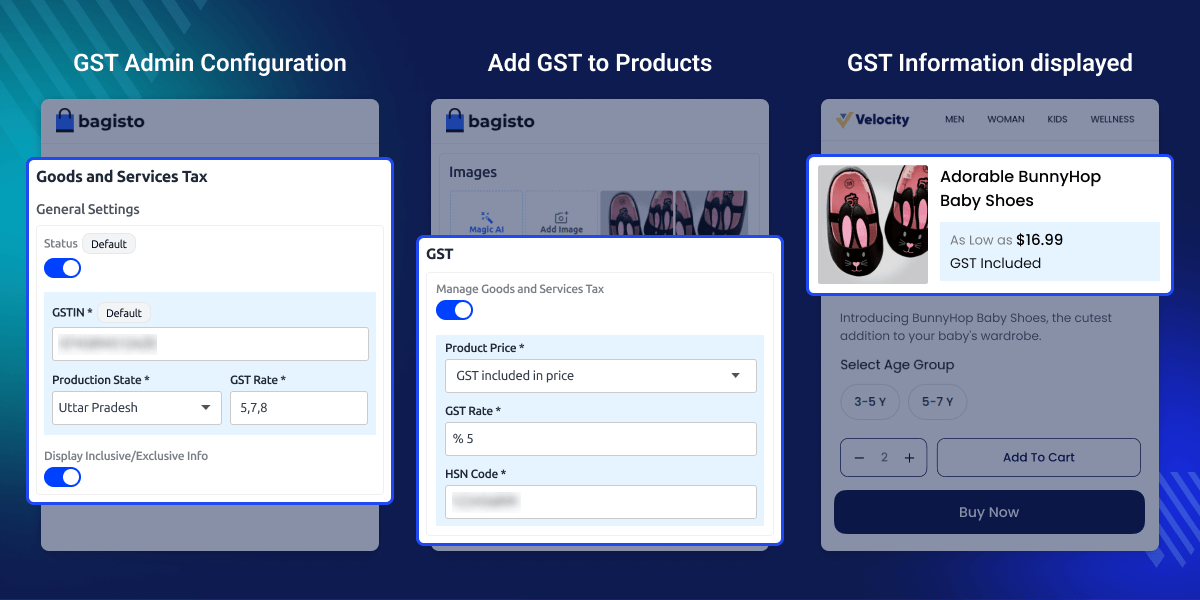
    Laravel eCommerce GST Extension seamlessly implements India's Goods and Services Tax (GST) into the Bagisto store. This extension streamlines business operations and helps to adhere to GST regulations.

    It allows to easily input GSTIN number and select the relevant state for taxation. It calculates and applies IGST, CGST, and SGST based on shipping and billing addresses.

    Using the extension, admin can also choose to display or hide GST information on the storefront. Additionally, they input specific HSN codes to products.

    Apart from this, if you would like to integrate the Stripe payment method for your Bagisto store, then you can check Laravel eCommerce Stripe Payment Gateway.
    Laravel eCommerce GST Extension

    Highlighted Features of Bagisto GST Extension

     Show Inclusive or Exclusive Information

    Admin gets the function to either display or hide the inclusion or exclusion of GST information on storefront.

     Add Multiple GST Rates

    Store admin can add multiple GST rates at a single time from configuration and then select them accordingly while adding a GST rate to products.

     Tax Rate Selection

    The Goods and Service Tax for a product can be set by admin based on the GST rates added in configuration. It can be changed anytime as required.

     Set Production State

    A field to set the default production state is provided in admin backend according to which the tax rate is calculated.

    Why do we need Laravel eCommerce GST Extension?

    Laravel eCommerce GST Extension simplifies the process of tax compliance and accurate calculations. It helps to determine applicable product taxes based on origin, destination, and other relevant factors.

    Additionally, you can check the Laravel Customer Credit Extension which enables the customers to add credit points and use them for purchasing.

    Initial General Configuration

    After installing the Laravel eCommerce GST extension, the admin has to configure it from the backend. Here, they’ll have to,
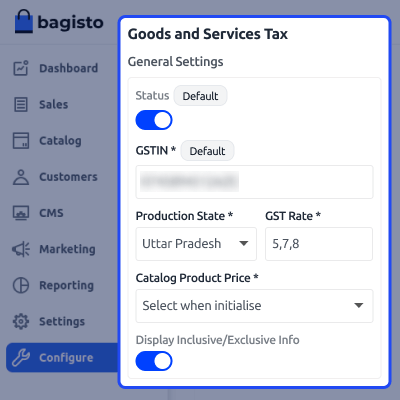
    • Enable or Disable the module.
    • Enter the GSTIN number.
    • Set the production state from the dropdown menu.
    • Input the GST rate(s).
    • Select the Catalog product price.
    • Switch button to display the exclusive and inclusive information.
    Initial General Configuration

    Add Goods and Services Tax in Products

    Once the extension is configured, admin sets the GST for each product. They will navigate to Product edit section to add GST information. Here admin gets below functions,
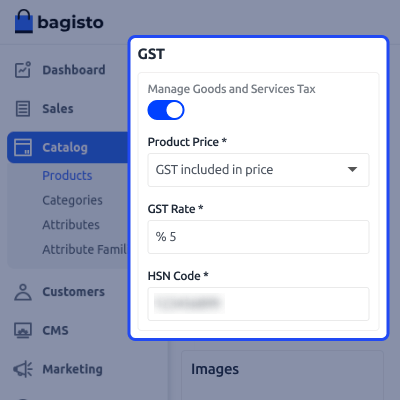
    • Button to enable or disable the GST for a product.
    • If enabled, and if GST is to be entered while initializing from configuration, then they can select tax to be included or excluded with the price.
    • Field to select the tax rate.
    • Field to enter the HSN rate.
    Add Goods and Services Tax in Products

     Support

    For any issue related to this module, please create a support ticket here or send an email to [email protected]

    You may also check our quality Bagisto Extensions.

    Specifications

    Product Version2.2.2
    Released1 year ago
    CategoryBagisto Laravel
    Last UpdatedJuly 25, 2025 (7 months ago)
    Supported Versions2.2.2  
    Write a review

    Frequently Asked Questions

     What is the Laravel eCommerce GST Extension?
    This Extension adds India's Goods and Services Tax (GST) structure to the Bagsito store. It helps to follow GST rules and calculate taxes correctly.
     
     Can more than one GST rate be added?
    Yes,  multiple GST rates can be added in backend and admin choose the right one for each product.
     
     Can we turn GST on or off for specific products?
    Yes, you can enable or disable GST for individual products.
     
     How to set the production state?
    You can set the production state from a dropdown menu in the backend.
     
     Can we include or exclude GST from prices?
    Yes, you can decide if GST is included or excluded when adding or editing products.

    Move to Cloud Today

    AWS Free tier hosting for one year by amazon web services, for more details please visit AWS Free Tier.

    GCP Free tier hosting for one year with 300 credit points by google cloud platform, for more details please visit GCP Free Tier.

    Azure free tier hosting for one year with 25+ always free services, for more details please visit Azure Free Tier.

    In our default configuration we will provide tremendous configuration for your eCommerce Website which is fast to load and response.

    Default Configuration Details of Server

    • 1 GB RAM
    • 1 Core Processor
    • 30 GB Hard Disk
    • DB with 1 GB RAM and 1 Core Processor

    * Server Configuration may vary as per application requirements.

    Want to know more how exactly we are going to power up your eCommerce Website with Cloud to fasten up your store. Please visit the Cloudkul Services.

    Get Started with Cloud
    • - Feature Add (+)
    • - Feature remove (-)
    • - Bug Fixed (!)
    • - Modification (*)
    Version 2.2.2
    • + Module compatible with Bagisto version v2.2.2
    • + Added the GST slabs option in the configuration section.


