USD
  • EUR
  • INR
  • USD
Cart
Cart 0
  • You have no items in your shopping cart.
    Cart
    Cart 0
    • You have no items in your shopping cart.
    Hire a Developer
    ×
    Contact Us!
    Send Again
    Close
    Please Login to Write Your Review

    Bagisto Multi-Tenant UPS Shipping

    Bagisto Multi-Tenant UPS Shipping helps tenants offer live UPS shipping rates, choose UPS services, and show shipping costs during checkout.


    • Enable UPS shipping for each tenant store.

    • Show live UPS shipping rates at checkout.

    • Let customers choose available UPS services.

    • Set the shipping origin for accurate rates.

    • Choose the right container for each shipment.

    • Select the weight unit for shipping rates.

    • Set shipping options to match your needs.

    • Give Super Admins an overview of the UPS integration available across tenant stores.

    Screenshots
    Bagisto Multi-Tenant UPS Shipping Bagisto Multi-Tenant UPS Shipping Bagisto Multi-Tenant UPS Shipping Bagisto Multi-Tenant UPS Shipping Bagisto Multi-Tenant UPS Shipping Bagisto Multi-Tenant UPS Shipping
    Show More Hide All
    $199.00
    Add To Cart
    $199.00
    Configure and Buy
    • Description
    • Reviews
    • FAQ
    • Customers ()
    • Specifications
    • Cloud Hosting
    • Changelog

    Bagisto Multi-Tenant UPS Shipping helps tenants add UPS shipping to their stores. It calculates live UPS shipping rates from the store address to the customer location. Customers can see the shipping cost during checkout before they place an order.

    Each tenant can manage their own UPS shipping setup. They can choose the UPS services to offer, select the container type, and set the weight unit. This gives each store the flexibility to match its own shipping process.

    Customers can choose from the UPS services made available by the tenant during checkout. The selected shipping method and shipping cost are also shown in the order details, making it easy to review delivery information after the order is placed.

    The Super Admin has a dedicated section that gives an overview of the UPS shipping integration available across the platform, while all UPS configuration stays tenant-managed. Tenants can also create invoices and shipments from the order panel, helping them manage the shipping process from one place.

    Also, if you want separate shipping options for each seller in your Laravel marketplace, check Laravel Marketplace Multi Shipping module. It lets sellers manage their own shipping methods. Buyers can choose different shipping services for each seller at checkout.
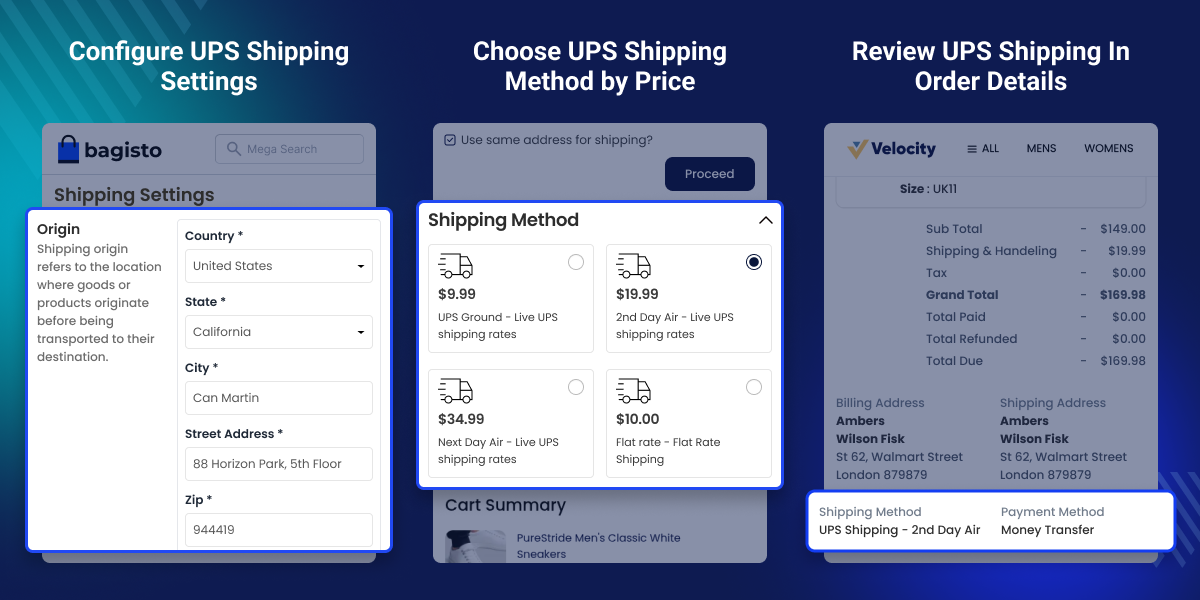
    Bagisto Multi-Tenant UPS Shipping

    Highlighted Features

     Live UPS Shipping Rates

    Calculate shipping charges with live UPS rates from the tenant's origin address to the delivery location.

     Flexible Shipping Preferences

    Choose UPS services, the container type, and the weight unit to fit your shipping needs.

     Tenant-Based UPS Setup

    Each tenant can manage their own UPS account, shipping settings, and allowed UPS services.

     UPS Service Selection

    Let customers choose from the UPS services enabled by the tenant during checkout.

     Simple Order Fulfillment

    Create invoices and shipments from the tenant panel after an order is placed.

     Super Admin Overview

    A dedicated Super Admin section explains the availability and purpose of the UPS integration, while each tenant manages their own configuration.

    Why Do You Need Bagisto Multi-Tenant UPS Shipping?

    Managing shipping across multiple tenant stores is not always easy. Every store has its own shipping needs. Without a UPS shipping integration, tenants cannot use live UPS shipping rates or manage their own UPS shipping settings.

    Bagisto Multi-Tenant UPS Shipping lets each tenant set up their own UPS account and choose the UPS services they want to offer. Tenants can also set the container type and weight unit. Customers can then choose an available UPS service and see the shipping cost at checkout.

    This gives tenants more control over shipping and helps customers make better delivery choices. The Super Admin also gets a clear overview of the UPS integration available across the platform, while each tenant manages their own UPS configuration.

    Additionally, if you want sellers to set different shipping rates for each product in your Laravel eCommerce marketplace, check Laravel eCommerce Marketplace Per Product Shipping extension. It lets sellers manage product-specific shipping charges from their own panel.

    Use Cases

    Franchise Marketplace

    Let each franchise manage its own UPS account while shipping from a different location.

    Brand Marketplace

    Keep every brand's UPS shipping setup separate without affecting other brands.

    Distributor and Dealer Network

    Ship orders from multiple warehouses with separate UPS shipping settings.

    Marketplace with Mixed Products

    Use the right UPS service, container type, and weight unit for different products.

    Customer-Focused Checkout

    Give customers a choice of UPS services and show shipping costs before they place an order.

    Daily Order Fulfillment

    Create invoices and shipments from one panel to handle daily orders faster.

    Set the Shipping Origin

    After enabling this module, set the shipping origin before using UPS shipping. The origin address is used to calculate live UPS shipping rates from the tenant's location to the customer's delivery address.
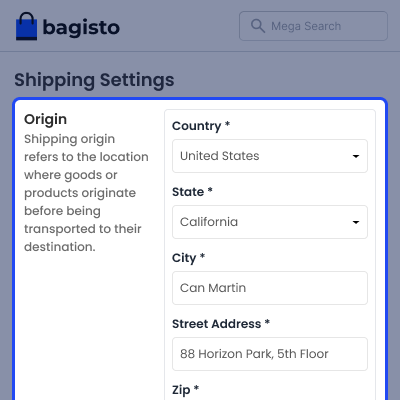
    • Set the country, state, and city.
    • Add the complete shipping address.
    • Enter the ZIP or postal code.
    • Save the store name and contact details.
    • Add the VAT number if required.
    • Use the origin address for accurate UPS rate calculation.
    Set the Shipping Origin

    View UPS Shipping Details in Order Summary

    Customers can view the selected UPS shipping method after placing an order. The order details also show the shipping information, making it easy to check the delivery service at any time.
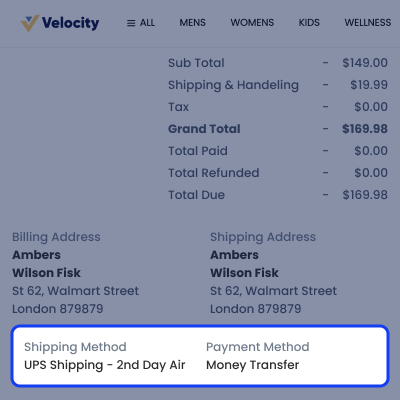
    • View the selected UPS shipping method.
    • Check shipping details in the order summary.
    • Confirm the chosen delivery service.
    • Review shipping information anytime.
    • Keep delivery details with the order.
    • Make order tracking easier for customers.
    View UPS Shipping Details in Order Summary

    Display UPS Shipping Options at Checkout

    Show available UPS shipping services and live shipping charges during checkout. Customers can compare delivery options, choose the service that fits their needs, and view the shipping cost before placing an order.
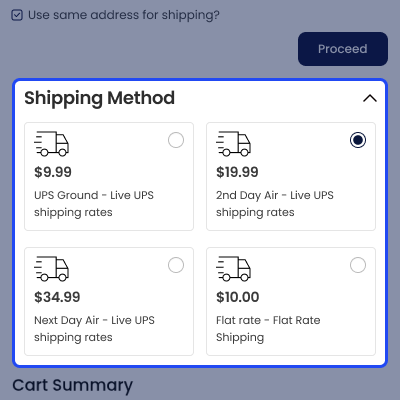
    • Display live UPS shipping rates at checkout.
    • Show all enabled UPS shipping services.
    • Let customers choose their preferred delivery option.
    • Calculate shipping charges using live UPS rates.
    • Display shipping costs before order confirmation.
    • Include the selected shipping method in the order details.
    Display UPS Shipping Options at Checkout

    Support

    For any query or issue, please create a support ticket here http://webkul.uvdesk.com/. You may also check our all Bagisto Extensions.

    Specifications

    Product Version2.4.x
    ReleasedToday
    CategoryBagisto Laravel
    Last UpdatedJuly 2, 2026 (1 day ago)
    Supported VersionsBagisto  2.4.x  
    Write a review

    Frequently Asked Questions

     Where can customers see the UPS shipping cost?
    Customers can see available UPS shipping services and shipping charges during checkout. The selected shipping method also appears in the order details.
     
     Can tenants manage shipping after an order is placed?
    Yes, tenants can create invoices and shipments from the order panel after an order is placed.
     
     Can different tenant stores use different shipping settings?
    Yes, each tenant manages its own UPS account, shipping services, container type, and weight unit independently.
     
     Can I choose which UPS services customers can use?
    Yes, tenants can choose the UPS services they want to offer. Customers can then select from those available services during checkout.
     
     How are UPS shipping rates calculated?
    This module uses live UPS rates to calculate shipping charges from the tenant's origin address to the customer's delivery location.

    Move to Cloud Today

    AWS Free tier hosting for one year by amazon web services, for more details please visit AWS Free Tier.

    GCP Free tier hosting for one year with 300 credit points by google cloud platform, for more details please visit GCP Free Tier.

    Azure free tier hosting for one year with 25+ always free services, for more details please visit Azure Free Tier.

    In our default configuration we will provide tremendous configuration for your eCommerce Website which is fast to load and response.

    Default Configuration Details of Server

    • 1 GB RAM
    • 1 Core Processor
    • 30 GB Hard Disk
    • DB with 1 GB RAM and 1 Core Processor

    * Server Configuration may vary as per application requirements.

    Want to know more how exactly we are going to power up your eCommerce Website with Cloud to fasten up your store. Please visit the Cloudkul Services.

    Get Started with Cloud
    • - Feature Add (+)
    • - Feature remove (-)
    • - Bug Fixed (!)
    • - Modification (*)
    Version 2.4.x
    • + Added full compatibility with Bagisto v2.4.x.
    • + Added compatibility with the latest Bagisto SaaS release.
    • + Added support for the UPS Shipping module.
    • + Added UPS Shipping SaaS integration.
    • + Added Super Admin visibility for tenants using UPS Shipping services.
    • + Added language files and translations.
    • * Improved package structure and configuration management.
    • * Improved overall package stability and maintainability.


