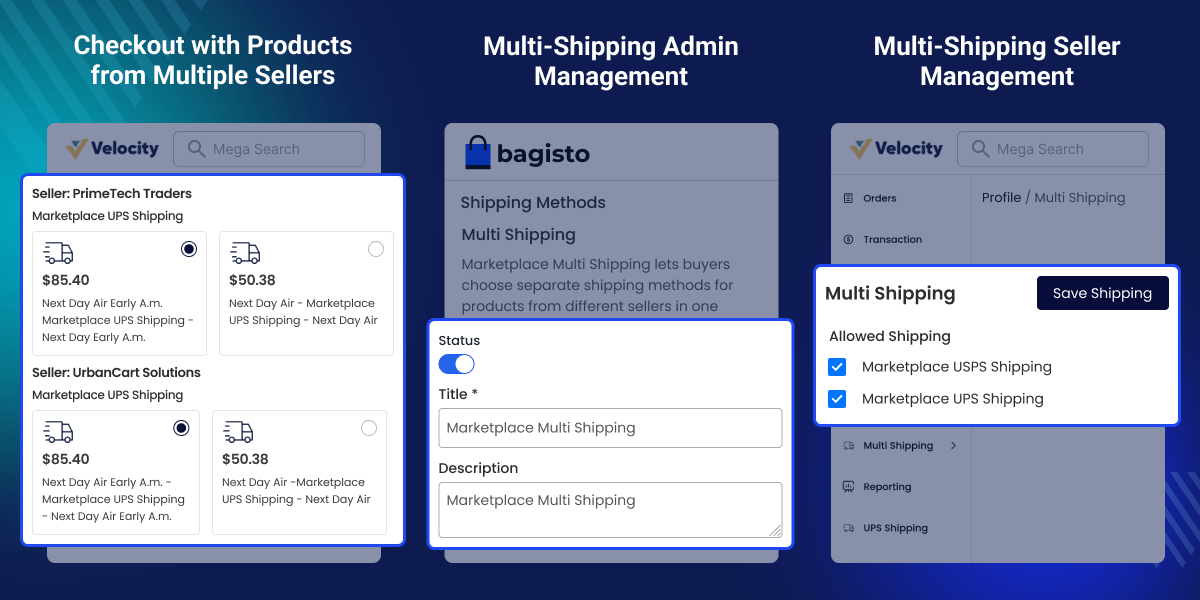
Laravel Marketplace Multi Shipping: This module allows the admin to enable multi shipping for the marketplace. This is an essential feature for both sellers and buyers. Using this module the sellers can select shipping methods for multi-shipping. While placing the order the buyer can select separate shipping services for every seller. Every seller will be able to manage shipment for their products individually.
- A seller can allow his shipping service from his panel.
- The buyer can select shipping according to a seller in the same order.
- Admin needs to install the shipping addon to manage shipment for the vendor panel.
- A vendor can choose the shipping channel which they want to display at checkout so that shipping will be based on per seller/vendor instead of the whole cart.
- Description
- Reviews
- FAQ
- Specifications
- Cloud Hosting
- Changelog
Laravel Marketplace Multi Shipping: This module allows the admin to enable multi shipping for the marketplace. This is an essential feature for both sellers and buyers. Using this module the sellers can select available shipping methods for multi-shipping. While placing the order the buyer can select separate shipping services for every seller. Every seller will be able to manage shipment for their products individually.
Important Note: To use the Marketplace Multi Shipping extension for Bagisto, you must have installed the Laravel Multi Vendor Marketplace and one of our below-listed Marketplace Shipping methods.
- Laravel eCommerce Marketplace Table Rate Shipping
- Laravel Marketplace FedEx Shipping
- Laravel Marketplace USPS Shipping
- Laravel Marketplace UPS Shipping
- Laravel eCommerce Marketplace Per Product Shipping

Highlighted Features
Seller-Wise Shipping Select
Each seller can multi-select shipping services that are integrated with multi shipping for their shops
Multiple Shipping Options at Checkout
Various shipping methods are integrated and visible to customers like the USPS, FedEx, UPS shipping methods.
View All Shipping Services Available
The buyer can select any shipping service of the shipping method that is included in the multi shipping.
Optimize Shipping Costs
Each seller can generate shipping for their orders placed and optimize delivery costs.
Multi-Shipping Admin Management
After the installation of the module, the admin can see the option of multi shipping under the shipping methods where the admin can configure the settings of the module so that the multi shipping option will be available for the customers in the front end.
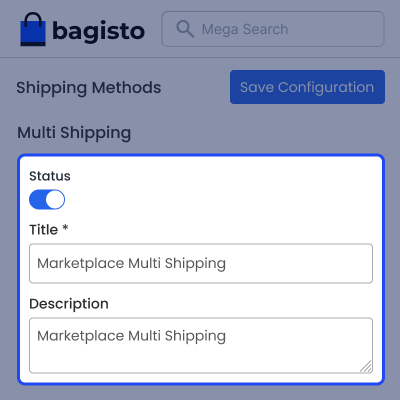
- The admin can active or inactive the module.
- The admin can add the description.
- The admin can input the title.

Multi-Shipping Seller Management
Multiple Shipping Marketplace is a very effective extension for all kind of marketplace as it provides the facility for vendor/seller to choose what kind of shipping methods they want to use for the shipment. Shipping method selection becomes very easy for the buyer as well to select the best and trusty shipping service.
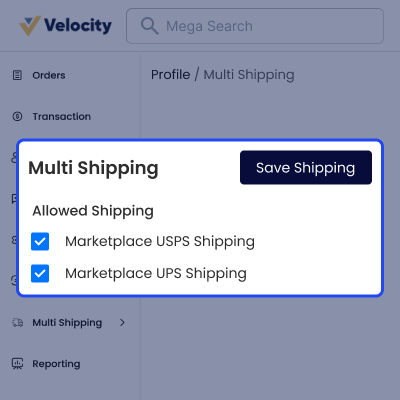
- The seller can multi-select the shipping methods for their shops.
- The seller can disable the multi-shipping method for their shop.
- The seller can generate the shipment for the order placed by the customers.

Multi-Shipping Options at Checkout
Once the product is selected the customers can select any shipping method that is integrated with the Bagisto eCommerce store according to the requirements
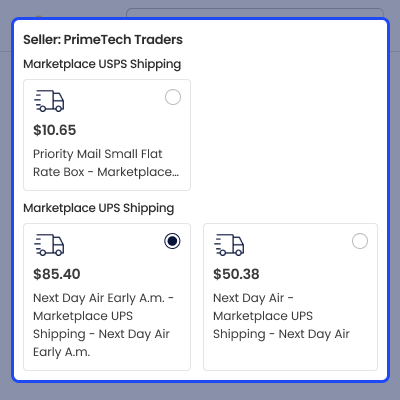
- The buyer can select any shipping method.
- The buyer can select shipping services provided by the shipping methods.
- The buyer can see the shipping method used in the order summary page.
- The buyer can select the shipping service according to the seller.

Support
For any issue related to this module, please create a support ticket here at - https://webkul.uvdesk.com/en/customer/create-ticket/ or send an email to [email protected]
You may also check our quality Bagisto Extensions.
Specifications
Frequently Asked Questions
Specification
Detailed technical features and requirements to help you understand the module’s capabilities and ensure smooth integration with your system.
Cloud Hosting for Websites & Applications
Power your website or application with flexible, scalable cloud infrastructure designed for performance and growth.
Move Your Website or Application to the Cloud
Get started with Cloudkul hosting tailored to your needs.
Configure Your Cloud Server
Choose server resources based on your workload, expected traffic, and performance requirements.
Start with the cloud resources your project needs today and adjust your server configuration as your business grows.
Explore flexible cloud hosting plans and choose your ideal configuration.
* Starting price is indicative. Final pricing and available server resources depend on the selected hosting configuration and requirements.
Change Logs
- - Feature Add (+)
- - Feature remove (-)
- - Bug Fixed (!)
- - Modification (*)
- * Compatible with Bagisto v2.5.0 and Marketplace v2.5.0.0; module version updated to v2.5.0.0.
- ! Fixed the checkout shipping step hiding content added by other shipping carriers. Rebased the override on Bagisto v2.5 to use the core shipping events, Tailwind 4 classes and accessible radio markup while retaining per-seller shipping forms and the UPS error notice.
- ! Fixed seller Multi Shipping toggle switches losing their knob position and focus outline by updating their classes for the Tailwind 4 Marketplace build.
- ! Fixed buyers being able to set their own multi shipping prices. Seller shipping choices are now priced using carrier-calculated rates, with the cheapest rate used as a fallback and invalid choices rejected.
- ! Fixed seller orders losing their shipping amounts because Multi Shipping replaced the Marketplace carriers' shared session rates. Per-seller rates now use a separate session key, and each seller order is charged its selected rate.
- ! Fixed Multi Shipping being offered free when no marketplace carrier, or no carrier allowed by a seller, could rate the cart. It is now offered only when every seller with shippable items has a rate, using the sum of their cheapest rates until the buyer makes a selection.
- ! Fixed the multi shipping charge being excluded from the cart's shipping total including tax, and per-seller prices displaying in the base currency under the current currency's symbol.
- ! Fixed the cart singleton retaining the completed cart after an order was placed with Multi Shipping. The cart override now resets it as the core does.
- ! Fixed seller orders being charged shipping quoted on the admin's carrier account. FedEx and EasyPost now identify seller-owned rates using the seller's credentials, share only those rates as seller marketplace rates, and record the quoting account for label purchases. Seller orders are charged only seller-owned shipping, while buyers pay all selected rates.
- ! Fixed saving a seller's Multi Shipping carriers resetting other seller profile data, including channels, restricted categories, boolean values and multiselect values. Only the allowed carriers are now saved.
- ! Fixed ShipRocket disappearing from checkout when active because Multi Shipping read courier details from failed quotes. Removed the override so ShipRocket rates the cart through its own carrier, using the seller's account when available.
- ! Fixed Store Pickup being unavailable under Multi Shipping when the cart contained products from other sellers or the admin. Each seller's items are now rated against that seller's own pickup stores.
- ! Fixed buyers' per-seller shipping choices being lost. Each seller order now records the selected carrier and method in its shipping_method and shipping_title fields.
- ! Fixed the checkout losing the per-seller shipping form when Marketplace Store Pickup was registered after this module. The checkout override now takes precedence regardless of provider registration order.
- ! Fixed the seller Multi Shipping page displaying default carrier titles instead of admin-configured titles and accepting values that were not valid lists of methods.
- ! Fixed admin products displaying a hardcoded, untranslated "Admin" seller name at checkout, and sellers without a business name displaying an empty title.
- ! Fixed Marketplace USPS not being offered under Multi Shipping, which also prevented Multi Shipping from being available when a seller allowed only USPS. Added a USPS override that uses Marketplace USPS Shipping v2.5.0.0's getRatesPerSeller() to rate each seller's items using their own account. Rates are marked as seller-owned only when quoted on that seller's account, seller orders are charged only their own shipping, and cart-wide USPS options include only services available to every seller.
- ! Fixed Marketplace UPS charging sellers for shipping quoted on the admin's UPS account and withdrawing Multi Shipping when a seller without their own UPS credentials allowed only UPS. Added a UPS override using Marketplace UPS Shipping v2.5.0.0's getRatesPerSeller() to collect each seller's rates and identify seller-owned rates. Seller orders are charged only their own shipping.
- ! Fixed the checkout displaying the "UPS not available" notice twice when Marketplace UPS could not rate the cart. Removed the duplicate notice from the shipping step override because Marketplace UPS already adds it through the shipping_methods.after event.
- ! Fixed the FedEx override offering cart-wide services unavailable to some sellers, pricing services for only part of the cart, and differing from Marketplace FedEx rate checks and service details. The override now extends Marketplace FedEx Shipping v2.5.0.0 and uses getRatesPerSeller(). Rates are marked as seller-owned only when quoted on the seller's account, and cart-wide services are offered only when every seller receives them.
- ! Fixed Marketplace DHL under Multi Shipping offering only products available to every seller and charging sellers for shipping quoted on the admin's DHL account. Added a DHL override using Marketplace DHL Shipping v2.5.0.0's getRatesPerSeller() to collect each seller's rates and identify seller-owned rates. Seller orders are charged only their own shipping.
- ! Fixed a server error at the checkout address step when Marketplace EasyPost Shipping was active. The outdated override now extends Marketplace EasyPost and uses getRatesPerSeller() with the shipping address. Cart-wide services include only options available to every seller, and Marketplace EasyPost purchases each seller's label for their selected service.
- ! Fixed artisan commands, including migrate and install, failing on databases without Bagisto tables while Multi Shipping was registered.
- ! Fixed Marketplace ShipRocket under Multi Shipping when sellers did not have their own ShipRocket accounts. Added an override using Marketplace ShipRocket Shipping v2.5.0.0's getRatesPerSeller() to collect each seller's couriers and identify seller-owned rates. Seller orders are charged only their own shipping, and cart-wide options include only couriers available to every seller.
- ! Fixed seller sub-users saving Multi Shipping carriers to their own sub-user accounts, which checkout does not read, and displaying an empty selection. The seller page now displays and saves carriers from the main seller account.
- ! Fixed the selected carrier and method for the admin's own items being lost in multi shipping orders. The selection is now stored on each admin order item under additional.multi_shipping, including shipping_method and shipping_title, for use by Store Pickup and Aramex.
- * Multi Shipping now manages carrier-specific behaviour through its own adapters in Adapters/, replacing the carrier classes when each carrier module is installed. This includes Store Pickup OTP services and pickup order grids, along with Aramex, ShipRocket, UPS, FedEx, DHL, USPS and Sendcloud shipment and label helpers. Adapters read each order part's selected method through Services\ShippingChoices. Per-seller rates from Table Rate, Aramex and Sendcloud are now collected through getRatesBySeller() instead of being written into the Multi Shipping session by carrier modules.
- ! Fixed the admin Store Pickup orders grid excluding multi shipping orders when the only Store Pickup items belonged to the admin. Such orders are now listed with the admin store's pickup address.
- Compatible with Bagisto v2.4.10 and Bagisto Marketplace v2.4.10.0; bumped the module version to v2.4.10.0.
- + Added a package
composer.jsonforbagisto/laravel-marketplace-multi-shipping, including PSR-4 autoloading forWebkul\MarketplaceMultiShipping\, package description, and keywords. - Audited the module against the Marketplace v2.4.10.0 breaking changes, including the removed extension subsystem,
ExtensionTag,ThemeCustomizationRepository, 20 argument productImporter, renamed events, datagrid event changes, and relocated marketplace configuration codes. No code changes were required. - + Added the missing seller ACL entry for the
mpmultishippingseller menu key, allowing the Multi Shipping seller page to be permission gated by seller role. - Fixed the checkout shipping override using hardcoded
Seller:andProducts:labels by replacing them with existing@langtranslation keys available across all locales. - Renamed
postcss.config.jsandtailwind.config.jsto.cjsto prevent CommonJS configuration files from being loaded as ESM because the package uses"type": "module". - + Updated
mp-multi-shipping:installto display an onboarding banner with ASCII art, a welcome message, and a short description after migrations, asset publishing, and cache clearing.
- + Compatible with Bagisto v2.4.7.
- + Implemented the Marketplace Shipping Settings page UI.
- + Formatted and refactored the code to improve readability, maintainability, and code optimization.
- Compatible with Bagisto 2.2.2
- [Feature] compatible with bagisto v1.2.0
- [bug] Multishipping icon is not visible on the seller end in mobile view.
- [bug] Multishipping should not be visible to the seller menu bar if still's inactive by admin.
- [bug] Loader not working on the checkout page.
- [bug] Add icon for multi shipping.
- A seller can allow his shipping service from his panel.
- The buyer can select shipping according to a seller in the same order.
- Admin needs to install the shipping addon from the above list to manage shipping from the vendor panel.
- A vendor can choose the shipping channel which they want to display at checkout so that shipping will be based on per seller/vendor instead of the whole cart.