Bagisto Semantic Search Extension adds AI-powered natural language product search with live autocomplete, vector storage and hybrid text matching to your store.
- Finds products by meaning from natural language search queries
- Shows live suggestions with product image, name and price as you type
- Stores vector embeddings in Elasticsearch or MariaDB 11.7 and above
- Combines AI semantic search with traditional text search for best results
- Reads price, brand, color and size from plain-language queries
- Cleans phrases like show me and do you have before searching
- Uses your existing Bagisto search synonym groups to widen text matches
- Re-indexes products automatically when they are saved or deleted
- Works with MagicAI and the AI provider API key you already use
- Sets similarity score, relevancy threshold and result count from admin
- Supports simple, configurable, bundle, grouped and booking products
- Description
- Reviews
- FAQ
- Specifications
- Cloud Hosting
- Changelog
Bagisto Semantic Search Extension adds AI-powered product search to your Bagisto store, so customers find products by meaning instead of exact words. A search like gift for dad who likes cooking can return cookware, kitchen gadgets and recipe books.
The extension turns product data into AI embeddings and stores them in Elasticsearch or MariaDB. Semantic search for Bagisto then compares what a shopper types with what each product is about.
Admins connect an AI provider through MagicAI and choose the AI model and the vector driver. They also set how strict matching should be from the Configure section of the admin panel.
Shoppers see live product suggestions with image, name and price as they type in the search bar. Bagisto AI search links each suggestion straight to the product page, even when the store runs in a sub-folder.
Hybrid search combines AI matching with traditional text search, and existing Bagisto search synonyms still widen the text matches. Bagisto natural language search also removes phrases like show me and do you have before searching.
Additionally, if you want an AI shopping assistant that answers product questions in a store chat window, then check Bagisto Chatbot Using OpenAI ( ChatGPT ) LLM.
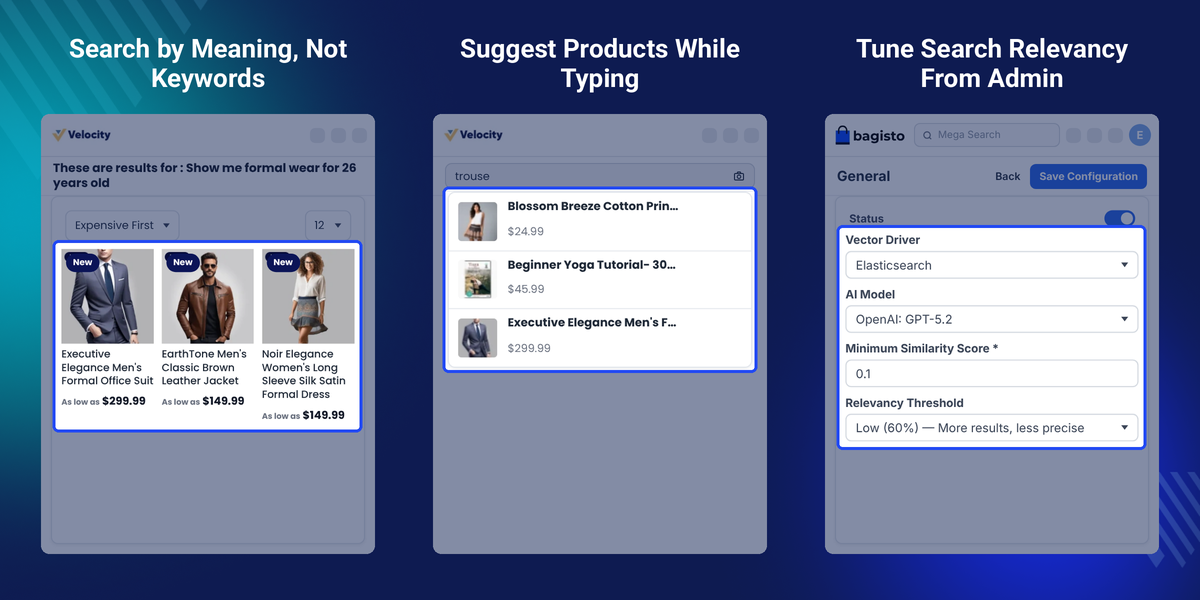
Highlighted Features of Bagisto Semantic Search Extension
AI-Powered Semantic Product Search
Understands natural language queries and finds products by their meaning.
Real-Time Search Autocomplete
Shows product suggestions with image, name and price as customers type.
Hybrid Search With Text Matching
Combines AI search with traditional text search for balanced results.
Smart Query Understanding
Picks up price, brand, color and size from natural language queries.
Elasticsearch and MariaDB Vector Drivers
Stores and searches vector embeddings in either supported driver.
Search Synonym Support
Works with the search synonym groups already created in Bagisto.
Automatic Re-Indexing
Updates the search index when products are saved or deleted.
Admin Control Over Relevancy
Sets similarity score, relevancy threshold and result count from admin.
Why Do We Need Bagisto Semantic Search Extension?
Bagisto Semantic Search Extension is needed because shoppers rarely type the exact words used in a product title. A store loses sales when searches for gifts, styles or needs return nothing useful.
The default Bagisto product search is built around keywords, which limits what shoppers can find. A query such as formal wear for 26 years old needs the same words in the product data.
Store owners also need control over how strict the matching is for their own catalog and shoppers. Stricter rules hide useful products while looser rules show unrelated ones, so the right balance differs between catalogs.
The extension compares the meaning of each query with AI embeddings of every product. It then shows only results that pass the similarity score and relevancy threshold set by the admin.
Apart from this, product saves, product deletes and shipments keep working when the vector store is offline. To add AI-written product and SEO content to your store as well, check Bagisto ChatGPT Content Generator.
Bagisto Semantic Search Use Cases
-
Gift and Intent-Based Searches
Shoppers who type gift for dad who likes cooking still reach cookware, kitchen gadgets and recipe books.
-
Fashion Searches by Age and Occasion
A query such as formal wear for 26 years old returns matching clothing without needing exact title words.
-
Catalogs With Mixed Product Types
Simple, configurable, bundle, grouped, downloadable and booking products all appear in one semantic search.
-
Stores With Many Product Name Variants
A synonym group like t-shirt can cover blue t-shirt, polo t-shirt and oversized t-shirt in text matches.
Bagisto AI Provider API Key Setup With MagicAI
The Providers page under Magic AI holds the API credentials that semantic search uses for embeddings. Every supported provider has its own API Key field.
Store owners can save keys for several AI providers on one page. They pick the AI model later from the Semantic Search settings page.
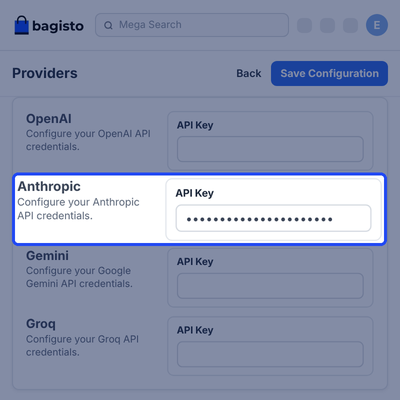
- Open Admin, Configuration, Magic AI, then Providers to reach the credential fields.
- Enter the API Key for the provider you want to use, such as OpenAI, Anthropic or Gemini.
- Groq and xAI also have their own API Key fields on the same page.
- Leave the API Key blank for providers you do not plan to use.
- Click Save Configuration to store the keys.

Semantic Search Settings With Vector Driver and Relevancy Threshold
The General settings page under Configure, Semantic Search controls how the AI search behaves. Settings run from the vector driver to the number of results returned for each search.
Admins can tighten or loosen matching without touching any code. This helps stores tune search for a small catalog or for a large one with many similar products.
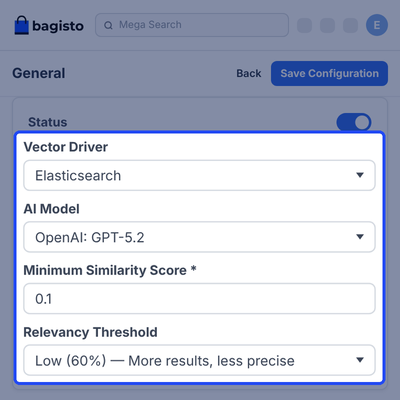
- Turn the Status toggle on to replace standard keyword search, or off to return to standard Bagisto search.
- Pick Elasticsearch or MariaDB as the Vector Driver, then re-index all products after changing it.
- Choose the AI Model that generates search embeddings, and re-index all products after changing it.
- Set the Minimum Similarity Score from 0.0 to 1.0 to drop weak matches from the results.
- Select a Relevancy Threshold from Low (60%) up to Very High (90%) to control how close a match must be.
- Set the Number of Results, from 1 to 50 products per semantic search.

Search Synonym Groups for Wider Text Matches
Search Synonyms under Marketing, Search & SEO let admins group related words. A search for one term in a group also matches the other terms in that group.
A group such as t-shirt can hold many variants like polo t-shirt or oversized t-shirt. This keeps the text half of hybrid search useful for every kind of shopper.
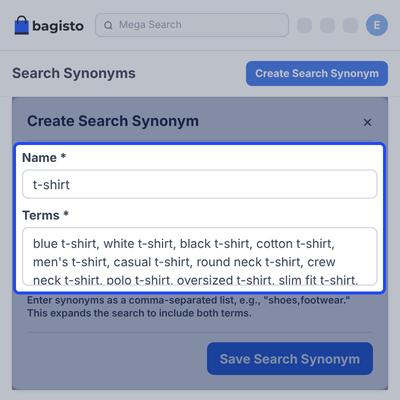
- Open Admin, Marketing, Search & SEO, then Search Synonyms.
- Click Create Search Synonym to open the form.
- Enter a Name for the group, such as t-shirt.
- Add the Terms as a comma-separated list, for example shoes,footwear.
- Click Save Search Synonym to apply the group.
- Edit or delete a saved group from the Actions column.

Search Bar Autocomplete With Product Image and Price
As customers type in the search bar, a dropdown shows matching products. Each row has a thumbnail, the product name and the formatted price before the search is submitted.
Each suggestion links straight to its product page, even when the store runs in a sub-folder. Shoppers reach the right product in a single click.
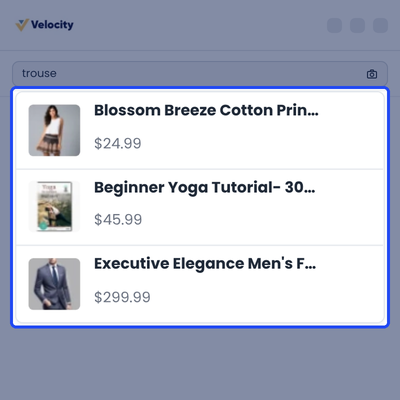
- Suggestions appear in real time while the customer types.
- Each row shows the product image, the product name and the formatted price.
- Long product names are shortened to fit inside the dropdown.
- Number of Suggestions in the admin settings sets how many products appear.
- The search bar follows the Minimum Query Length and Maximum Query Length from the Elasticsearch settings.
- A click on any suggestion opens that product page.

Natural Language Search Results Page
When a customer submits a search, the results page lists products that match the meaning of the query. The admin settings for similarity and relevancy decide what appears.
A full sentence such as show me formal wear for 26 years old works as written. Conversational phrases are cleaned before the search runs.
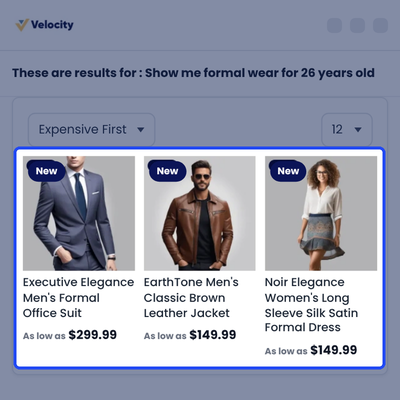
- Customers type full sentences instead of guessing exact product words.
- Phrases like show me and do you have are removed before the search runs.
- The page heading repeats the query the customer searched for.
- Results appear in a product grid with sort, per-page and list or grid view options.
- Filters such as Price and Color sit beside the results.

Complete Bagisto Semantic Search Extension Feature List
Search Experience
- Find products by meaning from natural language queries
- Show real-time autocomplete suggestions in the search bar
- Combine AI semantic search with traditional text search in hybrid search
- Extract price, brand, color and size filters from natural language queries
- Remove conversational phrases like show me and do you have before searching
- Use existing Bagisto search synonyms to widen text matches
- Show only products that closely match the best result with four relevancy levels
- Follow the minimum and maximum search length from the Bagisto search engine settings
Indexing and Vector Storage
- Store and search vector embeddings in Elasticsearch or MariaDB
- Index with the semantic-search:index command for one driver or both
- Re-index automatically when products change
- Remove deleted products from the search index automatically
- Keep product saves, product deletes and shipments working when the vector store is offline
- Show a clear message when the index command cannot reach the vector store
Admin Setup and Compatibility
- Manage every setting from the Bagisto admin panel without code
- Use MagicAI with any supported AI provider API key
- Switch to the default Magic AI model if Bagisto no longer supports the saved model
- Support simple, configurable, bundle, grouped, downloadable and booking products
- Open the right product page from suggestions when the store runs in a sub-folder
- Show every label translated for all 22 Bagisto languages
- Run on Bagisto 2.5 with Laravel 13, PHP 8.4 and Tailwind CSS 4
Support
For any query or issue, please create a support ticket here http://webkul.uvdesk.com/. You may also check our all Bagisto Extensions.
Specifications
Frequently Asked Questions
Specification
Detailed technical features and requirements to help you understand the module’s capabilities and ensure smooth integration with your system.
Cloud Hosting for Websites & Applications
Power your website or application with flexible, scalable cloud infrastructure designed for performance and growth.
Move Your Website or Application to the Cloud
Get started with Cloudkul hosting tailored to your needs.
Configure Your Cloud Server
Choose server resources based on your workload, expected traffic, and performance requirements.
Start with the cloud resources your project needs today and adjust your server configuration as your business grows.
Explore flexible cloud hosting plans and choose your ideal configuration.
* Starting price is indicative. Final pricing and available server resources depend on the selected hosting configuration and requirements.
Change Logs
- - Feature Add (+)
- - Feature remove (-)
- - Bug Fixed (!)
- - Modification (*)
- Compatible with bagisto v2.5.0 (Laravel 13, PHP 8.4).
- Rebased the search bar and search page view overrides on the bagisto v2.5.0 core views, including the minimum and maximum search length settings.
- Updated the product search call to searchFromDatabase().
- Fixed: an AI model retired in bagisto v2.5.0 now falls back to the default Magic AI model.
- Moved the frontend build to Tailwind CSS 4 and Vite 6, and the stylesheet now loads on the storefront.
- Fixed: suggestion links now work when the store runs in a sub-folder.
- Fixed: indexing failures no longer break product saves, product deletes or shipments.
- Fixed: deleted products are now removed from the search index.
- The index command now shows a clear message when the vector store cannot be reached.
- Fixed: admin order pages no longer fail with an array_merge() error from the nested stylesheet render event.
- Renamed the route names to shop.semantic_search.* (the URLs are unchanged).