USD
  • EUR
  • INR
  • USD
Cart
Cart 0
  • You have no items in your shopping cart.
    Bagisto Laravel Extensions
    Cart
    Cart 0
    • You have no items in your shopping cart.
    Hire a Developer
    ×
    Contact Us!
    Send Again
    Close
    Please Login to Write Your Review
    Bagisto ShipRocket Shipping

    Bagisto ShipRocket Shipping

    x
    Free
    $89.00
    Add To Cart

    Bagisto ShipRocket Shipping shows live ShipRocket courier rates at checkout and pushes each shipment to ShipRocket for AWB booking and label printing.


    • Show live ShipRocket courier rates for the delivery pincode.

    • List every serviceable courier as its own shipping option.

    • Display the estimated delivery date against each courier.

    • Create the ShipRocket order automatically on shipment save.

    • Assign the AWB against the courier the customer selected.

    • Save the assigned AWB as the shipment tracking number.

    • Download the ShipRocket shipping label from the admin panel.

    • Quote couriers for Cash On Delivery or for Prepaid orders.

    • Set a fallback package weight, length, breadth, and height.

    • Restrict the shipping method to selected countries at checkout.

    • Search, sort, and filter shipments by AWB number.

    • Enable or disable the ShipRocket shipping method per channel.

    Bagisto ShipRocket Shipping
    Bagisto ShipRocket Shipping
    $89.00
    Check How It Works

    Need Help Deciding?

    Support answers within one business day.

    Open a ticket
    $89.00
    Configure and Buy
    X
    • Description
    • Reviews
    • FAQ
    • Customers ()
    • Specifications
    • Cloud Hosting
    • Changelog

    Bagisto ShipRocket Shipping connects your Bagisto store with ShipRocket to display live courier rates at checkout and manage shipment bookings. It helps store owners offer delivery options based on the customer's location.

    This module fetches available courier services for the delivery pincode and displays their shipping charges and estimated delivery dates. Customers can compare the available options before placing an order.

    When the admin saves a shipment in Bagisto, the module creates the order in ShipRocket. It then books the AWB against the courier selected by the customer and saves the AWB as the shipment tracking number.

    Admin can manage ShipRocket settings from the Bagisto configuration panel. They can add API credentials, select a pickup location, and set default package weight and dimensions for shipping calculations.

    This module supports Cash on Delivery and prepaid shipping quotes. Admin can also restrict the shipping method to selected countries and configure the message shown when the method is unavailable.

    Store owners can download ShipRocket shipping labels from the Bagisto admin panel. This module also supports channel-based shipping configuration and shipment search using the AWB number.

    Additionally, if you want customers to choose a delivery date and time at checkout, then check Laravel eCommerce Delivery Time Slot.
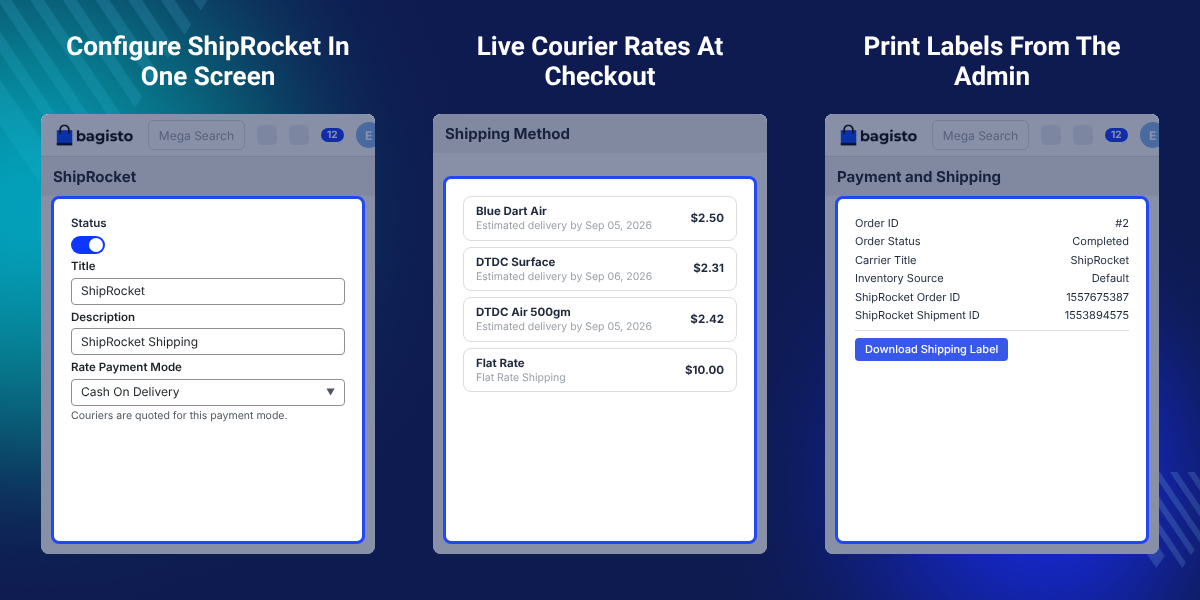
    Bagisto ShipRocket Shipping

    Highlighted Features of Bagisto ShipRocket Shipping

     Live Courier Rates

    ShipRocket quotes every courier that can service the delivery pincode. Each quote becomes its own checkout option.

     Estimated Delivery Date

    Every courier carries the delivery date ShipRocket returns, so shoppers compare speed as well as price.

     Automatic AWB Booking

    Saving a shipment creates the ShipRocket order and books the AWB against the courier chosen at checkout.

     Shipping Label Download

    Admin generate the ShipRocket shipping label from the shipment view page and from Sales > Shipments.

     Pickup Location Control

    Bagisto lists the pickup locations on your ShipRocket account. The chosen one sets the rate origin pincode.

     COD or Prepaid Quotes

    Rate Payment Mode decides whether ShipRocket quotes couriers for Cash On Delivery or for Prepaid orders.

    Why Do We Need Bagisto ShipRocket Shipping?

    Bagisto ShipRocket Shipping helps store owners connect their Bagisto store with ShipRocket for better shipping management. It displays courier rates and estimated delivery dates at checkout.

    Bagisto's default shipping options may not provide live courier rates based on the customer's delivery location. This can make it difficult to offer flexible shipping choices.

    Store admin may also need to enter order details into ShipRocket manually. Managing courier bookings and tracking numbers separately can increase work and lead to errors.

    With Bagisto ShipRocket Shipping, admin can create ShipRocket shipments, book AWBs, and download shipping labels from the Bagisto admin panel.

    Also, if you want customers to receive order updates on WhatsApp, you can check our extension Bagisto WhatsApp Chatbot & Order Notification.

    Use Cases

    • Indian D2C Store Shipping

      Bagisto store shipping across India lets ShipRocket quote every serviceable courier instead of one flat rate.

    • Cash On Delivery Orders

      Rate Payment Mode set to Cash On Delivery lists only couriers that collect COD at the delivery address.

    • Courier Rate Comparison

      Shoppers weigh a cheaper surface courier against a faster air courier, because both rates and dates appear.

    • Shipping an Order in Parts

      Each shipment reaches ShipRocket on its own, so a split order gets one booking per shipment.

    • Light Catalog Products

      Stores selling small items set a default package weight, because ShipRocket will not quote a weightless package.

    • Warehouse Pickup Selection

      A store with more than one registered pickup location picks the warehouse a courier collects from.

    Default Package Weight and Dimensions

    ShipRocket needs a weight and a box size before it quotes a rate. Package defaults cover carts that fall short.
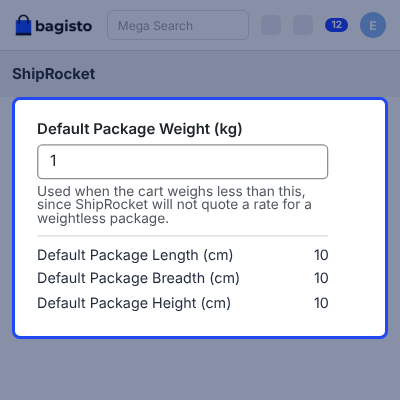
    • Set Default Package Weight (kg) as the fallback cart weight.
    • Bagisto applies the fallback when a cart weighs less than this value.
    • Set Default Package Length (cm) for the parcel.
    • Set Default Package Breadth (cm) for the parcel.
    • Set Default Package Height (cm) for the parcel.
    Default Package Weight and Dimensions

    Country Restrictions and Checkout Message

    Offer ShipRocket to every allowed country, or narrow it to a chosen list. You also write the message a shopper reads when it does not apply.
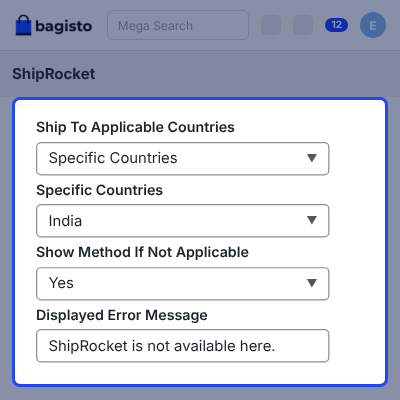
    • Set Ship To Applicable Countries to all countries or selected ones.
    • Pick the Specific Countries this shipping method covers.
    • Use Show Method If Not Applicable to display a message at checkout.
    • Write the Displayed Error Message a shopper reads.
    • Bagisto shows it when no ShipRocket courier can reach the address.
    Country Restrictions and Checkout Message

    Live ShipRocket Courier Rates at Checkout

    Once a shopper enters a delivery address, Bagisto sends the pincode and cart weight to ShipRocket and reads back the serviceable couriers.
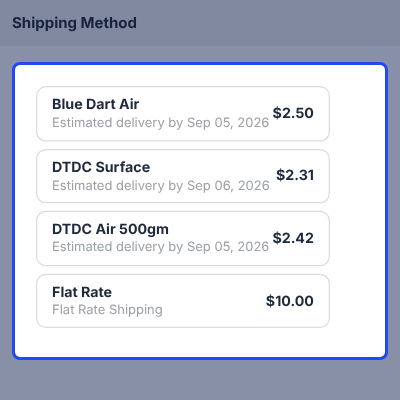
    • Fetch live rates for the customer delivery pincode.
    • List every serviceable ShipRocket courier company separately.
    • Show the real-time shipping charge against each courier.
    • Show the estimated delivery date ShipRocket supplies.
    • Carry the chosen courier into the order as the shipping method.
    Live ShipRocket Courier Rates at Checkout

    Download the ShipRocket Shipping Label

    Bagisto generates the ShipRocket shipping label once ShipRocket has assigned the AWB. Nobody opens the ShipRocket panel to print it.
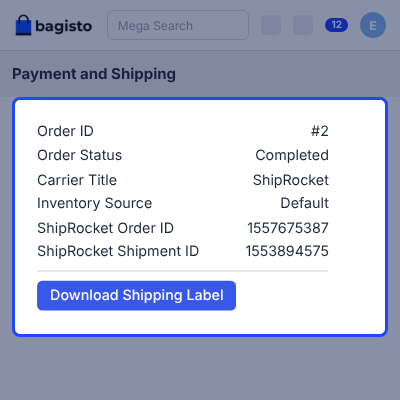
    • Generate and download the label from the shipment view page.
    • Generate and download the label from Sales > Shipments.
    • Bagisto shows the action only for shipments booked with ShipRocket.
    • Only admin holding the shipment view permission see it.
    • Print the label and attach it to the parcel before dispatch.
    Download the ShipRocket Shipping Label

    Support

    For any query or issue, please create a support ticket here http://webkul.uvdesk.com/. You may also check our all Bagisto Extensions.

    Specifications

    Product Version2.4.10.0
    Released14 days ago
    CategoryBagisto Laravel, 
    Last UpdatedSeptember 14, 2026 (14 days ago)
    Supported VersionsBagisto  2.4.x  

    Ratings

    We'd love to hear your thoughts! Share your feedback and help us craft an even better experience tailored just for you.

    Write a review

    Frequently Asked Questions

     How does Bagisto ShipRocket Shipping work?
    This module fetches courier rates from ShipRocket at checkout. After the admin saves a shipment, it creates the ShipRocket order and books the AWB.
     
     What credentials are required for ShipRocket integration?
    A dedicated ShipRocket API user is required. Add the API email and password under the module settings to connect your Bagisto store.
     
     Does the module show live courier rates at checkout?
    Yes, this module displays available courier services, shipping charges, and estimated delivery dates based on the delivery pincode and package details.
     
     When is an order sent to ShipRocket?
    The order is sent to ShipRocket when the admin saves its shipment in Bagisto. Placing an order alone does not create a ShipRocket order.
     
     Can customers choose a courier at checkout?
    Yes, customers can compare available courier options and select one based on the displayed shipping charge and estimated delivery date.
     
     How is the AWB assigned to a shipment?
    ShipRocket assigns the AWB to the courier selected at checkout. Bagisto then saves the assigned AWB as the shipment tracking number.
     
     Can the module handle split shipments?
    Yes, each shipment is sent to ShipRocket separately. An order divided into multiple shipments receives separate shipment bookings and AWB numbers.
     
     Why are no courier rates displayed for my cart?
    ShipRocket requires package details to calculate rates. Set a default package weight and dimensions when the cart does not have sufficient information.
     
     Can admin download shipping labels from Bagisto?
    Yes, admin can generate and download ShipRocket labels from the shipment view or Sales > Shipments after an AWB is assigned.
     
     Does the module support Cash on Delivery shipping?
    Yes, admin can select Cash on Delivery as the rate payment mode. ShipRocket then returns courier rates for the selected payment method.
     
     Can ShipRocket shipping be restricted to certain countries?
    Yes, admin can allow all countries or select specific countries where the ShipRocket shipping method should be available.
     
     Why is the ShipRocket pickup location list empty?
    The API credentials may not be saved correctly, or the account may have no registered pickup locations. Check the credentials and ShipRocket account settings.
     

    Specification

    Detailed technical features and requirements to help you understand the module’s capabilities and ensure smooth integration with your system.

    Cloud Hosting

    Detailed technical features and requirements to help you understand the module’s capabilities and ensure smooth integration with your system.

    Default Configuration Details of Server

    1 GB
    RAM
    1 Core
    Processor
    30 GB
    Hard Disk
    1 GB RAM & 1 Core Processor
    Database

    Want to know more how exactly we are going to power up your eCommerce Website with Cloud to fasten up your store

    * Server Configuration may vary as per application requirements.

    Change Logs

    • - Feature Add (+)
    • - Feature remove (-)
    • - Bug Fixed (!)
    • - Modification (*)
    Version 2.4.10.0
    • + Initial release of the ShipRocket Shipping package for Bagisto v2.4.10.


