USD
  • EUR
  • INR
  • USD
Cart
Cart 0
  • You have no items in your shopping cart.
    Cart
    Cart 0
    • You have no items in your shopping cart.
    Hire a Developer
    ×
    Contact Us!
    Send Again
    Close
    Please Login to Write Your Review

    CS-Cart Advanced Import Export

    CS-Cart Advanced Import Export enables fast bulk import, export, and migration of products, customers, and orders with multiple formats and cloud sources.


    • Import and export products, customers, and orders in bulk.

    • High speed processing up to 5000 products per second.

    • Queue based system for large data import and export tasks.

    • Supports CSV, TSV, XML, XLSX, JSON, ZIP, and TAR formats.

    • Import modes: Create Only, Update Only, Create + Update.

    • Update records using Product ID, Code, Email, or Name.

    • Queue based image import and processing for large catalogs.

    • Field mapping for all entities to ensure data accuracy.

    • Supports FTP, SFTP, Google Drive, and Amazon S3 sources.

    • Reliable handling of large datasets without system slowdown.

    • Import data directly from FTP, SFTP, Google Drive, Amazon S3, Dropbox, Zoho Sheet, and Cloudflare R2 sources.

    Additional Info

    Before installing the add-on, extract the downloaded package.

    • Install the License Manager add-on first.
    • Then install the required add-on.
    • Follow the license activation steps to generate your license key.

    Screenshots
    $249.00

    * Required Fields

    Add To Cart
    30 Days Refund*
    Only One Time Payment
    $249.00
    Configure and Buy
    • Description
    • Reviews
    • FAQ
    • Customers ()
    • Specifications
    • Cloud Hosting
    • Changelog

    Advanced Import Export for CS-Cart helps you move large data between systems without manual work. It supports products, customers, and orders in one place. You can import or export thousands of records quickly using CS-Cart bulk import export queue based processing and optimized performance.

    CS-Cart data migration module supports CSV, XML, JSON, XLSX, ZIP, and TAR formats, enabling flexible data exchange across systems. You can connect external sources like FTP, SFTP, Google Drive, and Amazon S3. This removes the need for manual file uploads.

    It also supports smart update rules using Product ID, Code, Email, or Name for accurate matching. Additionally, if you want to enable price negotiation, CS-Cart Make An Offer creates an offer record for each request, allowing admins to accept, reject, or counter it.
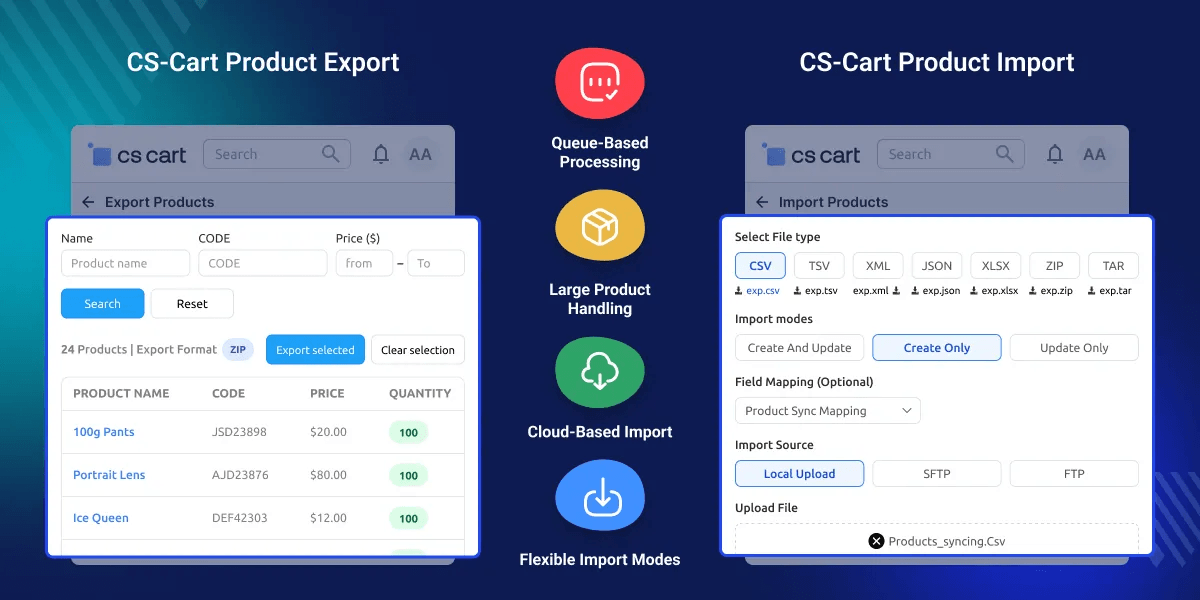
    CS-Cart Advanced Import Export

    Key Features of CS-Cart Advanced Import Export

     Bulk Product, Customer & Order Transfer

    Move all store data in one process. It supports products, customers, and orders without manual entry.

     High Speed Data Processing

    Processes up to 5000 products per second for fast large scale operations.

     Queue Based Import Export System

    Handles large datasets in background queues to avoid server overload.

     Multi Format File Support

    Works with CSV, TSV, XML, XLSX, JSON, ZIP, and TAR formats.

     Smart Import Modes Control

    Choose Create Only, Update Only, or Create + Update based on your workflow.

     Flexible Record Matching System

    Update records using Product ID, Product Code, Email, or Name.

     Cloud Storage Integration Support

    Import files directly from FTP, SFTP, Google Drive, and Amazon S3.

     Advanced Image Queue Processing

    Handles product image imports separately for stable bulk processing.

    Why Do We Need CS-Cart Advanced Import Export?

    CS-Cart default import tools are limited for large catalogs and complex data handling. Manual imports slow down operations and increase error risk. Bulk product migration needs speed, accuracy, and automation. Without it, store scaling becomes difficult and time consuming.

    This module solves these limits with queue processing, cloud integration, and multi-format support. It keeps large stores stable during heavy data operations. It is built for real eCommerce workflows where data changes often and must stay consistent across systems.

    If you’re looking to avoid stockouts, the CS-Cart Low Stock Notification alerts you when product quantities fall below a set threshold, ensuring timely replenishment.

    Use Cases

    Bulk Catalog Updates

    Update thousands of products in one go using CS-Cart Excel CSV import with CSV or Excel files for fast bulk updates.

    Multi Store Data Sync

    Sync product data across multiple CS-Cart stores using cloud storage sources.

    Supplier Data Import

    Import supplier catalogs directly from FTP or Google Drive in scheduled batches.

    Order Data Backup

    Export order data regularly for reporting, backup, or external ERP systems.

     Bulk Data Import & Export

    Handles large-scale data transfer without performance issues and supports background queue processing to keep the store stable during heavy imports.
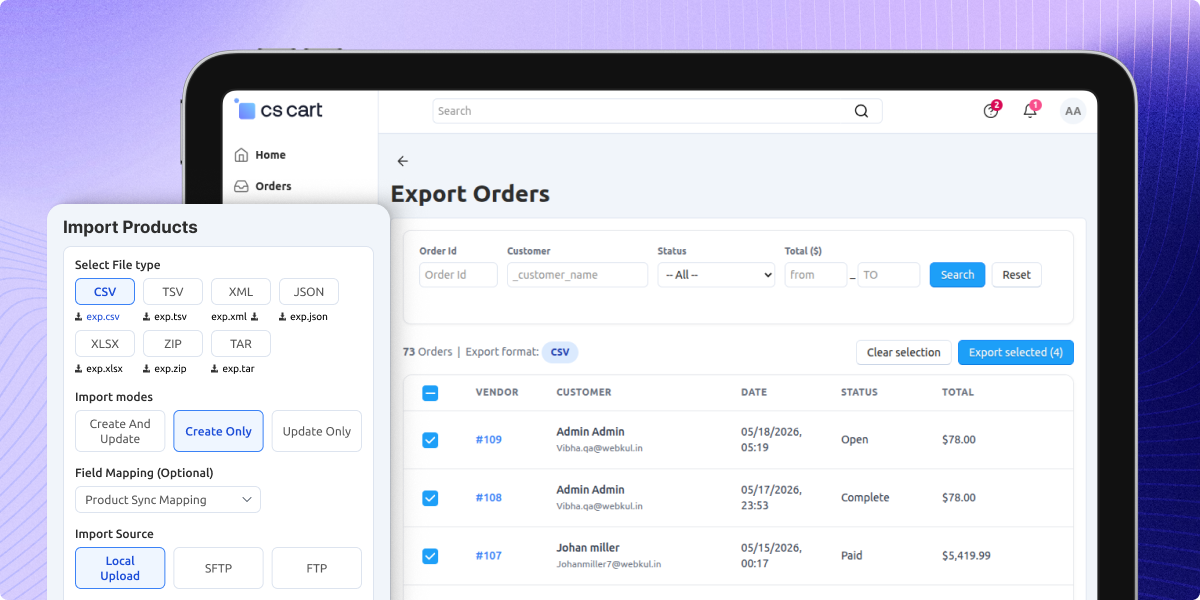
    • Processes large datasets without downtime
    • Runs import/export tasks in background queues
    • Prevents server overload during bulk operations
    • Optimized for high volume CS-Cart stores
    • Supports scheduled and repeated data tasks
    • Ensures stable performance during peak loads
    Bulk Data Import & Export

    Multi Format Data Support System

    Supports multiple file formats for flexible data exchange, making it useful for different systems, suppliers, and ERP tools.
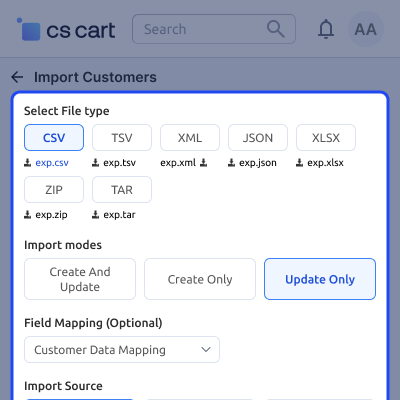
    • CSV and TSV support for standard data sheets
    • XML support for structured enterprise systems
    • XLSX support for Excel based workflows
    • JSON support for API driven data exchange
    • ZIP and TAR support for compressed data imports
    • Easy format switching without data loss
    Multi Format Data Support System

     Mapping and Update Control

    Provides full control over how data is matched and updated, reducing errors during large product or customer updates.
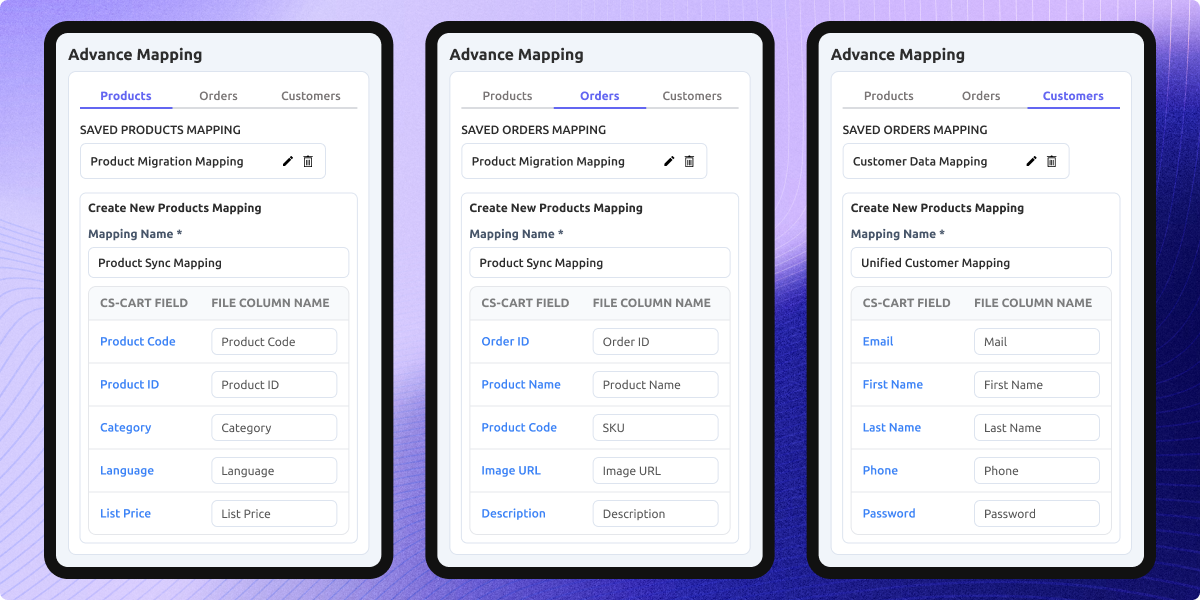
    • Map fields for products, customers, and orders
    • Update by Product ID, Code, Email, or Name
    • Prevent duplicate records during import
    • Custom mapping for flexible data structures
    • Supports complex catalog structures
    • Improves data accuracy during migration
    Mapping and Update Control

     Support

    For any query or issue please create a support ticket here http://webkul.uvdesk.comYou may also check our other top-quality CS-Cart Add-ons.

    Specifications

    Product Version1.0
    Released1 month ago
    CategoryCS-Cart
    Last UpdatedJune 16, 2026 (17 days ago)
    Supported VersionsCS-Cart  CS-Cart Multivendor  4.18.x  4.19.x  4.20.x  
    Write a review

    Frequently Asked Questions

     What is Advanced Import Export for CS-Cart used for?
    Enables bulk import/export of products, customers, and orders using fast queue processing and multiple file formats for migration.
     
     Which file formats are supported for import and export?
    Supports CSV, TSV, XML, XLSX, JSON, ZIP, and TAR for flexible data exchange with suppliers and external systems.
     
     Is cloud storage supported for importing files?
    Yes, supports cloud import FTP SFTP, along with Google Drive and Amazon S3 for direct data import/export without manual uploads.
     
     How fast is the import and export process in this module?
    Handles up to 5000 products per second using an optimized queue based processing engine for large catalogs.
     
     What import modes are available in this tool?
    Includes Create Only, Update Only, and Create + Update modes to control how records are handled during import.
     
     Does large data import slow down the store?
    Large data imports are handled through background queue processing, so they won’t impact your store’s speed or performance.
     
     How are existing records matched during import?
    Matching is done using Product ID, Product Code, Email, or Name to ensure accurate updates and avoid duplicates.
     
     How are product images processed during import?
    Images are handled in a separate queue to ensure smooth and stable processing of large catalog imports.
     
     What are the main use cases of this module?
    Used for store migration, bulk updates, supplier imports, multi store syncing, and order backup management.
     
     How is this different from default CS-Cart import tools?
    Offers queue processing, cloud integration, multiple formats, and advanced mapping for faster large scale operations.

    Move to Cloud Today

    AWS Free tier hosting for one year by amazon web services, for more details please visit AWS Free Tier.

    GCP Free tier hosting for one year with 300 credit points by google cloud platform, for more details please visit GCP Free Tier.

    Azure free tier hosting for one year with 25+ always free services, for more details please visit Azure Free Tier.

    In our default configuration we will provide tremendous configuration for your eCommerce Website which is fast to load and response.

    Default Configuration Details of Server

    • 1 GB RAM
    • 1 Core Processor
    • 30 GB Hard Disk
    • DB with 1 GB RAM and 1 Core Processor

    * Server Configuration may vary as per application requirements.

    Want to know more how exactly we are going to power up your eCommerce Website with Cloud to fasten up your store. Please visit the Cloudkul Services.

    Get Started with Cloud
    • - Feature Add (+)
    • - Feature remove (-)
    • - Bug Fixed (!)
    • - Modification (*)
    Version 1.0
    • Initial Release


