USD
  • EUR
  • INR
  • USD
Cart
Cart 0
  • You have no items in your shopping cart.
    Cart
    Cart 0
    • You have no items in your shopping cart.
    Hire a Developer
    ×
    Contact Us!
    Send Again
    Close
    Please Login to Write Your Review

    CS-Cart CyberSource Payment Gateway

    CS-Cart CyberSource Payment Gateway extension allows customers to pay via credit/debit cards and Visa Checkout. It uses RESTful APIs which are responsible for securely handling and storing payment data.


    • It avoids handling or storing sensitive customer data.

    • Provides fully secure payment to manage the risks.

    • CyberSource Payment supports inline card payments.

    • Offers card support for various credit cards.

    • Refund payment options include full or partial payment.

    • Integrated with CS-Cart, Multivendor, Multivendor-Plus, & Multivendor Ultimate.

    • The 3D Secure feature is available in the add-on.

    • Seamless Cybersource Unified Checkout Integration for Customers

    • Comprehensive Admin Control to Manage and Configure Payment Options

    • Provides support for almost all kind of cards including Visa, Mastercard, American Express, Discover, JCB, etc. 

    Screenshots
    CS-Cart CyberSource Payment Gateway CS-Cart CyberSource Payment Gateway CS-Cart CyberSource Payment Gateway CS-Cart CyberSource Payment Gateway CS-Cart CyberSource Payment Gateway
    Show More Hide All
    $79.00

    * Required Fields

    Add To Cart
    30 Days Refund*
    Only One Time Payment
    $79.00
    Configure and Buy
    • Description
    • Reviews
    • FAQ
    • Customers ()
    • Specifications
    • Cloud Hosting
    • Changelog

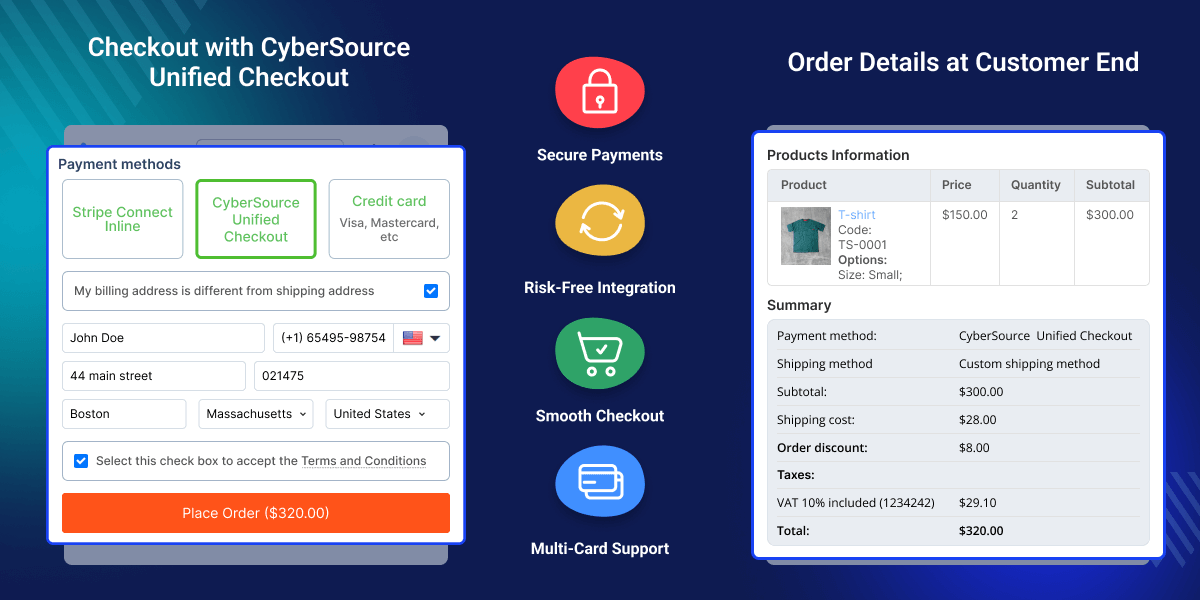
    CS-Cart CyberSource Payment Gateway extension offers you more flexibility in a seamless payment process. Using this module, you can securely handle and transmit the payment. It is a reliable payment method as customers can pay with a debit or credit card at checkout time to place their orders. Using this payment method, the admin will also be able to make the refund for the orders.

    The refund can be of the type - full or partial as per the requirement. You can also use CS-Cart Marketplace MangoPay Payment Gateway, which lets store owners integrate a secure and reliable end-to-end payment solution with their CS-Cart multi-vendor store.
    CS-Cart CyberSource Payment Gateway

    Highlighted Features

     Multi-Payment Options

    Supports various payment methods, including credit cards, debit cards, and more.

     Robust Security Measures

    Enables secure transaction flow via payment gateway reliability.

     Global Payment Acceptance

    Supports multiple currencies and integrates with major card networks.

     Easy Refund Option

    The admin can do a full or partial refund for a particular order.

    Why do we need a CS-Cart CyberSource Payment Gateway?

    CS-Cart CyberSource Payment Gateway extension supports multi-payment methods and gives the customers to select the payment option of their choice during checkout. Customers can make payments using any major credit, debit card, or Visa Checkout.

    With this module, payments for your online stores will be securely handled. The admin can make a full or partial refund of payment to the customer as per the product requirement.

    Explore our CS-Cart PayUMoney Payment Gateway, helping store owners integrate PayU Money for secure and seamless online payments within their CS-Cart store.

    Basic Options to Setup CS-Cart CyberSource Payment Gateway

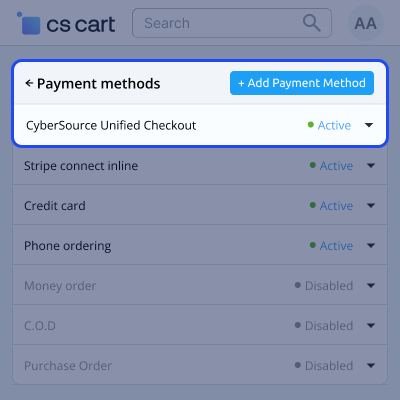
    In the admin panel, the store owner can set the Cybersource payment category, assign user groups, and manage success or failure order statuses.
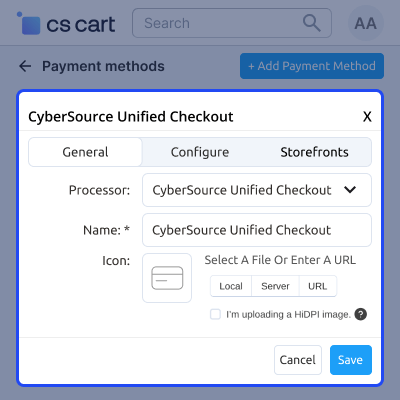
    • The admin can select the payment category for the Cybersource payment gateway.
    • The admin can select the user group for which the Cybersource payment gateway is applicable.
    • Set the success order status as open, failed, declined, back-ordered, canceled, awaiting the call.
    • Set the failed order status of any order whether it is open, failed, declined, back-ordered, canceled, awaiting the call.
    Basic Options to Setup CS-Cart CyberSource Payment Gateway

    Payment by Cybersource Method

    With Cybersource Unified Checkout, users select the payment method, enter details, and complete the payment to place the order successfully.
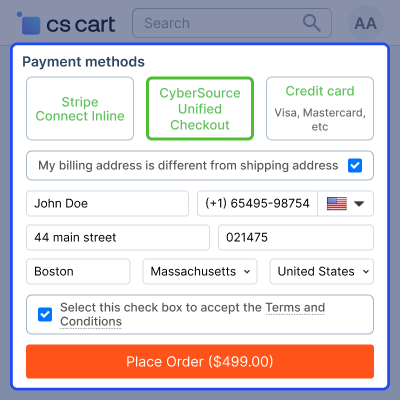
    • The user selects Cybersource Unified Checkout as the payment method.
    • After entering the required details, they click on the Place Order button.
    • The user selects the preferred payment option, enters the payment details, and clicks on Pay.
    • Once completed, the order is placed successfully.
    cybersource-payment

     Order View Details

    In the admin panel, the store owner can view complete order details, including payment method, order status, and card information, directly from the backend.
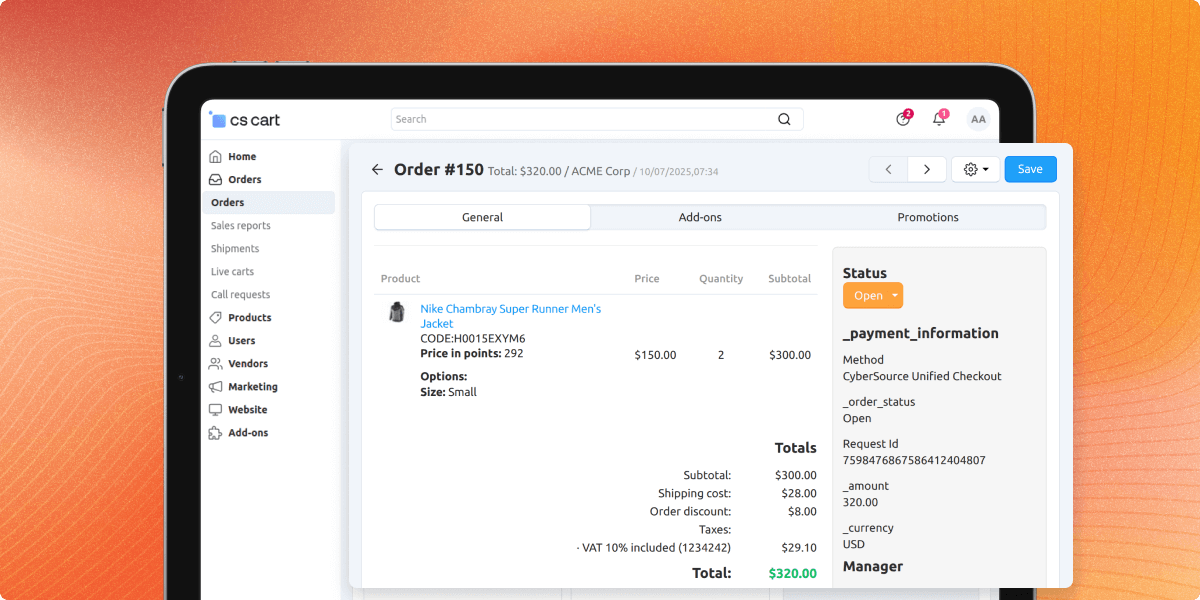
    • The admin can view the order details from the backend.
    • By selecting an order, the order details and payment mode can be viewed.
    • The current status of the order is displayed.
    • The order details also include the card information.
    order-view

    Select the Secure Payment

    In the admin panel, Cybersource enables secure inline card payments, supports all card types, and ensures customer data protection.
    • Supports all types of cards for the payment process.
    • Cybersource payment supports inline card payments.
    • Avoids handling or storing sensitive customer data.
    • Provides fully secure payment to handle the risk management system.
    secure-payment

     CS-Cart CyberSource Payment Gateway-Support

    For any query or issue please create a support ticket here http://webkul.uvdesk.com.You may also check our other top-quality CS-Cart Add-ons.

    Specifications

    Product Version1.3
    Released2 years ago
    CategoryCS-CartPayment
    Last UpdatedOctober 27, 2025 (4 months ago)
    Supported Versions4.16.x  4.17.x  4.18.x  CS-Cart  CS-Cart Multivendor  4.16.x  4.17.x  4.18.x  
    Write a review

    Frequently Asked Questions

     Does the merchant id and API key need any kind of modification CS-Cart CyberSource payment gateway, if I reinstall the extension?
    No, the user uses the same API and merchant id which was used by the user before in the CS-Cart CyberSource payment gateway.
     
     What kind of card is supported by the CS-Cart CyberSource payment gateway?
    It is compatible with almost all kinds of cards including Visa, Mastercard, American Express, Discover, JCB, etc.
     
     Is the CS-Cart CyberSource payment gateway extension compatible with the test and live modes?
    Yes, the CS-Cart CyberSource payment gateway works with both test and live modes on the payment gateway.
     
     Is there an option to select the user group for which Cybersource Payement Gateway is applicable?
    The admin can select the user group for which the Cybersource payment gateway is applicable like the guest user, user, or existing.
     
     Can I see the updated status of the order process?
    In the backed order details the admin can see the updated status of any order whether it is open, failed, declined, back-ordered, canceled, or awaiting the call.
     
     Is it possible for me to issue a refund for my customer using Cybersource?
    CS-Cart Refund capability is built into the CyberSource Payement Gateway. The refund can be whole or partial, meaning you can repay any amount up to the charge’s original value.

    Move to Cloud Today

    AWS Free tier hosting for one year by amazon web services, for more details please visit AWS Free Tier.

    GCP Free tier hosting for one year with 300 credit points by google cloud platform, for more details please visit GCP Free Tier.

    Azure free tier hosting for one year with 25+ always free services, for more details please visit Azure Free Tier.

    In our default configuration we will provide tremendous configuration for your eCommerce Website which is fast to load and response.

    Default Configuration Details of Server

    • 1 GB RAM
    • 1 Core Processor
    • 30 GB Hard Disk
    • DB with 1 GB RAM and 1 Core Processor

    * Server Configuration may vary as per application requirements.

    Want to know more how exactly we are going to power up your eCommerce Website with Cloud to fasten up your store. Please visit the Cloudkul Services.

    Get Started with Cloud
    • - Feature Add (+)
    • - Feature remove (-)
    • - Bug Fixed (!)
    • - Modification (*)
    Version 1.3
    • ! Fixed the checkout 400 and transaction cancel issue.
    • + Added unified checkout feature.
    • + Added the card option and payment type to the unified payment processor.
    Version 1.2
    • + Added the 3D Secure feature to the add-on.
    • ! Fixed the multiple time error notifications in the checkout.
    • ! Fixed the validation issue with the hidden required fields.
    • ! Fixed the git issues
    Version 1.1
    • + Added partner id
    • ! Fixed the git issues
    Version 1.0
    • Added initial addon


