USD
  • EUR
  • INR
  • USD
Cart
Cart 0
  • You have no items in your shopping cart.
    Cart
    Cart 0
    • You have no items in your shopping cart.
    Hire a Developer
    ×
    Contact Us!
    Send Again
    Close
    Please Login to Write Your Review

    CS-Cart GST Module

    CS-Cart GST Module helps Indian merchants manage GST tax calculation with HSN codes, automatic tax calculation, and SGST, CGST, and IGST support during checkout.


    • Product-wise GST rate management and HSN code configuration.

    • Category-based GST assignment for faster tax setup.

    • Automatic SGST, CGST, and IGST calculation.

    • Address-based GST split for intra and interstate orders.

    • Manage HSN codes with configurable digit length.

    • Apply GST automatically during customer checkout.

    • Display GST on cart, invoices, emails, and PDFs.

    • Configure GST tax rates based on Indian tax slabs.

    • Support standard tax rules for stores outside India.

    • Easy backend GST and tax configuration for admins.

    Screenshots
    CS-Cart GST Module CS-Cart GST Module CS-Cart GST Module CS-Cart GST Module CS-Cart GST Module CS-Cart GST Module
    Show More Hide All
    $99.00

    * Required Fields

    Add To Cart
    $99.00
    Configure and Buy
    • Description
    • Reviews
    • FAQ
    • Customers ()
    • Specifications
    • Cloud Hosting
    • Changelog

    CS-Cart GST Module helps Indian businesses manage GST in their online stores. It adds GST tax to products, applies the correct tax at checkout, and supports HSN codes. This reduces manual work and helps merchants apply GST correctly.

    Admin can assign GST rates to products or categories. HSN codes can also be added and managed from the admin panel. The module supports different GST tax slabs, making tax setup simple and accurate.

    The tax is calculated automatically during checkout. For orders within the same state, the module applies CGST and SGST. For orders between different states, it applies IGST. Customers always see the correct tax amount before placing an order.

    Customers can view tax breakdown details on the cart and checkout pages. The same information also appears on invoices, emails, and PDF documents. This gives customers clear tax details and helps businesses keep proper records.

    This module is built for businesses that sell in India. It reduces manual work and lowers tax errors. Businesses outside India can continue using the standard CS-Cart tax system instead of GST.

    Additionally, if you need a safe way to accept online payments, then the CS-Cart HiPay Payment Gateway addon can help. It supports card payments, simple checkout, and 3D Secure protection.
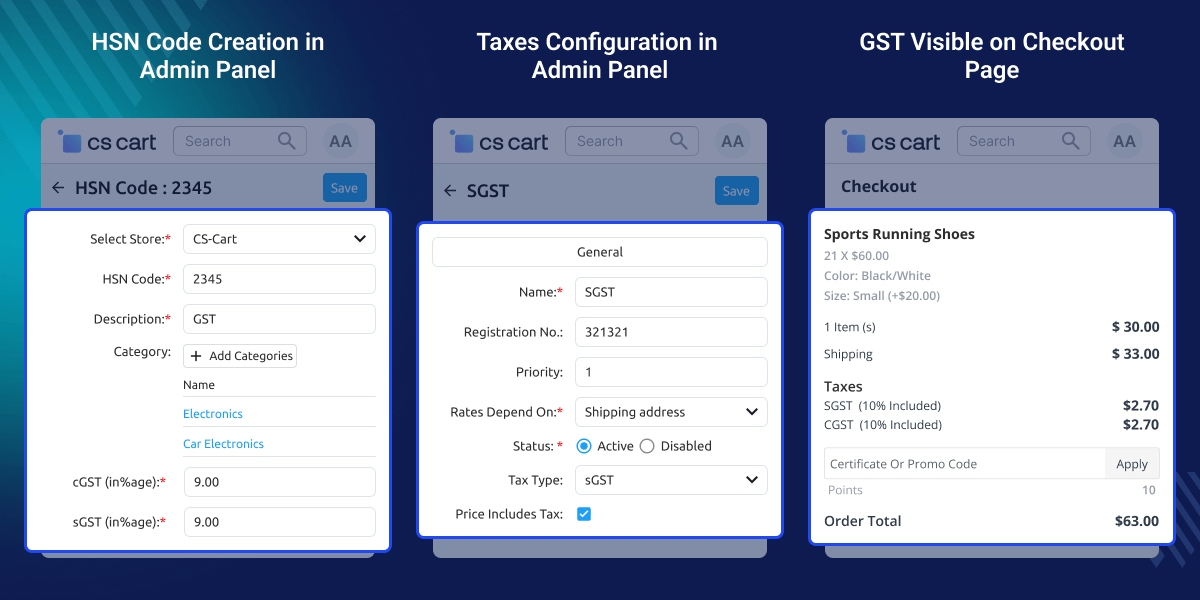
    CS-Cart GST Module

    Highlighted Features

     Automatic GST Calculation

    Calculate GST automatically during checkout based on product tax rates and the customer's shipping address.

     HSN Code Management

    Create and manage HSN codes with configurable digit length for accurate GST classification and tax reporting.

     Smart SGST, CGST & IGST Split

    Apply CGST and SGST for intra-state orders and IGST for interstate orders without manual calculation.

     Category-Based GST Assignment

    Assign GST rates to product categories to reduce repetitive work and simplify tax management.

     GST Display Across Orders

    Display GST details on the cart, checkout, invoices, emails, and PDF documents for complete tax transparency.

     India GST Compliance

    Automate GST calculations according to configured GST rules and simplify GST management for Indian stores.

    Why Do You Need CS-Cart GST Module?

    Managing GST manually becomes difficult as your product catalog and orders grow. Applying different GST rates, HSN codes, and tax rules by hand increases the chance of errors and takes extra time.

    Managing Indian GST using the default CS-Cart tax system may require additional manual configuration, especially when handling CGST, SGST, IGST, and HSN-based taxation.

    CS-Cart GST Module simplifies GST management by automating tax calculations and applying the correct GST rate type based on the customer's location. This helps businesses save time, reduce tax errors, and stay compliant with Indian GST regulations.

    Moreover, if you need another payment solution, you can also check CS-Cart Stripe Payment Gateway. It supports cards, Apple Pay, Google Pay, subscriptions, and partial refunds.

    Use Cases

    CS-Cart GST Module helps Indian businesses automate GST calculation and simplify tax management across products and customer orders.

    • Online Retail Stores

      Automatically calculate GST and display tax details for every customer order.

    • Multi-State Selling

      Apply CGST, SGST, or IGST based on the customer's shipping state.

    • Category-Based Tax Management

      Assign GST rates to product categories and manage tax rules more efficiently.

    • HSN-Based Product Management

      Assign HSN codes to products and manage GST rates from the admin panel for easier tax handling.

    Align GST Tax Automatically

    Automatically split GST into CGST, SGST, or IGST based on the customer's shipping address. This helps apply the correct tax for every order and reduces manual tax calculations.
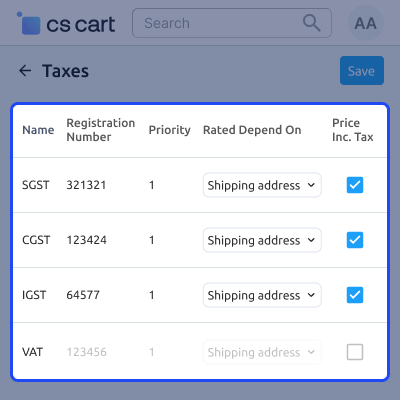
    • For intra-state, the tax is automatically applied to the orders.
    • Additionally, the tax is automatically applied to interstate orders as well.
    • The total tax applied and its breakdown are both visible to customers on the shopping cart page.
    Align GST Tax Automatically

    Category GST Assignment

    Set GST rates for product categories instead of adding them one by one. This saves time, makes tax setup easier, and helps apply the right GST to every category.
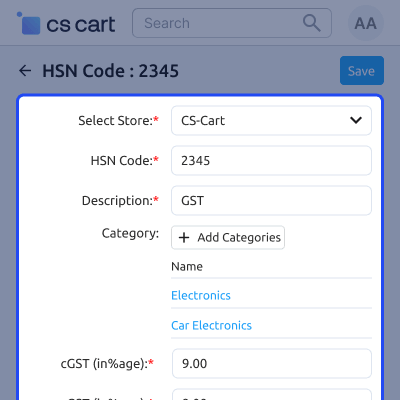
    • The HSN code can be added by the admin.
    • The category of taxable products can be chosen by the admin.
    • The GST rates can be specified by the admin.
    Category GST Assignment

    Display GST to Customers

    View GST details during checkout and in order documents. This gives customers a clear tax breakdown on invoices, emails, and PDFs for every purchase.
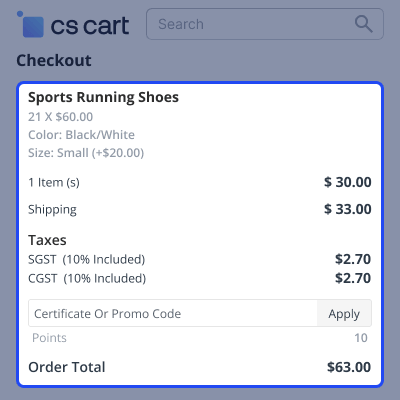
    • The customer address determines how the GST rates are split.
    • CGST and SGST apply to same-state transactions.
    • IGST is applicable to transactions between different states.
    • Through emails, PDFs, and invoices in CS-Cart, the customer can view the GST information.
    Display GST to Customers

     Support

    For any query or issue please create a support ticket here http://webkul.uvdesk.com

    You may also check our other top-quality CS-Cart Add-ons.

    Specifications

    Product Version1.1
    Released3 years ago
    CategoryCS-CartOrderPaymentMarketplace
    Last UpdatedJuly 3, 2026 (4 days ago)
    Supported VersionsCS-Cart  CS-Cart Multivendor  4.16.x  4.17.x  4.18.x  4.19.x  
    Write a review

    Frequently Asked Questions

     In what way is GST separated?
    GST is divided according to the shipping address. If the customer and the admin are from the same state, then CGST and SGST are applied. For interstate transactions, IGST is applied.
     
     Where can customers view GST details?
    Customers can view GST details on invoices, emails, and PDF documents generated for their orders.
     
     What happens to GST if a customer returns a product?
    When a return or refund is processed, GST remains recorded as part of the original order. Refund handling follows your CS-Cart order return and refund workflow.
     
     What happens if the store is located outside India?
    The standard CS-Cart tax system will apply taxes according to your local tax rules instead of GST.
     
     Does the module support HSN code management?
    Yes. The module lets you add and manage HSN codes for products. You can also set the HSN code digit length from 1 to 9 digits to meet your business requirements.

    Move to Cloud Today

    AWS Free tier hosting for one year by amazon web services, for more details please visit AWS Free Tier.

    GCP Free tier hosting for one year with 300 credit points by google cloud platform, for more details please visit GCP Free Tier.

    Azure free tier hosting for one year with 25+ always free services, for more details please visit Azure Free Tier.

    In our default configuration we will provide tremendous configuration for your eCommerce Website which is fast to load and response.

    Default Configuration Details of Server

    • 1 GB RAM
    • 1 Core Processor
    • 30 GB Hard Disk
    • DB with 1 GB RAM and 1 Core Processor

    * Server Configuration may vary as per application requirements.

    Want to know more how exactly we are going to power up your eCommerce Website with Cloud to fasten up your store. Please visit the Cloudkul Services.

    Get Started with Cloud
    • - Feature Add (+)
    • - Feature remove (-)
    • - Bug Fixed (!)
    • - Modification (*)
    Version 1.1
    • + Add activate/deactivate button in HSN codes.
    • + Add validation for HSN code.
    • ! Resolve GST tax not showing in storefront.
    • ! Resolve UI errors.
    Version 1.0
    • + Admin can create HSN codes with categories and GST rates.
    • + GST automatically applies as CGST & SGST for same states and IGST for different states.
    • + GST is calculated based on product main category.
    • + GST applies to selected categories and subcategories.
    • + Export and import HSN codes feature available.


