USD
  • EUR
  • INR
  • USD
Cart
Cart 0
  • You have no items in your shopping cart.
    Cart
    Cart 0
    • You have no items in your shopping cart.
    Hire a Developer
    ×
    Contact Us!
    Send Again
    Close
    Please Login to Write Your Review

    CS-Cart Multi-Select Product Options

    CS-Cart Multi-Select Product Options add-on lets customers choose more than one value for a product option. It makes product selection simple and flexible.


    • The admin can create multi-select options for products.

    • Customers can select multiple values in one option.

    • The add-on supports dropdown and list layouts.

    • The admin can set a price for each option value.

    • Selected options also work in the wishlist.

    • Customers can place orders directly from the wishlist.

    • The admin can select options while creating orders from the backend.

    Screenshots
    CS-Cart Multi-Select Product Options CS-Cart Multi-Select Product Options CS-Cart Multi-Select Product Options CS-Cart Multi-Select Product Options CS-Cart Multi-Select Product Options CS-Cart Multi-Select Product Options
    Show More Hide All
    $79.00

    * Required Fields

    Add To Cart
    $79.00
    Configure and Buy
    • Description
    • Reviews
    • FAQ
    • Customers ()
    • Specifications
    • Cloud Hosting
    • Changelog

    CS-Cart Multi-Select Product Options add-on improves the default option system. It allows customers to select more than one value instead of a single option.

    This feature is useful for add-ons, accessories, and custom features. Customers can select all required options in one place. Each selected option can have its own price. The add-on adds the correct price automatically.

    The system shows selected options on the product page, cart, checkout, and order details. This keeps the process clear and simple. Also, if you want a quick and secure login via mobile, email, or WhatsApp, then check CS-Cart OTP Verification add-on.
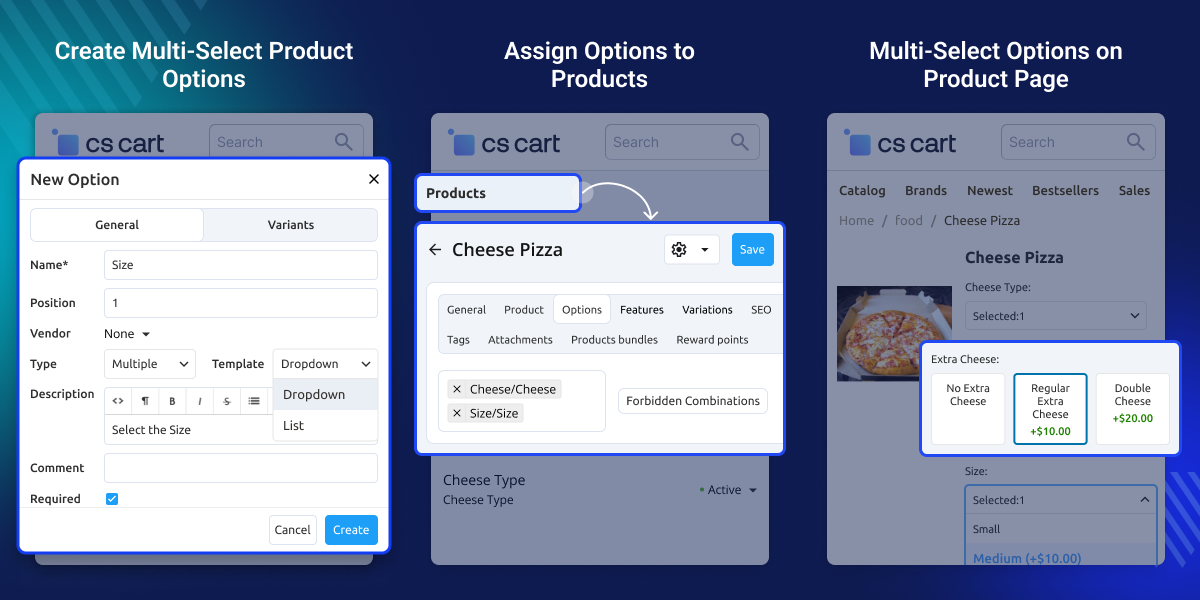
    CS-Cart Multi-Select Product Options

    Highlighted Features of CS-Cart Multi-Select Product Options

     Multiple Option Selection

    Customers can select more than one option easily.

     Flexible Display

    Show options in dropdown or list view.

     Easy Pricing

    Set a price for each option value.

     Full Compatibility

    Works with wishlist and backend orders.

    Why Do You Need CS-Cart Multi-Select Product Options?

    The default system allows only one option. CS-Cart Multi-Select Product Options add-on removes that limit. Customers can select multiple options without any issue.

    Many customers want more than one add-on or feature. This add-on makes the process easy. It also helps increase sales. Customers can add more items in one purchase.

    The add-on manages pricing automatically. It adds the correct price for each selected option. Customers can see their selected options at every step. This improves the shopping experience.

    Additionally, if you want an addon that boosts user engagement by allowing customers to bid on products with a timer, then checkCS-Cart Auction add-on.

    Use Cases

    • Multiple Options Selection

      Customers can select multiple options, such as extra toppings or accessories.

    • Product Customization

      Customers can choose multiple features like gift wrap or add-ons.

    • Service-Based Selection

      Customers can select multiple services in one booking, such as spa or salon services.

    • Bundle and Accessories Selection

      Customers can choose multiple accessories with a main product.

    • Improved Shopping Experience

      Customers can select options easily without confusion.

    • Clear Order Management

      All selected options appear clearly in the cart and order details.

    Create Multi-Select Product Options

    Set up a product option and enable multi-select.
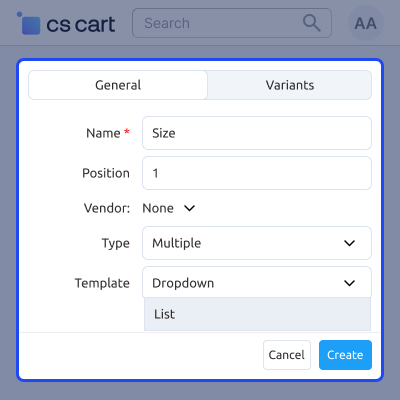
    • Enter the option name.
    • Set the position for display order.
    • Select the option type as multi-select.
    • Add a short description.
    Create Multi-Select Product Options

     Multiple Option Variants Configuration

    Add multiple values under one option.
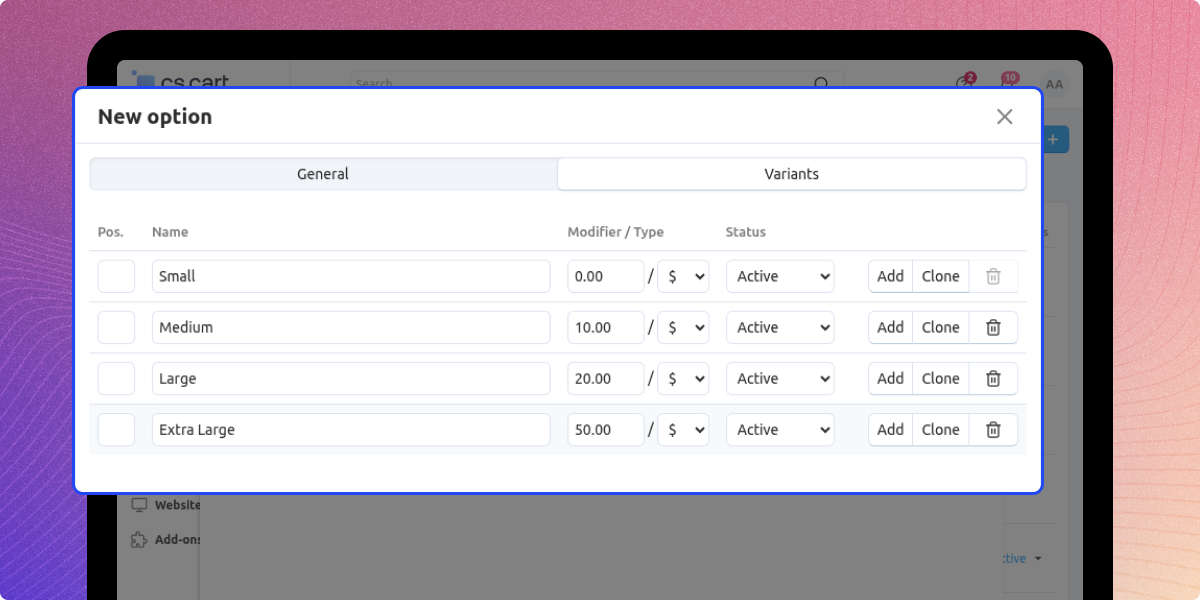
    • Add multiple variants for the option.
    • Set a price for each variant.
    • Enable or disable variants as needed.
    • Manage all values easily.
    Multiple Option Variants Configuration

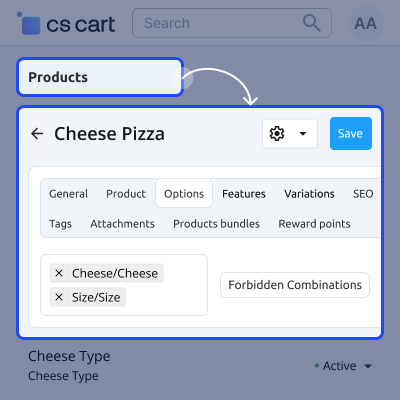
    Assign Options to Products

    Attach options to products.

    • Link options to products.
    • Assign multiple options to one product.
    • Show options on the product page.
    • Offer better customization.
    Assign Options to Products

    Multi-Select Options on Product Page

    Customers can select multiple values on the product page.
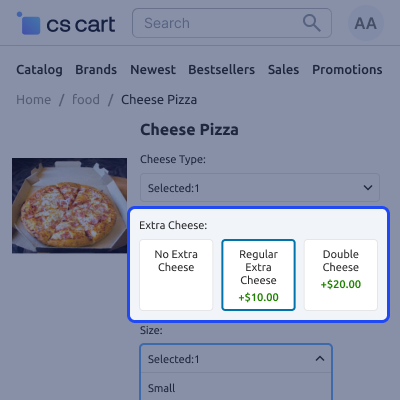
    • Select more than one option value.
    • View all options clearly.
    • See price updates instantly.
    • Enjoy a better shopping experience.
    Multi-Select Options on Product Page

    Support -

    For any query or issue please create a support ticket here

    You may also check our other top-quality CS-Cart Add-ons.

    Specifications

    Product Version1.0
    Released3 days ago
    CategoryCS-Cart
    Last UpdatedApril 9, 2026 (1 day ago)
    Supported VersionsCS-Cart  CS-Cart Multivendor  4.16.x  4.17.x  4.18.x  4.19.x  
    Write a review

    Frequently Asked Questions

     Can customers select multiple values for one option?
    Yes, customers can select multiple values for a single product option, making it easier to customize products based on their preferences.
     
     Can the admin set prices for each option?
    Yes, in CS-Cart Multi Select Product Options, the admin can assign individual prices to each option value, allowing flexible pricing.
     
     Are selected options shown on cart and checkout?
    Yes, all selected option values are clearly displayed on the cart and checkout pages, helping customers review their choices.
     
     Does it support wishlist?
    Yes, customers can save products with selected options in the wishlist and later add them to the cart or place orders easily.
     
     Can customers see selected options in order history?
    Yes, in CS-Cart Multi Select Product Options, customers can view all selected option values in their order history.
     
     Can the admin view selected options in orders?
    Yes, the admin can view selected option details within order information, helping manage orders accurately.

    Move to Cloud Today

    AWS Free tier hosting for one year by amazon web services, for more details please visit AWS Free Tier.

    GCP Free tier hosting for one year with 300 credit points by google cloud platform, for more details please visit GCP Free Tier.

    Azure free tier hosting for one year with 25+ always free services, for more details please visit Azure Free Tier.

    In our default configuration we will provide tremendous configuration for your eCommerce Website which is fast to load and response.

    Default Configuration Details of Server

    • 1 GB RAM
    • 1 Core Processor
    • 30 GB Hard Disk
    • DB with 1 GB RAM and 1 Core Processor

    * Server Configuration may vary as per application requirements.

    Want to know more how exactly we are going to power up your eCommerce Website with Cloud to fasten up your store. Please visit the Cloudkul Services.

    Get Started with Cloud
    • - Feature Add (+)
    • - Feature remove (-)
    • - Bug Fixed (!)
    • - Modification (*)
    Version 1.0
    • + Added support for multi-select product options.
    • + Provides multiple display layouts: dropdown and horizontal (checkbox) view.
    • + Fully compatible with price modifiers and wishlist functionality.
    • + Works seamlessly on both the storefront and admin panel.