CS-Cart OpenStreetMap Address Autocomplete
CS-Cart OpenStreetMap Address Autocomplete suggests matching addresses as users type on Checkout, Customer Profile, and vendor forms.
- Show matching address suggestions as customers type on the Checkout page.
- Suggest addresses when customers add or update their Customer Profile address.
- Help vendor applicants pick an address on the vendor account form.
- Let admins choose suggested addresses when editing customers and vendors.
- Search OpenStreetMap data with the Photon provider and partial words.
- Set Result Limit, Minimum Characters, and Debounce Time from the settings.
- Restrict suggestions by country and filter them by result type.
- Prioritize one region with viewbox coordinates and set the search language.
- Turn autocomplete on or off for each supported page from the Pages tab.
- Description
- Reviews
- FAQ
- Specifications
- Cloud Hosting
- Changelog
CS-Cart OpenStreetMap Address Autocomplete is a CS-Cart add-on that suggests matching addresses while users type in an address field.
It works on the Checkout page, the Customer Profile, and vendor forms. Users pick a suggestion instead of typing the full address.
Suggestions come from the Photon provider, which uses OpenStreetMap data and accepts partly typed words.
Admins control the endpoint URL, language, result limit, minimum characters, and debounce time from the settings screen.
Country Restriction, Result Type Filter, and a viewbox search bias keep suggestions close to the regions the store serves.
Additionally, if you want customers to request returns and add a pickup location, then check CS-Cart Advanced RMA.
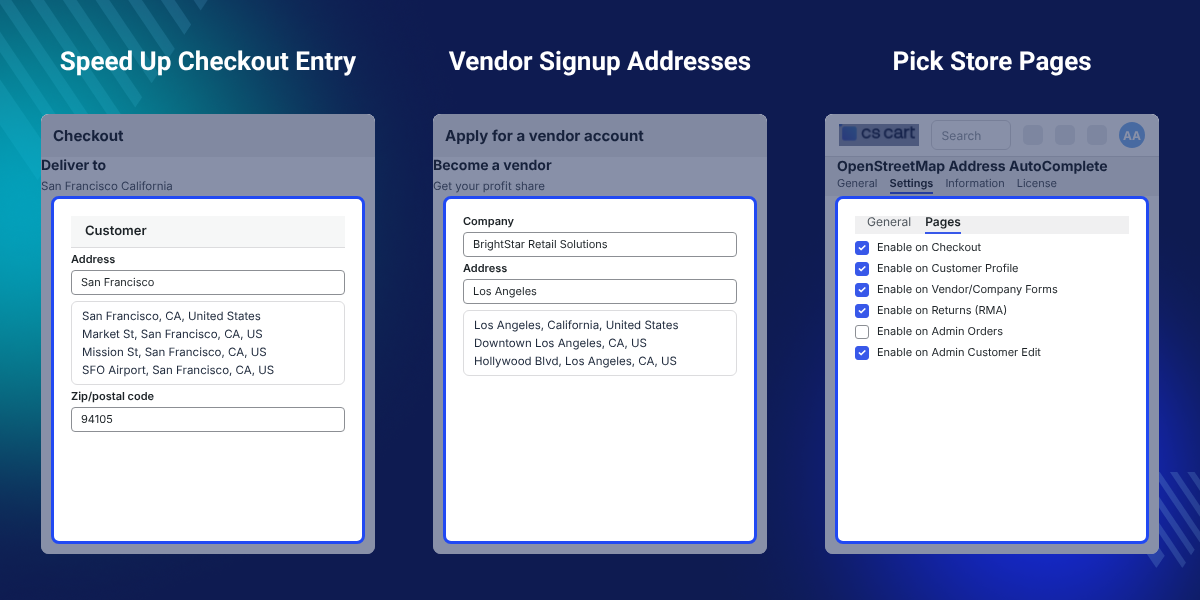
Highlighted Features of CS-Cart OpenStreetMap Address Autocomplete
Checkout Address Suggestions
Customers see matching addresses in the Address field while they type on the Checkout page.
Customer Profile Suggestions
Customers get address suggestions when they add or update details in their profile.
Vendor Address Suggestions
Applicants and vendors select a suggested address on vendor account and profile forms.
Photon Provider Search
The Photon provider searches OpenStreetMap data and returns matches for partly typed words.
Country and Type Filters
Limit suggestions to selected countries and filter them by result type or location type.
Page-Wise Control
Enable autocomplete separately for Checkout, Profile, Vendor, Returns, and admin forms.
Why Do We Need CS-Cart OpenStreetMap Address Autocomplete?
CS-Cart OpenStreetMap Address Autocomplete exists because typing a full address by hand is slow and easy to get wrong.
A plain text field accepts whatever the user enters. A misspelled street or city then reaches orders, vendor records, and customer profiles.
It shows matching addresses after a few characters. Users select one from the list instead of typing the rest.
The guide's settings screen uses Minimum Characters 3, Debounce Time 300 ms, and Result Limit 5, so searches start only after typing pauses.
Also, if you want to collect verified vendor documents after sign-up, you can check our extension CS-Cart Vendor KYC.
Address Autocomplete Use Cases for CS-Cart Stores
-
Faster Checkout Address Entry
Customers choose a suggested address on the Checkout page instead of typing every part.
-
Cleaner Vendor Onboarding
Applicants pick an address from suggestions on the Apply for a vendor account form.
-
Region-Based Delivery Stores
Restrict suggestions to the countries you serve, and bias results to one area with a viewbox.
-
Local-Language Address Search
Set the search language, such as Arabic (ar), so suggestions use the language of your customers.
OpenStreetMap Autocomplete General Settings
General Settings control address search. Go to Add-ons > Developers > Webkul Software Pvt Ltd > OpenStreetMap Address AutoComplete > Settings.
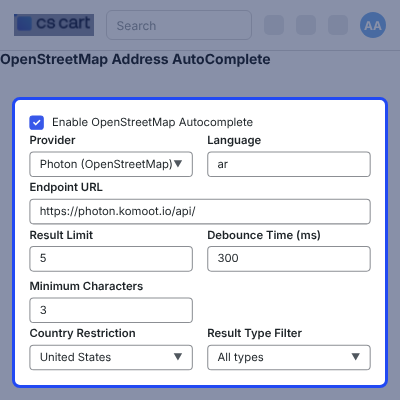
- Enable or disable OpenStreetMap Autocomplete for the supported address forms.
- Select the Photon (OpenStreetMap) provider, which supports partly typed words.
- Set the Endpoint URL used to retrieve address suggestions.
- Enter a Contact Email for provider-related communication.
- Choose the search Language, such as Arabic (ar).
- Set Result Limit, Minimum Characters, and Debounce Time (ms).
- Add Country Restriction, Result Type Filter, and Search Bias (viewbox).

Enable Address Autocomplete on Selected Pages
The Pages tab lets admins choose which address forms show suggestions. Each form has its own checkbox.
Stores can keep suggestions on customer forms and switch them off for admin forms.
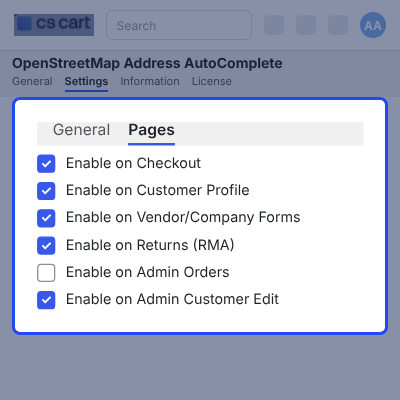
- Enable on Checkout for the checkout address field.
- Enable on Customer Profile for saved customer addresses.
- Enable on Vendor/Company Forms for vendor account forms.
- Enable on Returns (RMA) for return request addresses.
- Enable on Admin Orders for order addresses in the admin panel.
- Enable on Admin Customer Edit for customer addresses in the admin panel.

Edit Customer Addresses with Suggestions in Admin
Admins can use address suggestions when they edit a customer. The customer location updates without typing the full address.
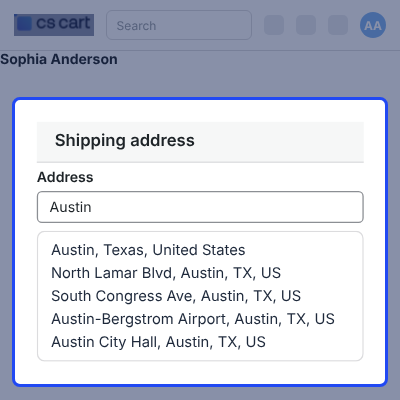
- Go to Users > Customers and select the customer.
- Type in the address field to display matching suggestions.
- Select a suggested address to update the customer location.
- Switch this on with Enable on Admin Customer Edit.

Edit Vendor Addresses with Suggestions in Admin
Admins can edit a vendor address on the Vendor Profile page. Suggestions appear as the admin types.
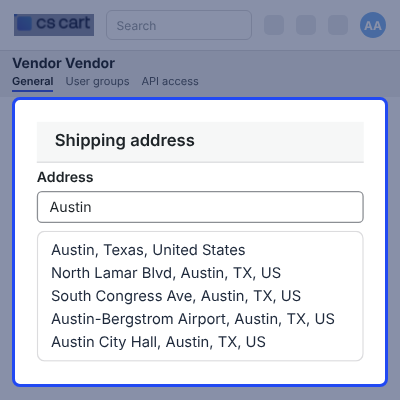
- Open the Vendor Profile page to edit address details.
- Type in the address field to see matching suggestions.
- Select a suggested address for the vendor.
- Control this form with Enable on Vendor/Company Forms.

Checkout Page Address Autocomplete
The Checkout page shows matching addresses as customers type in the Address field. Customers select the one they want from the list.
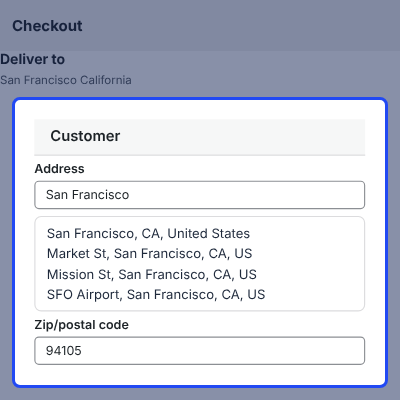
- Suggestions appear under the Address field in the Customer section.
- Each suggestion lists the place with its city, state, and country.
- Customers select a suggestion instead of typing the full address.
- The list shows the OpenStreetMap contributors credit.
- Switch this on with Enable on Checkout.

Customer Profile Address Autocomplete
Customers can update their address details from their profile and select an address from the suggestions.
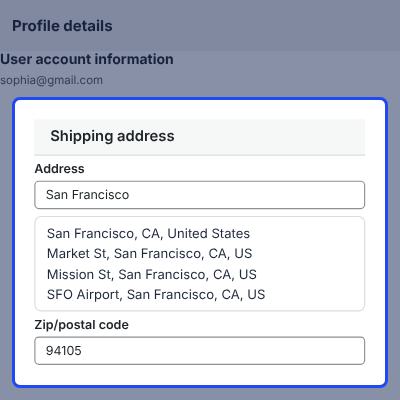
- Suggestions appear when customers add a new address.
- Suggestions appear when customers update an existing address.
- Customers select a match from the displayed list.
- Switch this on with Enable on Customer Profile.

Vendor Application Address Autocomplete
Anyone who applies for a vendor account can select an address from suggestions. The Address field sits on the Apply for a vendor account form.
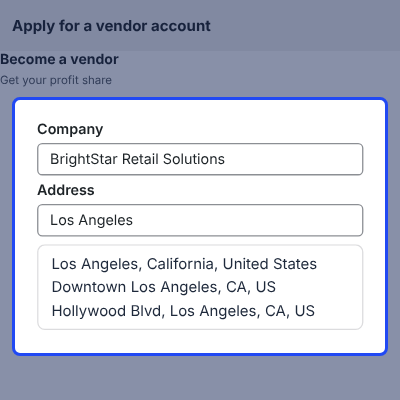
- Applicants type in the Address field of the vendor account form.
- Matching address suggestions appear below the field.
- Applicants select one suggestion from the list.
- Switch this on with Enable on Vendor/Company Forms.

Support
For any query or issue please create a support ticket here http://webkul.uvdesk.com. You may also check our other top-quality CS-Cart Add-ons.
Specifications
Frequently Asked Questions
Specification
Detailed technical features and requirements to help you understand the module’s capabilities and ensure smooth integration with your system.
Cloud Hosting for Websites & Applications
Power your website or application with flexible, scalable cloud infrastructure designed for performance and growth.
Move Your Website or Application to the Cloud
Get started with Cloudkul hosting tailored to your needs.
Configure Your Cloud Server
Choose server resources based on your workload, expected traffic, and performance requirements.
Start with the cloud resources your project needs today and adjust your server configuration as your business grows.
Explore flexible cloud hosting plans and choose your ideal configuration.
* Starting price is indicative. Final pricing and available server resources depend on the selected hosting configuration and requirements.
Change Logs
- - Feature Add (+)
- - Feature remove (-)
- - Bug Fixed (!)
- - Modification (*)
- + Added the address auto completed on checkout.
- + Added address auto completed on customer profile page.
- + Added address auto completed on vendor page.
- + Added address auto completed on rma request page.
- + Implemented the embedded license manager.