USD
  • EUR
  • INR
  • USD
Cart
Cart 0
  • You have no items in your shopping cart.
    Cart
    Cart 0
    • You have no items in your shopping cart.
    Hire a Developer
    ×
    Contact Us!
    Send Again
    Close
    Please Login to Write Your Review

    Cs-Cart Power BI Connector

    Cs-Cart Power BI Connector syncs store data with Microsoft Power BI, helping admins create reports, track performance, and view analytics from the admin panel.


    • Connect CS-Cart and Multi-Vendor stores to Microsoft Power BI.

    • Send orders, customers, products, and vendor data to Power BI.

    • Use secure Azure AD OAuth 2.0 login for Power BI access.

    • Create Power BI datasets automatically.

    • Send store data to Power BI for reports and analysis.

    • Update Power BI data when store changes occur.

    • Run bulk data sync from the admin panel.

    • Open Power BI reports inside the CS-Cart admin panel.

    • Create and manage Power BI reports from the backend.

    • View data sync progress with a live status bar.

    • Sync payments, taxes, shipping methods, and promotions.

    • Include RMA return request data in Power BI reports.

    Screenshots
    Cs-Cart Power BI Connector Cs-Cart Power BI Connector Cs-Cart Power BI Connector Cs-Cart Power BI Connector Cs-Cart Power BI Connector Cs-Cart Power BI Connector Cs-Cart Power BI Connector Cs-Cart Power BI Connector
    Show More Hide All
    $299.00

    * Required Fields

    Add To Cart
    30 Days Refund*
    Only One Time Payment
    $299.00
    Configure and Buy
    • Description
    • Reviews
    • FAQ
    • Customers ()
    • Specifications
    • Cloud Hosting
    • Changelog

    Cs-Cart Power BI Connector connects your CS-Cart or Multi-Vendor store with Microsoft Power BI and sends store data for reporting and business analysis. It sends store data to Power BI for reports and data tracking.

    This add-on sends orders, products, customers, categories, vendors, payments, and promotions to Power BI. You can use this data to view reports and check store performance.

    Store administrators can connect their Microsoft account with Azure AD OAuth 2.0. They can manage the connection from the admin panel. This add-on supports bulk data sync and automatic updates. This helps keep reports up to date.

    Users can open Power BI reports from the store backend. Sales, customer data, vendor data, and other store reports can be viewed in one place. The built-in report creator helps users create dashboards and custom reports with store data.

    This connector keeps reporting data in one place. Teams can use Power BI charts and reports to track store performance. Automatic dataset creation, data sync, and embedded reports save time and help teams work with current store data.

    You can also check our CS-Cart Advanced Backup Management Add-on, which helps you create, store, and manage secure backups for your store.
    CS-Cart Power BI Connector

    Highlighted Features of Cs-Cart Power BI Connector

     Secure Microsoft Login

    Connect Microsoft Power BI with Azure AD login and manage access from your store.

     Automatic Dataset Setup

    Create Power BI datasets automatically using your store data.

     Store Data Sync

    Send store data to Power BI for reports, charts, and business tracking.

     Automatic Data Updates

    Keep reports up to date by syncing data when store changes happen.

     Bulk Data Sync

    Sync existing store data to Power BI with a single action.

     Built-In Report Access

    Open and view Power BI reports directly from the CS-Cart admin panel.

     Report Management

    Create and manage Power BI reports without leaving the store backend.

     Sync Status Tracking

    Check data sync progress and view the current sync status from one place.

    Why Connect CS-Cart with Power BI for Store Analytics?

    Businesses use reports to check sales, customers, products, and vendors. This helps them understand how the store is doing. Store data is often kept in different places. Finding the right data can take time.

    CS-Cart Business Intelligence Add-on sends store data to Microsoft Power BI. Reports and dashboards can then be viewed in one place. CS-Cart includes basic reports. Some businesses need more report options and charts to view store data.

    Many store owners export data to spreadsheets. This adds extra work and takes more time. Reports are harder to create when data is spread across different store sections. CS-Cart Analytics Connector sends store data to Power BI automatically.

    Users can view reports and dashboards with current store data. This add-on supports automatic data sync, embedded reports, and centralized reporting. Keeping data and reports in one place saves time and makes store performance easier to check.

    Use Cases

    Sales Reports

    View sales, orders, and top products in Power BI to track store growth and support business planning.

    Customer Reports

    Check customer buying habits, repeat orders, and shopping trends with easy to read reports.

    Product Reports

    Find top selling products and review stock performance to support product planning and store management.

    Vendor Reports

    Track vendor sales, orders, and marketplace activity with Power BI reports built for Multi-Vendor stores.

    Promotion Reports

    Review the results of discounts and promotions to see how they affect sales and store revenue.

    Return Reports

    Track product returns and return requests to find trends and improve customer experience.

    Automated Dataset Management

    This connector creates Power BI datasets automatically, saving time and helping businesses start reporting quickly with less manual work.
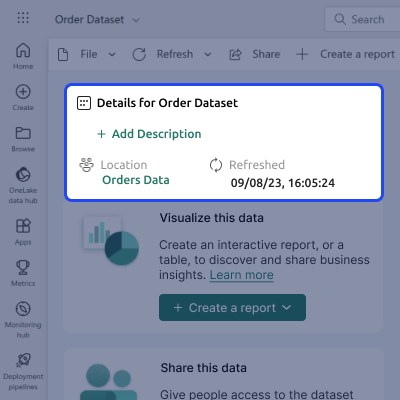
    • Automatic dataset schema registration
    • Create Power BI datasets automatically
    • Generate tables for store entities
    • Structured data mapping support
    • Custom dataset push engine included
    • Reduce manual reporting setup work
    Automated Dataset Management

    Store Data Synchronization

    Send store data from CS-Cart to Power BI and create reports with up to date information from different parts of your store.
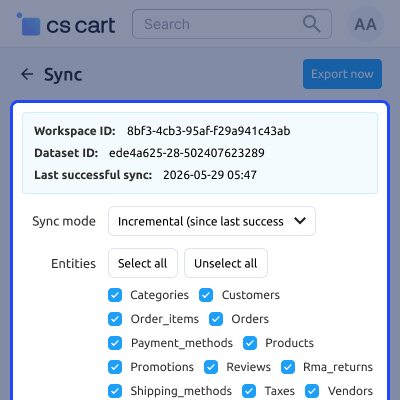
    • Sync orders and order item data
    • Synchronize customer information
    • Transfer products and categories
    • Sync vendors and marketplace data
    • Include taxes and payment details
    • Support promotion related data sync
    Store Data Synchronization

    Embedded Power BI Reporting

    View Power BI reports from the CS-Cart admin panel and check store performance without leaving your store dashboard.
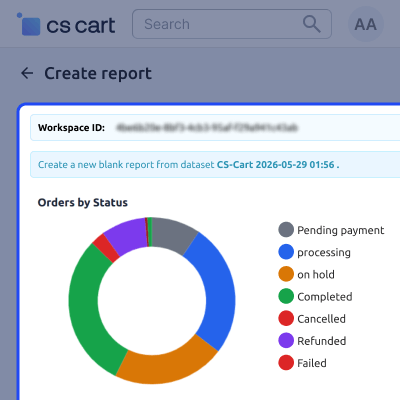
    • View reports inside CS-Cart admin
    • Access centralized business dashboards
    • Create Power BI reports from backend
    • Simplify report management process
    • Faster access to business insights
    • Support custom reporting requirements
    Embedded Power BI Reporting

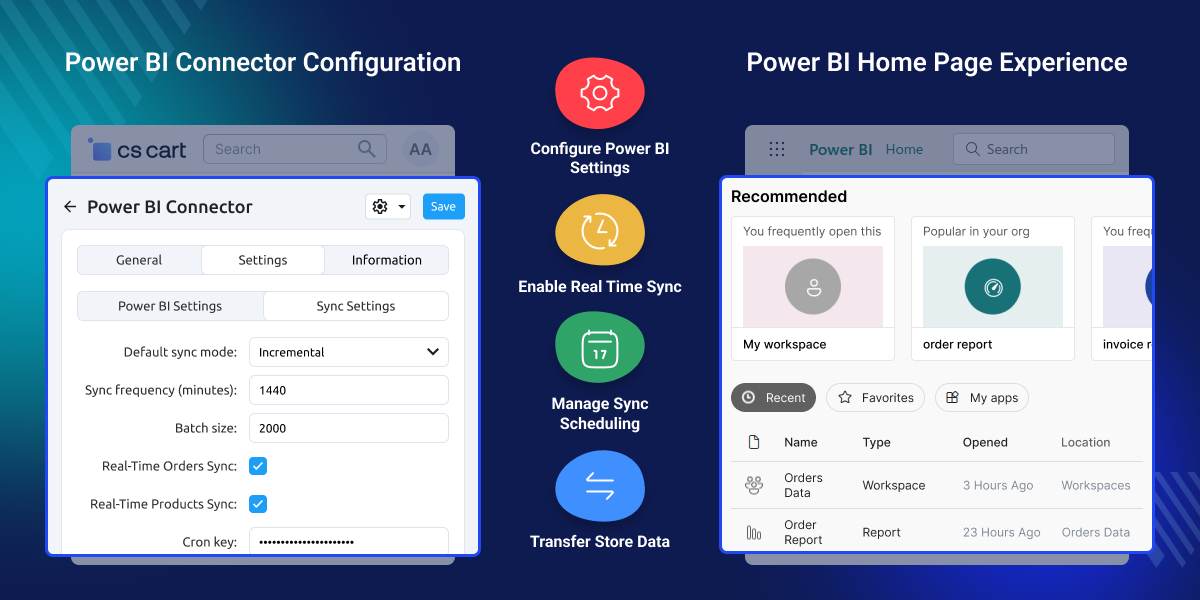
    Power BI Connector Configuration

    Configure synchronization preferences and data transfer settings between CS-Cart and Microsoft Power BI. Manage update frequency, sync modes, and automation options from the store backend.
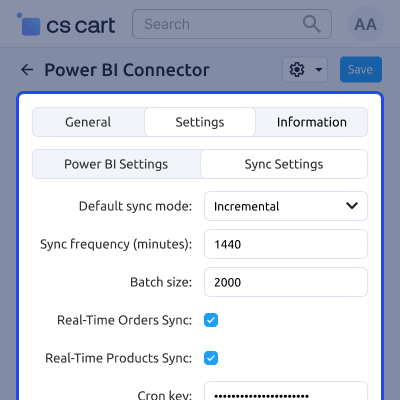
    • Configure incremental synchronization settings.
    • Set synchronization frequency for data updates.
    • Define batch processing size for large datasets.
    • Enable real time synchronization for orders.
    • Enable real time synchronization for products.
    • Configure cron key for secure sync execution.
    • Manage automated Power BI data transfers.
    • Control synchronization behavior from backend.
    Power BI Connector Configuration

     Support

    For any query or issue please create a support ticket here http://webkul.uvdesk.comYou may also check our other top-quality CS-Cart Add-ons.

    Specifications

    Product Version1.0
    ReleasedToday
    CategoryCS-Cart
    Last UpdatedJune 11, 2026 (1 day ago)
    Supported VersionsCS-Cart  CS-Cart Multivendor  4.18.x  4.19.x  4.20.x  
    Write a review

    Frequently Asked Questions

     Does the add-on work with both CS-Cart and Multi-Vendor?
    Yes, this add-on works with both CS-Cart and Multi-Vendor stores and sends store data to Power BI for reports, dashboards, and business tracking.
     
     What data can be synchronized to Power BI?
    You can sync orders, products, customers, categories, vendors, payments, taxes, shipping methods, promotions, and return request data.
     
     How is the connection to Power BI established?
    This add-on uses Azure AD OAuth 2.0 login, allowing administrators to connect their Microsoft Power BI account from the store admin panel.
     
     Can I synchronize existing store data after installation?
    Yes, you can run a bulk sync to send existing orders, products, customers, and other store records to Power BI after installation.
     
     Does this connector support real-time data updates?
    Yes, this add-on can update Power BI when supported store events occur, helping reports show the latest store data more quickly.
     
     Can I view Power BI reports inside the CS-Cart admin panel?
    Power BI reports can be opened from the CS-Cart admin panel, making it easy to view reports without changing platforms.
     
     Can marketplace vendors be included in Power BI reports?
    This Multi-Vendor Power BI Connector syncs vendor data to Power BI, allowing businesses to create reports for vendor sales, orders, and marketplace activity.
     
     Is this connector suitable for stores with large datasets?
    Yes, this add-on is built to process large amounts of store data and helps keep data transfers stable and organized.
     
     Can I create custom Power BI dashboards using synchronized data?
    Synced store data can be used to build custom Power BI dashboards, charts, and reports based on your business needs.
     
     Are Power BI datasets created automatically?
    Yes, this add-on creates the required Power BI datasets and tables automatically for supported store data and reports.
     
     Does this module support reporting for product returns?
    Product return request data can be synchronized with Power BI, making it easier to track returns and generate return-related reports for analysis.

    Move to Cloud Today

    AWS Free tier hosting for one year by amazon web services, for more details please visit AWS Free Tier.

    GCP Free tier hosting for one year with 300 credit points by google cloud platform, for more details please visit GCP Free Tier.

    Azure free tier hosting for one year with 25+ always free services, for more details please visit Azure Free Tier.

    In our default configuration we will provide tremendous configuration for your eCommerce Website which is fast to load and response.

    Default Configuration Details of Server

    • 1 GB RAM
    • 1 Core Processor
    • 30 GB Hard Disk
    • DB with 1 GB RAM and 1 Core Processor

    * Server Configuration may vary as per application requirements.

    Want to know more how exactly we are going to power up your eCommerce Website with Cloud to fasten up your store. Please visit the Cloudkul Services.

    Get Started with Cloud
    • - Feature Add (+)
    • - Feature remove (-)
    • - Bug Fixed (!)
    • - Modification (*)
    Version 1.0
    • + Added secure Microsoft Power BI integration using Azure AD OAuth 2.0.
    • + Added custom dataset schema registration for storefront entities.
    • + Added real-time sync hook handlers on order placements and product updates.
    • + Added paginated batch sync engine to optimize large database exports.
    • + Added interactive progress bar for synchronizing entities via AJAX.
    • + Added embedded views for Power BI reports and report editor in the administration panel.
    • + Added sync logs and user audit log databases in the CS-Cart backend.
    • ! Fixed strict typing ArgumentCountError crashes on order placement and status updates by specifying safe default parameter arguments in HookHandlers.
    • ! Fixed duplicate dataset creation bug on AJAX chunk sync runs by using a unified sync run ID.
    • ! Fixed empty payment method names on Power BI by left-joining payment descriptions translation table in the query.
    • ! Fixed missing top-level categories in sync by utilizing flat category queries.
    • ! Fixed memory leak and potential CPU timeout crash on RMA sync by shifting pagination from PHP array slice to the database query level.
    • * Refactored entire custom tables database access layer to introduce BaseModel query builder and PowerBIModel repository pattern.


