CS-Cart Advanced Backup Management
CS-Cart Advanced Backup Management add-on helps you create and manage secure backups for your store.
- Easy to configure and manage from the admin panel.
- Allows file backup, database backup, full backup, and store installer backup.
- Enables automatic log clearing, cache cleanup, and database optimization.
- Allows backup upload to Dropbox for secure cloud storage.
- Helps protect store data from server issues.
- Provides secure backup storage for improved data safety.
The Backup Management add-on cannot be added to the demo store because creating backups on the demo environment is not supported.
- Description
- Reviews
- FAQ
- Customers ()
- Specifications
- Cloud Hosting
- Changelog
CS-Cart Advanced Backup Management module helps admin to implement their own backup strategy to ensure data safety and business continuity. This module is used to create a store installer of the CS-Cart website.
Once the installer is created, the admin can create a fresh site on any other location server and database. The admin can create a cron for cleaning logs, cache, thumbnails, and database optimization. Also, they can generate the backup of files, database, and full backup.
They can also create an installer for backup. The admin can upload backups on Dropbox. Also, the store owner can take the manual backup or schedule it automatically.
Highlighted Features of CS-Cart Advanced Backup Management
Clear Store Website
The admin can clear the log, cache, template cache, thumbnails, and old backups and optimize the database.
Dropbox Upload
The admin can upload a backup in a Dropbox with the help of Crone.
Create Backups
The admin can create backups for files, full backups, and databases.
Create Store Installer
The store owner can also create a store installer for data backup and download it.
Why do we need CS-Cart Advanced Backup Management?
CS-Cart Advanced Backup Management helps store owners secure important store data by automating the backup process. It protects your store from unexpected data loss caused by server issues, accidental deletion, malware attacks, or system failures.
The add-on allows the admin to create scheduled backups, optimize the database, clear cache and logs, and upload backups to Dropbox for secure storage. It also reduces manual effort and helps maintain smooth and uninterrupted store operations through regular backup management.
Use Cases
-
Secure Data Recovery
Restore store data quickly in case of server failure, accidental deletion, or technical issues to minimize downtime.
-
Cloud Backup Storage
Upload backups to Dropbox for secure cloud storage and access backup files whenever required.
-
Store Migration Support
Create complete store installer backups to simplify store migration and deployment processes.
-
Pre-Update Data Protection
Create secure backups before updating CS-Cart or installing new add-ons to prevent data loss during changes.
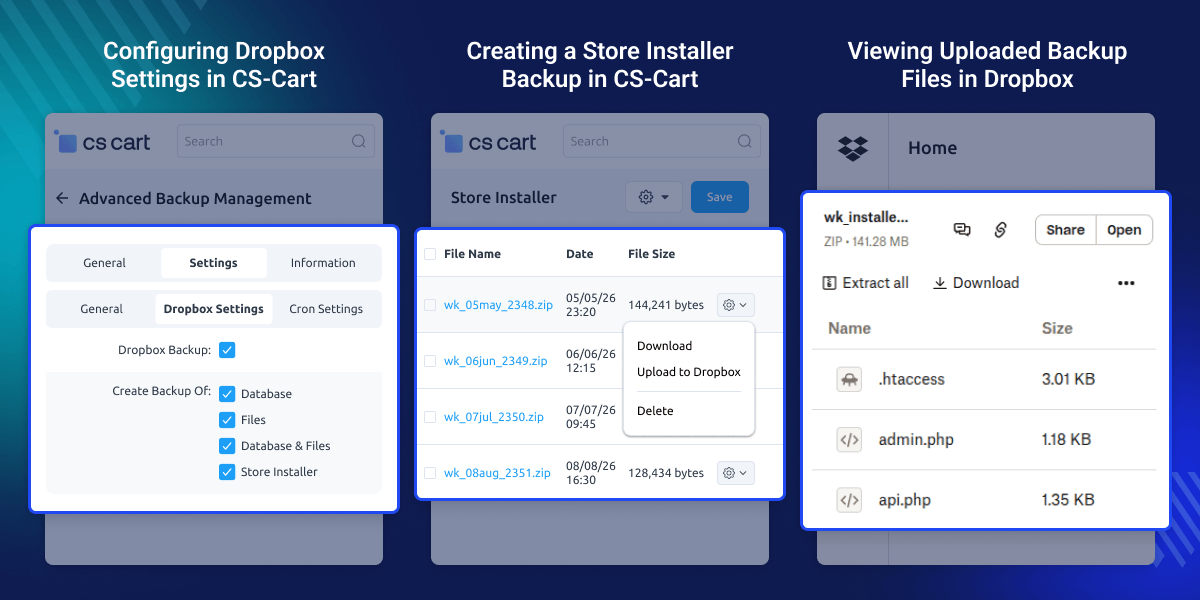
Configuring Dropbox Settings in CS-Cart
Configure Dropbox credentials in CS-Cart to enable secure cloud backup integration.
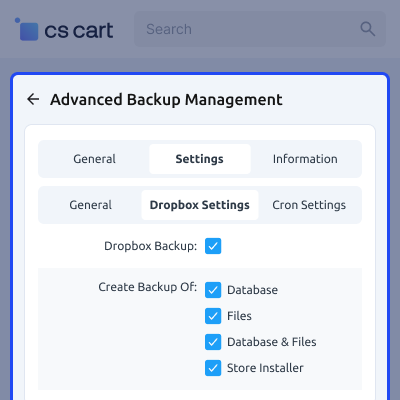
- Enable Dropbox integration for backup storage.
- Select the files and data to include in the backup.
- Configure options for clearing cache, logs, and thumbnails.
- Save backup and cron configuration settings from the admin panel.
Creating a Store Installer Backup in CS-Cart
Create a complete store installer backup for data recovery and store migration purposes.
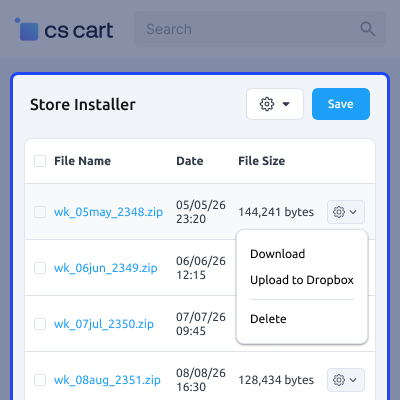
- Generate a full backup of store files and the database.
- Create store installer packages directly from the admin panel.
- Upload and download backup files through Dropbox integration.
- Manage backup files efficiently for future recovery and migration needs.
Connecting CS-Cart with Dropbox for Backup Management
Connect your CS-Cart store with Dropbox to automate backup storage.
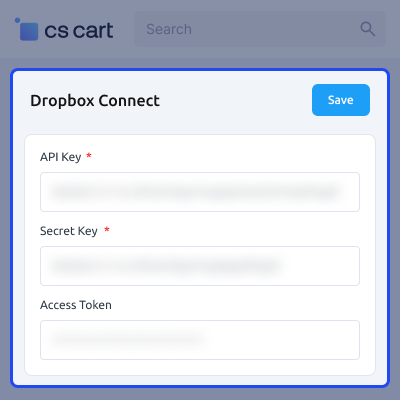
- Create a Dropbox app for integration.
- Enter the Dropbox API Key in the configuration settings.
- Enter the Dropbox Secret Key for secure authentication.
- Authenticate the connection to generate the access token.
Viewing Uploaded Backup Files in Dropbox
Access and manage uploaded backup files directly from Dropbox.
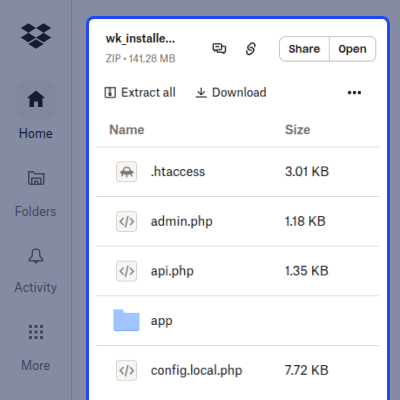
- View all uploaded backup ZIP files.
- Download backup files whenever required.
- Store backups securely in Dropbox folders.
- Manage backup files for future recovery purposes.
CS-Cart Advanced Backup Management -Support
For any query or issue please create a support ticket here http://webkul.uvdesk.com
You may also check our other top-quality CS-Cart Modules.
Specifications
Frequently Asked Questions
Move to Cloud Today
AWS Free tier hosting for one year by amazon web services, for more details please visit AWS Free Tier.
GCP Free tier hosting for one year with 300 credit points by google cloud platform, for more details please visit GCP Free Tier.
Azure free tier hosting for one year with 25+ always free services, for more details please visit Azure Free Tier.
In our default configuration we will provide tremendous configuration for your eCommerce Website which is fast to load and response.
Default Configuration Details of Server
- 1 GB RAM
- 1 Core Processor
- 30 GB Hard Disk
- DB with 1 GB RAM and 1 Core Processor
* Server Configuration may vary as per application requirements.
Want to know more how exactly we are going to power up your eCommerce Website with Cloud to fasten up your store. Please visit the Cloudkul Services.
Get Started with Cloud- - Feature Add (+)
- - Feature remove (-)
- - Bug Fixed (!)
- - Modification (*)
- + Added 3rd party library for uploading large files on Dropbox.
- ! Fixed cscart instance installation issue using installer setup.
- * Convert into schema 4.
- + Admin can set Dropbox settings for uploading backup on to Dropbox through cron.
- + Admin can set email notification after cron execution for cron logs.
- + Advanced backend options for admin to create store installer.
- + Admin can enable clear logs, cache clearing, database optimization.
- + Admin can enable backup of files, database, full backup as well as Store installer through cron.
- + Admin can enable delete old backups after creation of new backup through cron.


