USD
  • EUR
  • INR
  • USD
Cart
Cart 0
  • You have no items in your shopping cart.
    CS-Cart Extensions
    Cart
    Cart 0
    • You have no items in your shopping cart.
    Hire a Developer
    ×
    Contact Us!
    Send Again
    Close
    Please Login to Write Your Review
    CS-Cart Wix Connector

    CS-Cart Wix Connector

    x

    * Required Fields

    $139.00
    Add To Cart
    30 Days Money Back Guarantee*
    Only One Time Payment

    CS-Cart Wix Connector helps store owners connect CS-Cart with Wix for product, order, and inventory sync. Vendors run every sync from one dashboard.


    • Connect a vendor account to a Wix store through Wix authorization.

    • Run Wix to CS-Cart product import and CS-Cart to Wix export.

    • Run Wix to CS-Cart order import and CS-Cart to Wix order export.

    • Export a single product to Wix from the CS-Cart product page.

    • Export many selected orders to Wix with one Orders page action.

    • Import only the Wix products and orders that vendors select.

    • Set default payment, shipping, order status, and product status values.

    • Turn on automatic order sync and inventory sync from the settings.

    • Review product and order sync history and admin Wix logs.

    CS-Cart Wix Connector
    CS-Cart Wix Connector
    $139.00
    30-Day Refund Policy.
    Check How It Works

    Need Help Deciding?

    Support answers within one business day.

    Open a ticket
    $139.00
    Configure and Buy
    30 Days Money Back Guarantee*
    Only One Time Payment
    X
    • Description
    • Reviews
    • FAQ
    • Customers ()
    • Specifications
    • Cloud Hosting
    • Changelog

    CS-Cart Wix Connector is a CS-Cart add-on that links vendors with Wix, so products, orders, and inventory move between both platforms.

    A vendor clicks Connect to Wix, picks a site, and approves the requested permissions. After that one step, the connection is ready.

    From the connector dashboard, vendors open product sync and order sync. Each runs as Wix to CS-Cart or CS-Cart to Wix sync.

    Admins enter the Wix App ID, App Secret, Public Key, and App Installer URL. They can also switch on automatic order and product sync.

    Sync tasks run through the CS-Cart Queue Handler, and Webkul Data Grid must be installed first. Every run is saved in the sync history.

    Additionally, if you want to import products from AliExpress and automate orders, then check CS-Cart AliExpress Dropshipping.
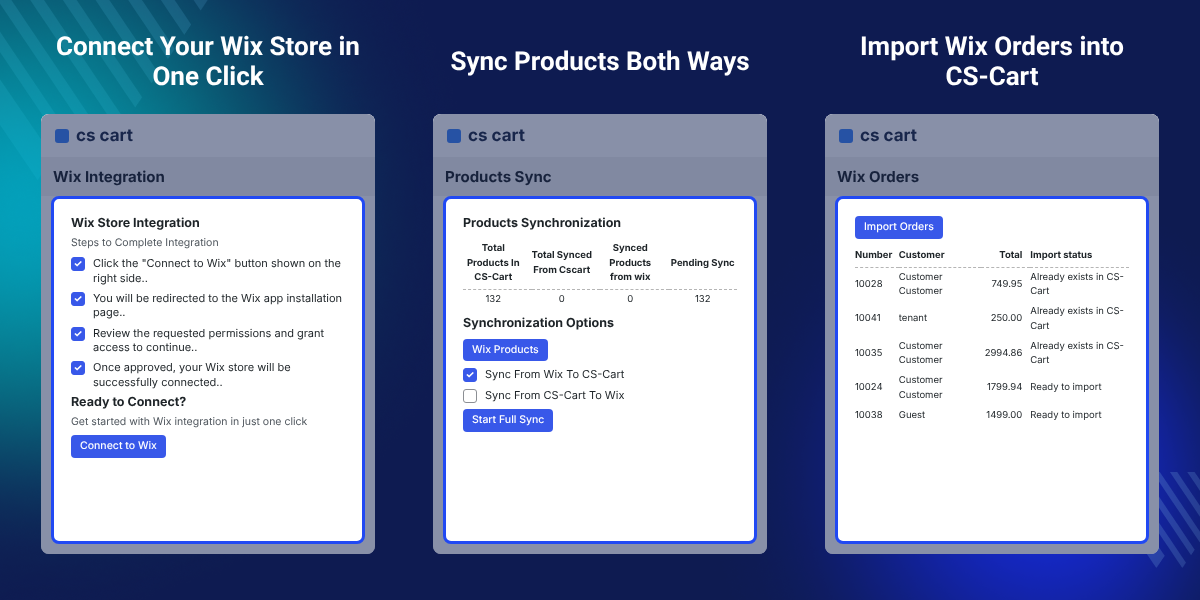
    CS-Cart Wix Connector

    Highlighted Features of CS-Cart Wix Connector

     Wix Authorization

    Vendors use the Connect to Wix button, choose a site, and click Agree & Add to link their Wix store.

     Two-Way Product Sync

    Run Sync From Wix To CS-Cart or Sync From CS-Cart To Wix, then start a full sync with one button.

     Two-Way Order Sync

    Import selected Wix orders into CS-Cart, or export CS-Cart orders to the connected Wix store.

     Single Product Export

    Open any CS-Cart product and use Export to Wix in the gear menu to send only that product.

     Bulk Order Export

    Select several orders on the CS-Cart Orders page and send them to Wix together from the Actions menu.

     Default Value Mapping

    Choose the default payment method, shipping method, order status, and product status for synced records.

     Sync History

    See the date, direction, processed items, and status of each product and order sync run.

     Admin Wix Logs

    Admins review log type, message, and related data to check connector activity and sync problems.

    Why Do We Need CS-Cart Wix Connector?

    CS-Cart Wix Connector exists for vendors who sell on CS-Cart and Wix. Without a CS-Cart Wix integration, each store keeps its own catalog and orders.

    Vendors then add each product twice and copy order details by hand. That costs time and leads to price, stock, and order mistakes.

    Through Wix authorization, the connector links a Wix eCommerce store with CS-Cart. Vendors pick what to sync, and which way, from one dashboard.

    Each import screen shows an Import status per record. A Wix order with an existing Wix Order ID is highlighted and cannot be picked again.

    Also, if you want to bring Shopify products, orders, and inventory into CS-Cart, you can check our extension CS-Cart Shopify Connector.

    Vendors who run a WooCommerce shop can look at CS-Cart WooCommerce Connector for the same kind of sync.

    For vendors who keep a PrestaShop store, CS-Cart PrestaShop Connector links that store with CS-Cart.

    If your vendors also want to manage their work from a phone, you can add CS-Cart Marketplace Vendor Mobile App.

    CS-Cart Wix Connector Use Cases

    • Sell on Two Storefronts

      A vendor keeps a CS-Cart shop and a Wix site, and syncs both so each shows the same products.

    • Move Wix to CS-Cart

      A vendor with a large Wix catalog selects products in the Wix Products window and imports them.

    • Launch on Wix

      A vendor who built a CS-Cart catalog first sends it to a new Wix site with Start Full Sync.

    • Handle Orders in One Place

      A vendor imports Wix orders into CS-Cart and fulfils every order from the CS-Cart panel.

    • Monitor Vendor Connections

      A marketplace admin sees which vendors are connected and filters them by connection and sync status.

    CS-Cart Wix Connector Configuration

    The Wix Connector add-on settings hold the Wix app credentials and sync options. Admins fill them in after installing the add-on.
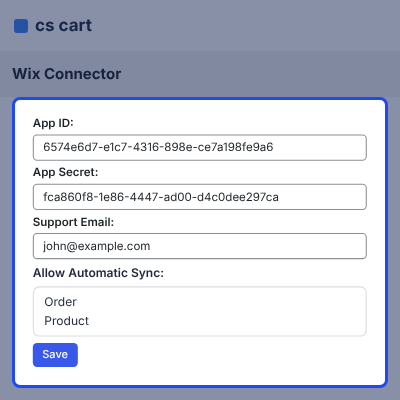
    • Enter the Wix App ID, App Secret, and Public Key.
    • Add the App Installer URL used for the Wix install step.
    • Set the Support Email shown for connector help.
    • Select Order, Product, or both in Allow Automatic Sync.
    • Install and set up CS-Cart Queue Handler before the first sync.
    CS-Cart Wix Connector Configuration

    Connect Wix Store from Vendor Panel

    The Wix Integration page in the vendor panel links a vendor account to a Wix site. A vendor needs an active Wix store with admin rights.
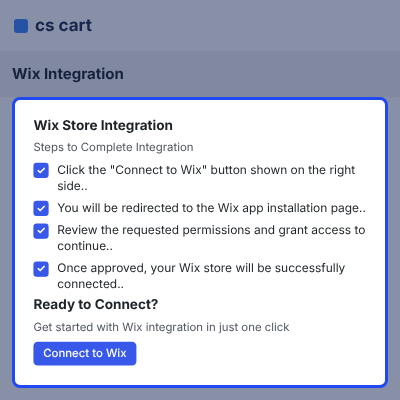
    • Click Connect to Wix to start the Wix authorization.
    • Select the Wix site from the My Sites list.
    • Review the requested permissions and click Agree & Add.
    • Check the Connection Status page for the Active Connection badge.
    • Open Sync Products, Sync Orders, or Configurations from the same page.
    Connect Wix Store from Vendor Panel

    Wix Product Import and Inventory Sync

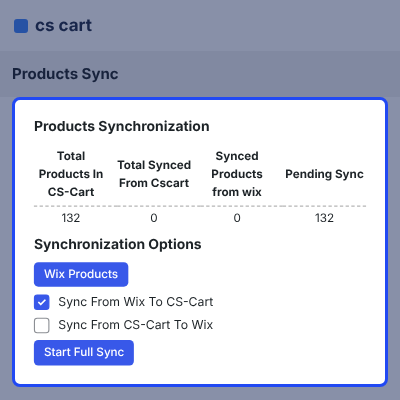
    The Products Synchronization page moves products between Wix and CS-Cart. Vendors pick the direction and start the sync.
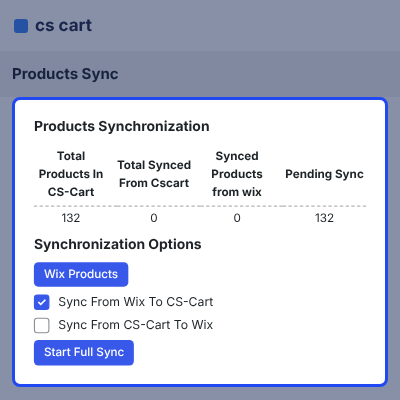
    • Read Total Products In CS-Cart, Total Synced From Cscart, Synced Products from wix, and Pending Sync counts.
    • Choose Sync From Wix To CS-Cart or Sync From CS-Cart To Wix.
    • Click Start Full Sync to run the selected direction.
    • Open Wix Products and select the products to import into CS-Cart.
    • Use Export to Wix on a CS-Cart product page to send one product.
    Wix Product Import and Inventory Sync

    Wix Order Import and Export

    The Orders Sync page imports Wix orders into CS-Cart and exports CS-Cart orders to Wix. Vendors choose which orders to move.
    • Select Sync From Wix To CS-Cart to open the Wix Orders list with number, customer, total, and status.
    • Check the Import status column, which shows Ready to import or Already exists in CS-Cart.
    • Click Import Orders to bring the selected orders into CS-Cart.
    • Select orders on the CS-Cart Orders page and click Export to Wix in Actions.
    Wix Order Import and Export

    Wix Connector Map Configurations

    Map Configurations sets the default values CS-Cart applies to products and orders created by a sync.
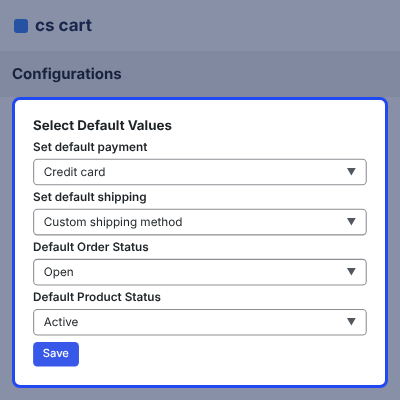
    • Set the default payment method, such as Credit card.
    • Set the default shipping method for synced orders.
    • Pick the Default Order Status, such as Open.
    • Pick the Default Product Status, such as Active.
    • Click Save to apply the selected defaults.
    Wix Connector Map Configurations

    Wix Sync History

    The Sync History lists past runs for products and orders. Vendors use it to confirm that a run finished.
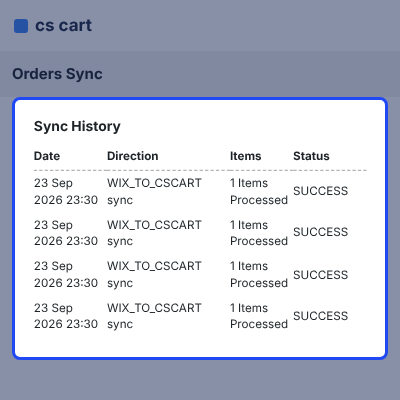
    • See the date and time of each run.
    • Read the direction, such as WIX_TO_CSCART or CSCART_TO_WIX.
    • Check how many items were processed.
    • Read the status badge, such as SUCCESS.
    • Click Show Details to open the record for that run.
    Wix Sync History

    Admin Wix Vendor Connections

    The Wix Vendor Connections page gives admins one view of every vendor connection. Summary tiles sit above the vendor table.
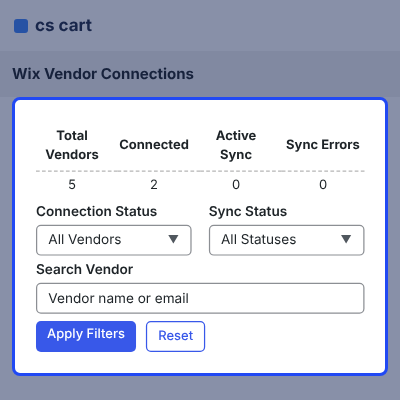
    • Read the Total Vendors, Connected, Active Sync, and Sync Errors tiles.
    • Filter by Connection Status and Sync Status.
    • Search vendors by name or email.
    • Click Apply Filters or Reset to change the list.
    • Use Export Data to download the vendor records.
    Admin Wix Vendor Connections

    Wix Logs for Admins

    The Wix Logs page records connector activity. Admins use it to check what the connector did during a sync.
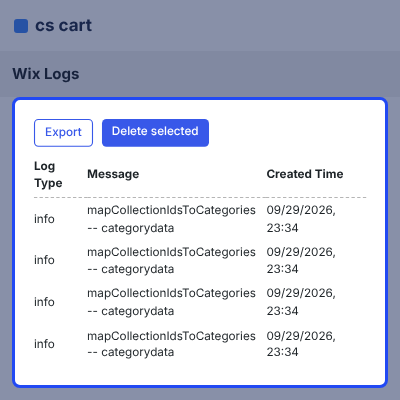
    • Read the Log Type, Message, and data columns.
    • See the Created Time for each entry.
    • Open the filter to narrow the list.
    • Use Export to save the logs.
    • Select entries and click Delete selected to remove them.
    Wix Logs for Admins

    Complete CS-Cart Wix Connector Feature List

    Connection & Setup

    • Connect a vendor account to a Wix site through the Wix authorization and Agree & Add steps
    • Enter the Wix App ID, App Secret, Public Key, App Installer URL, and support email in the add-on settings
    • Install through Add-ons > Downloaded Add-ons with Manual Installation
    • Process sync tasks with CS-Cart Queue Handler, with Webkul Data Grid installed as a dependency

    Product Synchronization

    • Sync products between CS-Cart and Wix in both directions with Start Full Sync
    • Import selected Wix products by name, code, price, and import status
    • Export a single product to Wix from the CS-Cart product page
    • Track total, synced, and pending product counts on the sync page
    • Turn on automatic product and inventory sync

    Order Synchronization

    • Sync orders between CS-Cart and Wix in both directions
    • Import selected Wix orders with number, customer, total, and status shown
    • Block repeat imports for orders that already exist with the same Wix Order ID
    • Export many CS-Cart orders to Wix together from the Orders page
    • Turn on automatic order sync from the add-on settings

    Defaults & Mapping

    • Set the default payment method and shipping method for synced orders
    • Set the default order status and product status used during sync

    Admin Management & Monitoring

    • View Total Vendors, Connected, Active Sync, and Sync Errors in Wix Vendor Connections
    • Filter vendors by connection status and sync status, search by name or email, and export the data
    • Review product and order sync history with date, direction, processed items, and status
    • Check Wix logs for log type, message, and related sync data

     Support

    For any query or issue please create a support ticket here http://webkul.uvdesk.com. You may also check our other top-quality CS-Cart Add-ons.

    Specifications

    Product Version1.0
    Released3 days ago
    CategoryCS-Cart, Connector, 
    Last UpdatedOctober 8, 2026 (3 days ago)
    Supported VersionsCS-Cart  CS-Cart Multivendor  4.16.x  4.17.x  4.18.x  4.19.x  4.20.x  

    Ratings

    We'd love to hear your thoughts! Share your feedback and help us craft an even better experience tailored just for you.

    Write a review

    Frequently Asked Questions

     How does CS-Cart Wix Connector work?
    CS-Cart Wix Connector links a vendor account to a Wix site through Wix authorization. Vendors then sync products and orders from Wix to CS-Cart or from CS-Cart to Wix.
     
     What do I need before installing the connector?
    Install the Webkul Data Grid (wk_datagrid) add-on first. Install and configure CS-Cart Queue Handler as well, because it processes the sync tasks.
     
     How does a vendor connect a Wix store?
    Vendors open the Wix Connector section in the vendor panel and click Connect to Wix. After they pick a site and click Agree & Add, the store shows an Active Connection.
     
     Can I sync products in both directions?
    Yes. Products Synchronization offers Sync From Wix To CS-Cart and Sync From CS-Cart To Wix. Click Start Full Sync to run the chosen direction.
     
     Can I export only one product to Wix?
    Yes. Open the product in CS-Cart and choose Export to Wix from the gear menu. Only that product is sent to the connected Wix store.
     
     What happens if a Wix order already exists in CS-Cart?
    Wix Orders highlights it and shows Already exists in CS-Cart. An order with the same Wix Order ID cannot be selected again.
     
     Can I export many orders to Wix at once?
    Yes. Select the orders on the CS-Cart Orders page and click Export to Wix in the Actions menu. All selected orders are exported together.
     
     Can I turn on automatic sync?
    Yes. Admins select Order, Product, or both in Allow Automatic Sync in the add-on settings. Automatic inventory sync is supported as well.
     
     Can admins see which vendors are connected?
    Yes. Wix Vendor Connections lists vendors with connection and sync status. Admins can filter, search by name or email, and export the data.

    Specification

    Detailed technical features and requirements to help you understand the module’s capabilities and ensure smooth integration with your system.

    Cloud Hosting

    Detailed technical features and requirements to help you understand the module’s capabilities and ensure smooth integration with your system.

    Default Configuration Details of Server

    1 GB
    RAM
    1 Core
    Processor
    30 GB
    Hard Disk
    1 GB RAM & 1 Core Processor
    Database

    Want to know more how exactly we are going to power up your eCommerce Website with Cloud to fasten up your store

    * Server Configuration may vary as per application requirements.

    Change Logs

    • - Feature Add (+)
    • - Feature remove (-)
    • - Bug Fixed (!)
    • - Modification (*)
    Version 1.0
    • + Sync products from CS-Cart to Wix.
    • + Import products from Wix to CS-Cart.
    • + Sync individual (single) products on demand.
    • + Perform bulk product synchronization.
    • + Import Wix orders into CS-Cart.
    • + Sync product inventory (stock) across platforms.
    • + Maintain consistent product pricing between systems.
    • + Map CS-Cart categories with Wix collections.


