- Description
- Reviews
- FAQ
- Customers ()
- Specifications
- Cloud Hosting
- Changelog
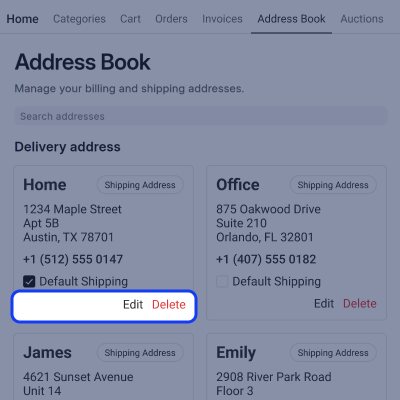
The ERPNext Website Customer Address Book gives every shopper a single place to store multiple addresses, such as a home address and a work address. A shopper can set one address as the default shipping address and another as the default billing address, saving time on every order.
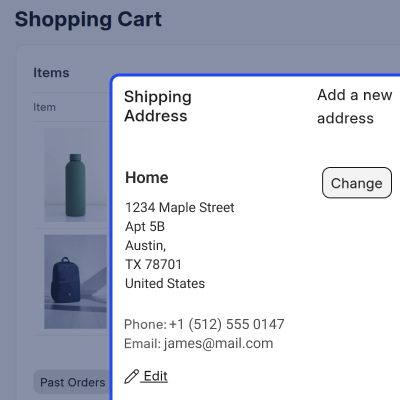
A shopper can update or remove a saved address at any time, and can even change the address during checkout. There is no need to contact the store or send a message, since the entire process happens directly on the website.
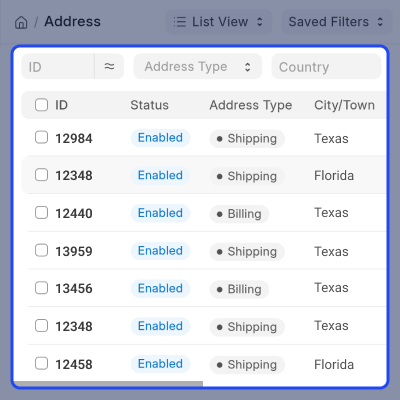
The store team can also view every saved customer address from the desk, under Selling and Setup. This single address list brings all customer addresses together in one place, keeping records organized and easy to manage.
From this list, the store team can correct an address that contains an error, remove an address that is no longer needed, or disable an address without deleting its saved details.
Shoppers prefer not to enter the same address more than once, and a fast, simple checkout experience matters most to them. This module delivers that convenience, while also giving the store team complete control over customer address data.
Both new and established stores benefit from this feature. First-time buyers get a quick and simple ordering experience, while returning buyers have their saved address ready to use. This module supports both types of shoppers effectively.
For real-time product availability on your ERPNext website, you can also explore the ERPNext Website Product Stock module.
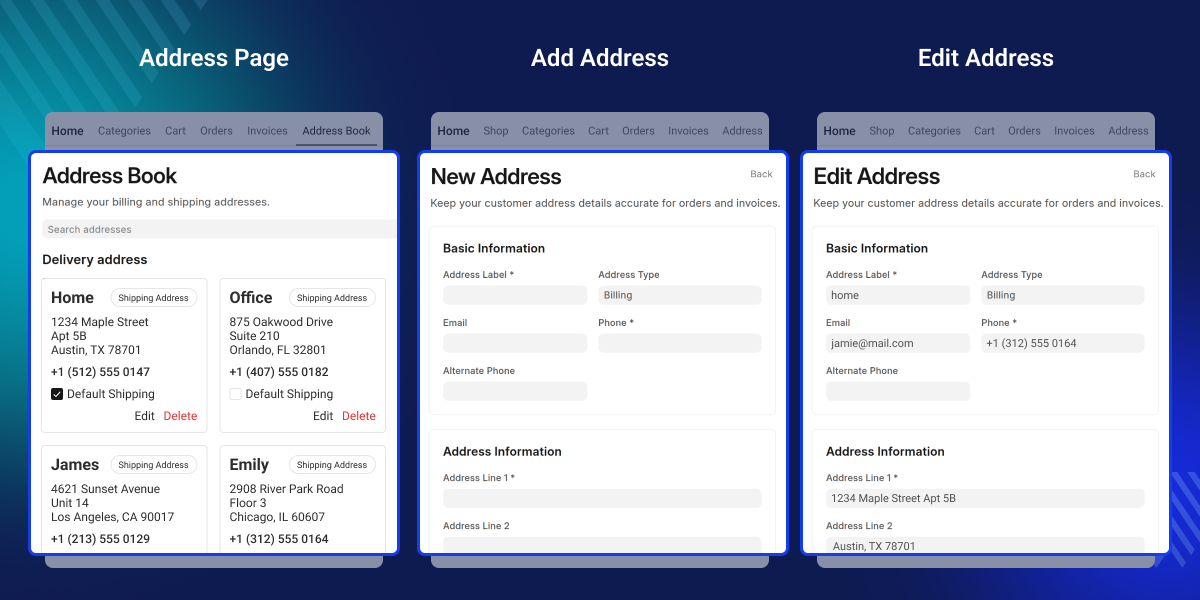
Highlighted Features of ERPNext Website Customer Address Book
Save Many Addresses In One Place
A shopper can add a home spot and a work spot in one account.
Pick A Default Shipping Address
A shopper can mark one saved address as the main ship spot.
Pick A Default Billing Address
A shopper can mark one saved address as the main bill spot.
Update Or Delete An Address
A shopper can fix a wrong field or drop an old address anytime.
Why do we need ERPNext Website Customer Address Book?
The old way made a shopper type the full address each time. This is slow, and it can lead to mistakes on the shipping label. A long form at checkout can even make a shopper leave the cart.
ERPNext Website Customer Address Book module fixes that gap with one saved address list. It lets a shopper pick a spot in one click. Store teams save time too, since fewer emails come in about wrong data.
This is a well-known pattern used by most big web stores today, and it fits right into an ERPNext store with no extra fuss.
Use Cases
Two Home Addresses
A shopper with two homes can save both spots in one account using ERPNext Website Customer Address Book. They can switch between the two in a single click. This works well for a shopper who splits time between two cities.
Gift Orders
A gift buyer can add a friend's address for just one order. The buyer does not need to change their own main address. The gift ships straight to the friend without any mix up.
Firm Billing
A firm can save its office address as the main bill spot. Every invoice then stays tied to the correct business address. It also saves the team from typing the same office details each time.
Repeat Buyers
A repeat buyer can skip the full form on every visit. Their saved address is ready the moment they open the checkout. This turns a slow task into a fast, one-click step.
Save Many Addresses On The Website
A shopper is not stuck with just one saved spot on the site. This cuts down on typing and speeds up every future order.
- Add a home, work, or gift address, all in one place
- Switch between saved spots in a single click
- No limit on how many spots a shopper can keep
- Each spot stays tied to that one customer login
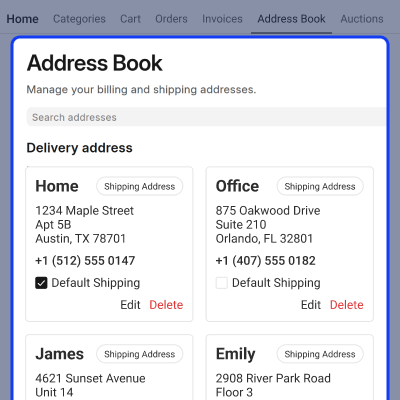
Set A Default Shipping Address
A shopper can mark one saved spot as the main ship spot. Orders auto-fill with the right spot, so ship errors drop fast.
- Pick one saved address as the default shipping address
- Change the default address anytime from the website
- Reduce wrong or late deliveries
- Save time on every new order placed
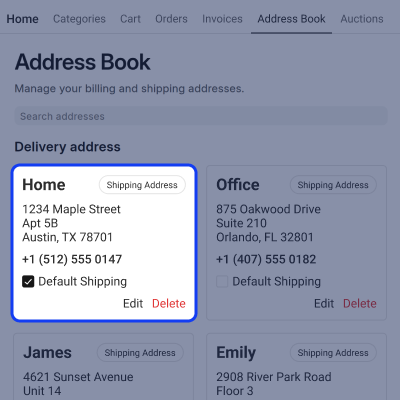
Set A Default Billing Address
A shopper can choose one saved address as the default billing address. This ensures billing details remain accurate and consistent for every order.
- Pick one saved address as the top bill choice
- Bill data auto-fills at checkout time
- Helps avoid mixed-up payment records
- Works well for buyers who bill from a firm
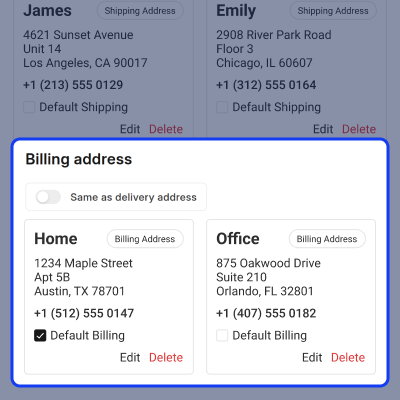
Edit Or Delete An Address
A shopper can fix a wrong field or drop an address that is old. The full address list stays clean and up to date.
- Fix a typo in a city, state, or PIN code
- Remove a spot that is no longer in use
- Add a fresh spot to replace an old one
- All changes save right on the website, right away
Change The Address At Checkout
A shopper can pick a new spot or edit one during checkout. Full control remains available right up to the final order step.
- Swap the ship spot at the very last step
- Swap the bill spot at the very last step
- Add a brand new spot mid-checkout too
- No need to leave the cart to fix a spot
Manage All Addresses From The Desk
The store team can view, edit, delete, or turn off any address. The back end gains full, clean control over customer data.
- Open the full Address list under Selling and Setup
- Fix a wrong field on any saved address
- Delete an address that is no longer valid
- Turn off a spot without losing its saved data
Support
For any query or issue, please create a support ticket here CREATE A TICKET HERE
You may also check our other top-quality ErpNext Modules.
Specifications
FAQ’s
Specification
Detailed technical features and requirements to help you understand the module’s capabilities and ensure smooth integration with your system.
Cloud Hosting
Detailed technical features and requirements to help you understand the module’s capabilities and ensure smooth integration with your system.
Move to Cloud Today
We’re partnered with top-tier, trusted providers!



Default Configuration Details of Server
RAM 1 Core
Processor 30 GB
Hard Disk
Database
Want to know more how exactly we are going to power up your eCommerce Website with Cloud to fasten up your store
* Server Configuration may vary as per application requirements.
