Send Again
Close
Laravel eCommerce Multi Tenant SaaS Pre Order helps stores sell items before they are in stock. It lets stores take early orders for new and out of stock products. Buyers do not need to wait for stock to arrive.
Stores can take full or part payment when a buyer places an order. This gives stores early sales and helps buyers book products before they are ready to ship. Each seller can choose how pre orders work.
They can set the stock date, order limit, payment type, and other store settings with ease. Product pages show the pay amount, stock date, and other order details.
Buyers know when the item will be ready and how much they need to pay. Stores can send stock updates by email when products are ready. They can also send updates to many buyers at one time from the admin panel.
All pre orders stay in one list with payments and order details. Search, filters, and export help stores check sales, plan stock, and save time.
Additionally, if you want to give every SaaS tenant a fast app-like shopping experience with offline access, home screen installation, and push notifications, then you can check Laravel eCommerce Multi-Tenant SaaS PWA module.
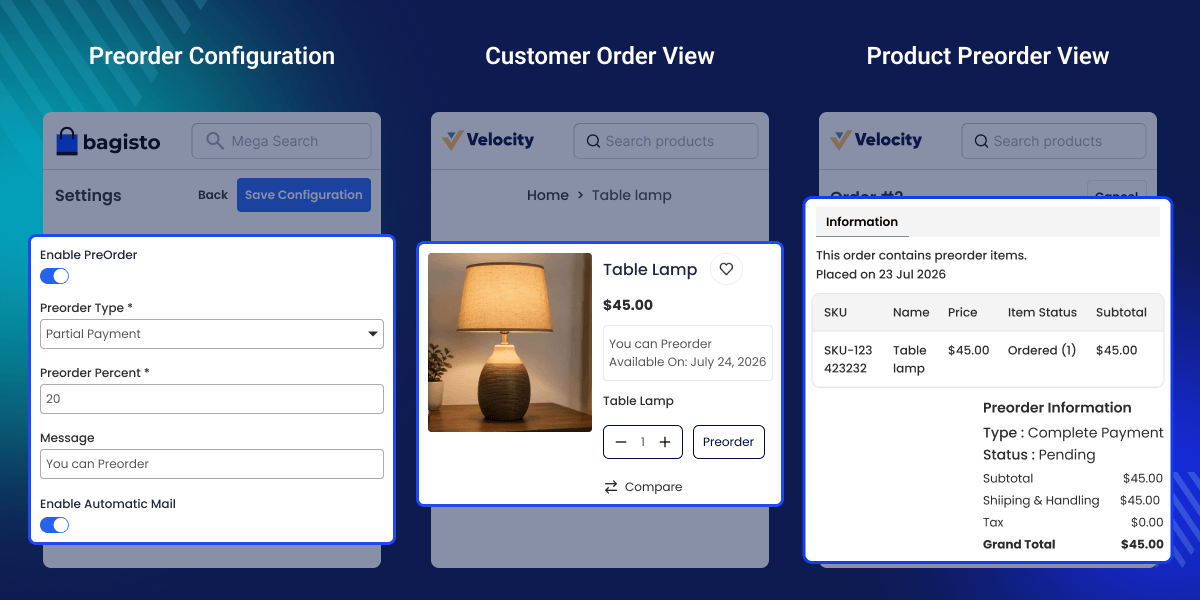
Let customers book new products before the official launch date.
Give customers the choice to pay all or part of the order value.
Show a Preorder button when products are not ready to ship.
Display the expected product release date on the product page.
Send email updates when pre-order products are back in stock.
Track pre-orders, payments, and orders from one admin page.
Laravel eCommerce Multi-Tenant SaaS Pre Order helps stores keep selling when products are out of stock or not yet released. Instead of losing buyers, stores can accept orders and plan future sales.
Most online stores stop customers from buying products that are not available. This often leads to missed sales, lower customer interest, and lost business opportunities.
This module lets merchants accept pre-orders with full or partial payment. Buyers can reserve products early, while stores get better demand planning and early revenue.
Each seller can manage preorder rules, release dates, payment options, and customer updates from one place. This reduces manual work and keeps the preorder process simple.
Businesses that sell new launches, limited stock, or made-to-order products can use this module to improve order management and provide a better buying experience. Apart from accepting pre-orders, stores also need a simple way to handle product returns and exchanges after delivery.
Laravel eCommerce Multi-Tenant SaaS RMA helps each tenant manage return requests, refunds, and customer communication from a single dashboard.
Let buyers book new items before launch day, so you can plan stock from real buyer demand.
Keep taking orders while new stock is on the way, so you do not lose buyers who are ready to shop.
Take orders before work starts, so each item is made only after a buyer places an order.
Sell custom gifts before they are made, so buyers can book items with ease and avoid delays.
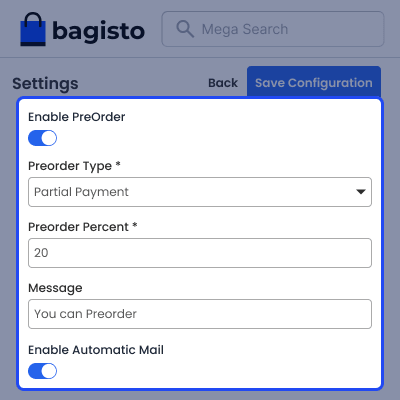
Enable and manage preorder settings from one place with flexible payment, messages, and email options. Configure each tenant store with rules that match business needs and give buyers a clear preorder process.
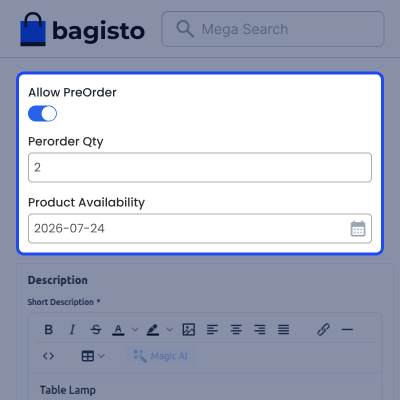
Enable preorder for individual products by setting the order limit and expected stock date from one page. Help buyers know when a product will be available while keeping preorder quantity under your control.
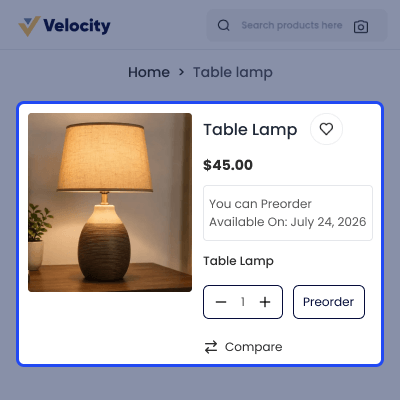
Show preorder details on the product page with clear payment and product availability information. Help buyers reserve products early by showing the preorder option before items are ready to ship.
View preorder status, payment details, and order summary from the customer account after placing an order. Help buyers track preorder progress, check due payments, and stay informed until product delivery.
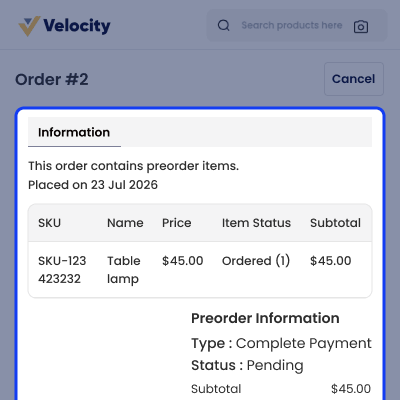
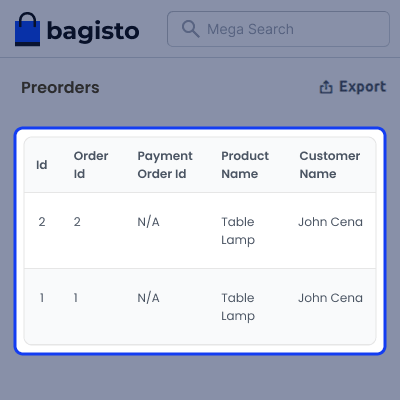
View all preorder records from one grid with search, filters, and export for quick order tracking. Help store admins find preorder details, manage customer orders, and handle daily tasks with less effort.
For any issue related to this module, please create a support ticket here at - https://webkul.uvdesk.com/en/customer/create-ticket/ or send an email to [email protected]
You may also check our quality Bagisto Extensions.
Yes, you can turn on preorder only for the products you choose. All other products stay available for normal checkout.
You can ask buyers to pay the full amount or only part of it. They can pay the rest later based on your store settings.
Yes, each seller can manage preorder rules for their own store. This gives every store more control over how pre-orders work.
Yes, you can set different preorder messages by channel and locale. Buyers see the right message for their selected store or language.
Buyers can see the preorder button, pay amount, release date, and preorder message before they place an order.
Buyers can open their account and view the preorder status, payment details, and order summary at any time.
A preorder grid keeps all records in one place. Search, filters, and export help admins find orders in less time.
Automatic emails can inform buyers when stock is ready. Admins can also send updates to many buyers with one action.
This module works with simple and configurable products. You can choose which products should accept pre-orders.
Yes, you can set the preorder quantity and release date for each product. This helps you plan stock and avoid extra orders.
Detailed technical features and requirements to help you understand the module’s capabilities and ensure smooth integration with your system.
Detailed technical features and requirements to help you understand the module’s capabilities and ensure smooth integration with your system.
We’re partnered with top-tier, trusted providers!
Want to know more how exactly we are going to power up your eCommerce Website with Cloud to fasten up your store
* Server Configuration may vary as per application requirements.



