Laravel (Bagisto) Purchase Order Management
Laravel Purchase Order module allows merchants to create purchase orders, request quotations, manage incoming shipments, and update incoming products information easily.
- Set the procurement method – auto or manual.
- Set default prefix for the purchase order number.
- Send quotation and purchase order emails to the suppliers.
- Add any comments to purchase orders, incoming shipments, and notify the suppliers.
- Create additional attributes for the purchase order products.
- Add suppliers in a product by specifying – cost price, quantity, priority.
- Manage incoming shipments and products from the suppliers.
- Update information about the partial shipments.
- It supports multiple language translations.
- Automatically Quotation created when the product goes out of stock.
- Description
- Reviews
- FAQ
- Customers ()
- Specifications
- Cloud Hosting
- Changelog
Laravel (Bagisto) Purchase Order Management: This extension allows you to execute purchase order management activities in your store. Add different suppliers to a product, make purchase orders, and manage the incoming shipments as well as a quote system for Laravel.
When a product is out of stock, a purchase order is automatically generated. It is hard to manage all of the product information. There are numerous issues to consider, including variations in lead time, seasonal demand, price changes, and so on.
As a result, the store owner makes many decisions including what products to carry in what quantities and from which suppliers. This addition is essential because keeping track of all these records is impossible.
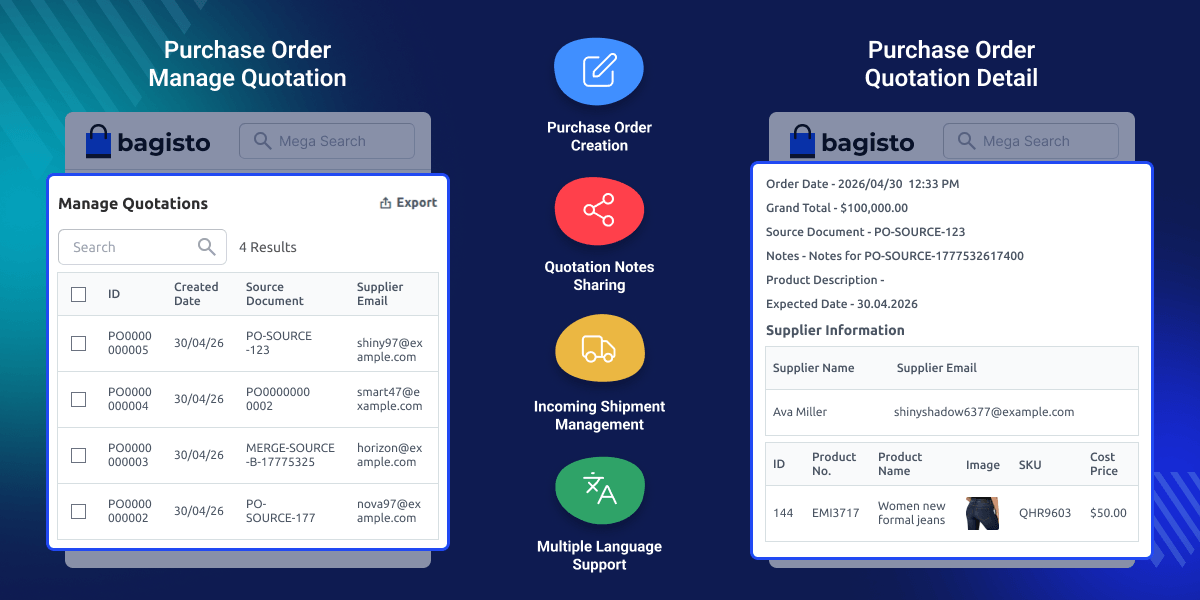
Highlighted Features
Order Purchased Manually / Automatically
Create purchase orders whenever the product quantity goes out of stock after the order is placed.
Inventory Control
For an e-commerce store with a sales order, inventory can be handled using Purchase Orders.
Manage Attributes
Admin adds new features to the purchase order products.
Create New Purchase Order
For suppliers, the admin can create new purchase orders.
View / Print Purchase Order
The admin print, and view the purchase order list for the suppliers.
Incoming Shipments
Admin is in charge of managing incoming shipments and products from suppliers, as well as updating information regarding partial shipments.
Why use Laravel (Bagisto) Purchase Order Management?
Managing a product's demand and supply is a huge task. If you have a catalog with products supplied to you by many suppliers, the Bagisto Purchase Order management will make your life easier. As a store owner, you must keep track of numerous details.
For example, which product to order, how much to order, and from which source of inventory. It's a huge task to keep track of everything. You can organize and track all information in one place and in an easy way by using the Bagisto Purchase Order module.
Basic Purchase Configuration
This extension makes it simple for sellers to create purchase orders, seek quotations, handle incoming shipments, and update product information.
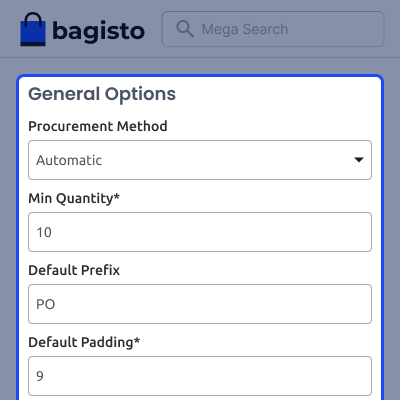
- Admin sends email quotations and purchase orders to the suppliers.
- The add-on can be enabled or disabled by the admin.
- They can configure email templates for the store owner.
- The admin configures the default prefix for the purchase order.

Management of Quotations
The admin can handle all of the quotations and can establish new quotations and designate numerous products to a supplier. Comments can also be added and a copy can be given to the supplier.
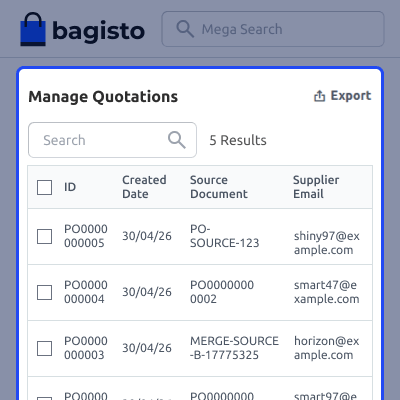
- Admin can generate a new quotation for the products by putting supplier information as well as the per product shipping information in Laravel.
- A supplier can be assigned to multiple products.
- Shipment starts to date and the expected delivery date can be managed by the admin.
- The admin can change the details of the ordered items and even remove a product from the quotations.

Incoming Shipment
Admin can handle all the supplier's shipments and update the shipments for specific suppliers.
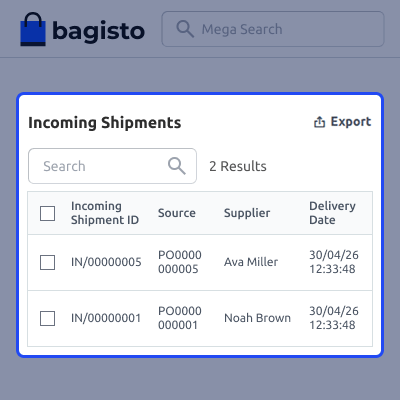
- The admin can create a new shipment for the products.
- Admin can add new suppliers for the shipment.
- Admin can easily edit the shipment of suppliers.
- The admin sends an email to the suppliers.

Incoming Products
The admin can edit, delete and update the incoming products for the suppliers.
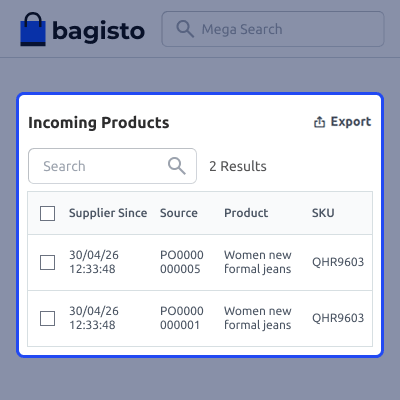
- The admin can export all the products into XLS or CSV files.
- The admin can edit the details of the incoming product.
- Admin notifies the supplier by e-mails of the incoming products.

Support
For any issue related to this module, please create a support ticket here or send an email to support@webkul.com
You may also check our quality Bagisto Extensions.
Specifications
Frequently Asked Questions
Move to Cloud Today
AWS Free tier hosting for one year by amazon web services, for more details please visit AWS Free Tier.
GCP Free tier hosting for one year with 300 credit points by google cloud platform, for more details please visit GCP Free Tier.
Azure free tier hosting for one year with 25+ always free services, for more details please visit Azure Free Tier.
In our default configuration we will provide tremendous configuration for your eCommerce Website which is fast to load and response.
Default Configuration Details of Server
- 1 GB RAM
- 1 Core Processor
- 30 GB Hard Disk
- DB with 1 GB RAM and 1 Core Processor
* Server Configuration may vary as per application requirements.
Want to know more how exactly we are going to power up your eCommerce Website with Cloud to fasten up your store. Please visit the Cloudkul Services.
Get Started with Cloud- + Features
- - Bugs
- + Optimized and enhanced the code
- - #36 Corrected translation in the module - Purchase Order (Admin panel)
- - #37 Placed Purchase Order Management details between Dashboard and Sales (Admin panel)
- - #38 Fixed automatic quotation for out-of-stock products
- - #39 Fixed codes appearing when editing and canceling a quotation
- - #40 Fixed UI issue when editing a quotation at Admin panel
- - #41 Corrected wrong details appearing in tab headings
- - #42 Fixed missing prices section when editing product
- - #43 Fixed missing details for incoming shipments
- - #44 Sidebar icons now visible properly at Admin end
- + Set procurement method – auto or manual
- + Added default prefix for purchase order number
- + Send quotation and purchase order emails to suppliers
- + Purchase orders and quotations now display product images
- + Add comments to purchase orders and incoming shipments, notify suppliers
- + Admin can create additional attributes for purchase order products
- + Add suppliers to a product with cost price, quantity, priority
- + Manage incoming shipments and products from suppliers
- + Update information about partial shipments
- + Quotation notes allow admin to share information with suppliers
- + Draft purchase order created for supplier offering best price
- + Supports multiple language translations
- + Automatic quotation created when product goes out of stock
- + Generate Request for Quotation for every Purchase Order
- + Check status of incoming products/shipments
- + Easily merge two or more purchase orders


