Laravel eCommerce Multi-Tenant B2B Marketplace Table Rate Shipping
Laravel eCommerce Multi-Tenant B2B Marketplace Table Rate Shipping module enables tenants and it's suppliers to manage product deliveries by defining shipping and superset rates.
- Enable suppliers/tenants to add shipping rates via CSV files for table rates.
- Tenants can set shipping rates for both tenants and it's supplier's.
- Suppliers and tenants can independently create and manage shipping rates.
- Supersets, created by tenants, are available to both tenants and it's suppliers.
- Shipping costs are calculated based on ZIP and product weight.
- Flexibility in calculating shipping costs according to suppliers.
- Suppliers can confirm orders, assign tracking IDs, and view shipping rate details.
This plugin is an add-on of the Laravel B2B Marketplace and SaaS. To use it, you must have installed Laravel eCommerce SaaS B2B Marketplace and the Laravel eCommerce SaaS module in your system.
- Description
- Reviews
- FAQ
- Customers ()
- Specifications
- Cloud Hosting
- Changelog
Laravel eCommerce Multi-Tenant B2B Marketplace Table Rate Shipping module lets tenants and their suppliers manage shipping with ease. Suppliers can upload CSV files to define rates by product weight, zip code ranges (numeric and alphanumeric), price brackets, and shipping types.
Tenants can create superset methods, assign rates, or upload CSVs on behalf of suppliers, ensuring standardized yet flexible shipping logic. At checkout, costs are calculated dynamically, giving customers transparent and accurate charges for bulk B2B orders across regions.
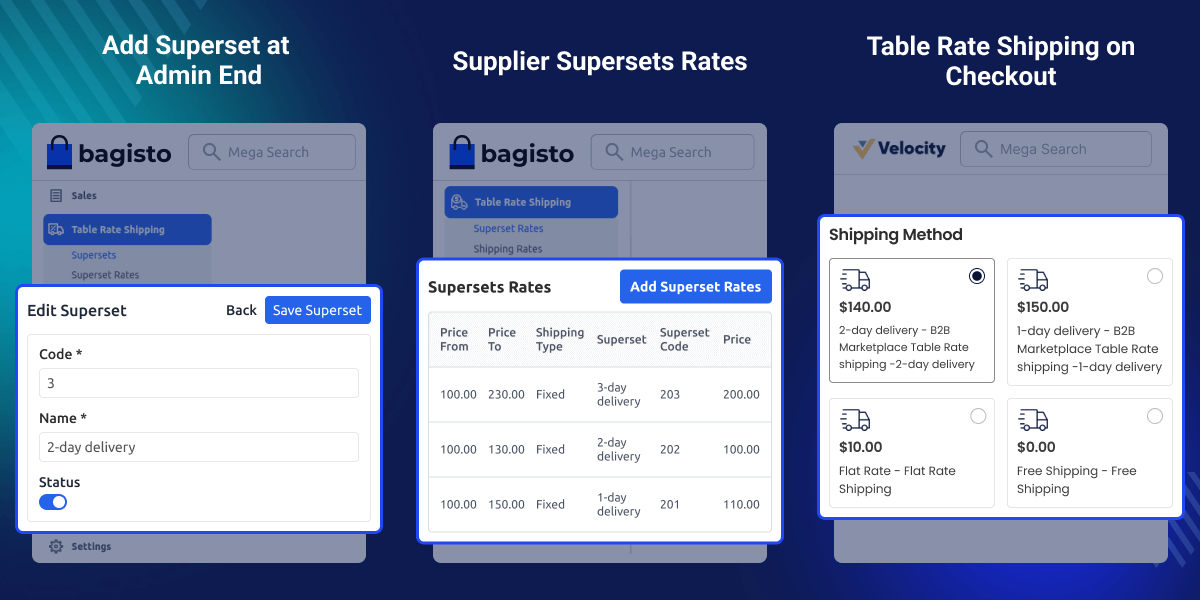
Highlighted Features
Multi-Tenant Support
Each tenant in the SaaS marketplace has its own independent admin panel and shipping configuration for its supplier.
Multiple Suppliers per Tenant
Tenants can onboard multiple suppliers, each managing their own shipping rules.
CSV Uploads
Suppliers and tenant admins can upload shipping details via CSV files for quick setup.
Flexible Shipping Rules
Define rates based on product weight, zip code ranges (numeric and alphanumeric), price brackets, or shipping types.
Superset Methods
Tenant admins can create standardized shipping methods that apply across all suppliers in their marketplace.
Supersets/Shipping Methods
The tenant can easily add superset methods to customize shipping.
Why Choose Laravel SaaS B2B Table Rate Shipping Extension?
Laravel eCommerce Multi-Tenant B2B Marketplace Table Rate Shipping makes it easy for tenants to create shared shipping methods for all suppliers, solving the challenge of managing the same shipping options.
By using these methods supplier can easily set the custom superset rates and shipping rates of their products.
Explore Laravel eCommerce Multi-Tenant Marketplace Table Rate Shipping to show accurate shipping rates at checkout based on address and weight.
Superset Management with Status & Add New Option
This section lets the tenant's manage all supersets created for the B2B Marketplace Table Rate Shipping module.
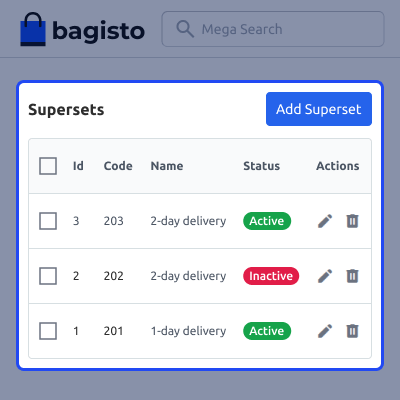
- View the list of all existing supersets with their current status.
- Create a new superset using the Add New button.
- Enable or disable supersets as needed.
- Use the same superset for both tenant and suppliers.
Shipping Rates Management with CSV Import & Export
The tenant can manage table rate shipping by uploading and downloading CSV files with shipping details.
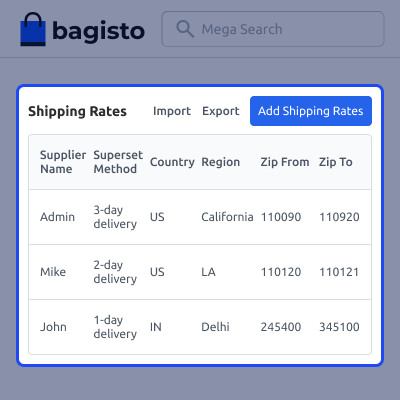
- Upload table rate shipping using a CSV file.
- Add superset method names for table rate shipping.
- Assign shipping rates to suppliers using supplier ID.
- Export shipping rates in CSV or XLS format.
Supplier Superset Shipping Rates
Suppliers can view, create, and manage their own superset shipping rates for products.
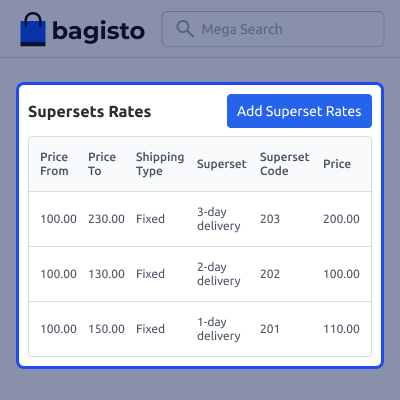
- View the list of all superset rates added by the supplier.
- Create a new superset rate using the Add Superset Rate option.
- Enter details like price from, price to, method, type, and price.
- Save rates and apply them directly to supplier products.
Table Rate Shipping Method on Checkout
The table rate shipping method is shown to customers during checkout based on their address and order details.
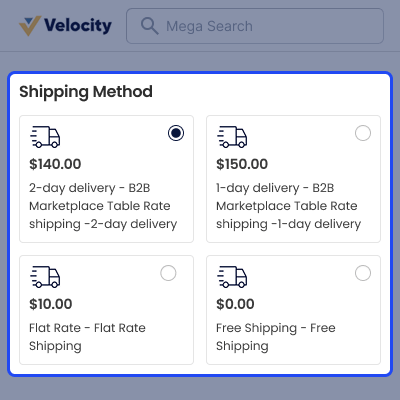
- Shipping price is calculated using country, region, zip code, and product weight.
- Customers see shipping methods if their address matches the CSV rules.
- Multiple matching shipping methods are shown when available.
- Customers can select the preferred table rate shipping method to complete checkout.
Support
For any issue related to this module, please create a support ticket here or send an email to [email protected]
You may also check our quality Bagisto Extensions.
Specifications
Frequently Asked Questions
Move to Cloud Today
AWS Free tier hosting for one year by amazon web services, for more details please visit AWS Free Tier.
GCP Free tier hosting for one year with 300 credit points by google cloud platform, for more details please visit GCP Free Tier.
Azure free tier hosting for one year with 25+ always free services, for more details please visit Azure Free Tier.
In our default configuration we will provide tremendous configuration for your eCommerce Website which is fast to load and response.
Default Configuration Details of Server
- 1 GB RAM
- 1 Core Processor
- 30 GB Hard Disk
- DB with 1 GB RAM and 1 Core Processor
* Server Configuration may vary as per application requirements.
Want to know more how exactly we are going to power up your eCommerce Website with Cloud to fasten up your store. Please visit the Cloudkul Services.
Get Started with Cloud


