USD
  • EUR
  • INR
  • USD
Cart
Cart 0
  • You have no items in your shopping cart.
    Cart
    Cart 0
    • You have no items in your shopping cart.
    Hire a Developer
    ×
    Contact Us!
    Send Again
    Close
    Please Login to Write Your Review
    Product Image
    Technology Partner Awards.
    Top Selling Extension Winner
    2 times in a row

    Magento 2 Advanced Import Export

    Magento 2 Advanced Import Export goes beyond Magento's built-in tools. It lets you import and export Orders, Invoices, Categories, CMS Pages, and more, all from the admin panel.


    • Import and export a wide range of entity types via CSV, including Orders, Invoices, Categories, CMS Pages, Product Reviews, Coupons, and more.

    • Import data via File Upload, FTP, SFTP, or REST API.

    • Schedule recurring jobs with a built-in cron-based Job Scheduler.

    • Track every operation with row-level run history.

    • Process jobs in the background so the admin panel stays fully usable.

    • Get email notifications when scheduled jobs finish.

    • Filter export attributes to include only the fields you need.

    • Download sample CSV files for every supported import entity.

    • Disable this module anytime.

    • Magento's default flow takes over automatically.

    Technology Partner Awards.
    Top Selling Extension Winner
    2 times in a row
    Screenshots
    Magento 2 Advanced Import Export Magento 2 Advanced Import Export Magento 2 Advanced Import Export Magento 2 Advanced Import Export Magento 2 Advanced Import Export Magento 2 Advanced Import Export Magento 2 Advanced Import Export Magento 2 Advanced Import Export Magento 2 Advanced Import Export Magento 2 Advanced Import Export
    Show More Hide All
    $299.00

    * Required Fields

    Add To Cart
    $299.00
    Configure and Buy
    • Description
    • Reviews
    • FAQ
    • Customers ()
    • Specifications
    • Cloud Hosting
    • Changelog

    Magento 2 Advanced Import Export makes data transfer simple and flexible. By default, Magento only supports a small set of entities for import and export. Everything else requires manual work or custom development.

    This extension removes that limitation. It supports a wide range of entity types through the standard Magento admin interface. It also connects to File Upload, FTP, SFTP, and REST API as import sources. No custom code needed.

    The built-in Job Scheduler automates repetitive tasks. Set up a job once, define how often it runs, and this extension handles the rest in the background. The Run History log keeps a record of every job. Admins can check row counts, run duration, and which user started each operation at any time.

    When you disable this module, import and export fall back cleanly to the default Magento flow. Nothing breaks. Also, check out Magento 2 Bulk Order Processing to create invoices, shipments, and update multiple orders in bulk from the admin panel.
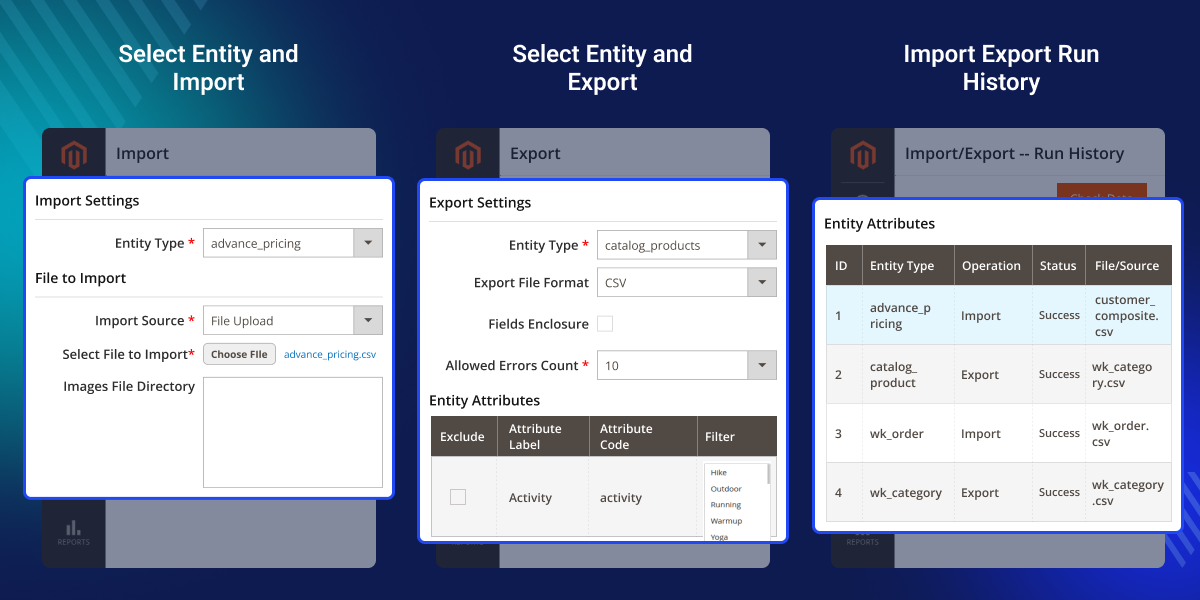
    Magento 2 Advanced Import Export

    Highlighted Features of Magento 2 Advanced Import Export

     Extended Entity Support

    Import and export a wide range of entity types that Magento's default tools do not support.

     Multiple Data Sources

    Import data from File Upload, FTP, SFTP, or a REST API connection.

     Scheduled Job Automation

    Create jobs that run automatically at set intervals: daily, weekly, monthly, or on a custom cron schedule.

     Background Processing

    Jobs run through Magento's message queue. The admin panel stays fully responsive during processing.

     Detailed Run History

    Track every import and export operation with row counts, duration, and user info.

     Flexible Import Behavior

    Choose from Add/Update, Replace, or Delete actions to match your business needs.

     Export Attribute Filtering

    Select specific attributes and apply filters to export only the data you need.

     Email Notifications

    Receive automatic email alerts when scheduled jobs complete.

     Sample File Support

    Download sample CSV files for any supported entity type before you start importing.

     FTP, SFTP and REST API Integration

    Connect Magento directly to external systems and automate data exchange.

    Why Do We Need Magento 2 Advanced Import Export Extension?

    Default Magento 2 supports only five entity types: Products, Customers, Advanced Pricing, Customer Addresses, and Stock Sources. If you need to migrate or sync any other entity type, Magento gives you no native option. You either do it manually, which takes hours, or build custom scripts.

    Magento also does not support FTP, SFTP, or REST API imports. Any automation has to be built from scratch. This extension solves all of those problems without writing a single line of code.

    Also, check out Magento 2 Admin Action Logs to track and audit admin activity across your store.

    Use Cases

    ERP and Supplier Data Sync

    Connect to a supplier's FTP or REST API and schedule daily product, pricing, or stock imports. No more manual CSV downloads.

    Store Migration

    Transfer order history, invoices, customer reviews, CMS pages, and URL rewrites to a new Magento store.

    Multi-Environment Content Management

    Export CMS pages and blocks from staging and import them directly into production.

    Wholesale and B2B Catalog Updates

    Import catalog price rules and coupon codes from brand partners to keep promotions in sync across all channels.

    Compliance and Reporting

    Schedule regular exports of orders, invoices, shipments, and credit memos for accounting and auditing.

    Newsletter List Management

    Import subscriber lists from external platforms or export Magento subscribers for use in third-party email tools.

    Module Setup

    After installing this extension, navigate to the General Settings section. From here, you can enable or disable this module, set up data sources, and configure email notification settings before running any import or export operation.
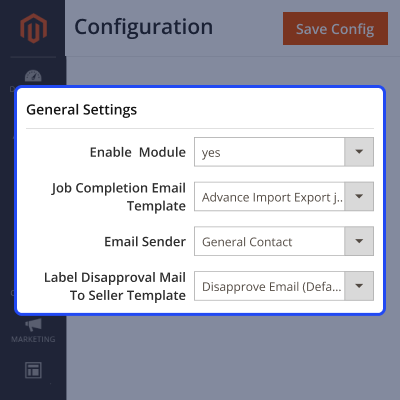
    • Enable or disable module.
    • Set the Job Completion Email Template and Email Sender identity.
    • Configure FTP with host, port, username, and password.
    • Set up SFTP with password or key-based authentication.
    • Connect via REST API using a Base URL and Authorization Header.
    • Each source is independent. Enable only the ones you use.
    Module Setup

    Advanced Import

    Once active, admins can import any supported entity type directly from the System menu. You can select the import behavior, choose a data source, and download a sample CSV before starting.
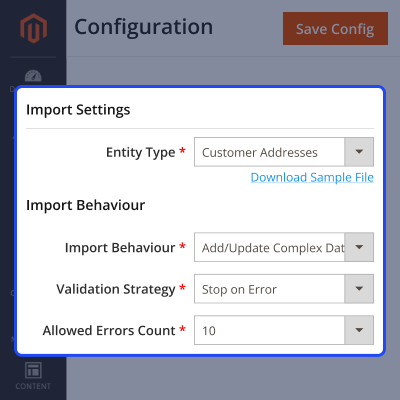
    • Choose from Add/Update, Replace, or Delete import behaviors.
    • Stop on errors or skip invalid rows.
    • Define field separators, value separators, and empty value constants.
    • Select your source: File Upload, FTP, SFTP, or REST API.
    • Set an Images File Directory for product image imports.
    • Download a sample CSV for any entity type before you begin.
    Advanced Import

    Advanced Export

    Use System > Export to export any supported entity type instantly. Apply attribute filters and download a clean CSV file with only the data you need.
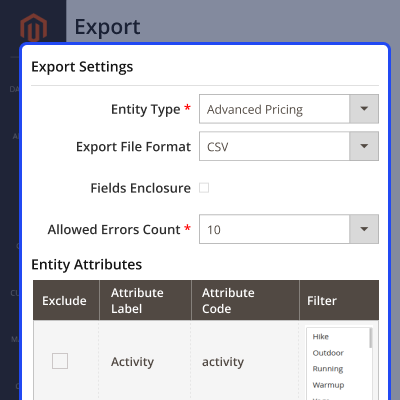
    • Export in CSV format with custom enclosure settings.
    • Include or exclude specific attributes per export job.
    • Apply value filters to narrow exported records.
    • Covers all default Magento entities plus extended ones.
    Advanced Export

    Run History

    Every import and export operation is logged automatically in the Run History section. Admins can review the status, row counts, run duration, and the user who triggered each job.
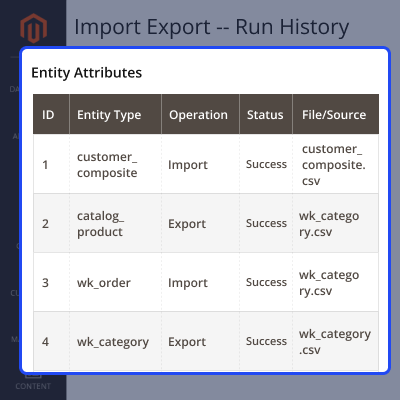
    • View entity type, operation, status, and source for each job.
    • See row-level counts: total, skipped, and failed rows.
    • Check duration and start time for performance tracking.
    • Identify which admin user triggered each job.
    • Open detailed job results from the Actions column.
    Run History

    Scheduled Jobs

    Go to Advanced Import Export > Scheduled Jobs to set up recurring automation. Define the entity type, data source, and cron frequency, and this extension runs the job automatically.
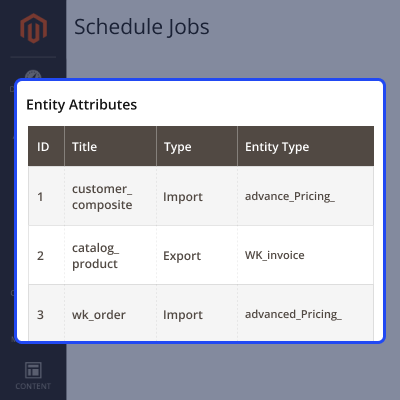
    • Add a job with a title, type, entity type, and cron frequency.
    • Choose Daily, Weekly, Monthly, or a custom cron expression.
    • Enable or disable jobs without deleting them.
    • Check the Last Run At column to see when each job last executed.
    • Jobs run via Magento's message queue so the admin panel stays fully usable throughout.
    Scheduled Jobs

    Support

    For any query or issue, please create a support ticket here http://webkul.uvdesk.com/

    You may also check our top-quality Magento 2 Extensions.

    Specifications

    Product Version4.0.0
    Released2 days ago
    CategoryMagento 2
    Last UpdatedJune 16, 2026 (2 days ago)
    Supported VersionsMagento  2.0.x  2.1.x  2.2.x  2.3.x  2.4.x  
    Write a review

    Frequently Asked Questions

     Can I import data from external servers?
    Yes, this extension supports multiple import sources. You can connect via File Upload, FTP, SFTP, or REST API to pull data directly from external servers into your Magento store.
     
     Can I schedule import and export jobs?
    Yes, you can create scheduled jobs for both import and export operations. Simply set the entity type, frequency, and source once. This extension runs the job automatically in the background at the defined interval.
     
     Does this extension support FTP and SFTP login methods?
    Yes, both are fully supported. SFTP accepts password-based and key-based authentication.
     
     Can I export only specific attributes or filtered data?
    Yes, this extension gives you full control over what gets exported. You can include or exclude specific attributes per export job and apply value filters on any attribute to narrow down the exported records.
     
     Are sample import files available?
    Yes, sample CSV files are available for every supported import entity. You can download them before you begin, which makes it easier to prepare your data in the correct format and avoid errors during import.

    Move to Cloud Today

    AWS Free tier hosting for one year by amazon web services, for more details please visit AWS Free Tier.

    GCP Free tier hosting for one year with 300 credit points by google cloud platform, for more details please visit GCP Free Tier.

    Azure free tier hosting for one year with 25+ always free services, for more details please visit Azure Free Tier.

    In our default configuration we will provide tremendous configuration for your eCommerce Website which is fast to load and response.

    Default Configuration Details of Server

    • 1 GB RAM
    • 1 Core Processor
    • 30 GB Hard Disk
    • DB with 1 GB RAM and 1 Core Processor

    * Server Configuration may vary as per application requirements.

    Want to know more how exactly we are going to power up your eCommerce Website with Cloud to fasten up your store. Please visit the Cloudkul Services.

    Get Started with Cloud
    • + Features
    • - Bugs
    Version 4.0.0
    • + Compatible with Magento 2.4.9^ and PHP 8.5
    • + Automated Cron-based scheduling for Import and Export profiles
    • + Added support for remote data sources and destinations (URL, FTP, SFTP and REST APIs)
    • + Added capability to export Magento Entities in XML and JSON formats
    • + Expanded Export and Import Entity support
    • * Orders
    • * Invoices
    • * Shipments
    • * Credit Memos
    • * Categories
    • * Customers
    • * CMS pages
    • * Blocks
    • * Product Attributes
    • * Product Reviews
    • * URL Rewrites
    • * Coupons
    • * Catalog Price Rules
    • * Newsletters


