USD
  • EUR
  • INR
  • USD
Cart
Cart 0
  • You have no items in your shopping cart.
    Magento 2 Extensions
    Cart
    Cart 0
    • You have no items in your shopping cart.
    Hire a Developer
    ×
    Contact Us!
    Send Again
    Close
    Please Login to Write Your Review
    Magento 2 Canva Connector

    Magento 2 Canva Connector

    x
    Free

    * Required Fields

    $199.00
    Add To Cart
    30 Days Money Back Guarantee*

    Magento 2 Canva Connector helps store owners connect Magento with Canva for product images design. Admins can create, edit, and import product images from Canva into the Magento product gallery.


    • Easily redesign product images and Import.

    • Open Canva directly from the Magento product workflow.

    • Let admins use existing product images as the base for new designs.

    • Allow admins to import redesigned images into the Magento product gallery.

    • Let admins replace existing product images with new designs.

    • Automatically assign media roles based on the admin configuration.

    • Allow store owners to add product names, offers, descriptions, and other product details to product images.

    • Let admins enable or disable automatic product image replacement from the global configuration.

    • Allow admins to choose the supported image formats for imports.

    • Let admins manage all settings directly from the magento admin panel.

    Magento 2 Canva Connector
    Magento 2 Canva Connector
    $199.00
    30 Days Refund
    GraphQL Compatible
    Check How It Works
    $199.00
    Configure and Buy
    30 Days Money Back Guarantee*
    X
    • Description
    • Reviews
    • FAQ
    • Customers ()
    • Specifications
    • Cloud Hosting
    • Changelog

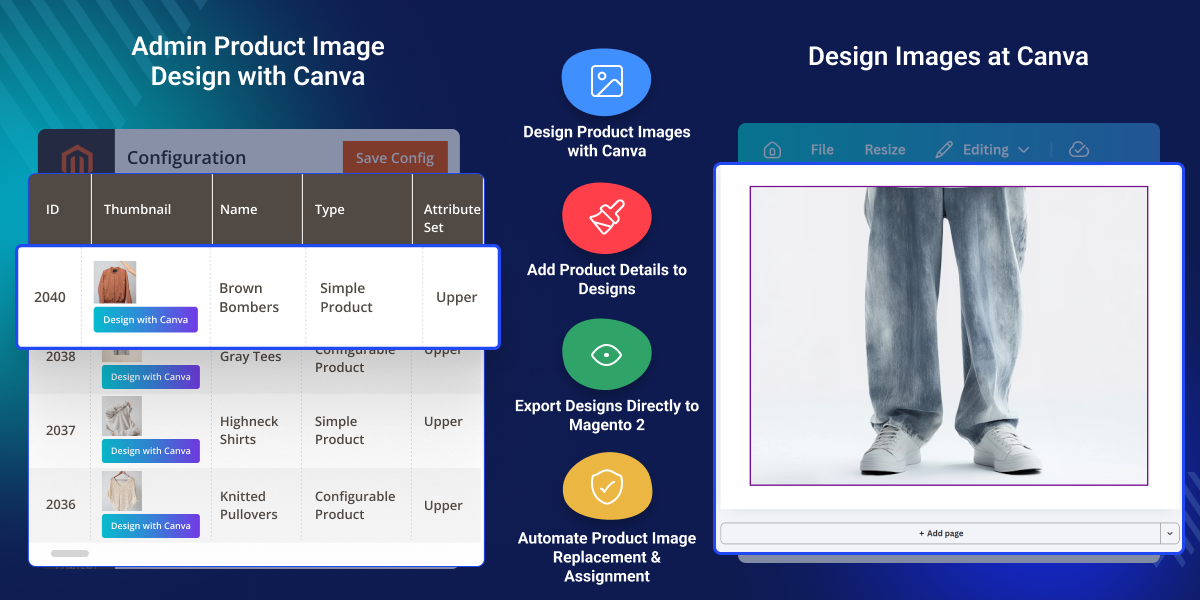
    Magento 2 Canva Connector connects Canva with Magento. Store owners can create or edit product images and import them to Magento. Admin can start the design process from the Magento product area.

    An existing product image can serve as the base for a new Canva design. Canva provides tools for adding text, shapes, graphics, and backgrounds. Product names, prices, offers, and descriptions can be added to the design.

    Once the design is ready, admins can send it from Canva to Adobe Commerce. The finished image then appears in the selected product gallery. Product Image Import Settings support Magento image roles.

    Store admin can assign new designs as Base Image, Small Image, or Thumbnail. Existing product visuals can be replaced with new designs. This extension helps store teams update product images without downloading and uploading files separately.

    This add-on supports JPG, PNG, and WebP image formats. Admin can choose the format that fits their product media needs.

    Canva Connector for Adobe Commerce connects the Canva app with Magento API services. Admins can manage the frontend path, backend URL, and API settings from Magento Admin.

    Additionally, if you want to integrate your Magento 2 website with QuickBooks and lets you synchronize products, customers, orders, and invoices data, then check Magento 2 QuickBooks Desktop Connector.
    Magento 2 Canva Connector

    Highlighted Features of Magento 2 Canva Connector

     Design Product Images

    Create and edit product visuals with text, graphics, shapes, and backgrounds.

     Import Designs to Store

    Send finished designs to the product gallery without manual file uploads.

     Add Product Details

    Add product names, prices, and descriptions to create clear product visuals.

     Manage Image Roles

    Assign designs as Base Image, Small Image, or Thumbnail from the settings.

     Replace Product Images

    Replace old product visuals with new designs to keep product pages fresh.

     Support Multiple Image Formats

    Import designs in JPG, PNG, or WebP formats based on store needs.

    Why Do We Need Magento 2 Canva Connector?

    Moving product images between design tools and Magento can take extra time. This extension brings both tasks into one workflow. An existing Magento product image can become the starting point for a new Canva design.

    Design teams can use it to create fresh product visuals. Product names, prices, and descriptions can be added during the design process. These details help create useful product images for the storefront.

    Finished designs can move back to Magento through the add-on. Admins do not need to save each file and upload it again through the product page.

    The integration also gives store teams control over image roles and replacement settings. This keeps product media easier to manage.

    Also, if you want admin to add/manage images into various galleries and galleries into various groups, you can check our extension Magento 2 Image Gallery.

    Use Cases

    • Create Branded Product Visuals

      Add brand text, product details, graphics, and other elements to product images.

    • Update Product Gallery Images

      Import new designs into Magento to refresh product galleries and improve product display.

    • Create Promotional Images

      Add prices, offers, and product details to images for sales and marketing campaigns.

    • Speed Up Product Media Work

      Send finished designs to Magento without downloading and uploading image files by hand.

    Canva Connector General Settings

    General Settings connects Magento with the Canva app. Admins can add Canva details and copy the URLs needed for the setup.
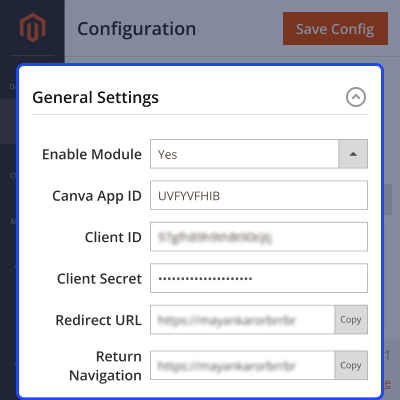
    • Enable or disable the Connector from Magento Admin.
    • Enter the App ID from the Canva Developer Portal.
    • Add the Client ID for secure login.
    • Enter the Client Secret for secure API access.
    • Copy the Redirect URL to Canva Developer Portal under Integration > Authentication > OAuth 2.0 as the Redirect URI.
    • Copy the Return Navigation URL to Canva Developer Portal under Integration > Return navigation as the Return Navigation URI.
    Canva Connector General Settings

    Product Image Import Settings

    Product Image Import Settings control how Canva designs enter Magento. Admins can choose image roles, formats, and image replacement options.
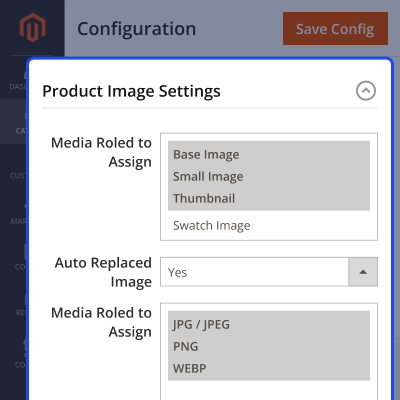
    • Select Base Image, Small Image, Thumbnail, or Swatch Image roles.
    • Assign selected media roles to new designs.
    • Turn automatic image replacement on or off.
    • Replace Base Image, Small Image, and Thumbnail when enabled.
    • Allow JPG, JPEG, PNG, and WebP image formats.
    • Import designs into the product gallery.
    Product Image Import Settings

     Design Product Images with Canva and Import in Magento

    Admins can create product images in Canva and import them into Magento. The process removes the need to download and upload files by hand.
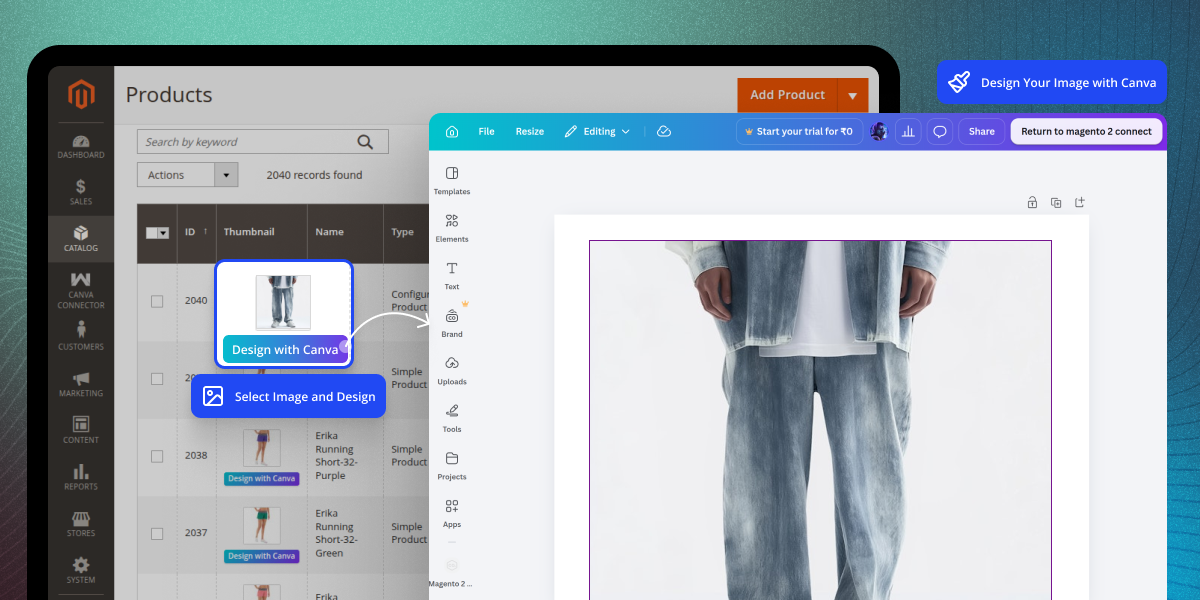
    • Click the Design with Canva button from the Magento product page.
    • Add product names, prices, descriptions, and design elements.
    • Add the new design to the selected product gallery.
    • Use the selected product image as the Canva design base.
    • Export the finished design from Canva to Magento.
    • Apply media roles or replace images based on the saved settings.
    Design Product Images with Canva and Import in Magento

    Canva App Frontend & API Configuration

    Canva App Frontend & API Configuration links the Canva frontend service with Magento. Admins can set the service details and API paths from Magento Admin.
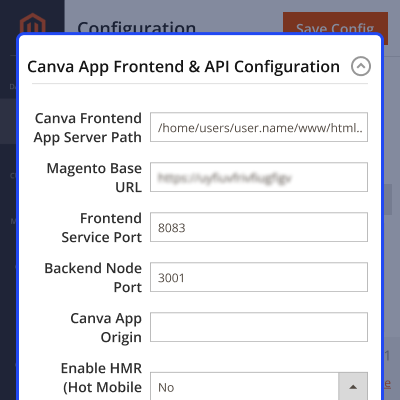
    • Enter the Canva frontend app path and Magento Backend Base URL.
    • Set the Frontend Service Port and Backend / Node Port.
    • Add the Canva App Origin for secure access.
    • Turn HMR on or off for frontend testing.
    • Set API paths for the product list and active product data.
    • Set the design export path and sync the .env file when saving.
    Canva App Frontend and API Configuration

    Support

    For any query or issue, please create a support ticket here http://webkul.uvdesk.com/

    You may also check our top-quality Magento 2 Extensions.

    Specifications

    Product Version4.0.0
    ReleasedToday
    CategoryMagento 2
    Last UpdatedAugust 20, 2026 (Today)
    Supported VersionsMagento  2.4.x  

    Ratings

    We'd love to hear your thoughts! Share your feedback and help us craft an even better experience tailored just for you.

    Write a review

    Frequently Asked Questions

     What does Magento 2 Canva Connector do?

    This extension connects Magento with Canva and lets admins create, edit, and import product images into the Magento product gallery.

     
     Can I design Magento product images in Canva?

    Yes, admins can open Canva from the Magento product workflow and use an existing product image as the base for a new design.

     
     Can I import Canva designs into Magento?

    Yes, finished Canva designs can be exported and added to the selected Magento product gallery through this extension.

     
     Can I replace existing Magento product images?

    Yes, admins can enable image replacement and replace old product images with new designs from Canva.

     
     Can I assign Canva images to Magento image roles?

    Yes, imported designs can be assigned to Base Image, Small Image, and Thumbnail roles from the product image settings.

     
     Which image formats does the extension support?

    This add-on supports JPG, PNG, and WebP formats for Canva designs that admins import into Magento product galleries.

     
     Does the extension require a Canva account?

    Yes, a Canva account is needed to create and edit designs through the Canva integration.

    Specification

    Detailed technical features and requirements to help you understand the module’s capabilities and ensure smooth integration with your system.

    Cloud Hosting

    Detailed technical features and requirements to help you understand the module’s capabilities and ensure smooth integration with your system.

    Default Configuration Details of Server

    1 GB
    RAM
    1 Core
    Processor
    30 GB
    Hard Disk
    1 GB RAM & 1 Core Processor
    Database

    Want to know more how exactly we are going to power up your eCommerce Website with Cloud to fasten up your store

    * Server Configuration may vary as per application requirements.

    Change Logs

    • - Feature Add (+)
    • - Feature remove (-)
    • - Bug Fixed (!)
    • - Modification (*)
    Version 4.0.0
    • + Compatible with Magento ^2.4.9 and PHP 8.5.
    • + Integrated Canva Connect REST API with OAuth2 PKCE authorization flow.
    • + Added real-time product catalog synchronization and active product context resolution.
    • + Added configurable default media roles for image, small_image, and thumbnail.
    • + Added auto-replace options for product images.


