Top Selling Extension Winner
2 times in a row
Magento 2 Dlocal Payment Gateway
Magento 2 Dlocal Payment Gateway Extension enables the store administrator to configure and accept payments through Dlocal, providing a secure and efficient payment solution.
- Receive payments in different currencies from customers.
- Customers can use various credit and debit cards to make payments.
- Customers can also pay using bank transfer and cash ticket payments methods.
- Allows both guest and registered users to use the payment method during checkout.
- Admin can refund directly to customers original payment method.
- Payment processing is secure and compliant with PCI standards.
- All transaction data is encrypted using TLS (Transport Layer Security).
Top Selling Extension Winner
2 times in a row
- Description
- Reviews
- FAQ
- Customers ()
- Specifications
- Cloud Hosting
- Changelog
Magento 2 Dlocal Payment Gateway Extension provides businesses with a secure and flexible solution for accepting online payments from customers across multiple countries.
The extension offers two modes: Live and Sandbox. Live mode is used when your store is active and processing real transactions, and Sandbox mode is for testing before you go live.
Using this extension, Magento 2 store owners can seamlessly accept payments through credit and debit cards, bank transfers, and cash-based payment methods, all without managing multiple payment providers or complex regional regulations.
If you want an extension that streamlines the checkout process into a single step, you can check the Magento 2 Telr Payment Gateway.
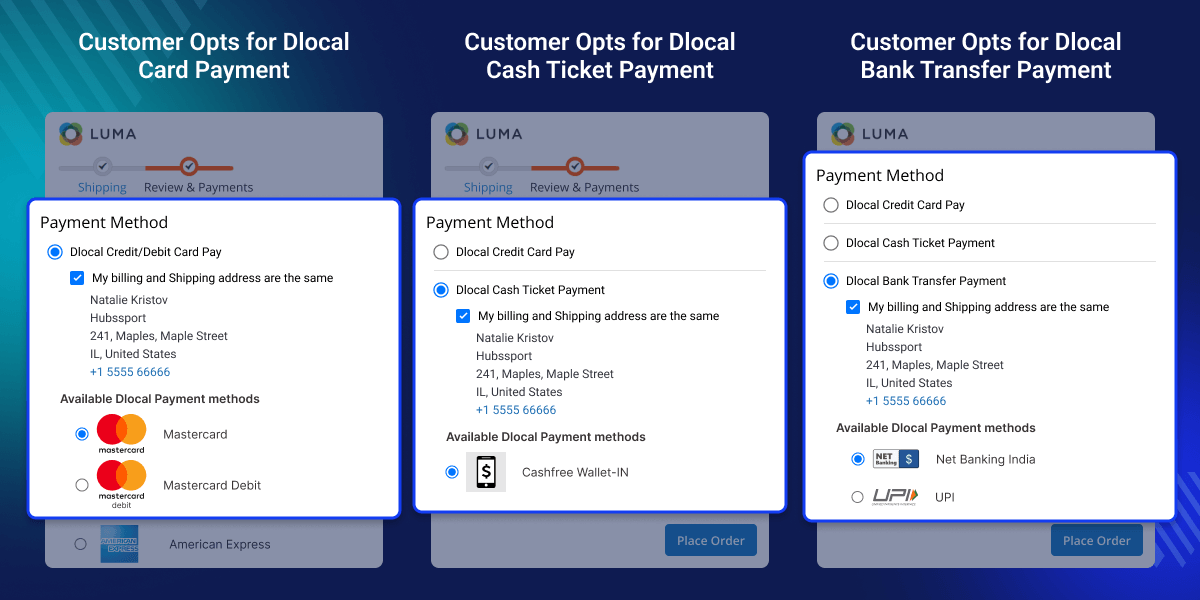
Highlighted Features of Magento 2 Dlocal Payment Gateway
Customize Payment Title
Admin can add or update the payment method title for each store view as needed.
Easy Refunds
The admin can handle online refunds directly from the Magento 2 admin panel.
Guest User Friendly
Guest users can also use the Dlocal payment method during checkout.
PCI Compliant
Dlocal is PCI DSS Level 1 certified, ensuring secure handling of cardholder data.
Secure to Use
This module enables tokenization to secure sensitive customer payment data like card numbers.
Support SCA
Dlocal supports SCA via 3D Secure for PSD2-compliant and secure European payments.
Why We Need Magento 2 Dlocal Payment Gateway Extension?
Magento 2 Dlocal Payment Gateway Extension helps ensure that store transactions are secure and protected. It allows you to expand globally by accepting payments in multiple currencies and through various local payment methods.
If you are looking to integrate additional payment methods in Magento 2, you can also check our:Magento 2 payment extensions
Configure Webkul Dlocal Payment
The admin can manage settings from the backend by following these steps.
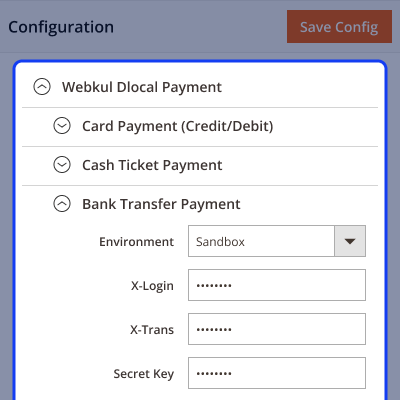
- Add Dlocal API credentials to connect the payment to the store.
- Select Sandbox or Live mode as needed for testing or production.
- Enter API X-Login, X-Trans, and Secret keys for authentication.
- Select the countries where Dlocal payments will be available.

Manage Dlocal Payment Methods
The admin can manage different Dlocal payment methods with ease.
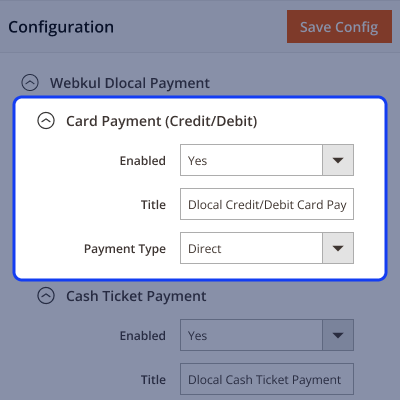
- Enable or disable Dlocal payment options like card, bank transfer, and cash payments.
- Customize and set different titles for each payment method for various store views.
- Choose between Redirect or Direct payment types for card payments on the frontend.

Online Order Return and Refund Support
The admin can handle refunds and returns efficiently.
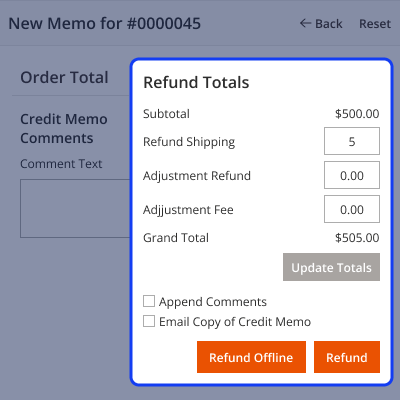
- Refunds are processed when Credit Memos are created for specific invoices.
- Online refunds can be done directly through this module.
- Track refund amounts easily from the Dlocal dashboard.
- Customers can view refunded amounts from their dashboards.
- You can also manage returns and cancellations using the Magento 2 RMA Extension.

Improved Checkout Process
The Dlocal payment gateway simplifies and speeds up checkout.
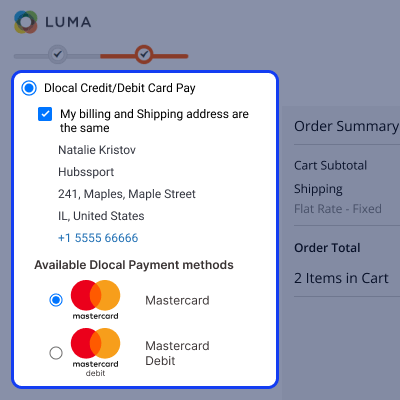
- Customers can add products to the cart and proceed smoothly to checkout.
- The checkout page displays Dlocal payment methods enabled by the admin.
- Customers can complete orders using card, bank transfer, or cash payment options.

Support
For any query or issue please create a support ticket here http://webkul.uvdesk.com/.
You may also check our top-quality Magento 2 Extensions.
Specifications
Frequently Asked Questions
Move to Cloud Today
AWS Free tier hosting for one year by amazon web services, for more details please visit AWS Free Tier.
GCP Free tier hosting for one year with 300 credit points by google cloud platform, for more details please visit GCP Free Tier.
Azure free tier hosting for one year with 25+ always free services, for more details please visit Azure Free Tier.
In our default configuration we will provide tremendous configuration for your eCommerce Website which is fast to load and response.
Default Configuration Details of Server
- 1 GB RAM
- 1 Core Processor
- 30 GB Hard Disk
- DB with 1 GB RAM and 1 Core Processor
* Server Configuration may vary as per application requirements.
Want to know more how exactly we are going to power up your eCommerce Website with Cloud to fasten up your store. Please visit the Cloudkul Services.
Get Started with Cloud- + Features
- - Bugs
- + Compatible with Magento ^2.4.8 and PHP 8.4
- + Admin can Enable/disable dlocal card payment method from admin panel.
- + Admin can Enable either redirect payment or direct payment, for dlocal card payment method.
- + Admin can Enable/disable dlocal Cash Ticket payment method from admin panel.
- + Admin can Enable/disable dlocal Bank Transfer payment method from admin panel.
- + Admin can refund the invoiced amount.
- + Customers can pay using card,bank transfer and cash ticket.


