Send Again
Close
Magento 2 LLMs TXT Generator automatically creates an llms.txt file that helps make your store’s content accessible to AI systems like ChatGPT, Gemini, Claude, and Perplexity.
It defines which pages, categories, and products should be visible to AI crawlers, ensuring structured and crawlable content for better AI search visibility and generative engine understanding.
Admins can automate llms.txt generation, schedule updates, and verify file status directly from the Magento panel, keeping your AI optimization effortless and up to date.
When used together with the Magento 2 IndexNow Integration, your store achieves faster indexing and improved Answer Engine Optimization (AEO) readiness, helping AI engines discover your content quickly.
This combination strengthens your AEO and GEO (Generative Engine Optimization) strategies, ensuring your Magento store remains visible across both traditional and AI-driven search experiences.
If you plan to use a chatbot on your site, check out the Magento 2 Chatbot Using OpenAI (ChatGPT) module too.

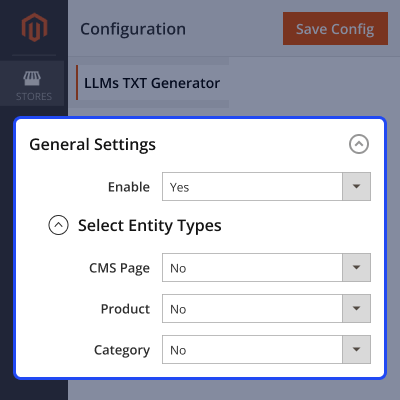
Specific entity types (CMS Page, Product, Category) can be chosen by admin for inclusion in the llms.txt file.
Admin can enter a Company Name and Company Description to be embedded in the generated file.
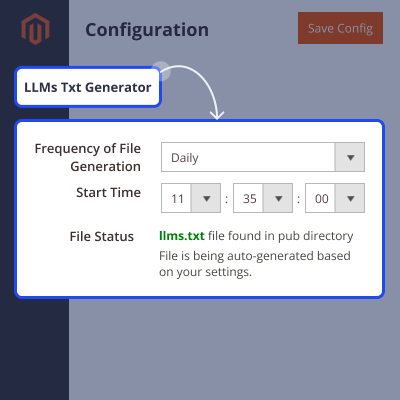
Admin can set how often (Daily, Weekly, etc.) the llms.txt file is regenerated automatically.
Admin can define the exact hour, minute, and second when the generation cron will execute.
The configuration screen shows whether an llms.txt file is already present.
Once enabled, the module runs on schedule without manual intervention, keeping the file current.
Admin can provide any extra text (notes, disclaimers, instructions) to appear in the llms.txt file.
The generated llms.txt file can be consumed by LLM services or BI tools needing structured text data.
As AI-powered assistants like ChatGPT, Claude, and Gemini shape how users search, content must be easily understandable by large language models (LLMs). The llms.txt file ensures your store’s content is properly structured for these systems.
Traditional SEO focuses on visibility in search results, but Answer Engine Optimization (AEO) and Generative Engine Optimization (GEO) require your content to be accessible to AI crawlers for inclusion in AI-generated responses.
The Magento 2 LLMs TXT Generator simplifies this by creating a dedicated llms.txt file that guides AI systems on which store data to crawl, ensuring relevant information is clearly available for AI retrieval.
You can also try the Magento 2 AI Product Recommendation module to offer smarter suggestions to your customers.
After installation of the module, the admin proceeds to configure it. The following options are available:
The module also provides cron settings for automated file generation:
The module periodically generates an llms.txt file based on admin configuration. It includes:

For any query or issue please create a support ticket here http://webkul.uvdesk.com/.
You may also check our top-quality Magento 2 Extensions.
Detailed technical features and requirements to help you understand the module’s capabilities and ensure smooth integration with your system.
Detailed technical features and requirements to help you understand the module’s capabilities and ensure smooth integration with your system.
We’re partnered with top-tier, trusted providers!
Want to know more how exactly we are going to power up your eCommerce Website with Cloud to fasten up your store
* Server Configuration may vary as per application requirements.



