USD
  • EUR
  • INR
  • USD
Cart
Cart 0
  • You have no items in your shopping cart.
    Cart
    Cart 0
    • You have no items in your shopping cart.
    Hire a Developer
    ×
    Contact Us!
    Send Again
    Close
    Please Login to Write Your Review
    Product Image
    Technology Partner Awards.
    Top Selling Extension Winner
    2 times in a row

    Magento 2 Multi Vendor Shiprocket Integration

    Magento 2 Marketplace Shiprocket Shipping Add-On connects your store with Shiprocket. This Magento 2 Shiprocket Shipping Marketplace extension helps sellers ship orders quickly and easily.


    • Set a custom Shiprocket shipping title for customers at checkout.

    • Allow admin and sellers to save their Shiprocket login details securely.

    • Enable sellers to use their own Shiprocket shipping configuration.

    • Display shipping rates in INR with configurable currency conversion.

    • Generate shipping labels for each seller based on their pickup location.

    • Fetch real-time shipping rates from Shiprocket’s courier partners.

    • Provide order tracking through Shiprocket’s tracking system.

    Technology Partner Awards.
    Top Selling Extension Winner
    2 times in a row
    Screenshots
    Magento 2 Multi Vendor Shiprocket Integration Magento 2 Multi Vendor Shiprocket Integration Magento 2 Multi Vendor Shiprocket Integration Magento 2 Multi Vendor Shiprocket Integration Magento 2 Multi Vendor Shiprocket Integration Magento 2 Multi Vendor Shiprocket Integration
    Show More Hide All
    $199.00

    * Required Fields

    Add To Cart
    $199.00
    Configure and Buy
    • Description
    • Reviews
    • FAQ
    • Customers ()
    • Specifications
    • Cloud Hosting
    • Changelog

    Magento 2 Marketplace Shiprocket Shipping Add-On for Magento 2 connects your marketplace with Shiprocket, a major logistics service in India. This Magento 2 Shiprocket Shipping Marketplace integration helps sellers handle shipping in a simple and organized way. They can create labels, arrange pickups, and track their orders with ease.

    Both admin and sellers can save their Shiprocket API email and password. They can also use many courier partners for fast delivery. The module shows real-time shipping rates and creates labels based on each sellers pickup location. This saves time and reduces manual tasks.

    Magento 2 Shiprocket Shipping Marketplace add-on makes the entire shipping process smooth. It calculates shipping costs, generates labels, and updates tracking details in Shiprocket. This leads to faster delivery, less effort, and a better shipping experience for both sellers and customers.

    Note: You must have the Webkul Magento 2 Marketplace Module installed to use this add-on.
    Magento 2 Multi Vendor Shiprocket Integration

    Highlighted Features of Magento 2 Multi Vendor Shiprocket Integration

     Custom Shipping Title

    Set a simple and clear shipping title for your customers at checkout.

     Default Pickup Location

    Admin and sellers can add and manage their default pickup address.

     INR-Based Rate Calculation

    Shipping charges are displayed in Indian Rupees for better clarity.

     Secure Login Storage

    Admin and sellers can store their Shiprocket login details safely.

    Why Do We Need Shiprocket Shipping?

    Shiprocket Shipping is easy to set up and helps sellers start shipping quickly. It supports many courier partners, which gives more options for reliable delivery.

    With faster shipping and smooth order handling, customers enjoy a better experience and receive their products on time.

    Apart from this, if you are looking for an extension that allows you to connect with all major carriers in one simple integration, then check out Magento 2 Marketplace EasyPost Shipping.

    Shiprocket Integration Settings

    The add-on gives full control over the Shiprocket setup for both admin and sellers.
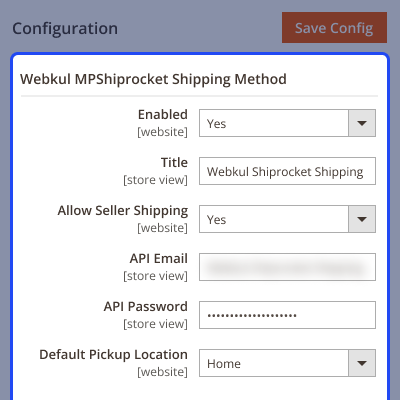
    • Enable or disable the add-on from the admin panel.
    • Set a custom shipping title for checkout.
    • Admin and sellers can enter their own Shiprocket login details.
    • Requires Shiprocket API email and password.
    Shiprocket Integration Settings

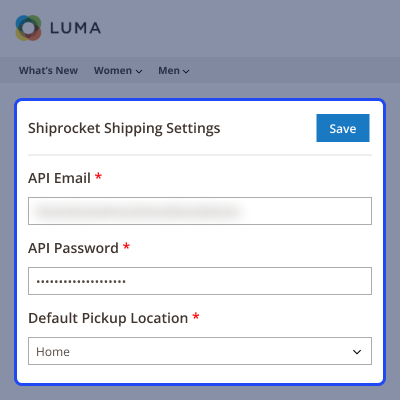
    Sellers Shiprocket Settings

    Sellers need to enter the details -

    • Firstly, seller will enter the API Email generated from Shiprocket.
    • Then, enter the API password
    • Set the default pickup location and then save.
    Sellers Panel Features

    Shipping Process

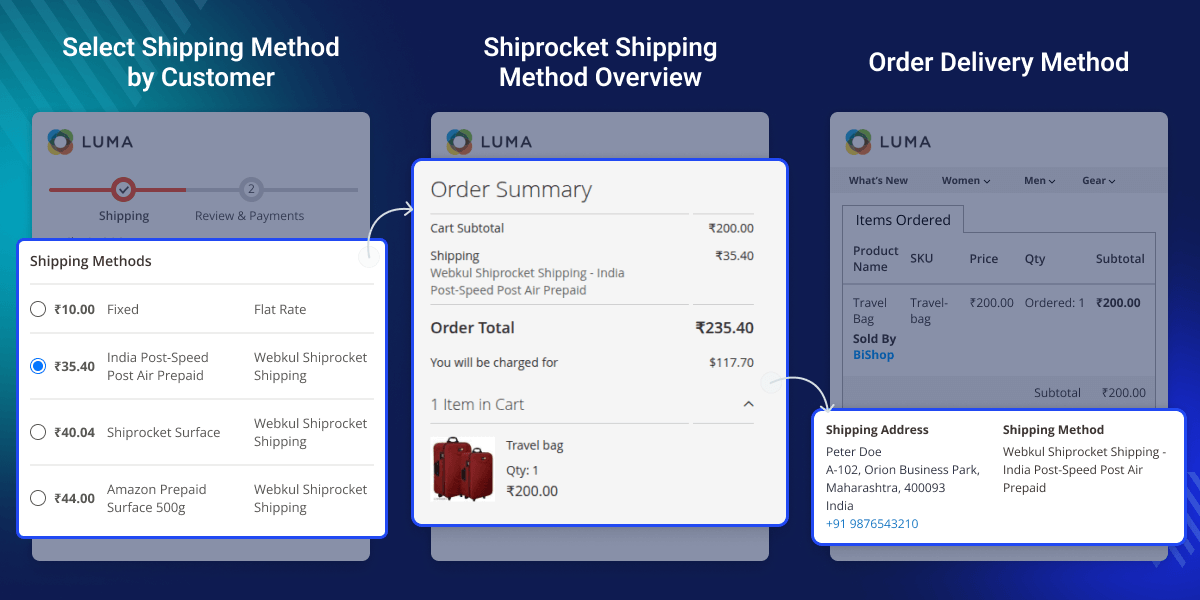
    Customers receive clear and accurate shipping rates at checkout.
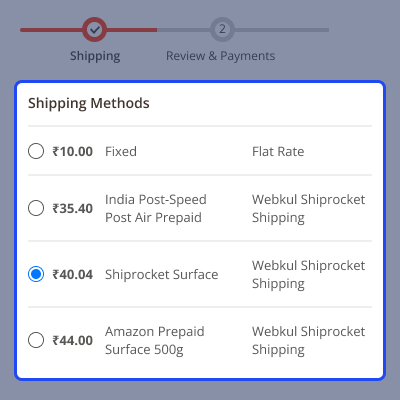
    • Shiprocket appears as a shipping option during checkout.
    • Real-time rates based on courier availability.
    • Rates vary by product weight, size, and pin codes.
    • Multi-vendor orders are split based on each seller’s pickup location.
    Shipping Process

    Support

    For any query or issue, please create a support ticket here http://webkul.uvdesk.com/

    You may also check our top-quality Magento 2 Extensions.

    Specifications

    Product Version5.0.0
    Released3 months ago
    Last UpdatedJanuary 19, 2026 (1 month ago)
    Supported VersionsMagento  2.0.x  2.1.x  2.2.x  2.3.x  2.4.x  
    Write a review

    Frequently Asked Questions

     Does it support multiple languages?
    Yes. It works with Magento 2’s language feature.
     
     Is it compatible with Magento 2 Marketplace?
    Yes. You need Magento 2, Webkul Marketplace, and a Shiprocket seller account.
     
     Can sellers add their own Shiprocket credentials?
    Yes. Each seller can add their API email and password.
     
     How are shipping costs calculated?
    Costs depend on product weight, size, origin pin code, and destination pin code.
     
     Does it support live shipping rates?
    Yes. It fetches real-time rates from Shiprocket.
     
     Can customers track their orders?
    Yes. Buyers can track their shipments using Shiprocket’s tracking system.

    Move to Cloud Today

    AWS Free tier hosting for one year by amazon web services, for more details please visit AWS Free Tier.

    GCP Free tier hosting for one year with 300 credit points by google cloud platform, for more details please visit GCP Free Tier.

    Azure free tier hosting for one year with 25+ always free services, for more details please visit Azure Free Tier.

    In our default configuration we will provide tremendous configuration for your eCommerce Website which is fast to load and response.

    Default Configuration Details of Server

    • 1 GB RAM
    • 1 Core Processor
    • 30 GB Hard Disk
    • DB with 1 GB RAM and 1 Core Processor

    * Server Configuration may vary as per application requirements.

    Want to know more how exactly we are going to power up your eCommerce Website with Cloud to fasten up your store. Please visit the Cloudkul Services.

    Get Started with Cloud
    • + Features
    • - Bugs
    Version 5.0.0
    • + Compatible with Magento 2.4.8^ and php8.4.
    • + Admin can enable or disable the Marketplace ShipRocket Shipping method.
    • + Admin can set the Marketplace ShipRocket shipping title name that will be shown from the front side.
    • + Admin and seller can save their ShipRocket credentials (user email and password).
    • + Shipping rate will be calculated based on INR.
    • + Admin needs to set the Indian Rupee currency conversion rate for ShipRocket shipping to enable
    • + Added graphql api for setting seller ShipRocket Shipping configurations, get admin system configuration
    • + Shipping labels will be generated based on the origin of products in the order—whether from sellers or the admin. Shipping package will be split accordingly by seller.
    Version 4.0.0
    • + Compatible with Magento 2.4.8^ and php8.4.
    • + Admin can enable or disable the Marketplace ShipRocket Shipping method.
    • + Admin can set the Marketplace ShipRocket shipping title name that will be shown from the front side.
    • + Admin and seller can save their ShipRocket credentials (user email and password).
    • + Shipping rate will be calculated based on INR.
    • + Admin needs to set the Indian Rupee currency conversion rate for ShipRocket shipping to enable
    • + Added graphql api for setting seller ShipRocket Shipping configurations, get admin system configuration
    • + Shipping labels will be generated based on the origin of products in the order—whether from sellers or the admin. Shipping package will be split accordingly by seller.