USD
  • INR
  • USD
Cart
Cart 0
  • You have no items in your shopping cart.
    Cart
    Cart 0
    • You have no items in your shopping cart.
    Hire a Developer
    ×
    Contact Us!
    Send Again
    Close
    Please Login to Write Your Review
    Product Image
    Technology Partner Awards.
    Top Selling Extension Winner
    2 times in a row

    Magento 2 Order Edit Extension

    Magento 2 Order Edit extension allows the admin to edit orders and manage its products. They can add or remove, adjust prices, and apply discounts on orders.


    • Order Edit lets the admin update order details via the admin panel.

    • Admin can change product quantities, price, tax, and coupon.

    • The Order view page has a detailed changelog and allows the admin to track updates of orders.

    • Admin can add discount coupons to orders that have already been placed.

    • Admin can remove products from orders that have already been placed.

    • Allow changes to prices, and taxes and recalculate the total based on updated taxes.

    Technology Partner Awards.
    Top Selling Extension Winner
    2 times in a row
    Screenshots
    Magento 2 Order Edit Extension Magento 2 Order Edit Extension Magento 2 Order Edit Extension Magento 2 Order Edit Extension Magento 2 Order Edit Extension
    Show More Hide All
    $179.00

    * Required Fields

    Add To Cart
    $179.00
    Configure and Buy
    • Description
    • Reviews
    • FAQ
    • Customers ()
    • Specifications
    • Cloud Hosting
    • Changelog

    The Magento 2 Order Editor enables admins to modify customer orders after been placed, making it easier to manage customer requests and updates. Admin can modify key order details such as product quantities, and prices and even apply coupons for flexible pricing adjustments.

    Every change made through Magento 2 Order Edit is logged. Admin can review the change log detailing product additions, removals, and price alterations directly from order view page.

    This ensures that all modifications are accurately tracked and easy to monitor. If you want to edit product information directly from the front end, then please check the extension Quick Product Edit for Magento 2.
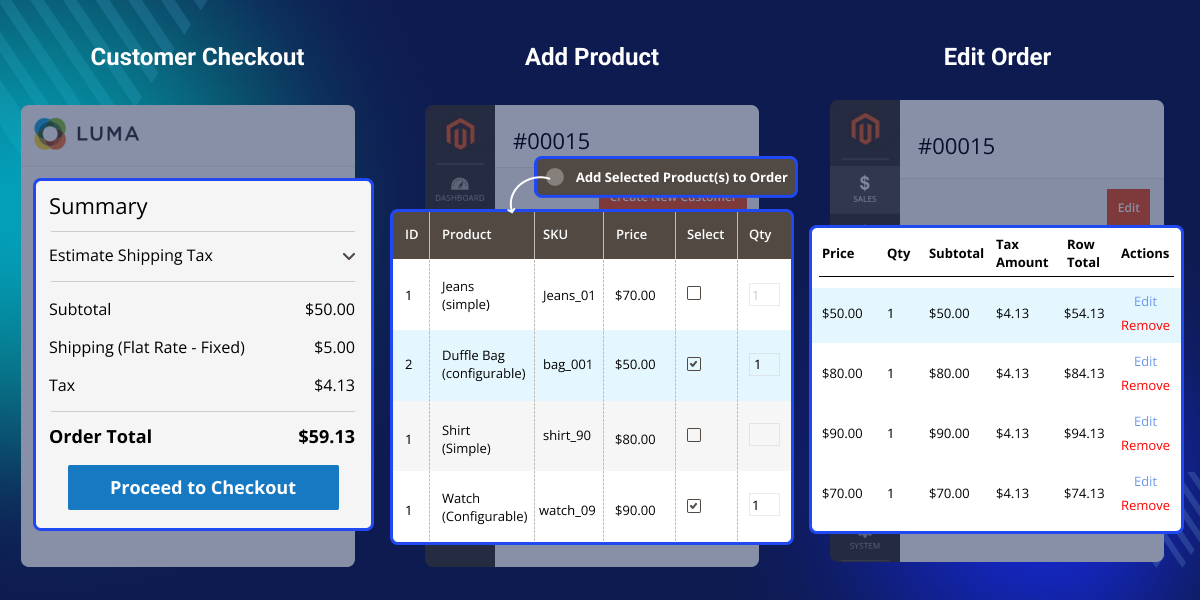
    Magento 2 Order Edit Extension

    Highlighted Features of Magento 2 Order Editor

     Modify Products

    Update product details in an order, including adding or removing items, and adjusting quantities and variations as needed.

     Edit orders directly from Order Edit Page

    Edit customer orders from order view page, simplifying the process and removing the need for multiple steps.

     Add New Products to Existing Orders

    Easily add new products to an existing order without a new transaction. This feature is perfect for handling customer requests for extra items after a purchase.

     Remove products from existing orders

    Admin can quickly remove products from an order if a customer changes their mind. This makes it easy to handle changes.

     Update product quantity and price

    Allow admin to modify product quantities and prices in real time. This lets them adjust for stock changes, special offers, or customer requests without creating a new order.

     Apply discount coupons

    Admin can apply discount coupons to their orders after placing them. It improves satisfaction with pricing and promotions.

     View changelog for order updates

    A detailed changelog on the order view page lets the admin track all changes to an order. It makes it easy to check changes for accuracy and to keep records.

     Seamless Post-Purchase Edits

    With easy post-purchase edits, businesses can avoid the hassle of refunds or reorders, creating a smoother experience for both admin and customers.

     Real-Time Order Management

    With the ability to apply all changes at once, businesses can streamline order handling, ensuring faster processing.

    Why use Magento 2 Order Editor?

    Magento 2 Order Edit lets admin edit orders after purchase. It ensures a smooth, flexible order management process. This feature lets the admin modify an order. They can add or remove products, update quantities, and change prices as well.

    The ability to make these changes without creating a new order simplifies admin workflow, Also, if you want to manage the product information on the product grid, then please check the extension Product Grid Editor for Magento 2.

    Admin can add new products

    Admin can update orders when customers want to add items using Edit Order for Magento 2. This avoids creating a new order.
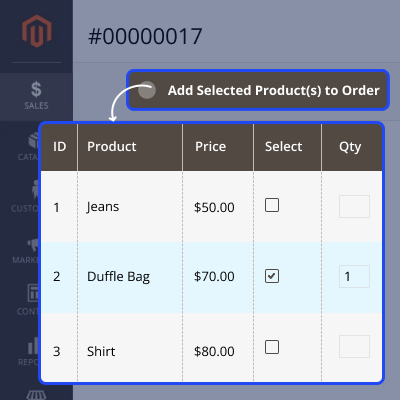
    • Save time, cut effort, and boost customer experience.
    • Admin can add new products to the original order to avoid creating a new order.
    • Additional products can be integrated into original order without creating a new order.
    Admin can add new products

    Edit orders on order view page

    From the order view page, the admin can update order details on time. They can add or remove products, change quantities, update prices, and apply discounts.
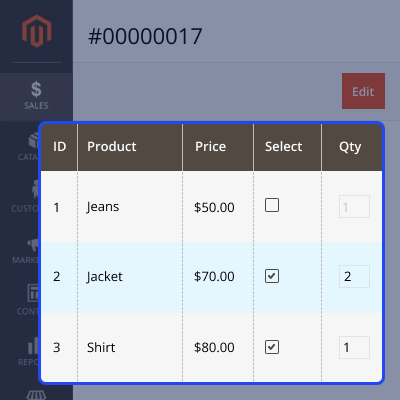
    • Admin can edit any order from the order view page.
    • Save time for admin by allowing them to edit orders directly from the order view page.
    • Admin can simply manage and update orders in real-time.
    • Changes will be visible on customer's orders.
    Edit orders on order view page

    Checking changelog for order updates

    Admin can access changelog for order updates from the order view page. It requires only a small effort.
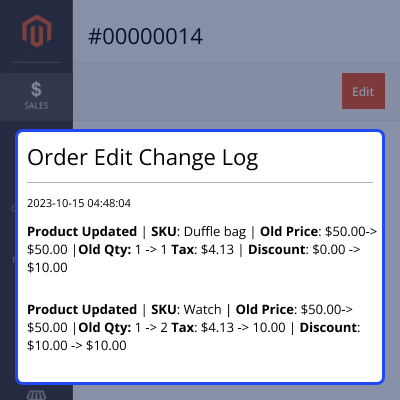
    • Provides a clear and detailed record of all changes made to customer orders.
    • For example, admin can add or remove products, adjust quantities, or apply discounts.
    • Admin can manage orders and track changes, making reviewing an order's history easy.
    Checking changelog for order updates

    Admin can apply discount coupons to orders

    Admin can easily apply discount coupons to orders using Edit Order for Magento 2. This allows for price adjustments and promotions after an order is placed.
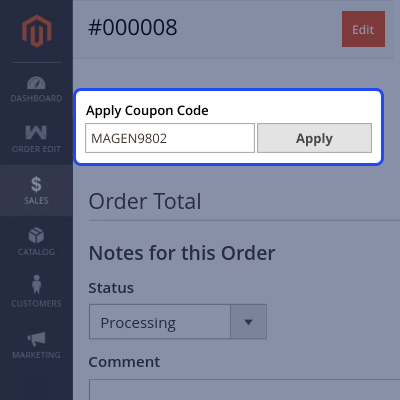
    • Offers discounts to customers without the need to create a new transaction.
    • Offer promotions or discounts post-purchase of products.
    • Applying discount coupon to an existing order.
    Admin can apply discount coupons to orders

    Change the tax amount and apply a discount

    Admins can change the tax amount and apply a discount while editing orders placed using the Edit Order extension for Magento 2.
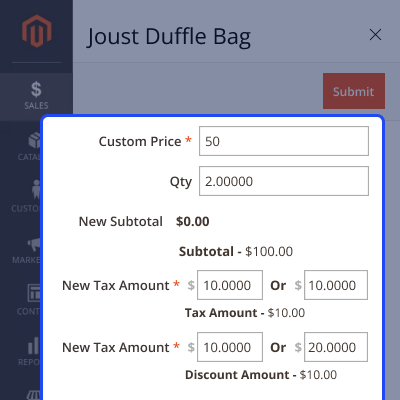
    • Admin can also adjust custom prices to provide a discount.
    • Admin can apply tax on orders as well.
    • After making changes, the system will automatically update total amount.
    Change the tax amount and apply a discount

    Support

    For any query or issue please create a support ticket here at Help Desk. You may also check our quality Magento 2 Extensions.

    Specifications

    Product Version4.0.1
    Released1 year ago
    CategoryMagento 2
    Last UpdatedFebruary 6, 2026 (14 days ago)
    Supported VersionsMagento  2.0.x  2.1.x  2.2.x  2.3.x  2.4.x  
    Write a review

    Frequently Asked Questions

     How can we edit an order using Magento 2 Order Edit Extension?
    You can edit an order directly from order view page. From there, you can add or remove products. You can also update quantities and prices and apply discounts as needed.
     
     Can I add new products to an existing order?
    Yes, admin can easily add new products to an existing order. There's no need to create a new one. This makes the process seamless and efficient.
     
     Can I remove products from the order?
    Yes, you can remove products from an order on the order view page. It allows for quick adjustments if a customer changes their mind.
     
     Can I apply discount coupons to an order after I have placed it?
    Yes, Magento 2 Order Edit lets admin use coupons on orders. This allows for flexible pricing adjustments.
     
     Is there a way to track changes made to an order?
    Yes, It records all updates to an order, such as additions, removals, and price changes. This log is accessible on the order view page for easy tracking.
     
     Can I update the product quantity and price in an existing order?
    Yes, admin can update product quantities and prices on the order page. This is to reflect the latest changes or customer requests.
     
     Does using Edit Order for Magento 2 affect order fulfillment?
    Fulfill orders based on the updated details. If someone adds or removes products, the fulfillment process will change.
     
     Can admin apply tax to the order in Edit Order extension for Magento 2.?
    Yes, admin can apply or modify taxes when editing an order using Edit Order extension for Magento 2.
     
     Can I apply changes to multiple orders at once?
    Magento 2 Order Editor is for editing individual orders. You must change each order one at a time to ensure accuracy.

    Move to Cloud Today

    AWS Free tier hosting for one year by amazon web services, for more details please visit AWS Free Tier.

    GCP Free tier hosting for one year with 300 credit points by google cloud platform, for more details please visit GCP Free Tier.

    Azure free tier hosting for one year with 25+ always free services, for more details please visit Azure Free Tier.

    In our default configuration we will provide tremendous configuration for your eCommerce Website which is fast to load and response.

    Default Configuration Details of Server

    • 1 GB RAM
    • 1 Core Processor
    • 30 GB Hard Disk
    • DB with 1 GB RAM and 1 Core Processor

    * Server Configuration may vary as per application requirements.

    Want to know more how exactly we are going to power up your eCommerce Website with Cloud to fasten up your store. Please visit the Cloudkul Services.

    Get Started with Cloud
    • + Features
    • - Bugs
    Version 4.0.1
    • + Compatible with Magento ^2.4.8 and PHP 8.4
    Version 4.0.0
    • + Compatible with Magento ^2.4.7 and PHP 8.3
    • + Admin can edit order in order to view page
    • + Admin can add new products to an existing order
    • + Admin can remove products from existing orders
    • + Admin can update product qty, price etc
    • + Admin can apply discount coupon
    • + Admin can check the changelog for order updates in order to view the page


