Magento 2 POS Thermal Printer add-on allows the POS agent to print order receipts through any POS-connected printer.
- Admin can integrate multiple printers with POS.
- POS agent can use all POS-connected printers from their end.
- POS agent can select any printer to set as their default printer.
- This module is compatible with Windows, Linux, and MacOS operating systems.
- It offers an auto-print option without requiring any command.
- Provides instant order printing for the placed orders from the selected printer.
- This module supports various printer types, including Thermal, Laserjet, and Barcode Label Printers.
- Description
- Reviews
- FAQ
- Customers ()
- Specifications
- Cloud Hosting
- Changelog
Magento 2 Thermal Printer is an add-on of Magento 2 POS that lets the admin configure the functionality of printing the invoices through the POS-connected Printers. It provides the functionality to the POS agent to print the invoice in different locations with your brand identity.
It helps customers associate their purchases with your brand and promotes brand recognition. Ruler characters make receipts or invoices more attractive. They break up text and make key info easier to read.
Note: To use this Magento 2 POS Thermal Printer Add-on, you must have Webkul Magento 2 POS Extension.
.
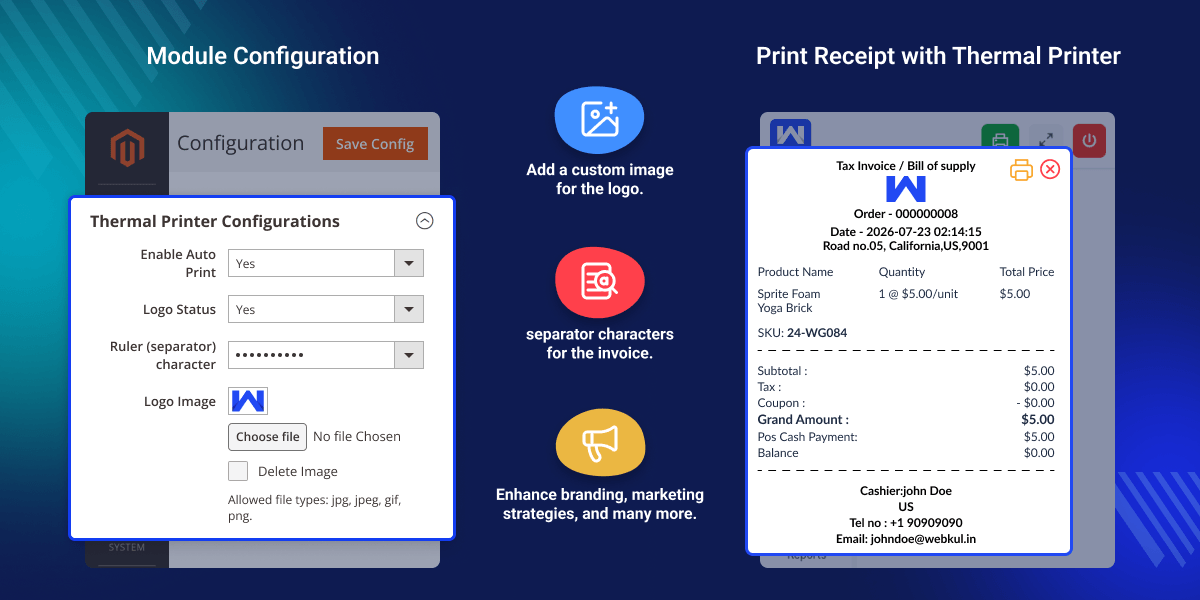
Highlighted Features of Magento 2 POS Thermal Printer
Logo status
Admin can enable or disable the status of the logo for the POS-generated invoice.
Invoice component separator character
Allows to change the separator on the invoice with the available ruler or separator character.
Allow to Choose Images for Logo
The admin can choose the desired image for the logo which supports file formats jpg, jpeg, gif, and png.
Brand Promotion
Magento 2 Thermal Printer helps promote the brand of the individual by printing the logo on the invoice.
Device Supports
Magento 2 POS Thermal Printer is compatible with Linux, Darwin (Mac OS), and Windows operating systems.
Printing Flexibility
It offers flexibility to the POS agents for using any of the printers that are connected to the POS server for printing the receipts.
Why do we need Magento 2 POS Thermal Printer Extension?
Magento 2 POS Thermal Printer offers numerous benefits to the POS store admin which lets the admin configure the print logo along with the available ruler(separator) for invoices. Using the logo on the POS invoice helps in promoting the brand name and it is also beneficial as it helps to identify the company, product, etc.
Using a ruler character helps organize the information on generated receipts or invoices. This makes it easier for customers to find relevant details like the items purchased, prices, and payment information.
The generated thermal printer POS invoice enhances branding, professionalism, and marketing opportunities, as well as clarity for your customers.
Module Configuration
After installing the Magento 2 POS Thermal Printer, the admin has to configure the module. They do this by navigating to the configuration section.
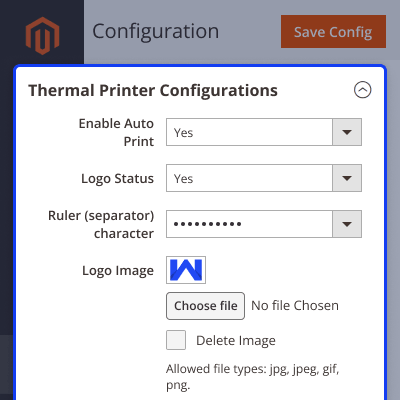
- First of all, the admin will configure the logo status as either Yes or No.
- After that, choose the available ruler(separator) character for the invoice.
- Finally, choose the image file for the logo.

Thermal Printer
POS receipt logo printer uses the ruler or separator character to enhance the way of organizing the information on the invoice.
- Admin can choose the available separator character which will printed on the POS-generated invoice to separate the information.
- Admin can manage the images of the logo from the backend.
- The images supported file formats such as jpg, jpeg, gif, and png.
- This makes it easier for customers to find relevant details like purchased items, prices, and other information.
- This functionality enhances customer satisfaction.

Support
For any query or issue please create a support ticket here at Help Desk. You may also check our quality Magento 2 Extensions.
Specifications
Frequently Asked Questions
Specification
Detailed technical features and requirements to help you understand the module’s capabilities and ensure smooth integration with your system.
Cloud Hosting
Detailed technical features and requirements to help you understand the module’s capabilities and ensure smooth integration with your system.
Move to Cloud Today
We’re partnered with top-tier, trusted providers!
Default Configuration Details of Server
RAM 1 Core
Processor 30 GB
Hard Disk
Database
Want to know more how exactly we are going to power up your eCommerce Website with Cloud to fasten up your store
* Server Configuration may vary as per application requirements.
Change Logs
- - Feature Add (+)
- - Feature remove (-)
- - Bug Fixed (!)
- - Modification (*)
- + Compatible with Magento 2.4.9, PHP 8.5, and POS version 5.1.5.
- + Compatible with Magento 2.4.8^ and POS version 5.1.4.
- + Updated the receipt print structure to prepared HTML data.
- + Receipt printing updated with multilingual support.
- + Added cashier offline notice banner.
- + Implemented secure webhook and WebSocket for real time stock updates at the cashier end.
- + Updated the receipt UI and structure to be more POS friendly.
- - Fixed invoice issues.
- + Compatible with POS Headless Theme version 5.1.2.
- + Added an option in the configuration to download the required printer application for POS.
- + Added automatic order invoice printing when an order is received at the POS.
- + Admin can enable or disable automatic invoice printing for POS.
- + Compatible with Windows, Linux, and macOS operating systems.
- + POS agents can use all POS connected printers.
- + POS agents can select any printer as the default printer.
- + Admin can upload an invoice logo image for POS.
- + Admin can enable or disable the invoice logo display.
- + Admin can configure the ruler (separator) character used in printed invoices.


