USD
  • EUR
  • INR
  • USD
Cart
Cart 0
  • You have no items in your shopping cart.
    Cart
    Cart 0
    • You have no items in your shopping cart.
    Hire a Developer
    ×
    Contact Us!
    Send Again
    Close
    Please Login to Write Your Review
    Product Image
    Technology Partner Awards.
    Top Selling Extension Winner
    2 times in a row

    Magento 2 Reseller Extension

    Magento 2 Reseller extension allows the admin to add many resellers to the Magento 2 store. It allows resellers to sell admin's products by registering with the store.


    • Customers can sign up as resellers. Resellers can add and update products to resell. 

    • Approve or disapprove the reseller profile and products.

    • Admin can do this automatically or manually.

    • Resellers can control their profiles. Resellers can view and filter product lists.

    • Bulk deletion of resell products from the reseller list.

    • Manage reseller orders. Filter these orders by Order ID, Date, and Order Status.

    • Resellers can retrieve and save transaction reports in CSV format.

    • Resellers can sell on their own shop with a separate sub-domain.

    • Email alerts sent to resellers and admin.

    • Admin can allocate categories to the resellers.

    • Resellers can see their profits in their account.

    Technology Partner Awards.
    Top Selling Extension Winner
    2 times in a row
    Screenshots
    Magento 2 Reseller Extension Magento 2 Reseller Extension Magento 2 Reseller Extension Magento 2 Reseller Extension Magento 2 Reseller Extension Magento 2 Reseller Extension Magento 2 Reseller Extension Magento 2 Reseller Extension Magento 2 Reseller Extension Magento 2 Reseller Extension
    Show More Hide All
    $399.00

    * Required Fields

    Add To Cart
    $399.00
    Configure and Buy
    • Description
    • Reviews
    • FAQ
    • Customers ()
    • Specifications
    • Cloud Hosting
    • Changelog

    Magento 2 Reseller lets the admin add multiple resellers in Magento 2. This setup helps customers become resellers. They can start selling the admin's products by signing up as resellers. Admin can control resellers. The admin can allow or stop resellers from selling certain products.

    Resellers can manage the shop page content of their custom subdomain shop. Resellers can add and update products from their dashboard. They can also manage their profiles and filter their product lists. The resellers can delete many items at once.

    They can also manage orders using filters. These filters let them search by order ID, date, and status. The resellers can check the transaction reports, search, and filter them. They can also be saved as a CSV file using the download option.

    Check out our Marketplace Multi Vendor Module for Magento 2 extension for vendors to sell products on a centralized Magento 2 admin store.

    Note - Our reseller plugin does not work with Grouped or Bundled type products.
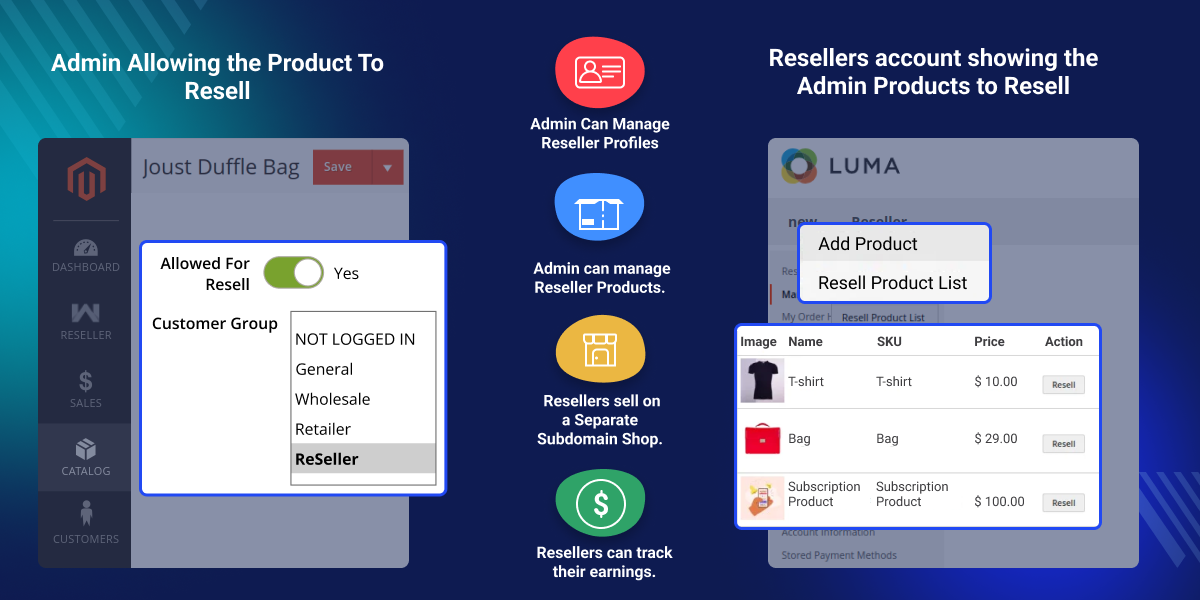
    Magento 2 Reseller Extension

    Highlighted Features of Magento 2 Reseller

     Add Multiple Resellers

    Admin can add multiple resellers on the Magento 2 store using Magento 2 Reseller extension.

     Approve or Disapprove Resellers

    Admin can easily approve or disapprove the reseller profiles and the reseller products either manually or automatically as required.

      Manage Reseller Profiles

    Admin can manage the reseller profiles, view/edit their account information, and make payouts to the resellers.

     Manage Reseller Products

    Admin can manage the reseller products and perform actions such as approve/disapprove the reseller products.

     Order Management

    Resellers can view their orders and filter them by Order ID, Date, and Order Status.

     Transaction Reports and Earnings

    Resellers can view their transaction reports, download them as CSV, and also check their earnings within their reseller profile.

     Custom Sub-Domain Shop

    Resellers can sell through their separate shop with a personalized subdomain shop URL, unique logo, and dedicated reseller collection page.

     Add Global Prefix

    Admin can add a global prefix to the resellers’ shops sub-domain.

     Assign Categories

    Admin can assign categories to resellers to be able to sell the admin products available within those categories.

     Email Notifications

    Email notifications to resellers regarding the approval/disapproval of reseller products and profiles and to the admin for withdrawal requests from the resellers.

    Why do we need to use Magento 2 Reseller extension?

    Magento 2 Reseller extension enables customers to resell admin products from the Magento 2 store effortlessly. The reseller profile needs to be approved by the admin either manually or automatically.

    Once the profile is approved and the admin has enabled any product for reselling, the reseller can add that product to his resell products list from his account. The reselling products can then be sold by the reseller on his custom domain shop using their choice of price, logo, and description for the reselling products.

    Admin can oversee and handle the orders and process payments to the resellers. You may also check our Magento 2 Multi Vendor Sell As Brand extension. It enables admin to create multiple brands for vendors to display and sell their products under a distinct brand identity.

    Add Multiple Resellers

    The store admin can add multiple resellers on the Magento 2 store using Magento 2 Reseller extension.
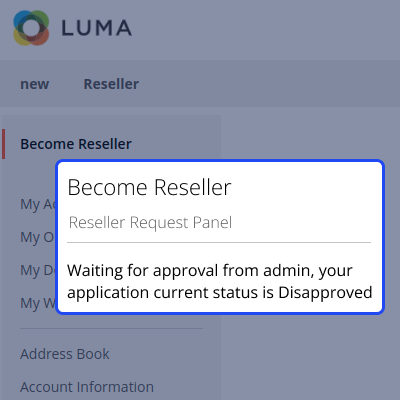
    • New customers can register as resellers and existing customers can become resellers.
    • The reseller profile needs to be approved by the admin.
    • The approval process can be manual or automatic per the admin.
    • Once approved, they can add products to resell from within their account.
    Add Multiple Resellers

    Manage Reseller Profiles and Products

    The store admin can manage the reseller profiles and the reseller product list using the Magento 2 Reseller extension.
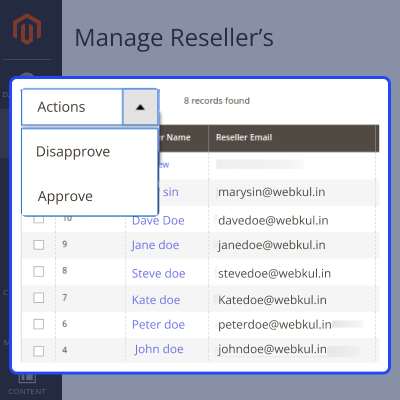
    • Admin can approve or disapprove the profiles of resellers in bulk.
    • Admin can view and edit the account information of resellers.
    • Admin can view the list of the reseller products and mark them as approved/disapproved.
    Manage Reseller Profiles and Products

    Withdrawal Request

    The resellers can request the admin pay their commission amount by using the 'Make a Withdrawal' Option under the My Transaction list.
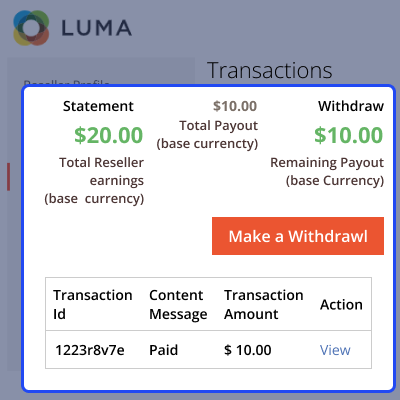
    • The request to withdraw the amount will be sent to the admin via email notification.
    • Admin can pay the amount by clicking on the 'Order' button beside the reseller name.
    • Admin can also add a comment for each payment made to the resellers.
    Withdrawal Request

    Order Management

    The resellers can view and filter orders by Order ID, Date, and Order Status from within their reseller account.
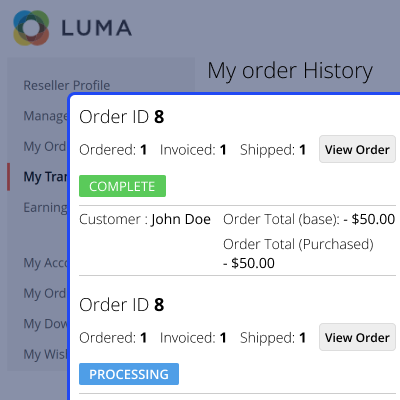
    • The resellers can send withdrawal requests to the admin.
    • The resellers can view transaction reports and download them as a CSV file.
    • The resellers can view the earnings within their account per Day/Month or Year.
    Order Management

    Reseller Transactions

    The resellers can view the transaction reports from within their reseller account to efficiently keep a record of the same.
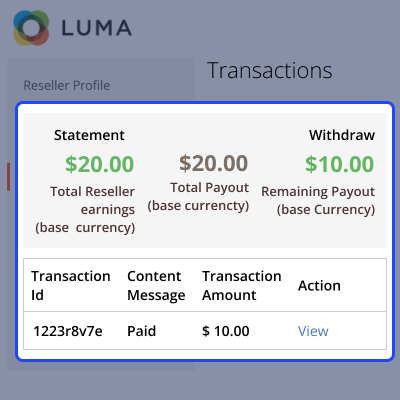
    • View all the transactions under the ‘My Transaction List’.
    • Search for transactions using filters for transaction ID and date.
    • Download the transaction reports as a CSV file.
    Reseller Transactions

    Reseller Earnings

    Resellers can easily track their total earnings by accessing their reseller account. This allows them to maintain an organized record of their income.
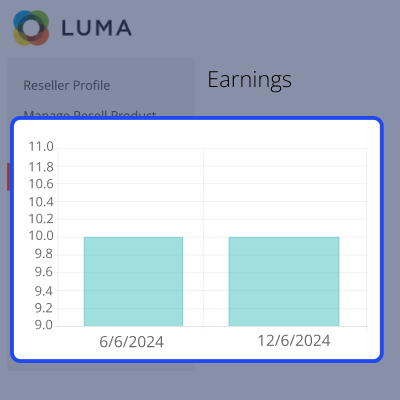
    • All reseller earnings will be visible under the 'Earnings' section in the left-side menu.
    • Filter earnings per - Day, Month, or Year.
    • Graphical chart and textual representation of reseller earnings.
    Reseller Earnings

    Custom Sub-Domain Shop

    The resellers can sell the admin products to the customers in their shop. They can do this with a custom domain, their logo, and their respective reseller products.
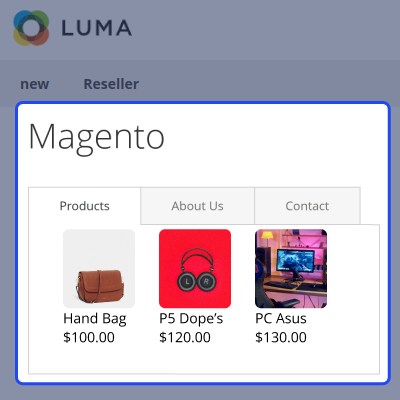
    • The resellers can select the subdomain to be set for their shop.
    • The resellers can update their Shop Title, Shop Banner, and Shop Logo anytime.
    • The reseller shop will have its collection page.
    Custom Sub-Domain Shop

    Email Notifications

    It provides various email notifications, enabling the admin to choose the email template for every notification.
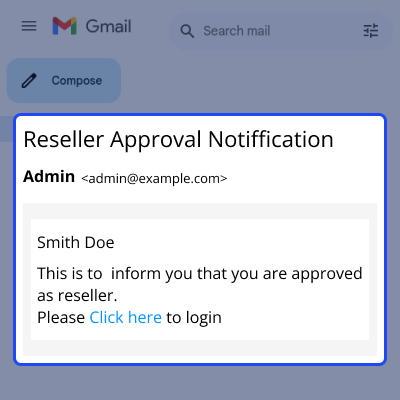
    • Admin can view the default email notification templates and also choose another template.
    • Reseller ProfileApproved/Disapproved email notifications.
    • Reseller Products Approved/Disapproved email notifications.
    • Email notifications for Withdrawal Request by Reseller.
    • Ask Questions to Reseller email notifications.
    Email Notifications

    Support

    For any query or issue please create a support ticket here at Help Desk. You may also check our quality Magento 2 Extensions.

    Specifications

    Product Version5.0.0
    Released1 year ago
    CategoryMagento 2
    Last UpdatedDecember 4, 2025 (3 months ago)
    Supported VersionsMagento  2.0.x  2.1.x  2.2.x  2.3.x  2.4.x  
    Write a review

    Frequently Asked Questions

      What is Magento 2 Reseller?
    Magento 2 reseller extension allows the customers to resell admin products on the Magento2 platform. They can enter their price and description while reselling.
     
     Can multiple Resellers Sell the Same Product?
    Yes, if the product’s inventory is available then the same product of the admin can be sold by multiple resellers.
     
     Is There Any Registration Fee for Becoming a Reseller?
    No, the customers can register themselves as resellers without paying any registration fee.
     
      Is The Approval Process for Resellers Manual?
    The admin can configure the settings in the extension to keep the approval process automatic or manual for resellers' profiles and products.
     
     Do Resellers Sell the Products on Different Store than that of Admin?
    Yes, the resellers sell the admin products on a separate shop with a custom sub-domain and it only lists the reseller’s products on the collection page of that shop.
     
     Can Customers Contact the Reseller?
    Yes, the customers can contact the reseller through the Contact Us button on the reseller's shop.

    Move to Cloud Today

    AWS Free tier hosting for one year by amazon web services, for more details please visit AWS Free Tier.

    GCP Free tier hosting for one year with 300 credit points by google cloud platform, for more details please visit GCP Free Tier.

    Azure free tier hosting for one year with 25+ always free services, for more details please visit Azure Free Tier.

    In our default configuration we will provide tremendous configuration for your eCommerce Website which is fast to load and response.

    Default Configuration Details of Server

    • 1 GB RAM
    • 1 Core Processor
    • 30 GB Hard Disk
    • DB with 1 GB RAM and 1 Core Processor

    * Server Configuration may vary as per application requirements.

    Want to know more how exactly we are going to power up your eCommerce Website with Cloud to fasten up your store. Please visit the Cloudkul Services.

    Get Started with Cloud
    • + Features
    • - Bugs
    Version 5.0.0
    • + Allow to add multi reseller with help of the extension.
    • + Reseller can add/update products from their dashboard.
    • + Resellers can manage their profile.
    • + Product filter by name, date and status in reseller's product list.
    • + Mass delete of product in reseller's product list.
    • + Reseller's order management with filter by order id, date and status in.
    • + Reseller's transaction report with download record in csv and search filter by transaction id and date.
    • + Reseller's own shop page like profile, collection page.
    • + Reseller can have there own website as a subdomain or primary domain.
    • + Admin can manage resellers.
    • + Admin can assign categories to resellers.
    • + Admin can manage products approval/disapprovals of resellers.
    Version 4.0.0
    • + Allow to add multi reseller with help of the extension.
    • + Reseller can add/update products from their dashboard.
    • + Resellers can manage their profile.
    • + Product filter by name, date and status in reseller's product list.
    • + Mass delete of product in reseller's product list.
    • + Reseller's order management with filter by order id, date and status in.
    • + Reseller's transaction report with download record in csv and search filter by transaction id and date.
    • + Reseller's own shop page like profile, collection page.
    • + Reseller can have there own website as a subdomain or primary domain.
    • + Admin can manage resellers.
    • + Admin can assign categories to resellers.
    • + Admin can manage products approval/disapprovals of resellers.


