USD
  • EUR
  • INR
  • USD
Cart
Cart 0
  • You have no items in your shopping cart.
    Cart
    Cart 0
    • You have no items in your shopping cart.
    Hire a Developer
    ×
    Contact Us!
    Send Again
    Close
    Please Login to Write Your Review
    Product Image
    Technology Partner Awards.
    Top Selling Extension Winner
    2 times in a row

    Magento 2 Marketplace Restrict Vendor Product

    Magento 2 Marketplace Restrict Vendor Products lets vendors request admin created products.


    • Vendors can submit requests for admin products.

    • Admins can approve or reject requests from a single grid.

    • Product requests are visible in the customer edit section.

    • Fast and easy approval workflow.

    • Gives full control over what products sellers can access.

    • Only approved products are shared with vendors.

    • Vendors can choose many products at once to request.

    • Product field edit permissions are managed by admins.

    • Email templates can be set for request status updates.

    Technology Partner Awards.
    Top Selling Extension Winner
    2 times in a row
    Additional Info

    Please note that this extension is an add-on to the Marketplace Multi Vendor Module for Magento 2, so you need to purchase and install it first.

    Screenshots
    Magento 2 Marketplace Restrict Vendor Product Magento 2 Marketplace Restrict Vendor Product Magento 2 Marketplace Restrict Vendor Product Magento 2 Marketplace Restrict Vendor Product Magento 2 Marketplace Restrict Vendor Product Magento 2 Marketplace Restrict Vendor Product
    Show More Hide All
    $249.00

    * Required Fields

    Add To Cart
    $249.00
    Configure and Buy
    • Description
    • Reviews
    • FAQ
    • Customers ()
    • Specifications
    • Cloud Hosting
    • Changelog

    Magento Marketplace 2 Restrict Vendor Products module helps admins control which products vendors can use. Vendors can send requests to use admin-created products. Requests are evaluated by admins for approval or rejection.

    All requests are shown in one place — the Manage Vendor Product Request Grid. This makes tracking and handling requests quick and simple. Admins can also manage product requests from the Product Requests for Vendors tab in the customer edit page.

    This avoids the need to open many pages to handle one task. If you need to block certain shipping options instead, try our Shipping Restriction for Magento 2 module.
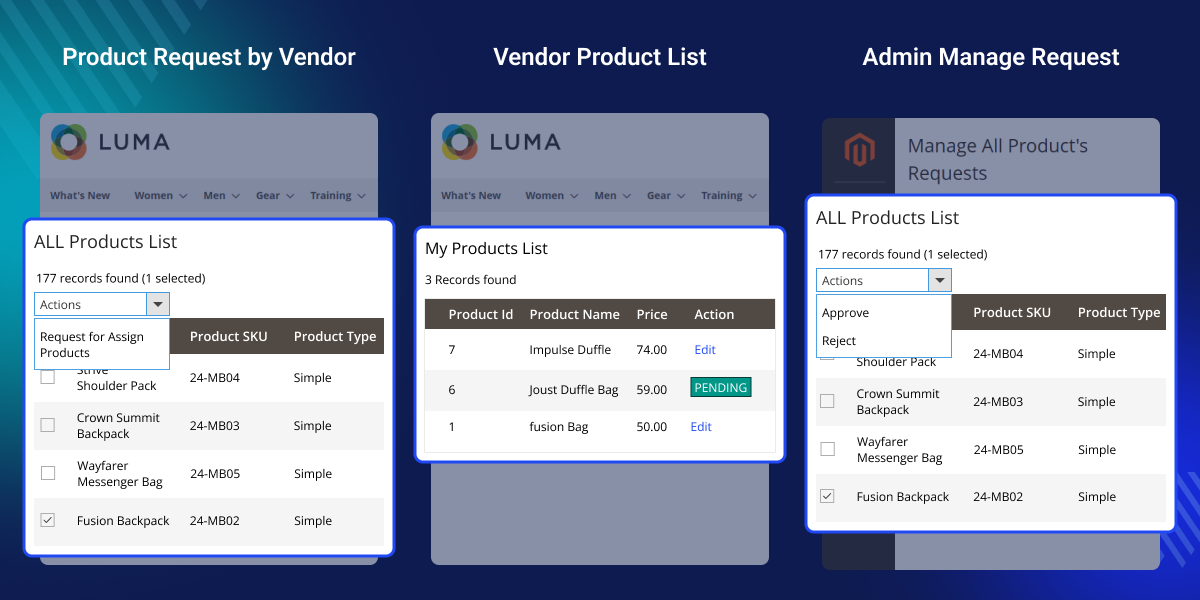
    Magento 2 Restrict Vendor Product

    Highlighted Features of Magento 2 Marketplace Restrict Vendor Product

     Vendor Product Request System

    Vendors can request permission to assign admin products to their catalog.

     Improved Product Management

    Ensure only approved products are assigned to sellers.

     Marketplace Control

    Restrict product use to only approved vendors.

     Manage Requests from Grid

    Track and manage product requests from a clear admin view.

    Why Do You Need Magento 2 Marketplace Restrict Vendor Products?

    Magento 2 Restrict Vendor Products module gives admins better control over which products vendors can add to their store. Without it, sellers might use the wrong or duplicate products. That can hurt your store’s quality and user trust.

    With this module, sellers can only request access to approved products, ensuring better control over the catalog. Admins can easily accept or reject these requests through a simple interface.

    The approval process is smooth and straightforward, helping maintain an organized and trusted product catalog. Want to compare seller prices too, then check out our Magento 2 Marketplace Seller Price Comparison extension.

    Magento 2 Restrict Vendor Product - Admin Configuration

    Once installed, the admin can set up the module using these options:
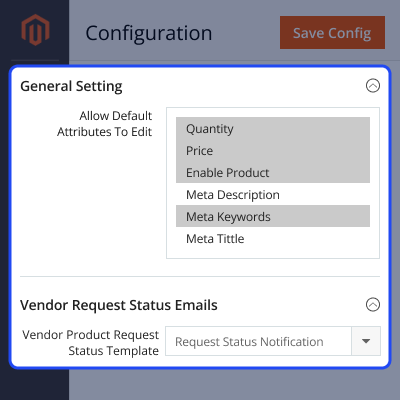
    • Allow Default Attributes To Edit.
    • Choose which fields (like price or stock) vendors can edit.
    • Vendor Request Status Emails: Pick the email template used to update vendors on their request status.
    Magento 2 Restrict Vendor Product - Admin Configuration

    Manage All Product Requests

    Admins can view and manage all product requests here:
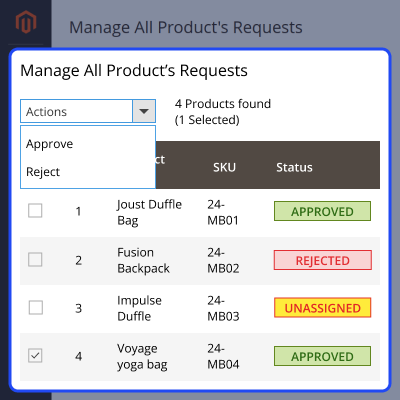
    • Approve or reject requests.
    • See if a request is approved, pending, or unassigned.
    Manage All Product Requests

    Vendor Requests Product

    From the vendor dashboard, sellers can:
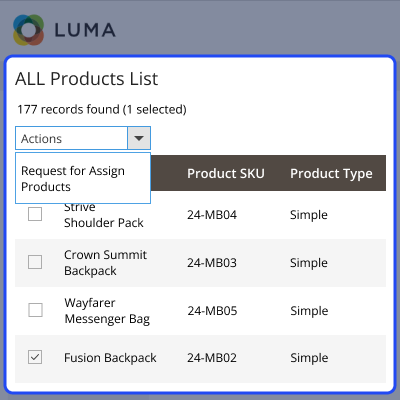
    • View all admin-created products.
    • Select multiple products to request access.
    • Submit the request for admin approval.
    Vendor Requests Product

    Support

    For any query or issue please create a support ticket here http://webkul.uvdesk.com/

    You may also check our top-quality Magento 2 Extensions.

    Specifications

    Product Version5.0.0
    Released8 months ago
    Last UpdatedDecember 4, 2025 (2 months ago)
    Supported VersionsMagento  2.0.x  2.1.x  2.2.x  2.3.x  2.4.x  
    Write a review

    Frequently Asked Questions

     How can vendors request product assignments?
    Vendors select admin products and send a request for approval.
     
     How do admins manage these requests?
    Admins can handle all requests from the request grid or the customer edit form.
     
     Can vendors request more than one product at a time?
    Yes, vendors can choose many products and request them together.
     
     Are product attributes editable by vendors?
    Yes, but vendors can edit only the attributes enabled by the admin.
     
     How does this help in managing the marketplace?
    It controls who can use what products, keeps the catalog clean, and avoids misuse.

    Move to Cloud Today

    AWS Free tier hosting for one year by amazon web services, for more details please visit AWS Free Tier.

    GCP Free tier hosting for one year with 300 credit points by google cloud platform, for more details please visit GCP Free Tier.

    Azure free tier hosting for one year with 25+ always free services, for more details please visit Azure Free Tier.

    In our default configuration we will provide tremendous configuration for your eCommerce Website which is fast to load and response.

    Default Configuration Details of Server

    • 1 GB RAM
    • 1 Core Processor
    • 30 GB Hard Disk
    • DB with 1 GB RAM and 1 Core Processor

    * Server Configuration may vary as per application requirements.

    Want to know more how exactly we are going to power up your eCommerce Website with Cloud to fasten up your store. Please visit the Cloudkul Services.

    Get Started with Cloud
    • + Features
    • - Bugs
    Version 5.0.0
    • + Compatible with Magento 2.4.8 and PHP 8.4.
    • + Vendor can create product assignment request for admin product.
    • + Admin can approve/reject request from Manage vendor product request grid.
    • + Admin can approve/reject request from Product Requests for Vendor tab of customer edit form.
    • + Coding standard applied.
    • + PHPStan applied.
    Version 4.0.0
    • + Compatible with Magento 2.4.8 and PHP 8.4.
    • + Vendor can create product assignment request for admin product.
    • + Admin can approve/reject request from Manage vendor product request grid.
    • + Admin can approve/reject request from Product Requests for Vendor tab of customer edit form.
    • + Coding standard applied.
    • + PHPStan applied.


