USD
  • EUR
  • INR
  • USD
Cart
Cart 0
  • You have no items in your shopping cart.
    Magento 2 Extensions
    Cart
    Cart 0
    • You have no items in your shopping cart.
    Hire a Developer
    ×
    Contact Us!
    Send Again
    Close
    Please Login to Write Your Review
    Magento 2 Shopware Connector

    Magento 2 Shopware Connector

    x
    Free

    * Required Fields

    $399.00
    Add To Cart
    30 Days Money Back Guarantee*

    Magento 2 Shopware Connector integrates your Magento 2 online store with the Shopware web store. It enables the merchants to sync products, categories, and orders between the two e-commerce platforms.


    • Import products from Shopware stores.

    • Order import from Shopware stores.

    • Map the imported Shopware order’s status with the Magento 2 store order status.

    • Map category of Magento 2 store with Shopware store.

    • Cron command is used to import real-time products and orders.

    • Check log messages related to the order and product import status.

    Magento 2 Shopware Connector
    Magento 2 Shopware Connector
    $399.00
    30 Days Refund
    GraphQL Compatible
    Check How It Works
    $399.00
    Configure and Buy
    30 Days Money Back Guarantee*
    X
    • Description
    • Reviews
    • FAQ
    • Customers ()
    • Specifications
    • Cloud Hosting
    • Changelog

    Magento 2 Shopware Connector integrates the Shopware store to the Magento 2 store. With the use of it, the store owners can import the orders and products from the Shopware store to Magento 2 store.

    They can easily map the categories between Magento 2 and Shopware stores with the cron command. The extension also allows the store merchants to set the order status for the imported orders. They can even check the log messages for product import and order import information.
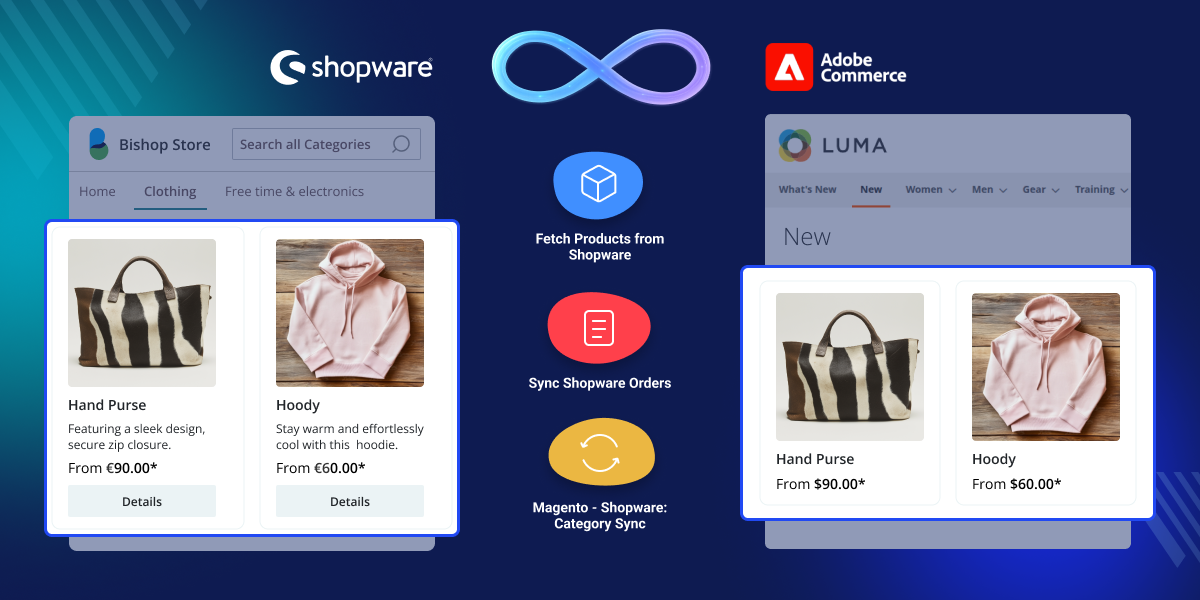
    Magento 2 Shopware Connector

    Highlighted Features

     Product and Order Import

    The store merchants can import the orders and products from the Shopware store.

     Shopware Magento 2 Integration

    The Magento 2 store gets connected to the Shopware store.

     Category Mapping Option

    The Shopware categories can be mapped with Magento 2 store categories.

     Use of Cron Command

    The cron command is used for real-time store synchronization.

     Multiple Store Sync Management

    The store merchants can manage multiple stores simultaneously.

     Check Log Messages

    The store owners can check the messages related to order import and product import.

    Why Do We Need Magento 2 Shopware Connector?

    The module is advantageous for store merchants who want to connect their Shopware store to the Magento store. They can easily manage the stores simultaneously.

    The Magento 2 Shopware Connector is also beneficial if the store owners want to migrate from Shopware to Magento 2 platform. In this case, the users can easily import the products and facilitate a smooth migration between the stores.

    General Shopware Store Setup

    The module has an easy setup for the Shopware store configurations after enabling the module status.
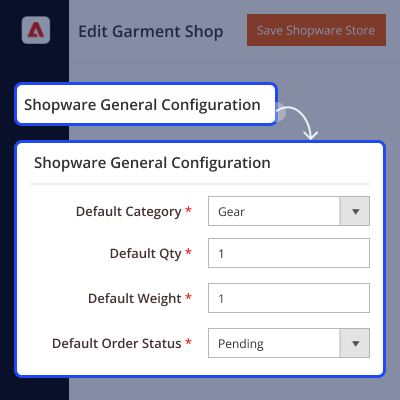
    • It helps store owners to connect and manage multiple Shopware stores with Magento 2 stores simultaneously.
    • The store admin can add, edit or delete the Shopware stores.
    • The store merchant can allow the default value for the products which do not have any value assigned.
    • The admin can also set the default quantity, weight, category, and order status of imported products.
    General Shopware Store Setup

    Category Mapping for Stores

    The Category Mapping section provides the store owners with a feature to map the Magento 2 category with the Shopware category.

    • Category mapping enables product assignment to the correct category.
    • The admin can map only one Shopware category at a time.
    • The mapped category list will be visible to the admin.
    • The product will import to the mapped category otherwise it will import to the default category if the settings of default are enabled.

    To import bulk categories from CSV, XML, and XLS files, please use Magento 2 Bulk Category Upload extension.
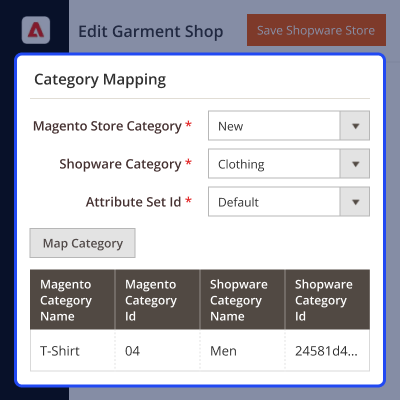
    Category Mapping for Stores

    Product Import from Shopware

    The module offers a convenient product import from the Shopware store to Magento 2 store.
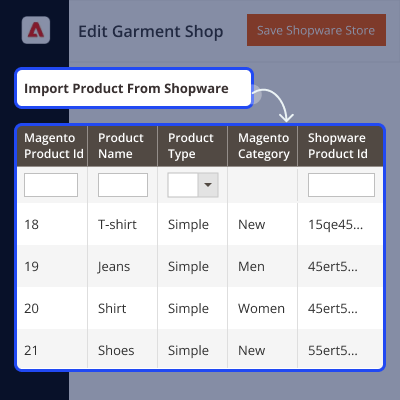
    • The product is imported by clicking on the Import Product button in an easy way.
    • The cron command pulls the products on a real-time basis.
    • The product information such as; base image, weight, SKU, attributes, description, and name get imported.
    • The admin can see the imported product list with Magento product ID, Shopware product ID, product name, and sync date.
    Product Import from Shopware

    Order Import from Shopware

    Similarly, the store admin can also import the Shopware orders to the Magento 2 store.
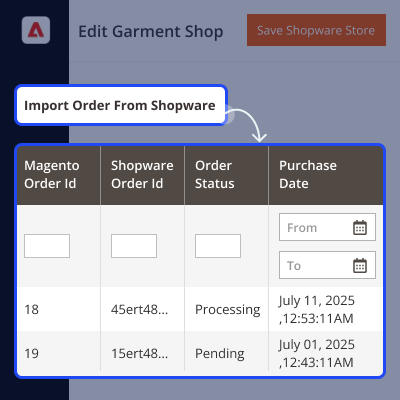
    • The store owners can easily import the orders by clicking on the Import order button.
    • Cron helps to import the product in real-time from the Shopware store.
    • The imported orders will be visible to the store owner in a list.
    • Orders will display with the Shopware order ID, Magento 2 order ID, purchase date, and order status.
    Order Import from Shopware

    Order Status Mapping

    The admin of the Magento 2 store after importing the orders can also map the order status of the Shopware store order to the Magento 2 Store order status as required.
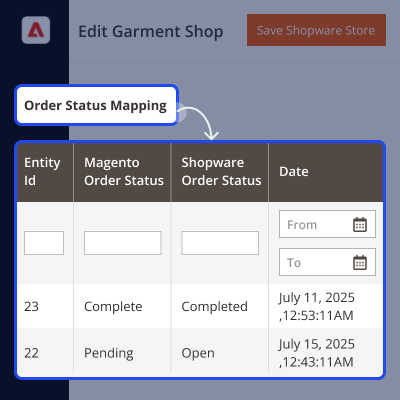
    • Select the Magento store order status.
    • Choose the Shopware Order status that needs to be mapped.
    • Tap the Map Order status button.
    • A sucess message is displayed and the order status gets mapped as required.
    Order Status Mapping

    Support

    For any query or issue please create a support ticket here http://webkul.uvdesk.com/

    You may also check our top-quality Magento 2 Extensions & Shopware Extensions.

    Specifications

    Product Version5.0.2
    Released4 years ago
    Last UpdatedJuly 17, 2026 (27 days ago)
    Supported VersionsMagento  2.0.x  2.1.x  2.2.x  2.3.x  2.4.x  

    Ratings

    We'd love to hear your thoughts! Share your feedback and help us craft an even better experience tailored just for you.

    5.0
    3 Reviews
    based on verified customer feedback
    Write a review
    Fernanda Fujishima

    The team is proactive and supportive

    Posted On - January 3, 2023

    The company was happy with the project's results; everything was delivered as expected. Webkul was proactive and supportive throughout the engagement, managing the project through an ERP system. This resulted in productive conversations, allowing the team to accomplish tasks more effectively.

    Sergio Perez Domingues

    Webkul is a reference company in the development market for Shopware

    Posted On - January 3, 2023

    Webkul carried out its efficient workflow. They allowed their centralization of shared information with free access to documentation throughout their progress. By the end of the project, they became a reference company in the development market.

    Marcelo Christiano

    Excellent Work by Webkul

    Posted On - November 2, 2022

    I really want to thank the whole team for the excellent work and service from beginning to end without a doubt one of the best you can trust and hire the service of this company I recommend. Congratulations...

    Frequently Asked Questions

     What product information gets synchronized during product import?
    The base image, SKU, description, name, weight, price, quantity, and additional image attributes with options get imported.
     
     Does this module support all types of products?
    The module works only for simple and configurable products.
     
     How does real-time synchronization take place?
    The Product and order synchronization uses the cron command in real-time.
     
     Is there any rule for the default category import?
    The products with no category assignment will get imported to the default category. For this, the status is enabled for the default category.
     
     Is there any option to export the products and order from the Magento store to the Shopware store?
    The module is currently working for product and order import from Shopware store to Magento store only.

    Specification

    Detailed technical features and requirements to help you understand the module’s capabilities and ensure smooth integration with your system.

    Cloud Hosting

    Detailed technical features and requirements to help you understand the module’s capabilities and ensure smooth integration with your system.

    Default Configuration Details of Server

    1 GB
    RAM
    1 Core
    Processor
    30 GB
    Hard Disk
    1 GB RAM & 1 Core Processor
    Database

    Want to know more how exactly we are going to power up your eCommerce Website with Cloud to fasten up your store

    * Server Configuration may vary as per application requirements.

    Change Logs

    • + Features
    • - Bugs
    Version 5.0.2
    • + Compatible with Magento 2.4.7^ and php 8.3
    Version 5.0.1-p1
    • + Compatible with Magento 2.4.6
    Version 5.0.1
    • + Added functionality to delete imported order entry
    • + Column for category name in mapped category section added
    • + Translations Added
    Version 5.0.0
    • + Compatible with Magento 2.4.*
    • + Admin can setup multiple Shopware Stores.
    • + Admin can set default values for product and order import.
    • + Admin can map shopware categories with magento categories.
    • + Admin can Import product from shopware.
    • + Admin can Import order from shopware.
    • + Admin can check error logs on the store edit page.
    • + Product created automatically if product didn't created in process of real time order updation.
    • + Cron Setup
    Version 4.0.2
    • + Compatible with Magento 2.4.7^ and php 8.3
    Version 4.0.1-p1
    • + Compatible with Magento 2.4.6
    Version 4.0.1
    • + Added functionality to delete imported order entry
    • + Column for category name in mapped category section added
    • + Translations Added
    Version 4.0.0
    • + Compatible with Magento 2.4.*
    • + Admin can setup multiple Shopware Stores.
    • + Admin can set default values for product and order import.
    • + Admin can map shopware categories with magento categories.
    • + Admin can Import product from shopware.
    • + Admin can Import order from shopware.
    • + Admin can check error logs on the store edit page.
    • + Product created automatically if product didn't created in process of real time order updation.
    • + Cron Setup


