Send Again
Close
Magento 2 Subscription Delivery extension turns one-time sales into repeat revenue. So, store owners sell products on a set schedule and run each subscription from the admin.
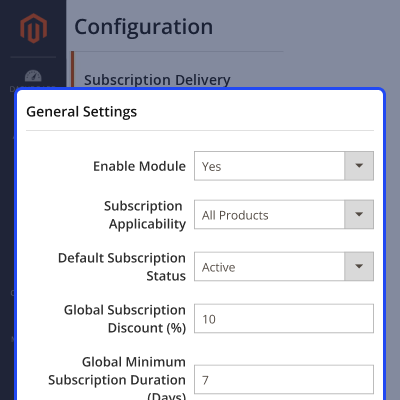
Admins enable the feature, pick an all-products or selected-products mode, and set a default status. Also, they add a discount and a minimum duration before they go live. A subscribe option shows on the product page. As a result, buyers choose to subscribe and get a recurring discount before they add the item to the cart.
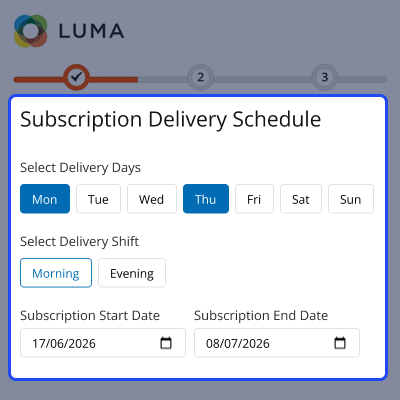
It also builds recurring orders on its own. Therefore, store owners create new orders for active subscriptions with less manual work. Buyers schedule their own delivery. Also, they pick delivery days, a shift, a start date, and an optional end date at checkout.
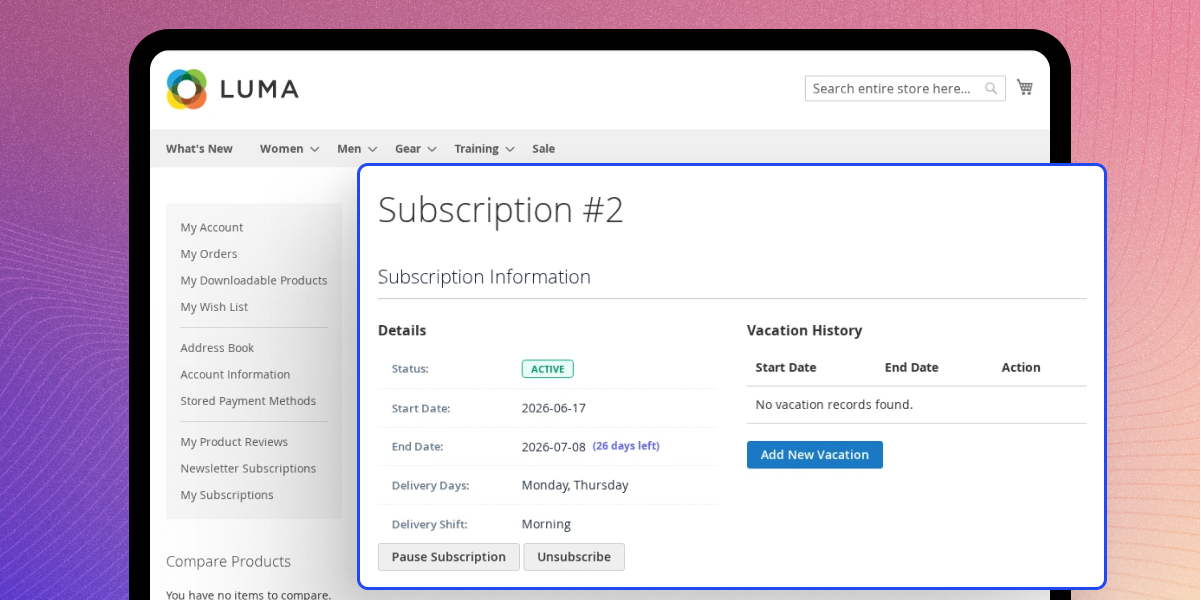
Stripe handles each renewal. So, every recurring delivery is billed in a secure way, and a manual-payment mode stays ready as a backup. In addition, buyers stay in control from the My Subscriptions page. They skip, pause, resume, add vacations, and cancel with a reason.
Admins get blackout dates, cancellation reasons, a subscription grid, a detail view, and an order generation log. So, they see the full picture in one place. Moreover, delivery follows cutoff hours, time zones, and same-day rules. As a result, orders ship on the right days and skip holidays.
Please Note: You need a Stripe account to collect recurring subscription payments. Please click here to sign up on Stripe.
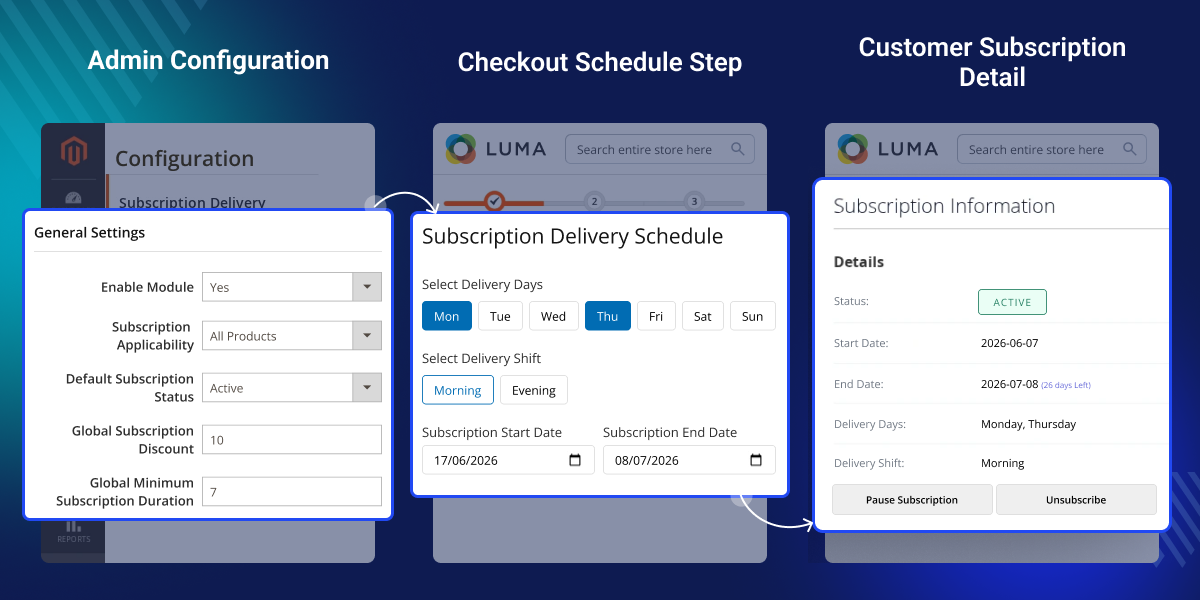
Turn any product into a subscription in all-products or selected-products mode. So, buyers subscribe and get the item on a repeat schedule.
Buyers pick delivery days, a shift, and start and end dates at checkout. Also, the schedule saves to the subscription and the order.
Buyers skip a delivery, add vacation dates, pause or resume, and cancel with a reason. As a result, customers stay in control.
A daily cron builds recurring orders and bills them through Stripe. So, admins run subscriptions with little manual effort.
Magento 2 Product Subscription Extension helps store owners build repeat revenue and run subscriptions from the admin. It cuts manual work and makes repeat ordering simple.
It shows a subscribe option with a recurring discount on the product page. So, buyers choose a subscription before they place the order. Also, buyers schedule their own delivery days and dates at checkout. Therefore, orders arrive when customers expect them.
In addition, it skips blackout dates, honors vacations, and applies skip rules before it builds an order. As a result, stores avoid shipping on the wrong days. Moreover, it builds and bills recurring orders through Stripe. So, admins manage subscriptions, payments, and an order log from one place.
If you would also like to provide customers with a wallet functionality or allow them to add extra funds, then you can check the Magento 2 Wallet System module.
Sell products on a repeat schedule with subscription discounts.
Let buyers pick delivery days, a shift, and start and end dates at checkout.
Let buyers skip, pause, add vacations, or cancel at any time.
Build recurring orders and capture Stripe payments on their own.
A subscription option shows on the product page. It uses store-wide and product-level rules to apply the right discount and delivery settings.
Admins manage subscriptions from one admin panel. Also, they set modes, discounts, cron, and payment options in one place.
Each subscription saves delivery days, a shift, and dates. Also, blackout dates skip or move deliveries on holidays.
A recurring payment flow builds and bills orders on its own. As a result, store owners run subscriptions with retries and failure handling.
Set up subscriptions from the admin panel. Pick the subscription mode, default status, discount, and minimum duration.
Show the delivery schedule on the checkout step. Buyers pick delivery days, a shift, and a start and end date.
Run subscriptions and recurring orders from the admin. Admins and buyers review subscription, delivery, and payment data.
For any query or issue, please create a support ticket here http://webkul.uvdesk.com/.
You may also check our top-quality Magento 2 Extensions.
Detailed technical features and requirements to help you understand the module’s capabilities and ensure smooth integration with your system.
Detailed technical features and requirements to help you understand the module’s capabilities and ensure smooth integration with your system.
We’re partnered with top-tier, trusted providers!
Want to know more how exactly we are going to power up your eCommerce Website with Cloud to fasten up your store
* Server Configuration may vary as per application requirements.



